Evaluating AI task management tools to improve productivity
Posted on December 8, 2025 in OCUL’s AI Tools for Academic Libraries

AI Tools for Academic Libraries* is a bimonthly series from the Ontario Council of University Libraries (OCUL) and Choice that explores specific categories of AI tools through concise, practical evaluations. Authored by members of OCUL’s Artificial Intelligence and Machine Learning (AIML) Team, the series helps academic library staff understand, assess, and thou…
Evaluating AI task management tools to improve productivity
Posted on December 8, 2025 in OCUL’s AI Tools for Academic Libraries
AI Tools for Academic Libraries* is a bimonthly series from the Ontario Council of University Libraries (OCUL) and Choice that explores specific categories of AI tools through concise, practical evaluations. Authored by members of OCUL’s Artificial Intelligence and Machine Learning (AIML) Team, the series helps academic library staff understand, assess, and thoughtfully integrate AI into their workflows. Learn more about this series.*
AI task management tools represent a rapidly growing class of productivity software. They promise to help us organize our lives, prioritize our days, and even predict how long it might take to finish that ever-important task that we’ve been avoiding. But in practice, they are part-experiment, part-assistant, and part-mirror, showing us how we actually work, not just how we think we do.
For academic librarians, whose roles blend teaching, service, and project work, these tools provide an opportunity to make their work more visible and intentional. This article explores a few of the AI-powered tools currently available, what they do well, and what to keep an eye on if you decide to try them yourself.
AI-Integrated Productivity Tools
Goblin Tools
Goblin Tools feels a bit like asking a helpful friend to break a project down into steps. It’s a free, browser-based suite of tools that doesn’t require an account and focuses on doing one thing really well: turning vague tasks into actionable lists.
Its signature tool, Magic ToDo, lets you type or speak a task, and then uses AI to expand it into subtasks. Users can even control the number of subtasks by adjusting the “spicy meter,” and can ask the tool to predict how long tasks will take. Users also have the option of using the stand-alone Compiler tool to generate a clear sequence of actionable steps, or the Estimator tool to provide time predictions for each task or subtask. Nothing gets saved to an account, which makes it ideal for quick, low-stakes planning sessions.
It’s not built for long-term or collaborative use, but as a lightweight cognitive aid, it’s wonderful. Think of it as an AI-powered notepad rather than a tool that is fully embedded in your work environment.
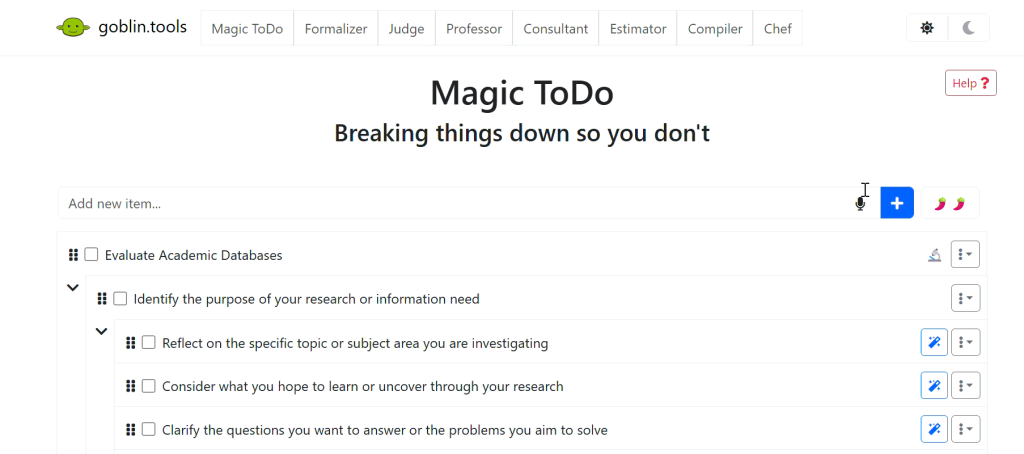 Goblin Tools interface
Fluidwave
Fluidwave is a more traditional task manager that is starting to play with AI. It requires an account, offers checklist, calendar, and kanban views, and includes a built-in Pomodoro timer for focused work. The free tier is surprisingly capable, but a one-time payment removes prompts and ads.
Its AI features are still in beta, but they already show promise: Fluidwave can estimate the time for tasks, rewrite them for clarity, and suggest urgency levels. For librarians experimenting with personal productivity systems, it’s a good middle ground that provides enough structure to manage multiple tasks, but is still accessible enough to try out.
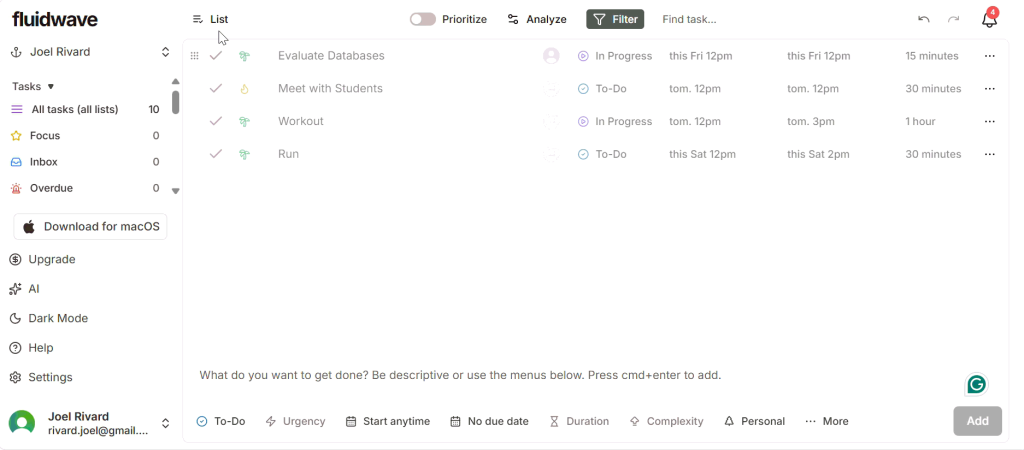 Fluidwave interface
Sunsama
Sunsama is a paid daily planning app that encourages you to schedule every task into a real calendar slot and reflect on what fits into your day. Instead of automating, the app prompts users to plan their day by defining specific tasks. Users can add tasks for the day by dragging them from weekly objectives, integrated applications, calendars, or emails, and organize their daily schedule by selecting the order of tasks and estimating the time needed for each. The app also supports time-tracking and, similar to Fluidwave, includes a Pomodoro timer to boost productivity. The design philosophy here is clear: AI should help you think better, not faster. For librarians managing complex service portfolios, this focus on intentionality can be especially valuable.
Any.do
Any.do is a feature-rich task management application that allows users to tag tasks, add notes and attachments, set priorities, and sync with their calendars. The app offers daily and weekly planning views, along with the flexibility to reschedule tasks throughout the week, making it easy to structure one’s agenda. The free version includes ChatGPT-powered task management, allowing users to add and remove tasks via the ChatGPT interface. The paid version adds automation features, such as breaking down complex tasks and rescheduling overdue ones.
If you’re the type of librarian who juggles multiple work projects and tasks, Any.do feels like an intuitive bridge between everyday task lists and AI-driven assistance. Just remember that with convenience comes complexity—especially when it comes to handling calendar integrations and data.
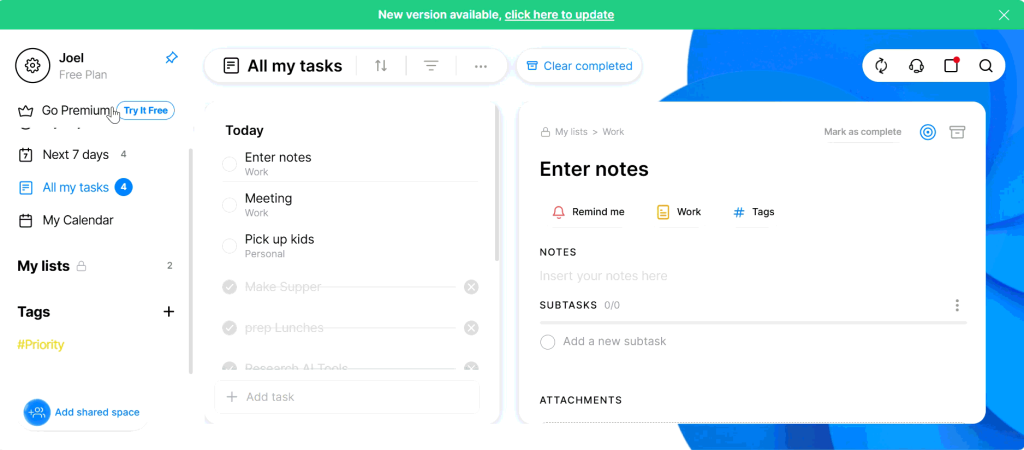 Any.do interface
Reclaim.ai
Reclaim.ai is the most automation-heavy tool in this mix, designed for those who are heavy calendar users. It uses AI to automatically block time for your tasks based on deadlines, priorities, and existing meetings. It also supports recurring tasks and routines to encourage better habits, but users should watch for calendar clutter from frequent focus blocks. The result is a dynamic, constantly updating schedule that aims to protect your focus time. This can be transformative or overwhelming, depending on how you like to work and how much control you like to have over your calendar.
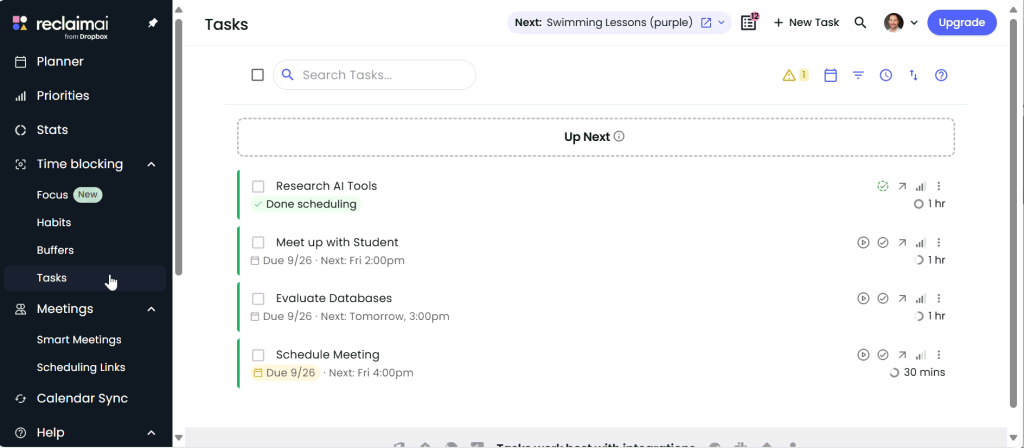 Reclaim.ai interface
How to Choose
AI task managers are not just productivity tools. They reveal patterns in how you spend time and where your attention goes. Before choosing one, consider what problem you’re actually trying to solve. Are you managing too many moving parts, or do you just want a nudge to focus better?
Start small. Try a free tool like Goblin Tools or Fluidwave to understand what feels natural. If you want deeper structure and intentional planning, Sunsama is worth exploring. And if you’re ready to automate scheduling, Reclaim.ai and Any.do both provide strong AI-automation options.
Explore the features of each tool and see if they match your needs. For instance, setting time estimates or using the time-tracking setting can be especially valuable for library professionals starting new roles, managing projects, or learning new workflows, as it helps estimate time requirements and clarify capacity limitations within teams or services.
When choosing a tool, it’s also important to consider the digital ecosystem you work within, such as Google, Microsoft, Apple, or a mix, because many tools are designed for seamless integration and can boost productivity. And while most applications are web-based, some require software installation, which may need IT approval, posing a barrier to their use. IT approval may also be necessary to meet privacy, security, and compliance requirements, so check with your organization. Finally, think about mobile app availability and compatibility with your device, as some platforms only support a single operating system.
Data Privacy, Protection, and AI Training
Across the board, these tools collect basic account and usage data and rely on secure connections to sync calendars or tasks. Most comply with US and European privacy standards and explicitly state they do not sell user data.
When it comes to AI model training, the differences matter. Sunsama, Any.do, and Fluidwave clearly state that your personal data are not used to train AI models. Reclaim.ai limits use to service functionality, while Goblin Tools routes tasks through OpenAI servers but keeps them anonymous. For academic contexts, especially where library data can be sensitive, it’s worth confirming how each platform handles your content before connecting institutional accounts.
Final Thoughts
AI task management tools don’t replace professional judgment or time management skills, but they can complement and support them. Each of these tools reflects a slightly different philosophy of productivity, from Sunsama’s intentional design to Reclaim’s automation-heavy approach. For academic librarians, the key is not to find the perfect system, but to experiment and see where AI can quietly support rather than distract. Used thoughtfully, these tools don’t just organize your tasks; they help you better understand your work.
Summary Table
| Tools / Cost | Visualization | Traditional Features | AI Features |
| Goblin Tools Free | Checklist | Task & subtask creation Task editing & reorganization Voice input | Automatic task breakdown Time estimates for tasks/subtasks |
| Fluidwave Free, with paid upgrades | Checklist Calendar Kanban board | Task and subtask creation Set status, deadlines, duration, urgency, and complexity settings Pomodoro timer Calendar syncing | Automatic task breakdown Time estimates for tasks/subtasks Rewrite and categorize tasks/subtasks Urgency suggestions |
| Sunsama Paid after 14-day trial (~$20/month) | Checklist Calendar Kanban board | Task and subtask creation Time tracking Pomodoro timer Drag-and-drop workload adjustment Calendar syncing | Time estimates for tasks/subtasks AI-driven task duration suggestions Automated calendar scheduling Voice command planning Channel recommendations |
| Any.do Free, with paid upgrades | Checklist Calendar | Task and subtask creation Set tags & priorities Add notes & attachments Calendar syncing | Automatic task breakdown ChatGPT integration for task management Voice/chat input Deadline and priority suggestions Calendar analysis for optimal timing Auto rescheduling overdue tasks Summarization of notes |
| Reclaim.ai Free, with paid upgrades | Checklist Calendar | Task and subtask creation Set recurring tasks Set deadlines, tags & priorities Add notes Calendar syncing | AI-powered time blocking Automated calendar space reservation Focus feature for deep work Meeting buffer control Priority-based scheduling |
Artificial Intelligence Disclosure Statement
Artificial Intelligence Tool: ChatGPT v.5 and Microsoft 365 Copilot (Carleton University paid institutional instance)
Conceptualization: ChatGPT was used to discover and investigate various AI Task Management tools
Writing—Review & Editing: Microsoft 365 Copilot was used in Word for consistent language and improved readability.