Photo management and memory-keeping have been a work in progress for me for a very long time. Honestly, ever since smartphones made it easy to take endless photos, and especially since I had my first child, this has been something of an obsession for me.
My first serious attempt at documenting life was scrapbooking. I went all in. Four massive three-ring binders in a 12x12 format of my pregnancy and my son’s first year of life, documenting absolutely everything. They are huge, heavy, and a bit strange to look at now. I am not particularly artistic, and it shows. But at the time, it felt important. He was not a great sleeper, and I have vivid memories of working on those albums late at night while trying to get him to settle.
Digital memory-keeping came later. Services like Shut…
Photo management and memory-keeping have been a work in progress for me for a very long time. Honestly, ever since smartphones made it easy to take endless photos, and especially since I had my first child, this has been something of an obsession for me.
My first serious attempt at documenting life was scrapbooking. I went all in. Four massive three-ring binders in a 12x12 format of my pregnancy and my son’s first year of life, documenting absolutely everything. They are huge, heavy, and a bit strange to look at now. I am not particularly artistic, and it shows. But at the time, it felt important. He was not a great sleeper, and I have vivid memories of working on those albums late at night while trying to get him to settle.
Digital memory-keeping came later. Services like Shutterfly, and then Mixbook, completely changed how I approached this. I started creating 12×12 digital photo books, one per year, plus separate books for more significant family trips.
As with scrapbooking, I initially went overboard. Some of those books are absolute monsters. For example, 2012 has four photo books, roughly one every three months, because I could never pare it down and there was also a page limit.
Over time, though, I learned to be more picky about which photos to include. A good example is my daughter’s first-year book. She was born six and a half years after my son, and her book is much more restrained: around 100 pages, easy to leaf through, and one she genuinely loves looking at.
I never went back to redo the older, oversized books and digitize the scrapbook. However, it’s on my to do list. I keep a list of photo books I’d love to make someday, when life is slower. For now, I’m focused on keeping up as I go.
That said, memory-keeping is also something I constantly question. I wonder about the point of making physical photo books, whether anyone really cares, and whether it’s worth the effort. I don’t know anyone in real life who does what I do. And yet, every time I ask my family if I should stop making the photo books, the answer is always no. My kids love them. They are a lot of work, though.
I recently read in The Fun Habit by Mike Rucker something that reinforces what I’ve felt instinctively for years: memories don’t stop mattering once the moment is over. When we intentionally hold on to them, both the good and the hard, they continue to contribute to our well-being long after the fun has passed. Rather than treating experiences as fleeting, Rucker frames remembering as a way of extending their value. By revisiting and reflecting on what we’ve lived through, we give those moments more weight, more meaning, and a longer life.
In that sense, memory-keeping isn’t indulgent or sentimental, it’s a practical habit that helps joy last.
Works for me.
This year, I decided to try something different. Instead of letting everything pile up until the end of the year, I created a recurring monthly photo-management card in Trello. It’s due at the end of each month and has a simple checklist:
Go through all the photos on my phone and sort and delete
Upload that month’s photos and videos to Dropbox, into the relevant monthly folder
Upload the best photos to Mixbook and add anything noteworthy from Day One to complement them
Delete the photos from my phone
The Trello card resets itself once I tick everything off, so the process keeps looping. My hope is that if I stay on top of this monthly, the end of the year will feel manageable instead of overwhelming. I have also started weekly notes on the blog this year. If that sticks, it will help memory keeping as well. We’ll see how it goes.
NOTE: The 2025 photo book is still sitting on my to-do list. All the photos are uploaded to Mixbook, but I still need to actually build the album and weave in little quotes and moments from Day One. I keep snippets of things my kids say there, and they love discovering those tucked into the photo books.
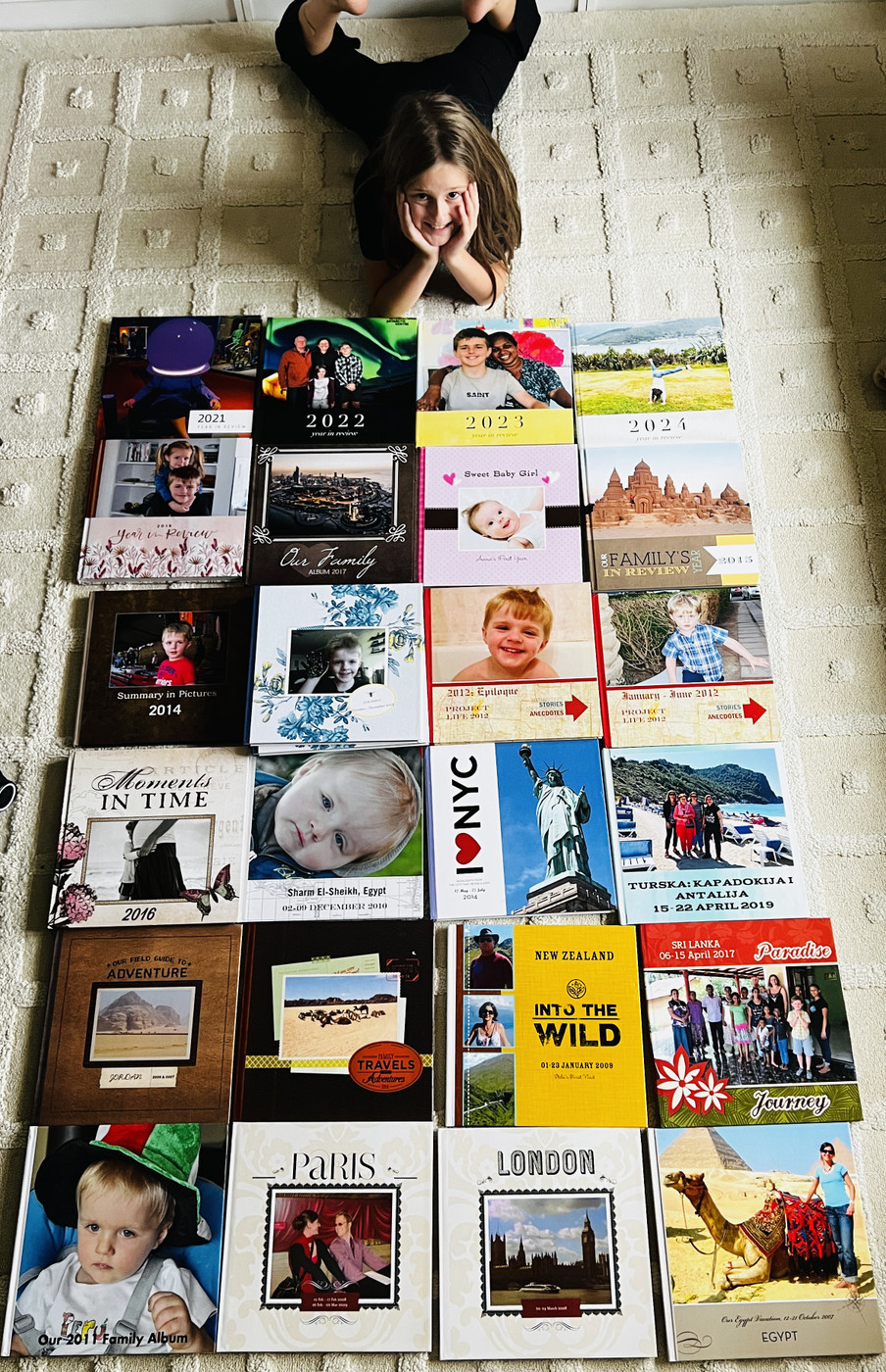
Before I get into the set workflow for 2026, here are a few photos of the photobooks I’ve made so far.
(2018 and 2020 are missing - both years were particularly chaotic, so I didn’t get around to memory-keeping, but they’re on the to-do list too.)
Managing Photographs and Mementos - My Workflow
Tools
iPhone — taking and editing photos
Dropbox — archiving and storage
Day One — daily journaling and memory keeping
Mixbook — digital photo books ⠀
Photos
I edit all photos on the go on my iPhone, deleting as I go.
By the end of each month, I manually upload the edited photos to a designated monthly folder in Dropbox.
I upload the 10-20 of the best photos to Mixbook.
Once the photos are safely in Dropbox, I delete them from my iPhone
I save snippets, screenshots, and things my kids say in Day One for safekeeping.
I use those notes alongside the photos when creating photo books in Mixbook
I create one photo book per year, unless we go on holiday or have a special event - in that case, I make a separate book**.**
⠀Limits
Aim for no more than 350 photos per year.
Select 10–20 photos per month for Mixbook (more if needed - be flexible).
Note: My iPhone automatically uploads all photos to Dropbox, but this is backup only. I delete those once the edited photos and videos are manually uploaded to their proper folders.
Videos
I keep all videos in one folder per year.
Favourite videos are also saved in Day One.
I plan to eventually create a clearly named “favourites” folder - that’s a future project, not something I worry about now
Letting Go of Old Journals and Mementos
Why Did I Wait So Long to Start Using Day One?
A Journey Through Journaling, Tracking and Memories with Day One