✴ ▄█▀ ███ ✴
✴  █▀   █   ✴
✴ ▀█▄  █  ✴
Run Claude Code on your machine. Team members watch and collaborate through Slack or Mattermost.
bun install -g claude-threads click to copy
or
npm install -g claude-threads click to copy
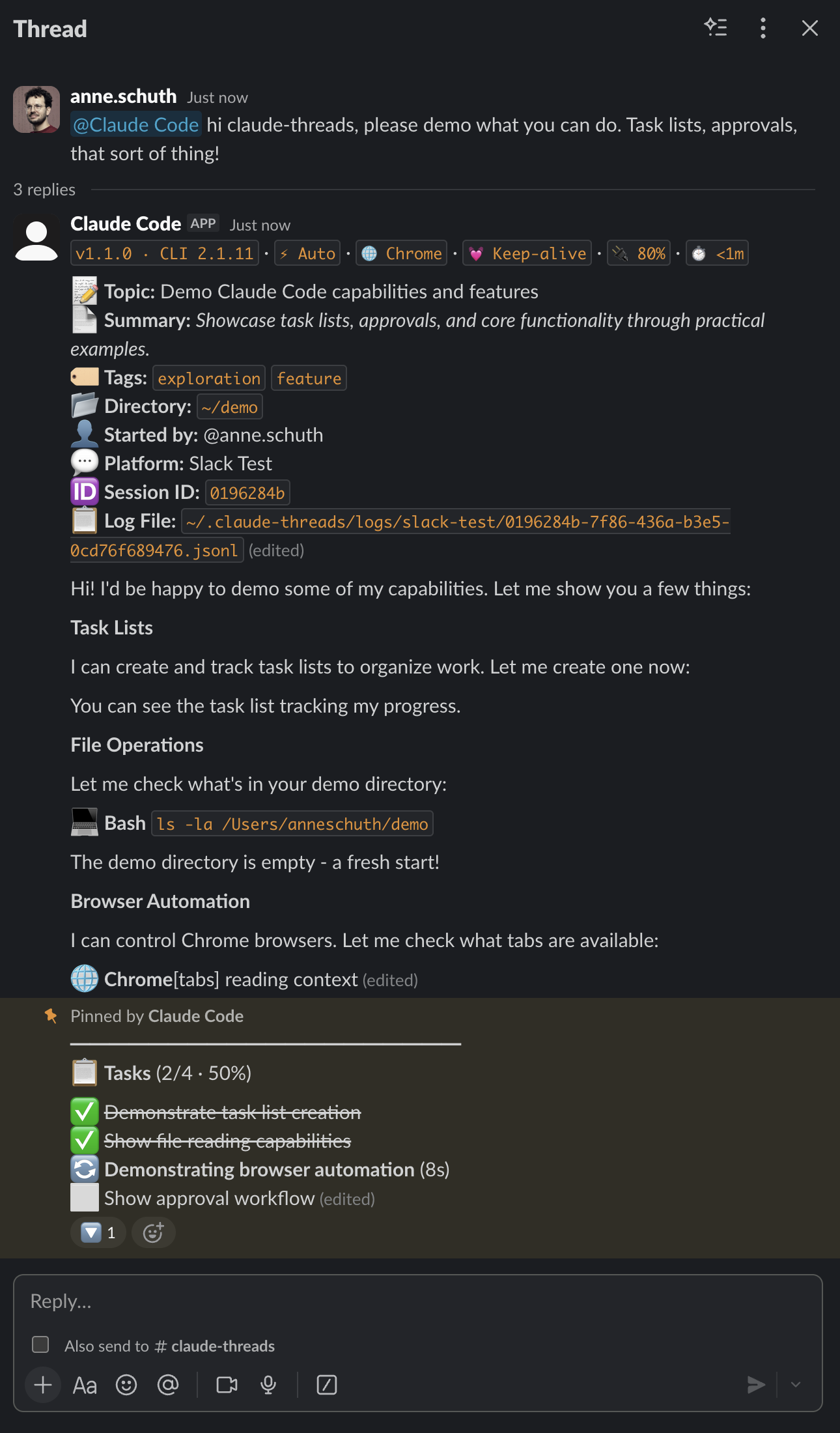
Features
- Output streams live to chat as Claude works
- Sticky to-do lists at the bottom of each thread
- Works with Slack and Mattermost
- Multiple concurrent sessions (one per thread)
- Sessions survive bot restarts
- Invite teammates to collaborate on a session
- Approve file writes and commands via emoji reactions
- Attach images, PDFs, and files for Claude to analyze
- Git worktrees to isolate changes in branches
Why I built this
I wanted …
✴ ▄█▀ ███ ✴
✴  █▀   █   ✴
✴ ▀█▄  █  ✴
Run Claude Code on your machine. Team members watch and collaborate through Slack or Mattermost.
bun install -g claude-threads click to copy
or
npm install -g claude-threads click to copy
Features
- Output streams live to chat as Claude works
- Sticky to-do lists at the bottom of each thread
- Works with Slack and Mattermost
- Multiple concurrent sessions (one per thread)
- Sessions survive bot restarts
- Invite teammates to collaborate on a session
- Approve file writes and commands via emoji reactions
- Attach images, PDFs, and files for Claude to analyze
- Git worktrees to isolate changes in branches
Why I built this
I wanted my team to use Claude Code without everyone needing their own setup. Screen sharing works but only one person can type. With claude-threads, colleagues watch Claude work in Slack and can jump in to help, approve actions, or ask questions. All from chat.
After the first minimal version, I built claude-threads using claude-threads. Colleagues watched, asked questions, and caught bugs in real time. It turns out that multiple people guiding the same AI session actually works.
The bot runs on your machine. You control what projects Claude can access.
Commands
| Command | Description |
|---|---|
!help | Show available commands |
!context | Show context usage |
!cost | Show token usage and cost |
!compact | Compress context |
!cd <path> | Change working directory |
!worktree <branch> | Create git worktree |
!invite @user | Invite user to session |
!kick @user | Remove invited user |
!bug <desc> | Report a bug with context |
!escape | Interrupt current task |
!stop | Stop session |
Controls
Permissions
When Claude wants to run a tool:
👍 allow ✅ allow all 👎 deny
Plans
When Claude creates a plan:
👍 approve 👎 reject
Questions
Multiple choice:
1️⃣ 2️⃣ 3️⃣ 4️⃣
Session
Interrupt or cancel:
⏸️ interrupt ❌ cancel
Quickstart
Requires Bun or Node 18+ and Claude Code CLI
bun install -g claude-threads    # or: npm install -g claude-threads
cd /your/project
claude-threads
click to copy
The setup wizard will guide you through connecting Slack or Mattermost.