#On recreating the lost SDK for a 42-year-old operating system: VisiCorp Visi On
Back in 1983, an office software giant VisiCorp released a graphical multitasking operating system for the IBM PC called VisiOn (or Visi On, or Visi-On, it was before the Internet, so anything goes). It was an "open system", so anyone could make programs for it. Well, if they owned an expensive VAX computer and were prepared to shell out $7,000 on the Software Development Kit.
VisiOn was released earlier than Microsoft Windows, Digital Research GEM, or Apple Macintosh. Its COMDEX demo even predates the annoucement of Apple Lisa. But being first doesn’t mean getting things right, so this VisiOn of the future did no…
#On recreating the lost SDK for a 42-year-old operating system: VisiCorp Visi On
Back in 1983, an office software giant VisiCorp released a graphical multitasking operating system for the IBM PC called VisiOn (or Visi On, or Visi-On, it was before the Internet, so anything goes). It was an "open system", so anyone could make programs for it. Well, if they owned an expensive VAX computer and were prepared to shell out $7,000 on the Software Development Kit.
VisiOn was released earlier than Microsoft Windows, Digital Research GEM, or Apple Macintosh. Its COMDEX demo even predates the annoucement of Apple Lisa. But being first doesn’t mean getting things right, so this VisiOn of the future did not win the market. Not a single third-party program was released for the system. No one preserved the SDK for the system. The technical documentation roughly amounts to three terse magazine articles and a single Usenet post. Heck, even the copies of the operating system itself are hard to come by.
Despite its low popularity, VisiOn is historically important. It influenced Microsoft’s decisions about Windows, and it is a lesson about failing. So, I thought it would be nice to recreate the SDK for it, Homebrew-style. How difficult could it be, right?!

It took me a month of working 1-2 hours a day to produce a specification that allowed Atsuko to implement a clean-room homebrew application for VisiOn that is capable of bitmap display, menus and mouse handling.
If you’re wondering what it felt like: this project is the largest "Sudoku puzzle" I have ever tried to solve. In this note, I have tried to explain the process of solving this puzzle, as well as noteworthy things about VisiOn and its internals. But, first things first...
#The first-ever third-party application for VisiOn

Pyramid Game is a simple patience card game that demonstrates the basics of application development for VisiOn. It comes with an installer and features loadable fonts, bitmaps, clickable areas ("buttons"), and a menu system.
You now can download the floppy image and the distribution files. Obviously, you will need an installed VisiOn system to run it. The rules of the game can be found on Wikipedia.
The source code is available in its own repo.
The claim of Pyramid being "the first-ever" third-party application is a bit strong. VisiOn was an "open system", and so it is theoretically possible someone bought a VisiOn ToolKit and made third-party applications for VisiOn. But even if they did, they never published or sold them. So, Pyramid is the first-ever published third-party application for VisiOn.
#Target audience of this note
This note is aimed at technically inclined readers with software engineering and coding background who want to learn more about vintage operating systems and reverse engineering. I’ll try to keep the explanations simple at the expense of obscuring some of the technical details; if you want the details, please check out the verbose notes and the test application. I hope to document the operating system at a later date.
This note is quite long. Feel free to scroll to a part that interests you and read from there.
Personally, I find this project fascinating in terms of solarpunk and permacomputing. Imagine: you find an ancient device (42 years is ancient for computers, right?!), an artefact of a previous era, without any documentation. You have all the modern knowledge, and you want to make this mysterious device do things it was not supposed to do originally. Of course, with Visi On it’s not quite the same; it runs on the IBM PC, a very well-documented and researched hardware platform.
If you have any feedback or comments, please leave them in the Mastodon thread or in the sr.ht ToDo project. Questions are fine, too!
#A tour of VisiOn quirks
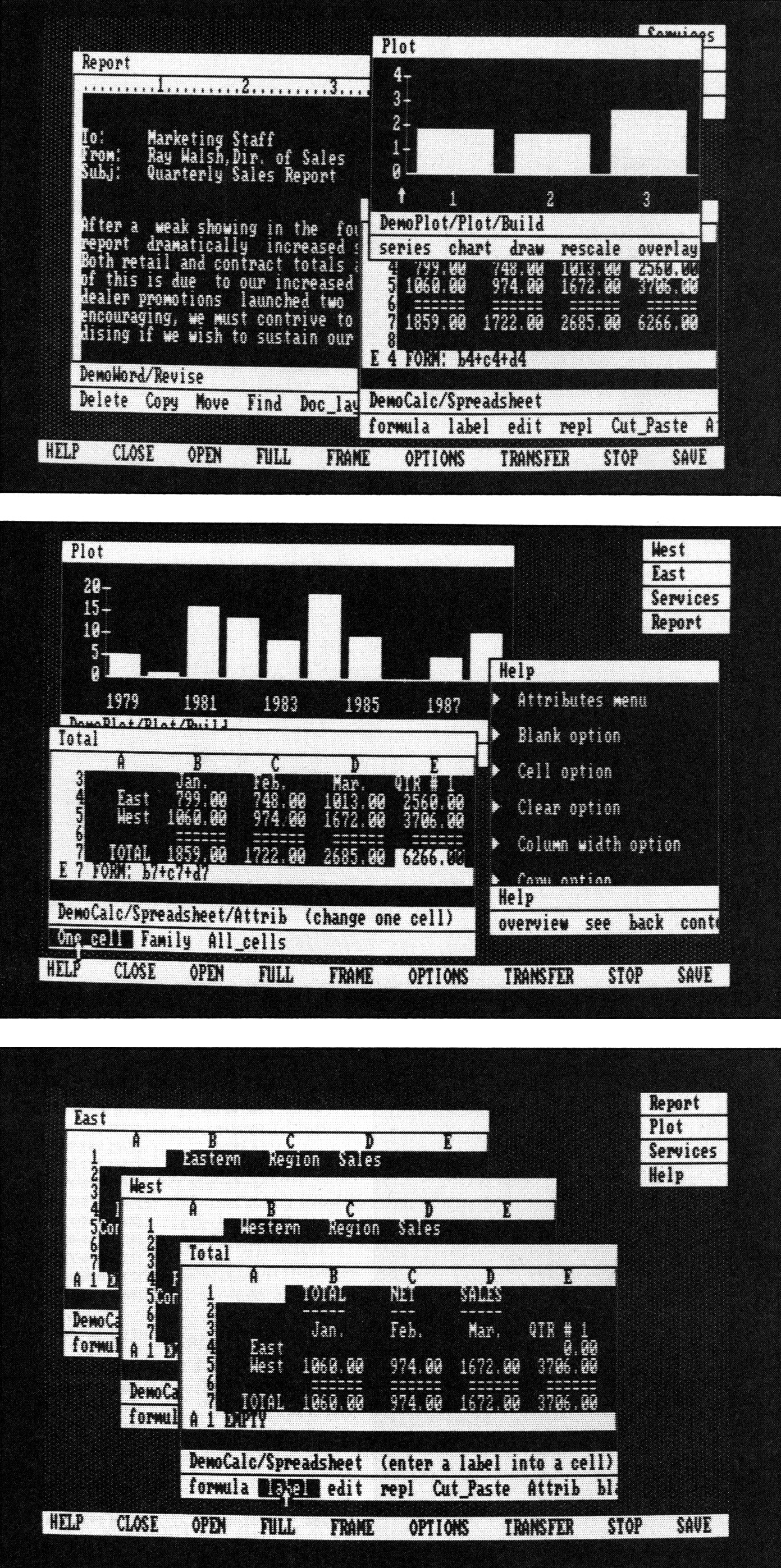
VisiOn was made before many common user interface conventions were invented. It targeted a computer with a tiny resolution of 640x200 pixels, so its authors decided not use any icons. Therefore, VisiOn looks a bit alien. At the same time, it was made by people who knew what they were doing, and it is mostly coherent in its interface decisions.
Here is a copy of the OS tour I gave on Mastodon. I did not insert the clips as inline GIFs because the animations cannot be paused and are very distracting.


One immediately obvious thing here is the "hourglass" icon. Some believe that it might have been the first OS to use the hourglass mouse icon, but no, Xerox and InterLisp had it earlier. Apple Lisa, a contemporary, also had a similar mouse cursor.
The main application of the Visi On Application Manager is called "Services". The biggest diference between "Services" and other applications is that its "exit" button shuts down the whole OS.
You can see the screen has a System Menu at the bottom. The system menu is here to manage windows: make them FULL screen, re-FRAME them, CLOSE into an on-desktop button (we’d say "minimise" today) or OPEN them back. You cannot move the windows by their title bars. The system is very happy to beep at you, like it’s a vintage PC game.


VisiOn is a multi-tasking operating system, and it allows launching multiple instances of the same application. To differentiate between them, the user can input the window name during the application startup.
Clip: multiple windows of the same program


In VisiOn, the Tutorial and Help apps implement a simple hyper-text system based on the "button" primitive. The "button" is simply a clickable area on the screen. It highlights by reversing the background and foreground colour when the mouse hovers over the button.
The system uses left-click for most operations. The right click is needed for the "scroll" operation. The user can scroll the documents (if there’s something that can be scrolled) and the menu. You can see that the application menu isn’t always fully visible, right?


The application menu system in VisiOn is hierarchical. Some operations make the menu behave like a modal window would in Windows or Mac. It is common not to add a "cancel" button in the menu. Instead, the system button STOP is used to cancel the operation.
In other situations, the menu can be navigated back by using the hierarchical menu selector. In either case, the system is "verb" driven - you choose the action ("verb"), and then you choose where the action should apply. The biggest problem is probably that the menu system is inconsistent. Some menus have "back" or "cancel" options, and some don’t. Some "verbs" are actually nouns - "Printing". Some verbs start with a capital letter - "Configure" - like they are nouns. Perhaps it is a sign of a menu element that doesn’t require "an object". The "object" here is more "grammatical" than a software concept.


The Archives app is the built-in file manager for the VisiOn and is one of the standard apps. Somewhat surprisingly, it puts deleted files into the "Wastebasket" folder. Windows couldn’t do that because of Apple’s patents - but Apple clearly wasn’t the first (I bet it’s coming from Xerox).
The Archives app makes it clear that VisiOn’s file system supports long file names. VisiOn runs on top of MS-DOS 2.0, so it has to implement its own FS on top of FAT for this to work. The app can also work in two-pane mode, but it divides the screen horizontally, so long file names would fit on the screen easily.
The "verb"-oriented interface requires the app to show a "NEW" item on the screen, though it is a bit confusing. Can you rename a "NEW" file?
Clip: the Archives application


There are some mysterious buttons we have not explored in VisiOn just yet. One of them, TRANSFER, is used to command the applications to perform a "copy-paste" operation. It is impossible to just "copy" a thing and then "paste" it multiple times.
You can see that the OPEN command is completely unnecessary, because the closed window can be opened simply by clicking its minimised button. It would be nice for VisiOn to remove the OPEN button and replace TRANSFER with separate COPY and PASTE buttons. It shouldn’t be too difficult to implement - Transfer From and Transfer Into are different system events from the application point of view. The concept of Copy&Paste wasn’t ubiqiutous, but it was not unheard of either, because the VisiOn Word has these options in the application menu, in addition to the system’s TRANSFER.
By the way, did you notice a cute VisiOn icon in front of some app names? It is actually two "non-printable" characters, 0x16 and 0x17. The system font has a few more useful icons hidden in it.


The last important button on the system menu of the VisiOn operating system is OPTIONS. Some applications have a configuration file, and the contents of the configuration file can be displayed on the right side of the window. The Options window behaves like a separate app with a separate menu. It is kind of similar to a pop-up window.
Curiously, it is possible to open the Options window from within the application. The same Options dialogue is shown by Word either by clicking "OPTIONS" or by clicking "Print>local-print". But then Word also has Cut&Paste menu system that allows copying and pasting within the application (but not between the application windows).


#Now, to the technical stuff
#What we thought we knew about Visi On
At face value, Visi On is a sleek, minimalist-looking windowing system for office applications. But it was built by people involved with early object-oriented programming, and the sales pitch for the system made some pretty bold claims. Were they true? Let’s find out.
#Fact-checking
This is a spoliers section for those who thought they knew things about Visi On! For everyone else, this is going to be boring - if so, skip to the next section :)
The primary objectives of Visi-On is a consistent user interface and portability. Visi-On is designed to run on any operating system. ("The Visi On experience")
Sort of. Claiming "Visi-On is designed to run on any operating system" is like claiming "Unix is designed to run on any hardware". Clearly, it was made with portability in mind, but even supporting CP/M-86 on IBM PC would require a completely different VISION.EXE, and a different installer floppy format (i.e. you couldn’t install Visi On Calc we have on a VisiOn running on top of CP/M). Supporting a different computer architecture would have been quite an ordeal.
It did this by providing a kind of non machine specific "virtual machine" (called the Visi Machine) that all applications were written for. (Toasty Tech)
What you have above Visi On or VOS itself is an interface we call the Visimachine interface. That is all of the calls that you need as a product designer to use all of the facilities provided by Visi On. This is the virtual machine? For product designers, this is the virtual machine. ("Byte", 1983/6)
The term "virtual machine" used by VisiOn developers means something different from what we mean by the words "virtual machine" today. The closest word we use today would be "API". That’s right, Visi On applications use a cross-platform API. Just like almost any other operating system today. I bet it was a really cool idea back in 1983, though.
By the way, "VisiHost" for IBM PC is VISION.EXE. The "VisiMachine", which is not a virtual machine, but a set of system libraries and the desktop manager, is also known as "VOS", "VisiOn Operating System", "Application Manager" or simply "Services".
The virtual machine provided supports virtual memory and concurrent processing. ("The Visi On Operating Environment", IEEE TCDE Bulletin, September 1983)
Half-true. Visi On indeed implements virtual memory, but it is a software implementation without any memory protection mechanisms. Nothing but good will stops applications from reading or corrupting memory used by other applications.
The words "concurrent processing" might lead you to believe that VisiOn is a truly multitasking system. But its concurrent processing capabilities are quite limited. It is most definitely not a preemptive multitasking system, because if an application hangs, the whole system hangs. There seem to be some provisions for background data processing, at least for printer spooling. I think a flavour of cooperative multitasking might be possible in VisiOn, but so far I could not find a way to run an application in the background, so maybe it is not multitasking at all!
[The virtual machine] comprises 12 abstract data types. Each abstract data type responds to messages and provides a specific type of service. ("The Visi On Operating Environment", IEEE TCDE Bulletin, September 1983)
Unclear. It seems there are some "messaging" capabilities, but most of the interaction with the OS is still done through regular system calls. So far, I have discovered only messages that create a window, define a menu and request events from the OS. And the messages aren’t really related to the "abstract data types". Perhaps, the representation of the objects and data types was different on the source code-level?
Also, this statement contradicts what the authors said about the system in an earlier interview.
Visihost is an object-oriented operating system, and it’s composed of 10 object types... You can establish instances of the objects by just sending messages to them on a Smalltalk message-class type interface. ("Byte", 6/1983)
Half-true. The "objects" do not seem to be "objects" in a modern sense. There is no system of attributes, methods and classes. Instead, there are instances of structures that are passed through the API to the OS. Most of the communication with the OS doesn’t happen through messages; it happens through system calls.
In fact, the very same interview confirms this:
An object in Smalltalk basically is a message, yes, that carries with it something that says what can be done to it. Visi On objects are not that complex. They’re objects... yes, they do have context of what their formatting is, but they aren’t Smalltalk objects.
Next!
Activities request services from the Visi-Machine via Visi-Ops or via BITS (Basic Interaction Techniques). The two are distinguished in that a Visi-Op call requires a process ID. (A 16 bit number assigned by Visi-Corp to a given application program). ("Visi On from a Software Developer’s point of view", 1983)
Mostly false. It seems VisiCorp itself couldn’t agree on what BITS means; sometimes it is used for low-level system calls for the kernel ("VisiHost"), and sometimes it is used to talk about patterns of the user interface. Also, a process ID is not assigned by Visi-Corp; it is evaluated at run time.
VOS (note: VisiMachine) is the only activity that actually does direct Visihost calls. All other calls come through VOS itself. ("Byte", 6/1983)
Mostly true. On the machine code level, applications can and do call the kernel ("VisiHost") directly. But all the existing applications only do so to talk to the Services ("VisiMachine"). On the machine code level, nothing stops the application from calling the VisiHost - this is how VisiMachine is getting things done - but presumably this would harm portability.
Visi On did not, however, include a graphical file manager. ("Visi On", Wikipedia, November 2025)
False. There is an application called Archive, which is a part of the "Services", and it is a bona fide file manager. It does not have icons, though; but there are no icons in any other parts of VisiOn, either.
The scripts capability is another important aspect of ease of use. It’s a learn mode. It has a window that you can interact with. You can stop that learn mode at any time and tell the system to accept a variable. You open a scripts window and say, “learn.” Then the system prompts you for a name, you type in the name, and that will be the name of a script. ("Byte", 6/1983)
Unfortunately, this part of VisiOn seems to be missing from the release. And speaking of missing features, the demo from 1983 also has a mysterious SAVE button that is not present in the final release.
#External sources
Most of the technical documentation about the system available until now comes from the following articles and posts:
- Visi On page in the Toastytech’s GUI Gallery
- Wikipedia page
- The Visi On™ experience – From concept to marketplace by George Woodmansee, from Proceedings of INTERACT ’84
- A Guided Tour of Visi On Byte, issue 6/1983
- Visi On’s Interface Design Byte, issue 7/1983
- Visi On from a Software Developer’s point of view Usenet report written for INFO-IBMPC, 1983
- The Visi On Operating Environment, IEEE TCDE Bulletin, September 1983
#The fun begins!
#Initial investigation
Visi On is meant to run on an IBM PC XT with a hard disk. It won’t run properly on an IBM PC AT, and it won’t run in most emulators. The pre-installed unprotected version with an AT patch available on ToastyTech runs in some emulators (86Box and PCEm). There are three software packages that can be installed in VisiOn: Word, Calc and Graph. Trying to install them from any old floppy is not possible due to various copy-protection methods (more on this soon).

The installed copy of VisiOn on the hard drive has the executable file VISION.EXE, and a bunch of cryptic files in the VISI_ON folder. Most interesting of those are:
856 PROGRAMS.VOS -- ??? binary data
200000 RESERVED.VOS -- resources for the applications? swap?
777728 SEG00000.VOS -- the actual software installed in the OS?
3290 SEGMENTS.VOS -- ??? binary data
The files don’t have an obvious structure. To grasp a feeling of the file, I use my favourite tool: Load Image From Raw Data in GNU IMP.

Scrolling through the segments surfaces a high-resolution font file and a garbled startup screen:

Are the installed files encrypted?
#Checking the installation media
The installation floppies have the files with names matching those on the hard disk, but they have different content. It is obvious that the contents are encrypted by some simple method. For example, here is the contents of the first installation floppy:
3110 16 Dec  1983 00000009.VOS -- same as the installed version, but encrypted
10334 16 Dec  1983 00000010.VOS -- same as the installed version, but encrypted
110 16 Dec  1983 H0000000.VOS -- a binary directory of files
65536 16 Dec  1983 SEG10002.VOS -- overlay, seemingly encrypted
65536 16 Dec  1983 SEG10003.VOS -- overlay, -""-
65536 16 Dec  1983 SEG10005.VOS -- overlay, -""-
44604 16 Dec  1983 VINSTALL.COM -- installer tool
71680 16 Dec  1983 VISION.EXE   -- the program itself, very clearly it is encrypted in some simple way
The contents of the files show a repeating pattern. For example, in SEG10003.VOS:
0000fe50  3c 6a 4f 3c 3c 6a 4f 3c  3c 6a 4f 3c 3c 6a 4f 3c  |<jO<<jO<<jO<<jO<|
0000fe60  3c 6a b0 3c c3 6a 4f 3c  3c 6a 4f 3c 3c 6a 4f 3c  |<j.<.jO<<jO<<jO<|
0000fe70  3c 6a 4f 3c 3c 6a 4f 3c  3c 6a 4f 3c 3c 6a 4f 3c  |<jO<<jO<<jO<<jO<|
Such a repeating pattern is indicative of an encryption with XOR. This is a very poor encryption technique; not only can the encryption key be guessed easily, but a long sequence of zero-bytes will expose the key as it is.
#Tweaking the installation media
The installation floppies are not only encrypted, but also copy-protected with "out-of-bounds" sectors. They require special emulation methods, but thankfully those methods are well described in 86Box and HxC floppy tool documentation.
With a simple encryption and decryption tool, I managed to change the text in the Tutorial app shipped with the operating system and package it back to the (still copy-protected) floppy.

#Figuring out the floppy file system
A floppy with a Visi On program has dozens of files named 00001000.VOS, 00001234.VOS and so on. Which files are mandatory, and what is in them? Lots of trial and error ("let’s delete this file, let’s put back this file") shows that a floppy must have the following files:
00000000.VOS- simply 12 zeroes00001000.VOS- the description of the floppy (disk label and the list of programs on it), encrypted00001001.VOS- a copy-protection mechanism, twice-encrypted- an installation script referenced from
00001000.VOS, - components of the program referenced from the installation script
The patterns in the unencrypted files can be observed by simply looking at the files. For example, this is a fragment of 00001000.VOS from the Visi On Calc package:
00000080  16 17 20 43 6f 6e 76 65  72 74 20 74 6f 20 43 61  |.. Convert to Ca|
00000090  6c 63 00 00 00 00 00 00  00 00 00 00 00 00 00 00  |lc..............|
000000a0  31 2e 30 00 00 00 00 00  00 00 00 00 01 00 41 04  |1.0...........A.|
000000b0  00 00 00 00 00 00 00 00                           |........|
Note: IBM PC is a little-endian architecture. The byte sequence 41 04 should be read as 0x0441, or 1089 in decimal. Sure enough, 00001089.VOS stores the installation script for the program, referencing other files on the floppy disk:
00000000  a7 43 16 17 20 43 6f 6e  76 65 72 74 20 74 6f 20  |.C.. Convert to | <- magic number + logo + name
00000010  43 61 6c 63 00 00 00 00  00 00 00 00 00 00 00 00  |Calc............|
00000020  00 00 31 2e 30 00 00 00  00 00 00 00 00 00 01 00  |..1.0...........| <- version
00000030  03 00 02 00 00 00 00 00  00 00 00 00 00 00 0a 00  |................|
00000040  00 00 01 00 42 04 01 00  02 00 43 04 01 00 01 00  |....B.....C.....| <- 0x442 - first file to install
00000050  44 04 01 00 02 00 45 04  01 00 02 00 46 04 01 00  |D.....E.....F...|
00000060  02 00 47 04 01 00 02 00  48 04 01 00 01 00 49 04  |..G.....H.....I.|
00000070  01 00 01 00 4a 04 01 00  01 00 4b 04 01 00 01 00  |....J.....K.....|
00000080  00 00 02 00 4c 04                                 |....L.|           <- .... 0x44c - last file to install
#Unencrypted installer
A big obstacle in developing applications is the copy-protection mechanism in 00001001.VOS. The file itself is lightly encrypted with XOR, and then heavily encrypted with XOR once again. Decrypting it and loading it in Ghidra allowed me to understand (generally speaking) that this little tool is an x86 program with a custom header and a single entry point. This entry point is called by the installer to check that the floppy is copy-protected and to decrypt the contents of the floppy.
Atsuko eventually rewrote the copy-protection binary, to skip the encryption and floppy checks. This version of 00001001.VOS is very useful even for installing VisiCorp’s programs, as it allows using regular floppy disks, or to tweak the program sources before the installation.
Fun note: the XOR encryption key on software disks is stored in plain text at the beginning of every 00001001.VOS file. Such a glaring oversight!
#Installer script; linking script
Checking unencrypted files (looking closely at their contents in a hex editor) revealed the internal structure of a program package:
- An installer script: it describes which VOS files are needed by the program,
- One or more "code segment" files: these mostly contain position-independent machine code for the Intel 8086 CPU (defeating the theory of VisiOn implementing a virtual machine),
- One "data segment" file: it stores the data needed by the program at all times,
- One linking script, which is somewhat similar to a header in EXE, DLL or ELF files: it points to a list of all "entry points" in the "code segment" files, and tells the OS where the program’s
main()function is, and - One mini file system with a collection of various files used by the program.
The type of VOS file is determined by two independent factors:
- The installer script marks the header file and the mini file system in a special way,
- "Data" and "code" segment files have an 8-byte header (four 16-bit numbers: magic, type of the segment, number of the segment, the length of the segment in bytes)
#Running under the debugger
Operating system development needs a good debugger. Even the history of Windows hints that a good debugger is essential for building a trillion-dollar software empire. And, as you can imagine, Visi On doesn’t run under debuggers, so an IBM PC emulator with a built-in debugger is a must.
#Bochs
There are multiple debugging emulators: Qemu, MAME, Bochs, DosBox and MartyPC. None could run Visi On. Among these, Bochs was my primary target, as it can emulate a Mouse Systems mouse - the only mouse type supported by Visi On. Thanks to built-in debugging features, I produced a simple patch that allowed Visi On to boot in Bochs and Qemu. The patch simply skips a few mouse-related checks:
--- visionat.exe.dmp
+++ viatmice.exe.dmp
@@ -2534,4 +2534,4 @@
0000a010  e8 7a 00 eb 49 b0 83 e8  47 00 e8 81 00 8b 1e 80  |.z..I...G.......|
-0000a020  0b 8d 57 05 ec a8 01 74  f8 8d 57 00 ec 24 f8 3c  |..W....t..W..$.<|
-0000a030  80 75 ee e8 78 00 e8 54  00 eb 23 c7 06 7e 0b ff  |.u..x..T..#..~..|
+0000a020  0b 8d 57 05 ec a8 01 90  90 8d 57 00 ec 24 f8 3c  |..W.......W..$.<|
+0000a030  80 90 90 e8 78 00 e8 54  00 eb 23 c7 06 7e 0b ff  |....x..T..#..~..|
0000a040  ff 06 b0 33 b4 35 cd 21  8c c0 07 0b c3 bb 7a 06  |...3.5.!......z.|
The Bochs interface rhymes visually with VisiOn, being monochrome and pixelated. 
#Mouse driver
If you want to reverse engineer a multi-tasking graphical operating system, the first thing you probably should figure out is its mouse driver. When you start an application, you cannot know where it will be loaded into the computer’s memory until it is started. And when it is started, it is already too late to look at the application’s initialisation. We need to stop the operating system the very moment we ask to start the program. In other words, the moment we release the mouse button after the double click.
Visi On uses serial mice connected over the COM port. Looking at the emulator events, I can see that the COM port is configured to be interrupt-driven. On an IBM PC, the handler for COM1 port interrupts is known as IRQ4/INT 0x0c. In other words, the address of the mouse driver is recorded in the interrupt table of the computer - it is set to 1a68:0000, which, by the way, is exactly where it is in VISION.EXE.
In Bochs, you cannot set up a breakpoint (sometimes known as "pause") at the interrupt address, but you can set up a breakpoint for the next instruction. When I figured this out, it was easy to set a breakpoint at the mouse driver and understand how the mouse driver works.
Now I could simulate mouse clicking in the following way. RAM address 0x1f21b holds the mouse button status. Writing "1" there makes the OS think there was a right button click. Writing "2" and then "0" works as "press and release the left mouse button". With this, I managed to pinpoint the moment the OS starts an applications.
#Reverse-engineering pains
A tool that can convert machine code back to something human-readable is called a disassembler. There are many options, but I went with NSA’s Ghidra as it is the tool I’ve used in the past to reverse-engineer the Sumikko Gurashi computer.

Normally, disassembly is a straightforward process. Truth to be told, I expected the whole reverse engineering process to take a couple of weekends. If only life was so simple...
#Visi On was compiled by a vintage C compiler
Here is a bit of the disassembly of now-open-source contemporary text editor EDLIN from Microsoft, as seen by Ghidra:
0000:0119 50              PUSH       AX
0000:011a b4 30           MOV        AH,0x30     ; syscall 0x30
0000:011c cd 21           INT        0x21        ; an MS-DOS call
0000:011e 3c 02           CMP        AL,0x2
0000:0120 7d 05           JGE        LAB_0000_0127
0000:0122 ba 8a 10        MOV        DX,0x108a   ; pointer to an error message
0000:0125 eb e7           JMP        LAB_0000_010e
Here is the corresponding source code:
;----- Check Version Number --------------------------------------------;
push    ax
mov     ah,Get_Version
int     21h
cmp     al,2
jae     vers_ok                         ; version >= 2, enter editor
mov     dx,offset dg:bad_vers_err
jmp     short errj
;-----------------------------------------------------------------------;
The disassembly basically matches the source code and thus is easy to understand.
Compare with the disassembly coming from VisiOn:
64c5:0c55 c7 06 16        MOV        word ptr [0x16],0x0
00 00 00
64c5:0c5b 8b 1e 16 00     MOV        BX,word ptr [0x16]
64c5:0c5f 89 1e 18 00     MOV        word ptr [0x18],BX
64c5:0c63 8b 0e 18 00     MOV        CX,word ptr [0x18]
64c5:0c67 89 0e 9c 15     MOV        word ptr [0x159c],CX
64c5:0c6b 8b 16 9c 15     MOV        DX,word ptr [0x159c]
64c5:0c6f 89 16 de 09     MOV        word ptr [0x9de],DX
64c5:0c73 83 ec 02        SUB        SP,0x2
64c5:0c76 c7 46 d6        MOV        word ptr [BP + -0x2a],0x1
01 00
64c5:0c7b 83 ec 02        SUB        SP,0x2
64c5:0c7e c7 46 d4        MOV        word ptr [BP + -0x2c],0x1742
42 17
64c5:0c83 e8 9e 00        CALL       define_window
Can you follow the logic?
var_0x16 = 0
BX = var_0x16
var_0x18 = BX
CX = var_0x18
var_0x159c = CX
DX = var_0x159c
var_0x9de = DX
**whack the stack!**
BP[-0x2a] = 1
**whack the stack!**
BP[-0x2c] = 0x1742
CALL       define_window
Do you also feel your blood boiling from seeing the "hot potato" variable definition? It should have been
var_0x16 = 0
var_0x18 = 0
var_0x9de = 0
var_0x159c = 0
BX = 0
CX = 0
DX = 0
CALL define_window(0x1742, 1)
#BP stack frame
The comment "whack the stack!" above is quite representative of what is happening in the code.
Most computers nowadays have a stack. If you don’t know what a "stack" is, imagine: you work as a clerk, and your assignments come in the form of sheets of paper with tasks. You put new sheets with tasks on top of the sheets you already have. When you need to process the next task, you usually take the topmost sheet. You might feel bad for all the old tasks at the bottom of the stack, but it is the easiest way to keep track of things.
Here is where "stack frames" come. Now, imagine that you have a coworker obsessed with efficiency. They think that some old tasks should be done before newer tasks, and some new tasks should be done after old tasks. To do so, they take a chunk of the sheets from the stack, rearrange them as they see fit, and put them back in. Sometimes they even grab multiple unrelated chunks of the stack at once. A chunk of a stack is a "stack frame".
Using stack frames simplifies code compilation for subroutines, because a subroutine can assume that it can do whatever it wants with its stack frame, treating it like its own private memory allocated on the global stack. "Forgetting" the data from the stack frame is as simple as moving the stack pointer.
This technique used to be common on x86-based computers some 40 years ago. Ghidra doesn’t support it at all. Bochs doesn’t care about the BP stack and can only show you the SP stack. VisiOn almost never uses the SP stack directly; most of the applications are working with the BP stack.
I believe this is a property of the C compiler Visi On used. A different compiler might have used SP, just like modern compilers do. And most certainly, a hypothetical Visi On port for Motorola 68k CPU, a processor that doesn’t have a BP register, would not need to emulate the BP stack frame.
#Unusual cross-segment calls and "magic" long pointers
#Segment model
The IBM PC, VisiOn target computer, is built around the Intel 8088 processor. A remarkable thing about this processor is that it uses the segment memory model. In a nutshell, at any given moment in time, the program has access to no more than four fragments of the computer’s RAM, each 64 kilobytes in size: the code segment, the data segment, the stack segment, and the "extra" segment. This memory organisation simplifies porting programs from 8-bit computers, and in theory allows a straightforward implementation of multi-tasking for small programs. If you have 640 kilobytes of RAM, and your program is configured to use a single segment for all four segments (CS, DS, SS and ES), you could easily load 10 programs at once.
But, as it happens, segments are quite limiting. A single data segment can store about 35 pages of "plain text" in a common 8-bit encoding. If you want to store a long document in the computer’s RAM (a novel or a thesis), your program will need to switch between multiple data segments.
By the way, a memory reference to data within a single segment is called a "short pointer". A memory reference to a different segment is called a "far segment". To unambiguously identify a region in memory, you need a "long pointer" consisting of a segment and offset pair.
Things are much worse if a program doesn’t fit in a single code segment. For programs running under DOS, it is usually not an issue: the program can assume it has a monopoly over the computer’s RAM and just use "CALL FAR" and "JMP FAR" to change the current code segment. Even so, the operating system might load the program into any available memory segment. If the program uses "far" calls or pointers, the operating system must perform a "relocation". This is how things were done in DOS and early Windows versions.
VisiOn’s approach to memory management is different from DOS. Each code segment is position-independent; it cannot use far CALLs or long pointers. Large programs are split into multiple code segments. When a program is executing a code segment 1 and needs to call a function from a code segment 2, for example, it must do so through the operating system. The benefit of this approach is a software implementation of "virtual memory". If a program is, for example, 2 megabytes large, and the computer only has 512 kB of RAM, the operating system can only keep in RAM the segments of the program that are being executed right now. When a program requests a segment not in the RAM, the OS can load it from the hard drive, in a form of swapping.
By the way, most of the time the ES segment is set to the kernel/OS/VisiHost data segment, and SS is set to DS (the current applications’ data segment).
#"Magic" pointers
Even so, VisiOn could have been "normal" about their implementation of virtual memory. A far call might have looked like this: call_segment(segment_number, function_address). Instead, it looks like this: call(). Magic!
This is what cross-segment calls look like in Ghidra (and it would look exactly the same in any other disassembler):
5e32:009b cd c1       INT 0xc1                    ; Call operating system entry point 0xc1
5e32:009d 28 08       SUB byte ptr [BX + SI],CL   ; ??? Change a random memory byte ???
The disassembler assumes that bytes 0x28 0x08 encode a command. It is a normal thing to assume; this is how the Intel x86 processor normally works. But in this case, it is not a command, it is a 16-bit number: 0x0828. The OS tweaks the return address from the INT 0xc1 handler so these two bytes are skipped by the processor.
I call this kind of number "magic pointers", because a long pointer normally must be two 16-bit numbers: a segment and an offset. But in VisiOn, a single 16-bit number encodes both. This is implemented in a really clever way. Remember the "entry points" table I mentioned?
The "entry points" table has pairs of 16-bit numbers: segment and offset. For example, if a function is stored in a segment file 0x0002 at the offset 0x1234, the table will have both numbers written down:
<entry_points_table:0> 0x1234 0x0002
Now, what is the "magic pointer" then? It is a pointer (or offset) to the address of a row in this table, in bytes, relative to the beginning of the code segment where the entry points table is stored. Baaam!
The code above, INT 0xc1 ; 0x0828 basically tells the OS:
- Load the code segment with the entry points table - we told you about it when we installed the program
- Go to the position 0x0828 in this code segment and read two numbers from there:
offsetandsegment - Do the far call to a function at
segment:offset - When the function is finished, return everything the way it was before
Moreover, the segment references in the entry points table are dynamically refreshed. The operating system keeps track of the physical RAM address where each segment is loaded.
#Code segment reallocations
VisiOn is unusually aggressive at memory management compared to its contemporaries; it keeps swapping code segments in and out. This is very troublesome for debugging.
Imagine that the program you are debugging, currently loaded to the computer’s RAM at segment 0x5e32, makes a cross-segment call at the offset 0x9b (like in the code snippet in the previous chapter). Let’s say you’re not interested in what is happening in this call, and you want to just "step over" the function call. You expect that when the far call is completed, your program will continue starting from the address 0x5e32:0x09f (the next command after the "magic pointer"). Oh, how naive!
The operating system can (and often does) decide to swap your program out of RAM during the far call. When the OS swaps your program back in, it will put it in the next available code segment, for example, 0x4c4b. The execution will continue not from 0x5e3d:0x09f but from 0x4c4b:0x09f. Your breakpoint at 0x5e32:0x09f won’t activate; the debugger’s "step over" function simply doesn’t work.
#Note: the only thing the application absolutely must do is bounce off the trampoline
All the code segments in VisiOn have a command jmp [es:0x0] at the address 0x9.
When an application’s function is called (be it main, an event handler, or a "magic pointer" call), the OS pushes 0x9 on the stack as the return address before jmp to the function’s entry point.
When a function finishes its work and executes a ret command, the CPU gets the return address from the stack (0x9) and executes the command jmp [es:0x0]. This is a far jump, but where does it jump to? The answer is: the CPU reads a long pointer from es:0 (the beginning of the OS kernel data segment); then jumps to it. The code at this point will decide what is the next jmp destination. This technique is called "jumping into a trampoline".
If you’re writing your program in assembly (and you shouldn’t be), then no one stops you from replacing ret at the end of your functions with:
add SP, 2
jmp [es:0x0]
You can avoid "returning to 0x9", but you still must jump into the trampoline. Fun!
#Talking to VisiHost
A major part of the reverse-engineering effort was focused on trying to understand the internals of two smallest applications available for the OS, the Tutorial app ("tutor") and the Convert To Calc app ("cvtcalc"). The Tutorial app is 6.3 kilobytes of machine code, but that’s actually quite a lot: 3525 lines (about 80 A4 sheets) of disassembly.
#Leveraging magic breakpoints
One thing that really simplified the debugging was adding Bochs’ "magic breakpoints" to the Tutor and CVTCalc apps. Magic breakpoints work like this: when the emulator encounters a useless instruction - xchg bx, bx - it treats it as a breakpoint. These breakpoints happen as if by "magic", without any need to simulate mouse click events or figure out segment relocation between the calls to the OS. The only downside: this command needs to be "squeezed in" into the existing machine code. Thankfully, some of the machine instructions in the Tutor app are NOP ("do nothing"), so I replaced a few of those with xchg bx, bx.
#System calls
Most operating systems provide "system calls", a set of library methods that can manage disks, RAM, and so on. Graphical operating systems often provide calls for creating windows, and even handling the mouse and keyboard. Visi On is no exception.
A standard way to make a system call on an IBM PC-compatible is to call a software interrupt. The operating system tells the CPU that it can handle a certain software interrupt; a program uses this interrupt to communicate with the OS; the OS can return control to the program when the system call is finished. This is how system calls work in MS-DOS, for example:
;; Print a character
mov DL, '!'     ; the character to print in the DL register
mov AH, 2       ; function number 2 in the AH register
int 0x21        ; MS-DOS system call
VisiOn registers multiple interrupt handlers; among those, three are commonly used: 0xc0, 0xc1 and 0xc2. The interrupts 0xc1 and 0xc2 are used for direct and indirect "magic pointer" function calls. 0xc0 is the system call interrupt; it is the interface to the VisiHost.
Designed with portability in mind, VisiHost accepts arguments to the system calls through the stack: different processors might have different registers, but VisiOn most definitely needs to have a stack to work. A VisiOn system call looks like this:
;; Get the Segment ID for own data segment
push process_id         ; put "process_id" variable on the stack
push 0x219              ; push the syscall number and the size of the arguments in bytes on the stack
int 0xc0                ; call VisiHost
I originally thought that 0x219 is the number of the syscall, but very quickly discovered that there are only ~0x70 syscall handlers, so the actual syscall number is simply 0x19. It took a bit of trial, error, reading the disassembly of the kernel, and stepping through a call to understand that 0x02 is the number of the arguments passed to the syscall times two.
The reason for that is simple: the application’s stack is stored in its own data segment. When the operating system takes control, it uses its own data segment with its own stack. To pass the parameters between the stacks, the OS copies all the syscall arguments from one stack to the other.
#Get_Process_ID and Get_Segment_ID
There aren’t that many system calls that a regular application makes. Among those, the first two calls an application makes are 0x17 and 0x19.
0x17 returns the process ID for the current application.
0x19 takes a process ID as an argument and returns the data segment ID for the application. A VisiOn application absolutely must know its own Data Segment ID. The Segment ID is passed to all the syscalls; for example, when the application asks the OS to print a string on the screen, it needs to pass around not only the offset to the string relative to a data segment, but also the Segment ID for this data segment.
These two are followed by a system call 0x18 - "get Application Manager data" - which I will describe later.
#Messages
A bare-bones application for VisiOn must:
- create a window,
- then create a menu,
- then wait for a menu click,
- and then destroy the menu and the window.
All of this is done with system calls 0x21 and 0x22. How did I find this out? There was no silver bullet, I’ve been running the same code in the debugger over and over again, tweaking some parameters, commenting out some bits of code here and there, and eventually asking Atsuko to write a small assembly program following the specifications I provided to confirm the discoveries experimentally.
Originally, I thought that 0x21 was something like "create windows & menus" and 0x22 was "redraw the window and maybe wait for an event". But something didn’t feel right. 0x21 is always called with a different structure as the argument: sometimes it defines a window, sometimes it defines a menu and the event handlers, and sometimes it destroys all the created UI elements. 0x22 always returns a value, and sometimes it makes the application go into the background.
So, my conclusion is: most likely, 0x21 is "send the message" and 0x22 is "receive the message (maybe wait for one)". I don’t have many examples of "messages", but I managed to partially describe "create the window" and "wait for the events" structures.
These messages resemble Smalltalk, but they are relatively rare compared to other types of system calls. It makes me think that at s