How a classic engineering pattern quietly powers modern AI systems

If you have built software long enough, you start to recognize certain patterns when they reappear in new places. The names change, the scale changes, but the gist stay the same. One of those patterns is progressive loading. It helped browsers feel fast, games feel large, and distributed systems stay alive. It is now quietly doing the same thing for modern AI systems.
Claude Skill is a recent example. The syste...
How a classic engineering pattern quietly powers modern AI systems
If you have built software long enough, you start to recognize certain patterns when they reappear in new places. The names change, the scale changes, but the gist stay the same. One of those patterns is progressive loading. It helped browsers feel fast, games feel large, and distributed systems stay alive. It is now quietly doing the same thing for modern AI systems.
Claude Skill is a recent example. The system scales by loading only the metadata of available capabilities upfront and deferring the full skill logic until it is actually invoked.
This blog will review how progressive loading evolved across classic engineering domains and why it is quietly becoming one of the most effective ways to scale AI today.
Definition of Progressive Loading
In software engineering, progressive loading is the practice of delivering something useful as early as possible, then gradually loading the rest only when it is needed, instead of initializing everything up front. This makes systems start small, stay responsive, and grow in sophistication as demand becomes clearer.
In AI systems, progressive loading takes on a slightly different meaning. It is not just about bytes or assets, but about intelligence. Context is retrieved only when relevant. Capabilities like tools or skills are activated only when intent demands them. Expensive computation is deferred until simpler paths are exhausted. These have shown this pattern not just an optimization but a practical and sustainable way to scale modern AI systems.
Progressive Loading in Classic Engineering
Long before AI systems needed to manage context, tools, and computation, engineers were already using progressive loading to cope with limited resources and unpredictable demand.
Games
Video game is the place we can visualize progressive loading. When you play The Legend of Zelda: Breath of the Wild and stand on a mountaintop, you can see vast landscapes stretching far into the distance. Mountains, rivers, sky, and even birds in flight all seem to exist at once. You may wonder how a small device like the Nintendo Switch can possibly load an entire continent of Hyrule in real time.

No, it does not load everything at once. What the game renders near Link(the main character) is rich and fully interactive, while distant is represented with less details. As you move through the world, the background gradually sharpens. Textures, geometry, and objects are streamed in continuously based on where you are and where you are likely to go next.
This is progressive loading in one of its clearest forms. The game loads just enough to keep the experience smooth, then incrementally more as exploration continues. Without this approach, large open worlds would simply be impractical on consumer hardware.
Web
On the web, progressive loading shows up as progressive rendering and lazy loading. Pages render their structure before data arrives. Images load at low fidelity before sharpening.

Similarly, JavaScript bundles are split so only the code needed for the current view is downloaded. The goal is not to finish loading everything as fast as possible, but to make the page usable as soon as possible.
Mobile
Mobile apps pushed this idea even further under tighter constraints. Apps often launch with a lightweight shell, show cached content first, and load features or data in the background.
Apple iPhone’s Offload Unused Apps is an OS-level example of the same idea. Rarely used apps are reduced to placeholders and fully loaded again only when you tap them again.
Distributed Systems
In distributed systems, progressive loading shows up as lazy initialization, staged startup, and demand-driven cache warming. Services often come online with just enough state to serve traffic, then progressively hydrate caches, establish downstream connections, or activate heavier components as real access patterns emerge.
Data pipelines may deliver fast, partial results before refining them in the background, while infrastructure layers gradually ramp traffic or capacity to avoid cold-start failures. Instead of eagerly loading everything up front, these systems prioritize responsiveness and stability first, becoming more complete, accurate, and efficient over time.
Progressive Loading in Modern AI
What makes modern AI systems challenging is not just the model itself, but everything wrapped around it.
- Growing context
- Complicated tools and skills
- Expensive computation
And all of this has to happen fast enough to feel interactive but loading everything upfront quickly becomes impractical. This is where progressive loading reappears, not as a UI trick or a performance hack, but as a system-level design choice.
4.1 Context Progressive Loading
Context is one of the fastest-growing costs. Conversations get longer, documents get larger, and external knowledge piles up quickly. Loading everything upfront may feel safe, but it is often unnecessary and expensive.
Context progressive loading takes a different approach. The system starts with the minimum context needed to respond and pulls in more only when the task requires it. This is the idea behind Retrieval-Augmented Generation(RAG). A small set of relevant documents is retrieved first, with deeper retrieval triggered only if the problem turns out to be more complex.
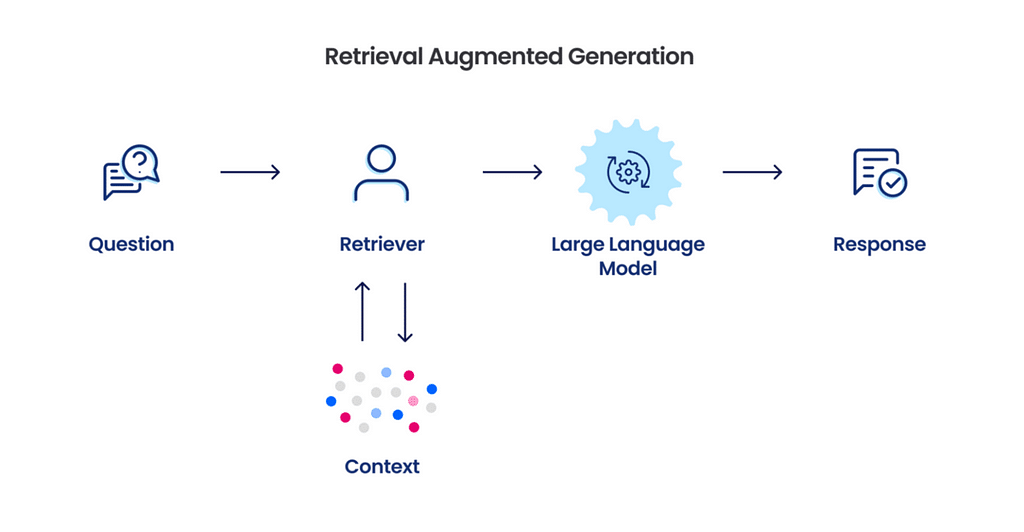
The same pattern applies to long documents and conversations. Instead of loading everything at once, systems summarize earlier content and expand only the parts that matter. The assistant feels informed and responsive, while most of the context is loaded on demand.
4.2 Capability Progressive Loading (Skills and Tools)
As models get better, platforms naturally want them to do more. Anthropic has Claude Skills. OpenAI has tools and function calling. Others rely on plugins or custom integrations with different names but same goal.
In Claude’s case, that solution is Skills, a folder centered around a SKILL.md . The progressive-loading part is subtle but important. A SKILL.md starts with YAML format containing required metadata: name and description.
Skill layout
.claude/skills/pdf/ ├─ SKILL.md # has YAML: name + description + core instructions ├─ forms.md # only needed for form filling └─ scripts/ └─ extract_fields.py
SKILL.md(shape)
--- name: pdf-helper description: Work with PDFs (extract fields, fill forms). Use when user mentions PDFs or forms. --- # PDF Helper If the task is "fill a form", read [forms.md](forms.md) before proceeding. For extraction, run: python scripts/extract_fields.py <file.pdf>
At startup, the agent pre-loads the name and description of every installed skill into its system prompt.
That gives Claude a skill menu, without paying the token cost of loading every skill’s full instructions. When Claude decides a skill is relevant, it then loads the full SKILL.md into context. If the skill bundles extra files, those files are not loaded either. They are referenced from SKILL.md, and Claude reads them only when needed.
Conceptually, the agent’s startup prompt looks like
Installed skills (metadata only): - pdf-helper: Work with PDFs (extract fields, fill forms)... - git-reviewer: Review PR diffs and suggest changes... - ...
That’s capability progressive loading in a nutshell: the assistant stays light by default, and only becomes specialized when needed.
4.3 Computation Progressive Loading
Consider how an AI assistant answers a question. It rarely needs to go straight to the most expensive reasoning path. If you ask a simple factual question, a quick response is often enough. If you ask something ambiguous or complex, the system may need to think longer, retrieve more context, or call tools.

Computation progressive loading makes this explicit. The system starts with cheap computation first. A fast response using minimal reasoning. If that is not sufficient, it escalates. It may run a deeper analysis, fetch additional data, or validate the answer with tools. Each step adds more computation, but only when the previous step falls short.
4.4 Interaction Progressive Loading
From a user’s perspective, the most noticeable form of progressive loading is how an AI responds before it finishes everything.
You see this when an assistant gives a quick summary before expanding into details, or produces a rough draft before polishing it further. Sometimes the first response answers the question well enough. Other times, follow-up prompts trigger deeper reasoning, more context, or additional computation.
In practice, this is why good AI systems feel responsive and trustworthy even doing complex things. They help first, then improve, instead of insisting on finishing everything before saying anything at all.
Final Thoughts
It is easy to believe that modern AI works because the models are huge and the math is clever. In reality, a lot of the magic comes from classic engineering instincts: do not load everything, start small, and add complexity only needed.
Progressive loading did not suddenly become relevant because of AI but AI made the costs visible again. The systems that scale are the ones that stay disciplined about when to do more.
As fast as AI is moving, good software engineering still matters. Many of the ideas shaping modern AI are not new but simply showing up higher in the stack.
If you are interested in what I’m working on, check out my other articles and follow my GitHub, or LinkedIn️ ❤️
Progressive Loading: A Classic Pattern to Scale Modern AI was originally published in Towards AI on Medium, where people are continuing the conversation by highlighting and responding to this story.