Summary: Explanation text in AI chat interfaces is intended to help users understand AI outputs, but current practices fall short of that goal.
As AI chat interfaces become more popular, users increasingly rely on AI outputs to make decisions. Without explanations, AI systems are black boxes. Explaining to people how an AI system has reached a particular output helps users form accurate mental models, prevents the spread of misinformation, and helps users decide whether to trust an AI output.** However, the explanations currently offered by large language models (LLMs) are often inaccurate, hidden, or confusing. **
This article focuses on how explanation text appears in AI chat interfaces, what works, what does not, and how UX tea…
Summary: Explanation text in AI chat interfaces is intended to help users understand AI outputs, but current practices fall short of that goal.
As AI chat interfaces become more popular, users increasingly rely on AI outputs to make decisions. Without explanations, AI systems are black boxes. Explaining to people how an AI system has reached a particular output helps users form accurate mental models, prevents the spread of misinformation, and helps users decide whether to trust an AI output.** However, the explanations currently offered by large language models (LLMs) are often inaccurate, hidden, or confusing. **
This article focuses on how explanation text appears in AI chat interfaces, what works, what does not, and how UX teams can approach designing AI explanations moving forward.
- Explainable AI
- Explanation Text in AI Chat Interfaces
- Avoid Anthropomorphic Language
- Be Honest and Transparent about Limitations
Explainable AI
Explainable AI is about making the reasoning behind AI systems transparent and understandable. It refers to how an AI system communicates the reasons behind its output, so that people can understand and evaluate it.
Challenges With Explainable AI
Currently, explainable AI is limited by technical complexity. The technical reality is that modern AI models are so complex that even AI engineers cannot always accurately trace the reasons behind an output. Right now, we do not have AI that can fully and transparently explain everything it does. The technical details of building accurate, explainable models are ongoing conversations in the industry.
Yet, when AI chatbots confidently present their outputs, users may place undeserved trust in these answers. Many AI chatbots attempt to provide at least basic explanations (such as source) for their answers, but often these explanations are inaccurate or hallucinated. Users who are not aware of the limitations see a confident and plausible explanation and automatically trust the output. The more users trust AI, the more likely they are to use AI tools without question.
Explanation Text in AI Chat Interfaces
Explainability in AI is a broad topic; however, this article specifically examines the textual explanations provided by AI chatbots — including Claude, ChatGPT, Copilot, and Gemini — to contextualize their outputs.
These explanations include source citations, step-by-step walkthroughs, and disclaimers. Each pattern is intended to benefit users, but also introduces risks.
Source Citations
It is common for AI chat interfaces to cite sources in their outputs. Citations are intended to help users verify outputs. However, for citations to be useful, they must be accurate.
The reality is, citations are often hallucinated and point to nonexistent URLs. And, even when the links are real, they may lead to unreliable sources or to unrelated articles that do not actually support the claim made in the AI output. In all these cases, including the source regardless of its validity, gives users a false sense of reliability.
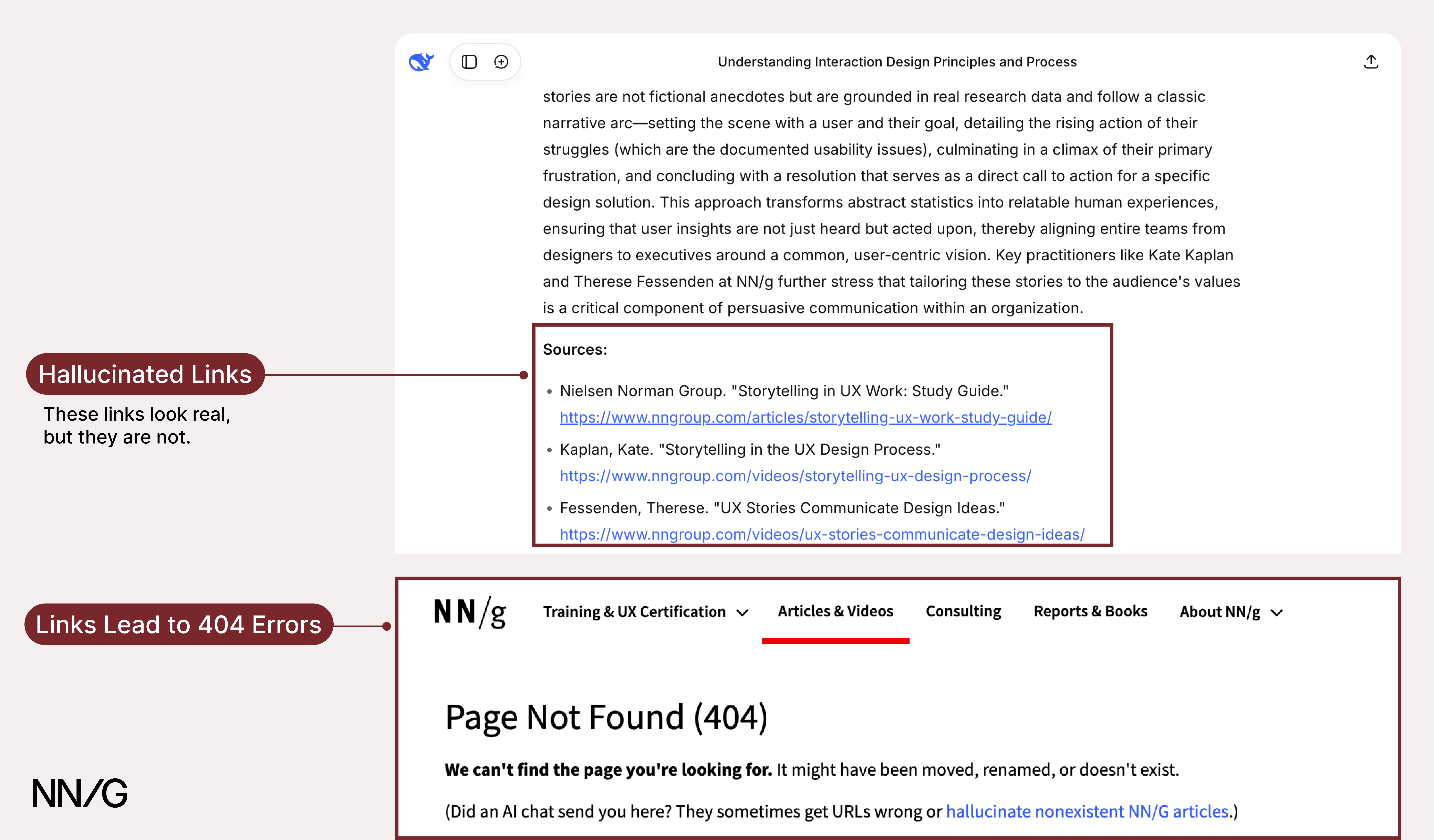 DeepSeek provides what appears to be a link to a credible source, but clicking it leads to a 404 error.
Although users could theoretically verify information by checking each source, they seldom do so in practice. Our research on AI information-seeking behaviors revealed that people rarely click citation links. Without examining these sources, users may not realize that the citations could be inaccurate or even fabricated. Because the citations appear trustworthy, this perception alone strengthens confidence in the output. As one participant described it:
“I trust [the chatbot] a lot, to be honest… if I want to learn more and see where it got the information from, I could just click the source and keep reading.”
Yet that participant never clicked on any of the citations presented during the session. It’s easy for users to overtrust AI outputs simply because they appear well-cited.
Now, UX professionals don’t control how AI chatbots generate citations, and hallucinated content is often baked into how the model works. Fixing that is a technical challenge that sits outside the UX team’s scope. But designers can influence how sources are presented and interpreted by users. With that in mind, here’s how UX teams can design sources to encourage verification of outputs:
- **Set realistic expectations. **Clearly indicate in the interface that it is important to verify sources, as they may not always link to accurate information.
- **Style citations differently from the main output response. **Do not bury citations in the body of the answer. Make citations visible and prominent on the page to encourage users to investigate them.
- Place sources directly next to the specific claim or sentence they support. This encourages users to click on them and makes it easier for users to verify information in context.
- **Link to the relevant part of the source. **When possible, link directly to the part of the article that supports the claim. This practice reduces the interaction cost of finding and verifying information.
- **Avoid vague link labels, **such as Source. Show meaningful labels for sources, such as the name of the publication or article title, so users know what they’re clicking into.
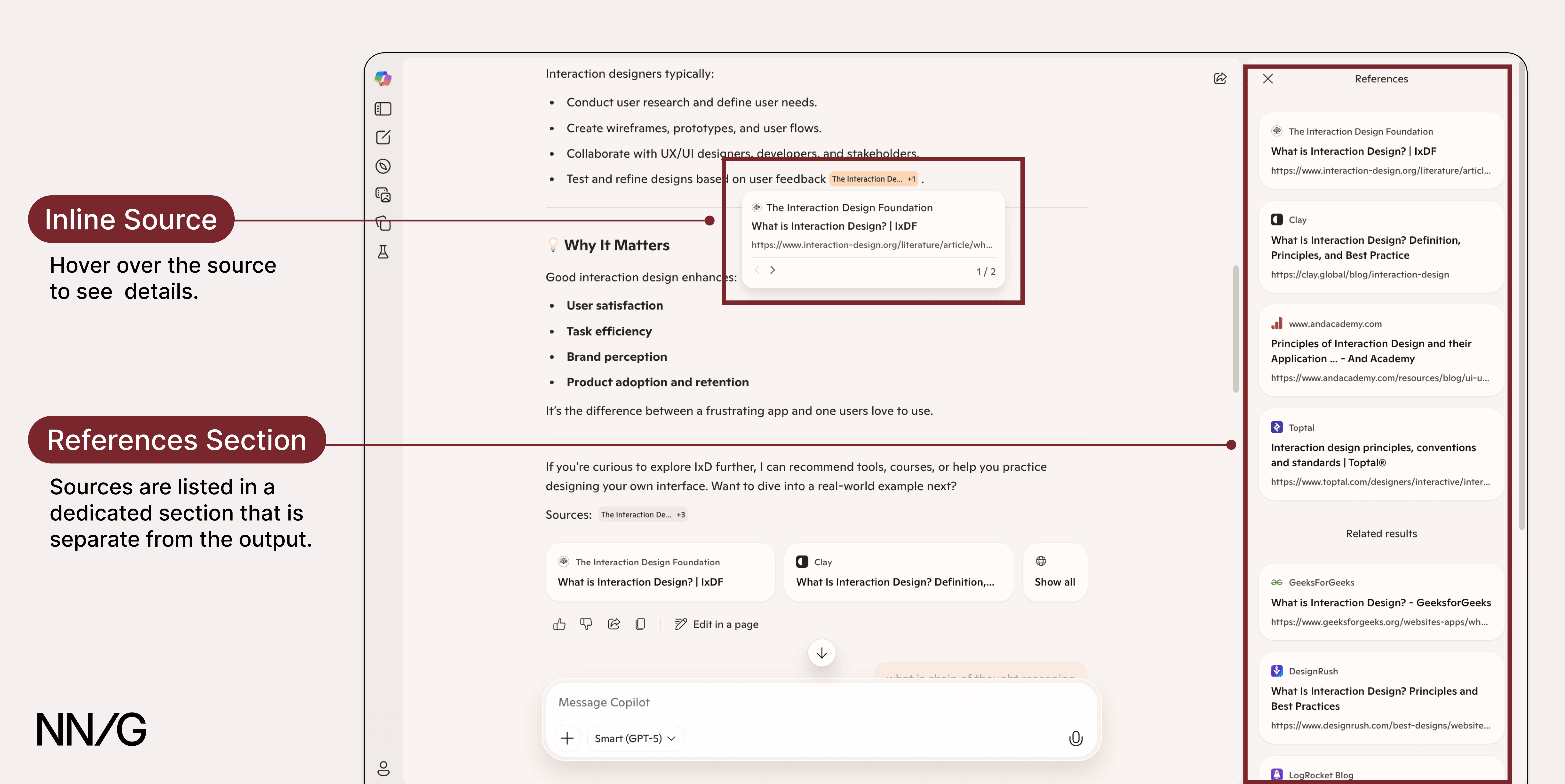 *Copilot cites sources throughout its response and displays them as clickable chips. When users hover over a chip, a preview of the source appears. A See all button allows users to view all sources referenced in the output. This design separates citations from the main response and makes it easier to click into sources to verify information.*
 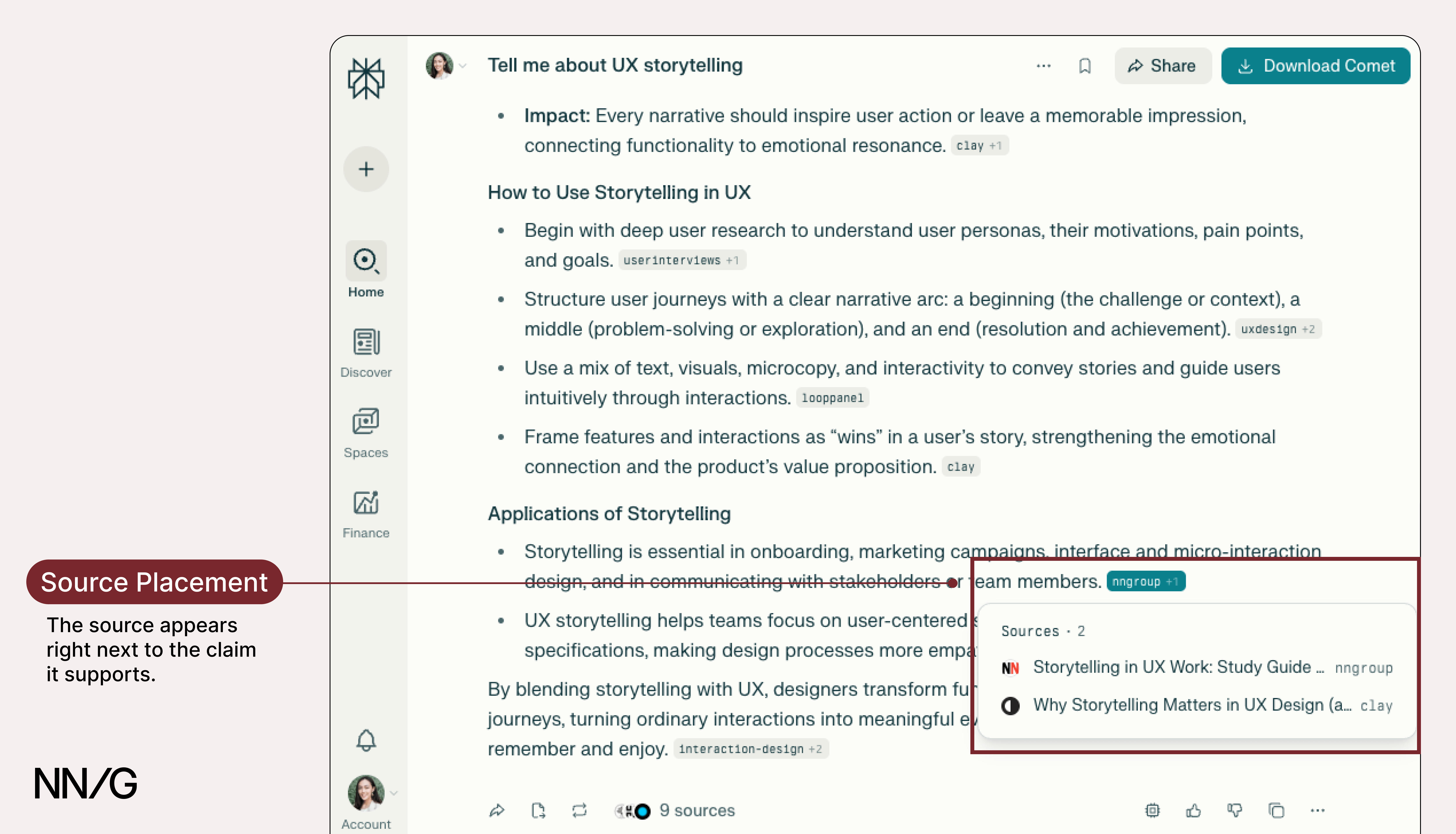 Perplexity places sources directly next to the referenced text using inline citation tags. This design makes it easy for users to verify information in context and reduces the likelihood of missing sources.
Step-by-Step Reasoning
Step-by-step explanations are supposed to help users understand how the AI chatbot arrived at an output. The idea is that if users can see the reasoning process, they’ll be able to better assess the output’s accuracy.
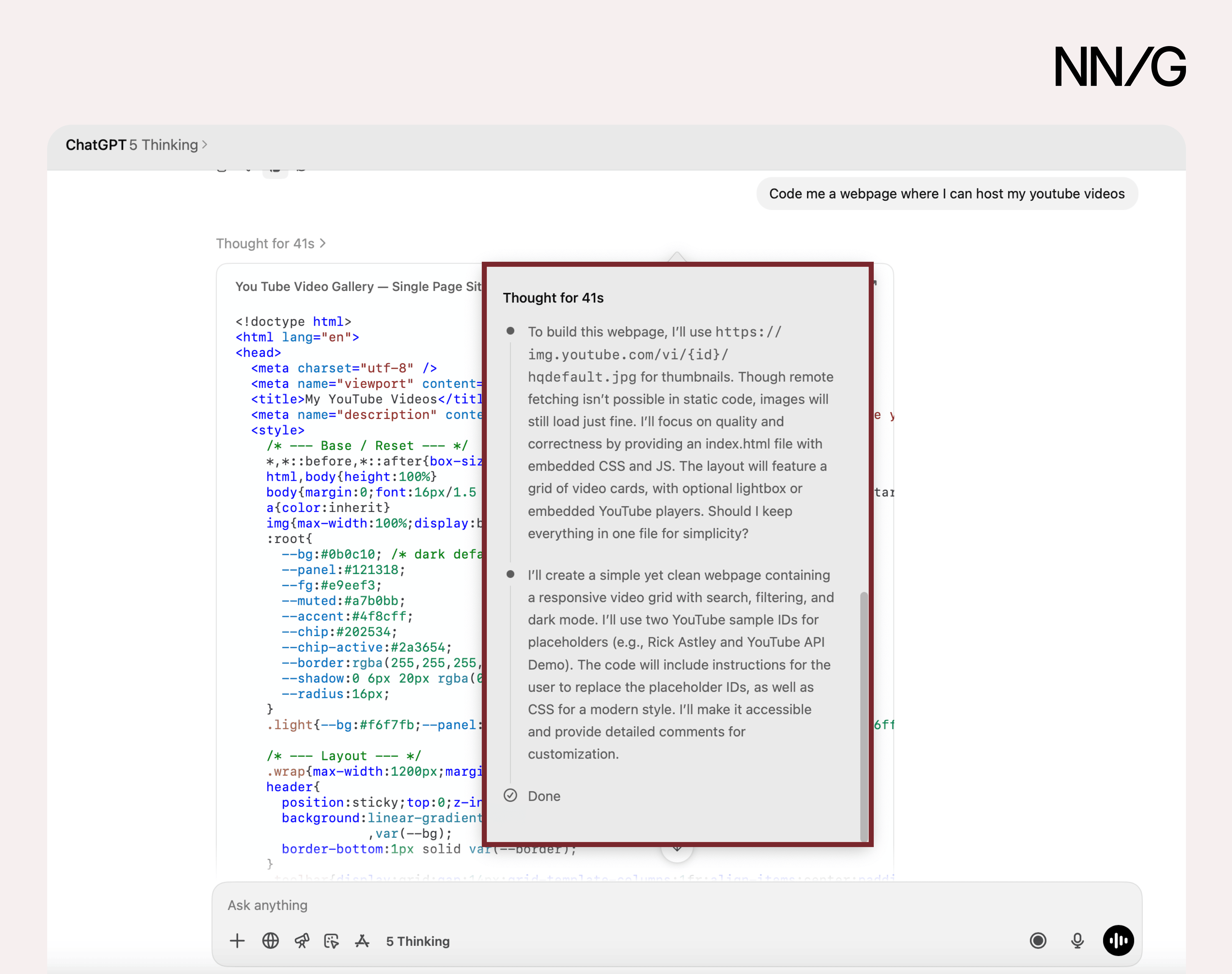 ChatGPT 5 Thinking walks users through its reasoning for complex tasks, such as coding a website.
In principle, step-by-step explanations seem promising. They give the impression that the system is thinking carefully, logically, and transparently. But that’s not what is actually happening. In many cases, these walkthroughs are rationalizations generated after the fact, rather than faithful representations of how the model arrived at an answer.
Research has shown that these explanations are often unfaithful to the model’s actual computation. They may omit influencing factors or adjust their explanation to justify incorrect answers when nudged in that direction by the user. The result is often plausible but untrue.
This leaves designers with a dilemma. On one hand, step-by-step reasoning can make a product feel more approachable and understandable. On the other hand, it risks promoting trust in a flawed tool.
Given that step-by-step reasoning is often unreliable, designers should avoid using step-by-step explanations that imply certainty or transparency. Instead, use alternative explanation strategies, such as providing relevant sources and clarifying the model’s limitations. As the technology evolves and true explainability improves, designers will be better positioned to introduce step-by-step explanations that accurately reflect the system’s internal processes.
Disclaimers
Disclaimers are presented on interfaces to make users aware of the tool’s limitations. They remind users to verify outputs, since the information may be false.
While disclaimers seem effective in theory, they help only if users read them. Research consistently shows that people often just skim the text instead of reading every word and skip over fine print entirely. If disclaimers are hidden at the bottom of an output, tucked behind a help icon, or written in vague language, users tend to ignore them altogether.
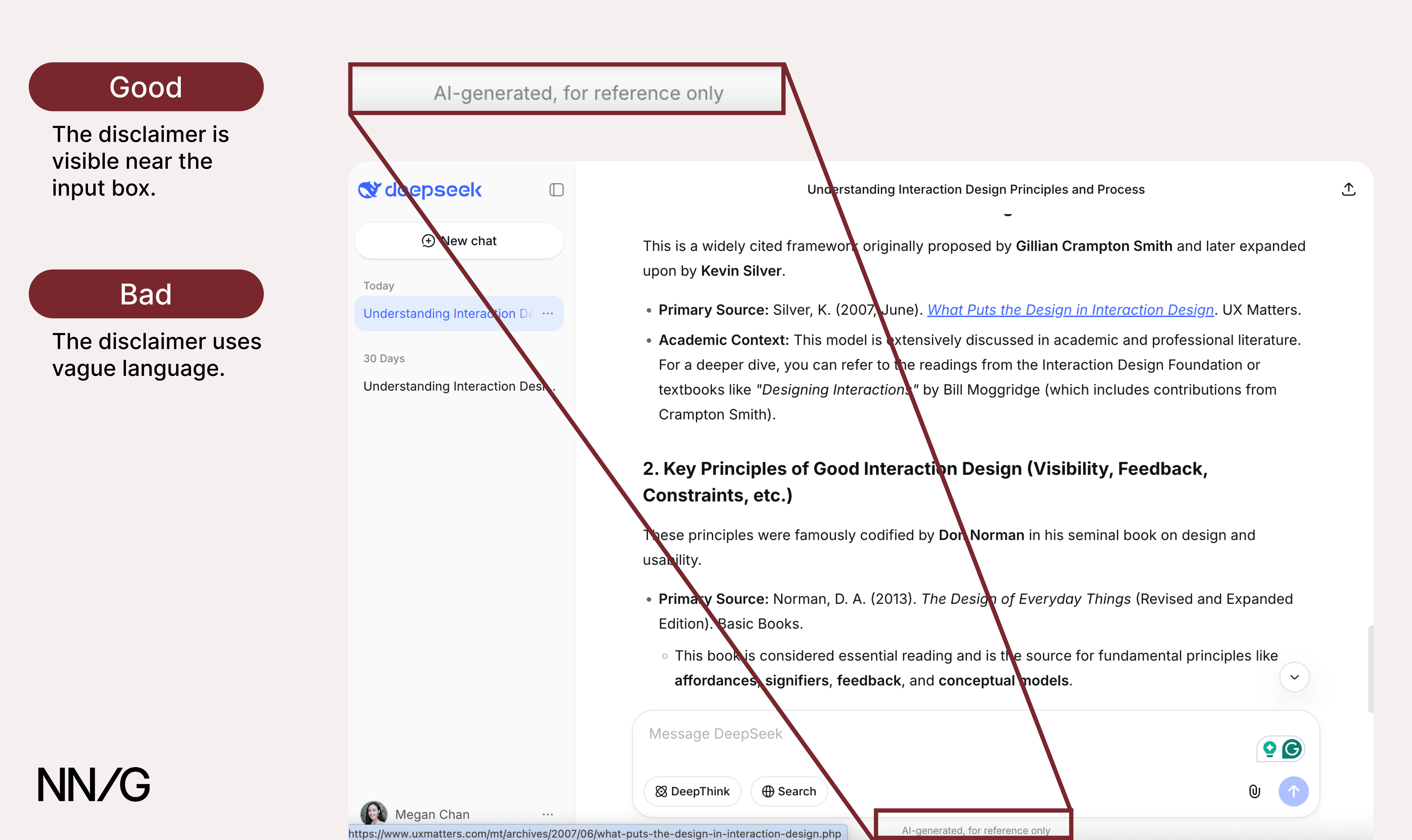 DeepSeek’s disclaimer appears near the input box, which is good, but it uses vague language (AI generated, for reference only) that does little to communicate specific risks or limitations.
When disclaimers are designed well, they are more likely to be noticed and can succeed in helping users calibrate their trust and engage with AI tools critically. Here’s how:
- **Use clear language to write disclaimers. Describe limitations using **plain, direct language that users can understand at a glance. Avoid technical terms or AI jargon.
- **Pair disclaimers with an action. **In addition to stating the limitation, tell the user what exactly they should do (e.g., Double-check AI outputs).
- Place disclaimers prominently in the main interface, ideally near the input box, where users tend to focus their attention. Do not place them in footers or behind help icons where they’re easy to overlook.
- **Include disclaimers in onboarding **to set expectations early.
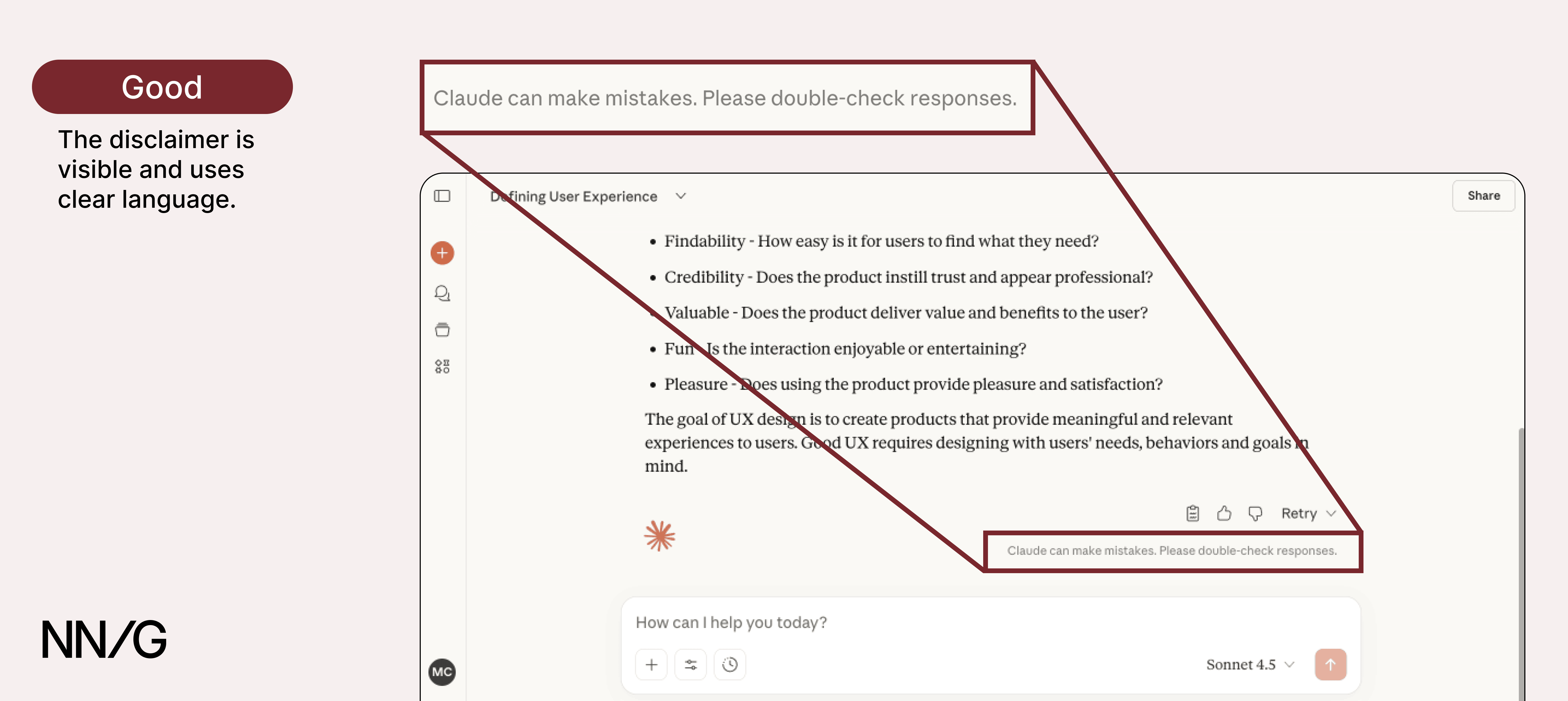 Claude places its disclaimer in a visible area and uses clear action-oriented language to remind users to double-check responses.
Avoid Anthropomorphic Language
Anthropomorphizing AI, or giving it names, personalities, or backstories, can make the tool feel friendly and approachable, but it can also inflate trust and set unrealistic expectations.
When explanations sound like they were written by a human (e.g., I thought about your problem and searched the internet), users may overestimate the model’s intelligence and capabilities. Instead, use factual, neutral language (e.g., This answer is based on the following source: [link].)
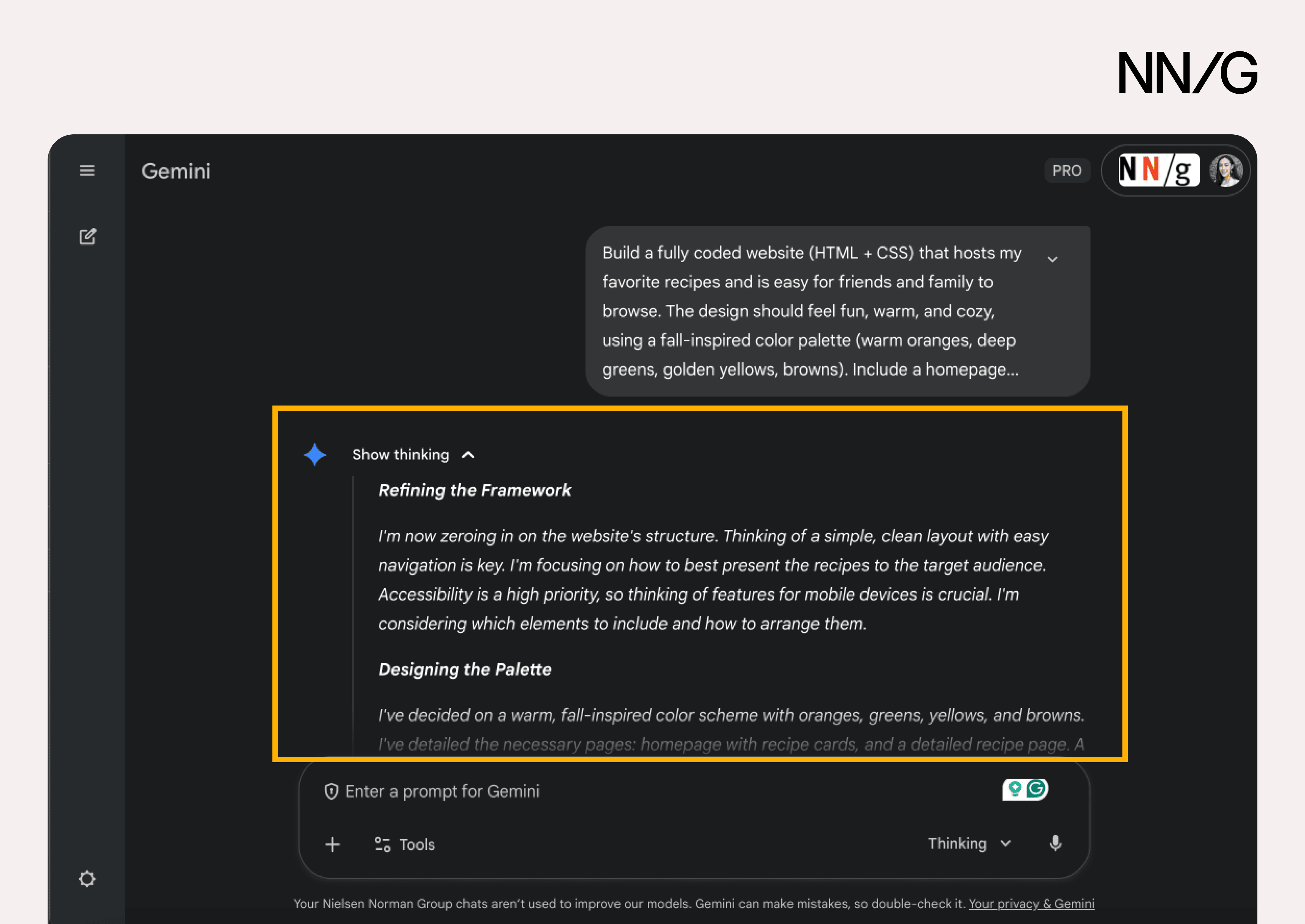 *Gemini 3 presents a *Show thinking section to explain its reasoning. This explanation uses first-person language, which anthropomorphizes the AI. It suggests human-like thinking that the model is not actually capable of.
Be Honest and Transparent about Limitations
UX practitioners have always been responsible for shaping mental models and helping people understand new technologies. Early digital interfaces relied on skeuomorphism, using familiar physical metaphors, such as folders and trash bins, to make digital interactions understandable. Designing explainable AI is the latest iteration of our challenge to make products trustworthy and understandable, so users can fully leverage the technology. With AI, this means honestly communicating AI’s limitations and mitigating the risk of overtrust, so users can interact with these AI tools safely.
Reference
Miles Turpin, Julian Michael, Ethan Perez, and Samuel R. Bowman. 2023. Language models don’t always say what they think: unfaithful explanations in chain-of-thought prompting. In Proceedings of the 37th International Conference on Neural Information Processing Systems (NIPS ’23). Curran Associates Inc., Red Hook, NY, USA, Article 3275, 74952–74965.