Fizzy is a new issue tracker (source available) from 37signals with a refreshingly clean UI. Beyond looking good, it ships with a solid webhook system for integrating with external services.
For most teams, webhooks are the bridge between the issues you track and the tools you already rely on. They let you push events into chat, incident tools, reporting pipelines, and anything else that speaks HTTP. If you are evaluating Fizzy or planning an integration, understanding what these webhooks can do will save you time.
I also put together a short PDF with the full payload structure and example code, which I link at the end of this post if you want to go deeper.
What could we build?
Here are a few …
Fizzy is a new issue tracker (source available) from 37signals with a refreshingly clean UI. Beyond looking good, it ships with a solid webhook system for integrating with external services.
For most teams, webhooks are the bridge between the issues you track and the tools you already rely on. They let you push events into chat, incident tools, reporting pipelines, and anything else that speaks HTTP. If you are evaluating Fizzy or planning an integration, understanding what these webhooks can do will save you time.
I also put together a short PDF with the full payload structure and example code, which I link at the end of this post if you want to go deeper.
What could we build?
Here are a few ideas for things you could build on top of Fizzy’s events:
- A team metrics dashboard that tracks how long cards take to move from
card_publishedtocard_closedand which assignees or boards close issues the fastest. - Personal Slack or Teams digests that send each person a daily summary of cards they created, were assigned, or closed based on
card_published,card_assigned,card_unassigned, andcard_closedevents. - A churn detector that flags cards that bounce between columns or get sent back to triage repeatedly using
card_triaged,card_sent_back_to_triage, andcard_postponed. - A cross-board incident view that watches
card_board_changedto keep a separate dashboard of cards moving into your incident or escalation boards. - A comment activity stream that ships
comment_createdevents into a search index or knowledge base so you can search discussions across boards.
If you want to go deeper, you can also build more opinionated tools that surface insights and notify people who never log in to Fizzy:
- Stakeholder status reports that email non-technical stakeholders a weekly summary of key cards: what was created, closed, postponed, or sent back to triage on their projects. You can group by label, board, or assignee and generate charts or narrative summaries from
card_published,card_closed,card_postponed, andcard_sent_back_to_triageevents. - Capacity and load alerts that watch for people who are getting overloaded. For example, you could send a notification to a manager when someone is assigned more than N open cards, or when cards assigned to them sit in the same column for too long without a
card_triagedorcard_closedevent. - SLA and escalation notifications that integrate with PagerDuty or similar tools. When certain cards (for example, labeled “Incident” or on a specific board) are not closed within an agreed time window, you can trigger an alert or automatically move the card to an escalation board using
card_postponed,card_board_changed, andcard_closed. - Customer-facing status updates that keep clients in the loop without giving them direct access to Fizzy. You could generate per-customer email updates or a small status page based on events for cards tagged with that customer’s name, combining
card_published,card_closed, andcomment_createdto show progress and recent discussion. - Meeting prep packs that assemble the last week’s events for a given board into a concise agenda for standups or planning meetings. You can collate newly created cards, reopened work, and high-churn items from
card_published,card_reopened,card_triaged, andcard_sent_back_to_triage, then email the summary to attendees before the meeting.
Here is how to set it up.
Setting up webhooks
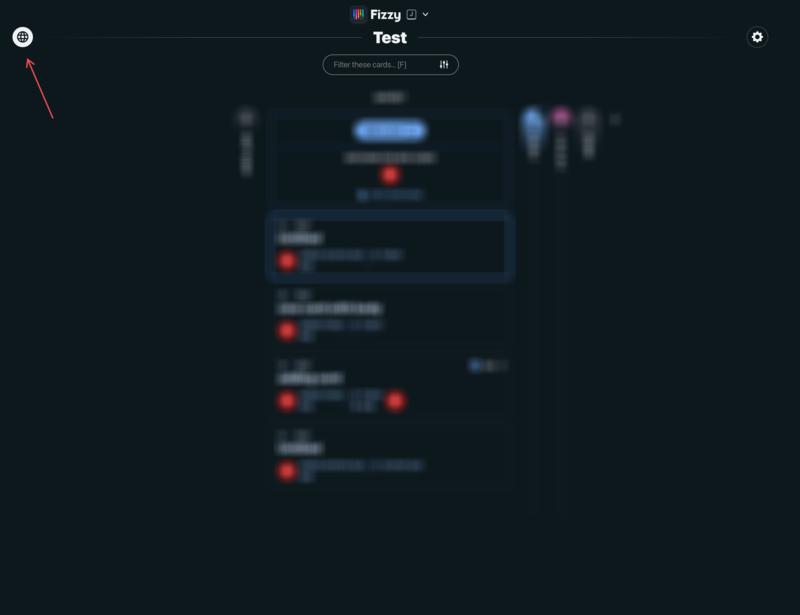
Step 1. Visit a board and click the Webhook icon in the top right.
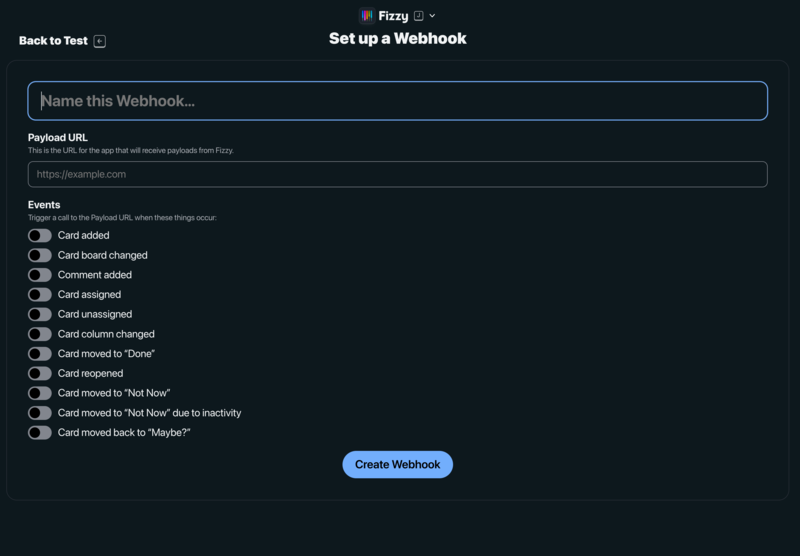
Step 2. Give the webhook a name and the payload URL and select the events you want to be alerted to.
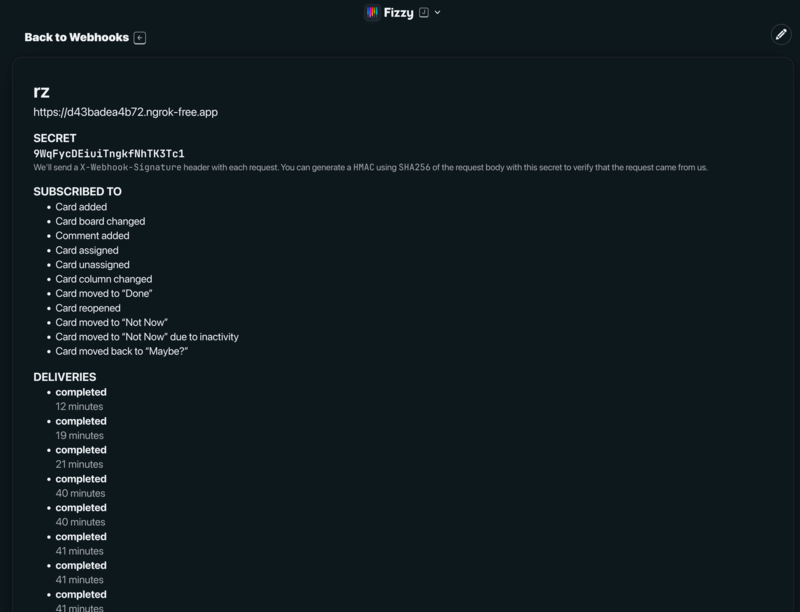
Step 3. Once the webhook saves you will see a summary of how it is setup and most importantly the webhook secret which you will need for your handler for securing the webhook. There is also a handy event log showing you when an event was delivered.
Since I like to tinker with these sorts of things, I built a small webhook receiver to capture and document the payload structures.
The Webhook System
Fizzy sends HTTP POST requests to your configured webhook URL when events occur. Each request includes an X-Webhook-Signature header containing an HMAC-SHA256 signature of the request body. The verification process is straightforward:
require 'openssl'

def verify_signature(body, signature, secret)
expected = OpenSSL::HMAC.hexdigest('SHA256', secret, body)
OpenSSL.secure_compare(expected, signature)
end
Event Types
Fizzy covers the essential card lifecycle events:
card_published- new card createdcard_triaged- card moved to a columncard_assigned/card_unassigned- assignment changescard_closed- card moved to Donecard_reopened- card reopened from Donecard_postponed- card moved to Not Nowcard_sent_back_to_triage- card moved back to Maybe?card_board_changed- card moved to different boardcomment_created- comment added to a card
How I captured the payloads
The approach was straightforward: I wrote a small Ruby script using WEBrick to act as a webhook receiver. The script listens for incoming POST requests, verifies the HMAC-SHA256 signature (using the webhook secret Fizzy provides when you configure webhooks), and saves each event as a separate JSON file with a timestamp and action name. This made it easy to review and compare the different event types later.
To expose my local server to the internet, I used ngrok to create a temporary public URL pointing to port 4002. I then configured Fizzy’s webhook settings with this ngrok URL and selected the event types I wanted to capture.
With everything set up, I went through Fizzy’s UI and manually triggered each available event: creating cards, adding comments, assigning and unassigning users, moving cards between columns and boards, marking cards as done, reopening them, postponing cards to “Not Now”, and sending cards back to triage. Each action fired a webhook that my script captured and logged.
In total, I captured 13 webhook deliveries covering 10 different action types. The only event I could not capture was “Card moved to Not Now due to inactivity” — Fizzy triggers this automatically after a period of card inactivity, so it was not practical to reproduce during this test.
Gotchas and Observations
Card body content is not included. The card object in webhook payloads only contains the title, not the full description or body content. Comments include both plain_text and html versions, but cards do not. Since Fizzy doesn’t have a public API (DHH is working on it), you can’t fetch the full card content programmatically - you’ll need to use the url field to view the card in the browser.
Column data is only present when relevant. The column object only appears on card_triaged, card_closed, and card_reopened events - the events where a card actually moves to a specific column.
IDs are strings, not integers. All identifiers in the payload are strings like "03f25q9q7bw7t3206v9ttiy53", not numeric IDs.
Documentation
I created a short webhook documentation based on this research: FIZZY_WEBHOOKS.pdf
It includes the full payload structure, all event types with examples, and code samples for signature verification in both Ruby and JavaScript. Hopefully this helps you get up and running with Fizzy’s webhooks. Let me know if you discover additional events or edge cases.
Since the source code is available, you can also submit PRs to fix or enhance aspects of the webhook system if you find something missing or want to contribute improvements.