January 29, 2026 by Kaj Grönholm | Comments
Let’s talk about Qt Canvas Painter — a new imperative 2D rendering API aiming to combine performance, productivity and modern features. This blog post brings you up to date with some 2D rendering history, the current status and future possibilities.
To get us started, here’s a short introduction video of 2D rendering with the Qt Canvas Painter.
History of Qt Imperative 2D Rendering
We can start the imperative 2D rendering history lesson by looking into QPainter, the beloved painting API of Qt. QPainter is a great general painting API that has been powering Widgets and imperative drawing in Qt for more than two decades. To learn more about QPainter history, I recommend watch…
January 29, 2026 by Kaj Grönholm | Comments
Let’s talk about Qt Canvas Painter — a new imperative 2D rendering API aiming to combine performance, productivity and modern features. This blog post brings you up to date with some 2D rendering history, the current status and future possibilities.
To get us started, here’s a short introduction video of 2D rendering with the Qt Canvas Painter.
History of Qt Imperative 2D Rendering
We can start the imperative 2D rendering history lesson by looking into QPainter, the beloved painting API of Qt. QPainter is a great general painting API that has been powering Widgets and imperative drawing in Qt for more than two decades. To learn more about QPainter history, I recommend watching Eirik’s Qt World Summit 2025 Keynote: 30 Years of Graphics Rendering in Qt. What you will learn is that QPainter is best suited for paint engine implementations done on CPU.
One weakness of the QPainter API and its 2D rendering architecture in the modern world is that it doesn’t suit very well with GPUs and 3D APIs. The abstraction of QPaintEngine makes it easy to get the QPainter API supported on different backends, but it does not allow taking the best performance out of GPUs that like parallel processing and maintaining data in the GPU memory. The feature set is usually also limited, as with the legacy OpenGL-based paint engine that provides a subset of the functionality of the pure software (the so-called raster) paint engine.
So, considering that we very much want to keep QPainter as a general 2D rendering API and avoid causing issues for the current QPainter and widgets users, what would be the best approach for a hardware-accelerated imperative painting? About a year ago, we gathered in a workshop in the Qt Oslo office together with some graphics team members. And as the outcome of that workshop, we decided to start an experimental project to build an alternative, more compact painting API on top of QRhi. The main target of this API would be to combine performance and productivity.
The history of Qt Canvas Painter could be considered to start from NanoVG, a great, compact painting library originally developed by Mikko Mononen. About 10 years ago, I personally started a project called QNanoPainter that offers a Qt C++ API and Qt Quick & widget helpers on top of NanoVG. Over the years, it has been quite a successful little project, getting positive feedback from many users.
So we decided to start building the Canvas Painter based on QNanoPainter. It started by rewriting the NanoVG C-language backend with Qt C++. The OpenGL rendering backend was rewritten to use QRhi, so we got support not just for OpenGL but also Vulkan, Metal and Direct3D. The text rendering was rewritten from scratch, building on Qt Quick’s powerful text rendering capabilities and signed distance field fonts. And then we added many features, a few of which bring missing HTML Canvas 2D context features, while others enable new functionality. Some of these new features are still experimental, but we already see them being potentially very useful for high performance and modern needs.
At this point, I could mention the mandatory warning:
Qt Canvas Painter is a tech preview in Qt 6.11. This means that we don’t guarantee API or ABI stability yet.
The Steps to Great Imperative 2D Rendering
The main design goals of the new painter could be summarized with three points:
Performance: First and maybe the most important goal in a way is reaching high performance, especially on mobile/embedded hardware. If the performance isn’t better than the existing alternatives, there likely isn’t an appeal to start using a new API. To reach the maximum performance, we reduced features and abstractions and implemented the painting directly on QRhi. While many 2D rendering libraries have initially been implemented for (CPU) software rendering and later received a (GPU) accelerated rendering backend, Qt Canvas Painter is only available on GPU from the very beginning. There are no plans to implement a software backend.
Productivity: Performance of course can’t be the only goal, or otherwise we could just instruct developers to use QRhi or Vulkan directly. These low-level APIs are very powerful and fast, but not easy to use, so they don’t offer high productivity. By selecting the HTML Canvas 2D context as the basis for the Qt Canvas Painter API, we aim to provide familiar APIs, clear documentation and code samples in the hope of increasing the development productivity. Familiar API and plenty of source code available on the internet also improve AI assistants’ capabilities in the future.
Features: With the two above goals, performance and productivity, the API could already be quite helpful for many of our users. But it could also still remain quite niche if we don’t provide an attractive set of features. A library that makes it easy to paint thousands of white rectangles very fast would not fit the needs of many of our users. Offering a big part of HTML Canvas 2D context features gives a good backbone to the library. But to really attract the users, we need and want to offer more features, especially features tailored for modern UIs and hardware-acceleration.
The above points will be discussed in more detail in the follow-up blog posts, where we go through the features and benchmarking results.
Using Canvas Painter with Qt Quick
The main expected 2D rendering usage of the Canvas Painter is implementing custom Qt Quick items. It can be considered as a more performing and better integrated replacement for QQuickPaintedItem.
To create the custom QML item, you implement a class inheriting QQuickCPainterItem and overriding the createItemRenderer() method. Something like this:
class HelloItem : public QQuickCPainterItem
{
Q_OBJECT
QML_ELEMENT
public:
HelloItem(QQuickItem *parent = nullptr);
QQuickCPainterRenderer *createItemRenderer() const override;

private:
friend class HelloItemRenderer;
QString m_label;
};
This class can then have properties, slots, etc., to integrate with the QML like the QQuickItems do. In this simple example we just set the label text directly instead of getting it from QML. So implementation of that class looks like this:
HelloItem::HelloItem(QQuickItem *parent)
:  QQuickCPainterItem(parent)
{
m_label = QString("Canvas Painter");
}

QQuickCPainterRenderer *HelloItem::createItemRenderer() const
{
// Create the renderer for this item
return new HelloItemRenderer();
}
The renderer class inherits QQuickCPainterRenderer and commonly overrides synchronize() and paint() methods. As the rendering on most platforms happens in a separate thread, the synchronize method is the only place where it is safe for the renderer and the item to read and write each other’s variables. For our Hello Canvas Painter example, the renderer code looks like this:
void HelloItemRenderer::synchronize(QQuickCPainterItem *item)
{
// Synchronize here data between the item and the renderer.
HelloItem *helloItem = static_cast<helloitem*>(item);
m_label = helloItem->m_label;
}

void HelloItemRenderer::paint(QCPainter *p)
{
float size = std::min(width(), height());
QPointF center(width() * 0.5, height() * 0.5);

// Paint the background circle
QCRadialGradient gradient1(center, size * 0.6);
gradient1.setStartColor(0x909090);
gradient1.setEndColor(0x202020);
p->beginPath();
p->circle(center, size * 0.46);
p->setFillStyle(gradient1);
p->fill();
p->setStrokeStyle(0x202020);
p->setLineWidth(size * 0.02);
p->stroke();

// Paint texts
p->setTextAlign(QCPainter::TextAlign::Center);
p->setTextBaseline(QCPainter::TextBaseline::Middle);
QFont font1("Titillium Web");
font1.setWeight(QFont::Weight::Bold);
font1.setItalic(true);
font1.setPixelSize(size * 0.08);
p->setFont(font1);
p->setFillStyle(0x2CDE85);
p->fillText("HELLO", center.x(), center.y() - size * 0.28);
QFont font2("Titillium Web");
font2.setWeight(QFont::Weight::Thin);
font2.setPixelSize(size * 0.12);
p->setFont(font2);
p->fillText(m_label, center.x(), center.y() - size * 0.16);

// Paint the heart
QCImage logo = p->addImage(m_logoImage, QCPainter::ImageFlag::Repeat |
QCPainter::ImageFlag::GenerateMipmaps);
float pSize = size * 0.05;
QCImagePattern pattern(logo, center.x(), center.y(), pSize, pSize);
p->setFillStyle(pattern);
p->setStrokeStyle(0x2CDE85);
p->beginPath();
float hs = size * 2;
QPointF hc(width() * 0.5, height() * 0.25);
p->moveTo(hc.x(), hc.y() + hs * 0.3);
p->bezierCurveTo(hc.x() - hs * 0.25, hc.y() + hs * 0.1,
hc.x(), hc.y() + hs * 0.05,
hc.x(), hc.y() + hs * 0.18);
p->bezierCurveTo(hc.x(), hc.y() + hs * 0.05,
hc.x() + hs * 0.25, hc.y() + hs * 0.1,
hc.x(), hc.y() + hs * 0.3);
p->fill();
p->stroke();
}
And when we run the above example, the custom Canvas Painter item looks like this:
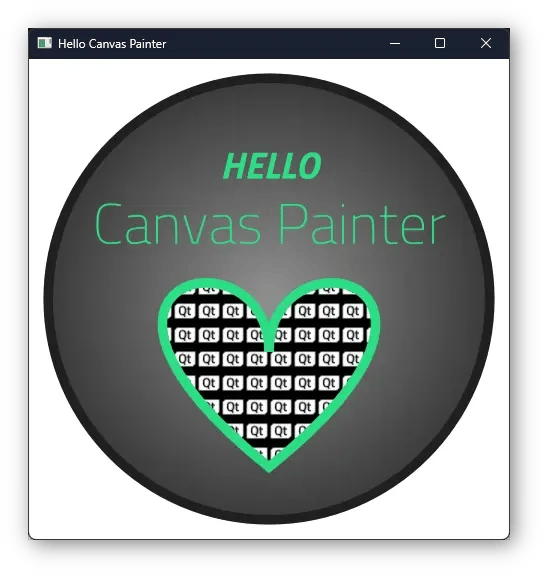 For more complex examples, please see the ones available in the Qt release (starting from Qt 6.11), like the Gallery example that presents many of the available 2D rendering features. Also available is the Compact Health example that shows how to use QCPainter directly with QRhi and QWindow, without Qt Quick or Qt Widgets dependency. Also, please check the Canvas Painter API documentation and especially the QCPainter class.
What About Widgets?
We have good news for all the Qt widgets users: Widgets are also fully supported with the Canvas Painter! There is a QCPainterWidget helper class, built on top of QRhiWidget, that is used just like QWidget, inheriting it in your own widget class and reimplementing the painting method. But instead of using QPainter, you use QCPainter. And then you can have custom widgets in your QWidget application, rendering hardware-accelerated on QRhi. Here is a simple example application with some standard widgets and an analogue clock painted using Canvas Painter.
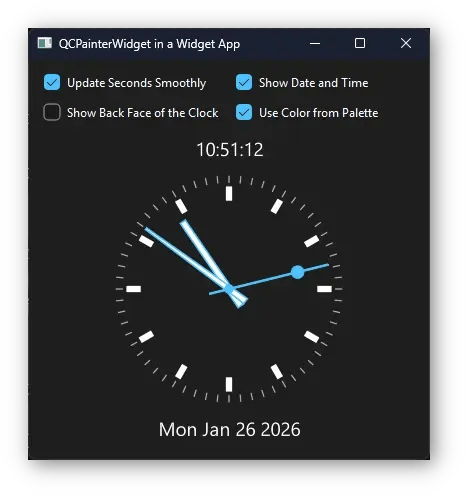 This means that existing applications and widgets continue using QPainter with the Raster backend; only widgets that are specifically implemented to use Canvas Painter are changing. The pros of this approach are that all widgets look and behave exactly as before, and acceleration can be targeted to the custom widgets that gain from it. But that can also be considered a con, that the existing QPainter code is not automatically accelerated. Nevertheless, this makes it easier to port widget applications to Qt Quick if desired, as the painting code can remain the same.
As an example of how to implement custom widgets using the Canvas Painter, please check the Hello Widget example.
Current Status
What we have right now is an API that generally follows the HTML Canvas 2D context (hence the name Canvas Painter). There are different reasons why we selected 2D context as the base specification. For one, the Canvas 2D context is more compact than the QPainter as an API, so while being a compact API, we can reach a bigger compatibility with the 2D context than with QPainter. Also, as one target of the new painter was to be used as a new Quick Canvas backend, what would be a more suitable backend for Quick Canvas QML element than a C++ implementation of the 2D context 😀
That said, we do not aim to be 100% compatible with the 2D context API. With browsers, users expect that the canvas element rendering matches with Chrome ( not necessarily with the spec! ). With the Canvas Painter C++ API (and also with Quick Canvas), developers always need to port the code and are in control of the content, so full compatibility is not as important. It is more important that the specification is consistent and high-performance.
The main features that we are currently missing compared to 2D context specification are:
- Filters: Filter effects is an API that we will very likely never support. We do eventually want to support post-processing effects for the offscreen canvas, but the C++ API will not be a string of effects and their values, which then need to be parsed. This would be very inefficient for an imperative API, both to use and for performance.
- Dashed strokes: Currently, Canvas Painter only supports solid stroking and not dashed stroking. The reasons are mostly a lack of time and impact on performance, as triangulating dashes (especially with round joins) is slower and generates more triangles. We might support this in the future, but for now, alternatives could be, for example, using a grid pattern or an image pattern, or even a custom shader brush to make the strokes stand out as the dashed strokes do.
- Shadows: 2D context supports shadow effects. To create a shadow, rendering into an offscreen canvas and Gaussian blurring are required. And this has performance implications, so that even Mozilla instructs to "Avoid the shadowBlur property whenever possible". We do have initial support for offscreen canvas elements, but are still unsure if the 2D context shadow API is the way to go. Maybe an approach that gives users more control when / how the offscreen canvas gets created and updated would be more optimal? Or maybe fast round rectangle shadows and freely adjustable antialiasing are enough, considering the performance impacts?
- Shape clipping: 2D context supports the clip() method, which allows clipping to any shape. Canvas Painter doesn’t currently support this; it only supports fast clipping of rectangle-shaped areas with or without transformation.
So we are missing some of the 2D canvas features, but do we add anything new to the table? Yes, quite a lot actually! The list of new features is fairly long, and I want to really get into the details with those, so there will be a separate follow-up blog post soon that concentrates fully on the new features of the Qt Canvas Painter.
Future Plans
Qt Canvas Painter will be offered as a tech preview in Qt 6.11. We have big plans for improving the 2D rendering API and locating use cases that bring out the best parts of utilizing it. The most obvious one being a new Quick Canvas backend that could bring feature compatibility for Canvas Painter C++ and QML JavaScript APIs. Which would mean fast dynamic UIs built with QML scripting and optionally easily porting that code to C++ when more lower-level control and data is required.
As far as I’m concerned, the future is now. Please install Qt 6.11 pre-releases or build Qt from sources and give Canvas Painter a try. And please create bug and suggestion tickets for us. Getting the real user feedback is the best way for us to improve and get this out of tech preview as a fully supported part of Qt solutions.
I hope to see you back in the next blog post, which will tell more about the new Canvas Painter features!