There was a post on Hacker News yesterday about ByteShape’s success running Qwen 30B A3B on a Raspberry Pi with 16 gigabytes of RAM. I wondered if their quantization was really better. I had tried fitting a quant of Qwen Coder 30B A3B on my Radeon 9700 XT GPU shortly after I installed it, but I didn’t have much luck with OpenCode. The largest quant I could fit didn’t leave enough room for OpenCode’s context, and it wasn’t smart enough to correctly apply changes to my code most of the time.

I am going to tell …
There was a post on Hacker News yesterday about ByteShape’s success running Qwen 30B A3B on a Raspberry Pi with 16 gigabytes of RAM. I wondered if their quantization was really better. I had tried fitting a quant of Qwen Coder 30B A3B on my Radeon 9700 XT GPU shortly after I installed it, but I didn’t have much luck with OpenCode. The largest quant I could fit didn’t leave enough room for OpenCode’s context, and it wasn’t smart enough to correctly apply changes to my code most of the time.
I am going to tell you the good news up front here. I was able to fit ByteShape’s Qwen 30B A3B Q3_K_S onto my GPU, and llama-bench gave me better than 200 tokens per second for prompt processing and 50 tokens per second generation speed with 48,000 tokens of context.
That is enough speed to be useful, especially since it is almost three times faster in the early parts of an OpenCode session when I am under 16,000 tokens of context. It isn’t a complete dope. It correctly analyzed some simple code. It was able to figure out how to make a simple change. It was even able to apply the change correctly.
OpenCode with ByteShape’s quant isn’t even close to being in the same league as the models you get with a Claude Code or Google Antigravity subscription. When my new GPU arrived, I couldn’t find a model that fit on my GPU, could create usable code, and consistently generate diffs that could consistently be applied using OpenCode. Two months later, and all of this is at least possible!
Will I be canceling my $6 per month Z.ai coding subscription?
Definitely not. First of all, this isn’t even Qwen Coder 30B A3B. There is no ByteShape quant of the coding model. Even if there were, unquantized Qwen Coder 30B A3B is way behind the capabilities of Z.ai’s relatively massive GLM-4.7 at 358B A32B.
My local copy of Qwen 30B A3B does feel roughly as fast as my Z.ai subscription when the context is minuscule, but my Z.ai subscription doesn’t slow down when the context pushes past 80,000 tokens. My GPU doesn’t have enough VRAM to get there with a 30B model, and it would be glacially slow if it could.
Not only that, but my GPU cost me more than $600. Is it worthwhile tying up my VRAM, eating extra power, and heating up my home office when the price of that GPU could pay for 100 months of virtually unlimited tokens from Z.ai?
I am certain that someone reading this has a good reason to keep their data out of the cloud, but it is a no-brainer for me to continue to use Z.ai.
- Is The $6 Z.ai Coding Plan a No-Brainer?
- Contemplating Local LLMs vs. OpenRouter and Trying Out Z.ai With GLM-4.6 and OpenCode
- Devstral with Vibe CLI vs. OpenCode: AI Coding Tools for Casual Programmers
You don’t need a $650 16 GB Radeon 9700 XT to use this model
If it runs on my GPU, then it will run just as easily on a $380 Radeon RX 9060 XT. It will probably run at around half the speed, but it will definitely run, and half speed might still feel fast for some use cases.
This model will also run on inexpensive used enterprise GPUs like the 16 GB Radeon Instinct Mi50. These have nearly double the memory bandwidth of my 9070 XT, yet they sell on eBay for half the price of a 16 GB 9060 XT. The Mi50 has less compute horsepower, and it is harder to get a good ROCm and llama.cpp environment up and running for these older cards, but it can definitely be done. This is a cheap way to add an LLM to your environment if you have an empty PCIe slot somewhere in your existing homelab!

I would expect that you’d get good performance on a Mac Mini, but I can’t test that. You can buy an M4 Mac Mini with 24 GB of RAM for $999. That is enough RAM for your operating system, some extra programs, and it would easily hold ByteShape’s quant of Qwen 30B A3B with way more than the 48,000 tokens of context that I can fit in 16 GB of VRAM.
- Should You Run A Large Language Model On An Intel N100 Mini PC?
- Deciding Not To Buy A Radeon Instinct Mi50 With The Help Of Vast.ai!
ByteShape has me more excited about the future!
I don’t even mean all that far in the future. When they came out, 7B models were nearly useless. A year later, and those tiny models were almost as good as the state-of-the-art models from the previous year.
You couldn’t fit a viable coding model on a 16 GB GPU six months ago. Now I can get OpenCode and my GPU to easily create and apply a simple code change. This is a fancy quant, but it isn’t a quant of what is currently the best coding model of its size. There’s room for improvement there.
Not only do smaller models keep getting better every six months or so, but the minimum parameter count for a useful model seems to keep dropping.
I wouldn’t be the least bit surprised if Qwen’s 30B model is as capable at the end of the year as their 80B is today. I also wouldn’t be surprised if someone comes up with a way to squeeze a little more juice out of a slightly tighter quant during the next 12 months.
I’ve tested the full FP16 versions of Qwen Coder 30B and 80B using OpenRouter, and the larger model is noticeably more capable even with my simple tasks. Once again, I wouldn’t be surprised if we’ll be able to cram a model that is nearly as capable as GLM-4.7 into 16 GB of VRAM by the time the calendar flips over to 2027.
The massive LLMs won’t be standing still
It won’t just be these small models that are improving. Claude, GPT, and GLM will also be making progress. They’ll be taking advantage of the same improvements that help us run a capable model in 16 GB of VRAM.
Just because you can run a capable coding model at home doesn’t mean that you should. The best coding model twelve months ago was Claude Sonnet 4. You’d be at a huge disadvantage if you were running that model today instead of GLM-4.7, GPT Codex, or Claude Opus. Just like you’ll be massively behind the curve if you’re running a 30B model in 2027 while trying to compete with the speed and capabilities of tomorrow’s cloud models.
Buying hardware today in the hope that tomorrow’s models will be better isn’t a great plan. There is no guarantee that Qwen will continue to target 30B models. I wouldn’t have been able to write this blog post if the current Qwen model was 32B or 34B, because it just wouldn’t have fit on my GPU.
This is exciting for more than just OpenCode!
I was delighted with some of my experiments with llama.cpp when my Radeon 9070 XT arrived. I tried a handful of models, and I learned that I could easily fit Gemma 3 4B along with its vision component and 4,000 tokens of context into significantly less than 8 gigabytes of VRAM.
Why is that cool? That means we ought to be able to fit a reasonably capable LLM with vision capabilities, a speech-to-text model, and a text-to-speech model on a single Radeon RX 580 GPU that you can find on eBay for around $75. That would be a fantastic, fast, and inexpensive core for a potential Home Assistant Voice setup.
The trouble is that Gemma 3 4B didn’t work well in my test when it needed to call tools, at least with OpenCode.
ByteShape’s Qwen 30B A3B can call tools. Home Assistant wouldn’t need 48,000 tokens of context, so that ought to free up plenty of room for speech-to-text and text-to-speech models.
I tried to test this model on my 32 gigabyte Ryzen 6800H gaming mini PC
I thought about leaving this section out, but including it might encourage me to take another stab at this sometime after publishing.
I thought my living-room gaming mini PC would be a good stand in for a mid-range developer laptop. Having 32 gigabytes of RAM is plenty of room for 100,000 tokens of context with ByteShape’s Qwen quant, and there’d be plenty of room left over for an IDE, OpenCode, and a bunch of browser tabs.
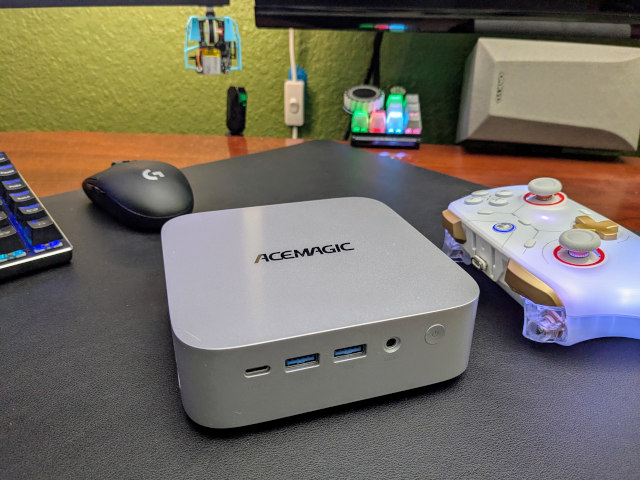
I copied my ROCm Distrobox container over to my mini PC, and I got ROCm and llama.cpp compiled and installed for what seems to be the correct GPU backend. I am able to run llama-bench with the CPU, but that is ridiculously slow. When I try to use the GPU it SEEMS to be running, because the GPU utilization sticks at 100%, but tons of time goes by without any benchmark results.
I found some 6800H benchmarks on Reddit while I was waiting, and they aren’t encouraging. They say 150 tokens per second prompt processing speed with the default of 4,000 tokens of context. That’s what my 9070 XT manages at 48,000 tokens of context with the ByteShape model. I’d expect to see something more like 20 tokens per second on the 6800H at 48,000 tokens of context.
I would consider my 9070 XT to be just barely on this side of usable. The 6800H wouldn’t be fun to use with OpenCode.
So where does that leave us?
So here’s where we stand at the start of 2026. If you have a reasonable 16 GB GPU sitting in your home office, you can actually run a competent coding assistant locally. This isn’t just in theory either. The speeds feel responsive enough to use. That’s real progress, and ByteShape’s aggressive quantization deserves credit for pushing the boundaries of what fits on consumer hardware.
At the same time, let’s not kid ourselves: my $600 GPU delivers an experience that’s still slower, so much less capable, and significantly more expensive per token than what I get from a $6 monthly cloud subscription. The exciting part isn’t that local models have caught up, because they haven’t! However, that the gap is narrowing at a pace that would have seemed unlikely a year ago.
Whether that matters for your use case depends entirely on whether you value data privacy, offline access, or just the sheer satisfaction of running this stuff on your own silicon. For me, it’s a “both/and” situation: I’ll keep paying for Z.ai because it’s objectively better, but I’ll also keep tinkering with local models because watching this space evolve is half the fun.
If you’re experimenting with local LLMs too, or you’re just curious about what’s possible, I’d love to hear about your setup. Come join our Discord community and share what hardware you’re using, what models you’re running, and what’s working (or not working) for you. The more we learn from each other, the faster we’ll all figure out the sweet spots in this rapidly evolving landscape.
- Is The $6 Z.ai Coding Plan a No-Brainer?
- Contemplating Local LLMs vs. OpenRouter and Trying Out Z.ai With GLM-4.6 and OpenCode
- Devstral with Vibe CLI vs. OpenCode: AI Coding Tools for Casual Programmers
- How Is Pat Using Machine Learning At The End Of 2025?
- Should You Run A Large Language Model On An Intel N100 Mini PC?
- Is Machine Learning Finally Practical With An AMD Radeon GPU In 2024?
- Deciding Not To Buy A Radeon Instinct Mi50 With The Help Of Vast.ai!