When transferring data among networked systems, trust is a central concern. In particular, when communicating over an untrusted medium such as the internet, it is critical to ensure the integrity and the publisher of all the data a system operates on. You use Docker Engine to push and pull images (data) to a public or private registry. Content trust gives you the ability to verify both the integrity and the publisher of all the data received from a registry over any channel.
About Docker Content Trust (DCT)
Docker Content Trust (DCT) provides the ability to use digital signatures for data sent to and received from remote Docker registries. These signatures allow client-side or runtime verification of the integrity and publisher of specific…
When transferring data among networked systems, trust is a central concern. In particular, when communicating over an untrusted medium such as the internet, it is critical to ensure the integrity and the publisher of all the data a system operates on. You use Docker Engine to push and pull images (data) to a public or private registry. Content trust gives you the ability to verify both the integrity and the publisher of all the data received from a registry over any channel.
About Docker Content Trust (DCT)
Docker Content Trust (DCT) provides the ability to use digital signatures for data sent to and received from remote Docker registries. These signatures allow client-side or runtime verification of the integrity and publisher of specific image tags.
Through DCT, image publishers can sign their images and image consumers can ensure that the images they pull are signed. Publishers could be individuals or organizations manually signing their content or automated software supply chains signing content as part of their release process.
Docker is retiring DCT for Docker Official Images (DOI). You should start planning to transition to a different image signing and verification solution (like Sigstore or Notation). Timelines for the complete deprecation of DCT are being finalized and will be published soon.
For more information, see Retiring Docker Content Trust.
Image tags and DCT
An individual image record has the following identifier:
A particular image REPOSITORY can have multiple tags. For example, latest and 3.1.2 are both tags on the mongo image. An image publisher can build an image and tag combination many times changing the image with each build.
DCT is associated with the TAG portion of an image. Each image repository has a set of keys that image publishers use to sign an image tag. Image publishers have discretion on which tags they sign.
An image repository can contain an image with one tag that is signed and another tag that is not. For example, consider the Mongo image repository. The latest tag could be unsigned while the 3.1.6 tag could be signed. It is the responsibility of the image publisher to decide if an image tag is signed or not. In this representation, some image tags are signed, others are not:
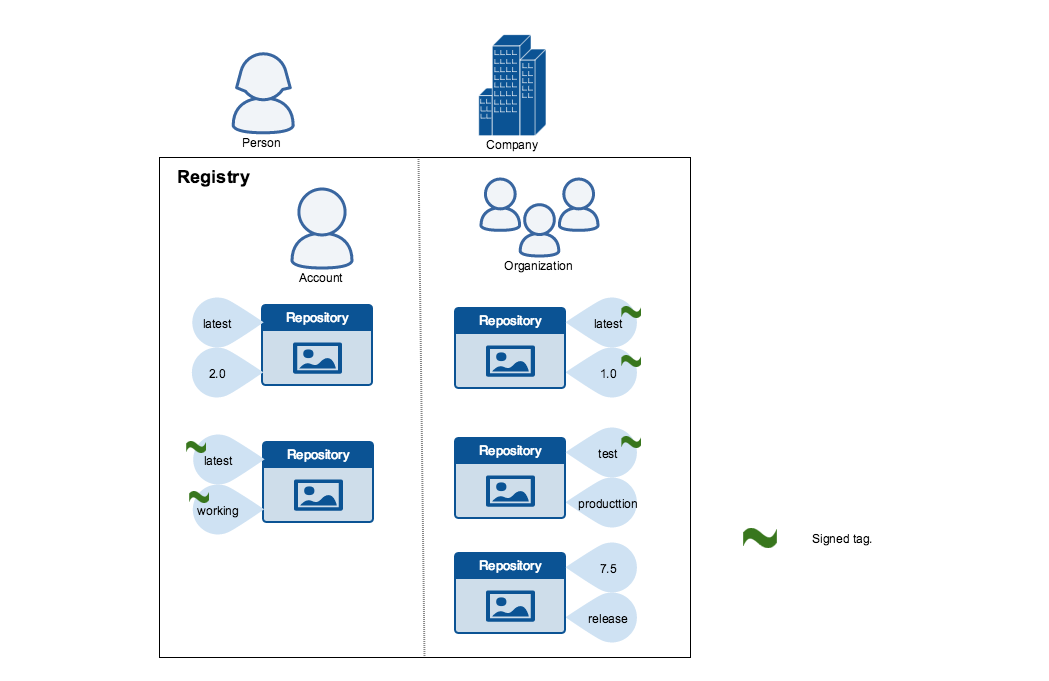
Publishers can choose to sign a specific tag or not. As a result, the content of an unsigned tag and that of a signed tag with the same name may not match. For example, a publisher can push a tagged image someimage:latest and sign it. Later, the same publisher can push an unsigned someimage:latest image. This second push replaces the last unsigned tag latest but does not affect the signed latest version. The ability to choose which tags they can sign, allows publishers to iterate over the unsigned version of an image before officially signing it.
Image consumers can enable DCT to ensure that images they use were signed. If a consumer enables DCT, they can only pull, run, or build with trusted images. Enabling DCT is a bit like applying a "filter" to your registry. Consumers "see" only signed image tags and the less desirable, unsigned image tags are "invisible" to them.
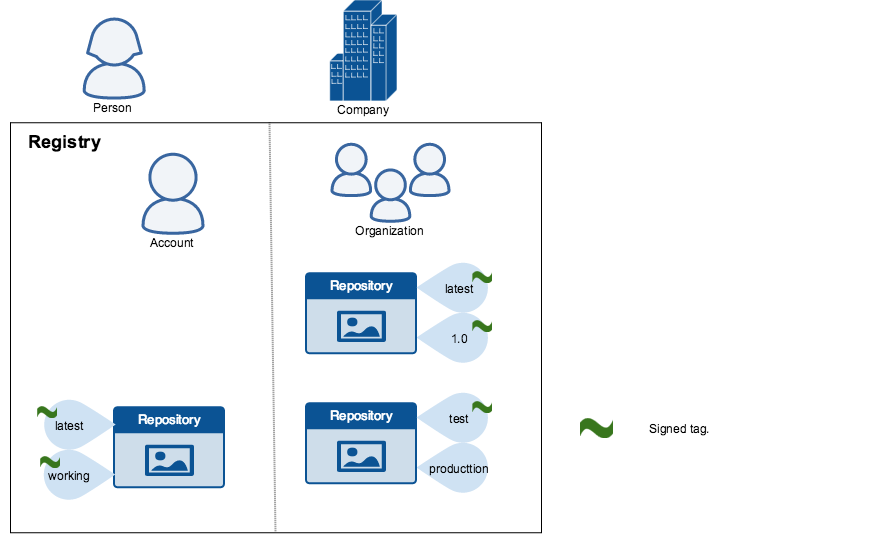
To the consumer who has not enabled DCT, nothing about how they work with Docker images changes. Every image is visible regardless of whether it is signed or not.
Docker Content Trust Keys
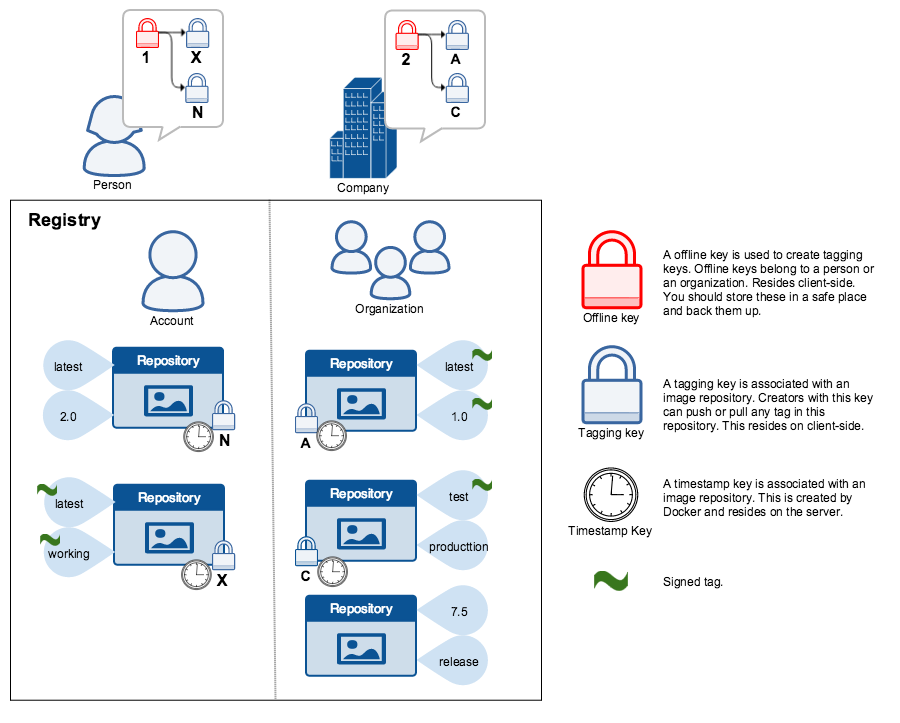
Trust for an image tag is managed through the use of signing keys. A key set is created when an operation using DCT is first invoked. A key set consists of the following classes of keys:
- An offline key that is the root of DCT for an image tag
- Repository or tagging keys that sign tags
- Server-managed keys such as the timestamp key, which provides freshness security guarantees for your repository
The following image depicts the various signing keys and their relationships:
The root key once lost is not recoverable. If you lose any other key, send an email to Docker Hub Support. This loss also requires manual intervention from every consumer that used a signed tag from this repository prior to the loss.
You should back up the root key somewhere safe. Given that it is only required to create new repositories, it is a good idea to store it offline in hardware. For details on securing, and backing up your keys, make sure you read how to manage keys for DCT.
Signing images with Docker Content Trust
Within the Docker CLI we can sign and push a container image with the $ docker trust command syntax. This is built on top of the Notary feature set. For more information, see the Notary GitHub repository.
A prerequisite for signing an image is a Docker Registry with a Notary server (such as Docker Hub) attached. Refer to Deploying Notary for instructions.
Docker is retiring DCT for Docker Official Images (DOI). You should start planning to transition to a different image signing and verification solution (like Sigstore or Notation). Timelines for the complete deprecation of DCT are being finalized and will be published soon.
For more information, see Retiring Docker Content Trust.
To sign a Docker Image you will need a delegation key pair. These keys can be generated locally using $ docker trust key generate or generated by a certificate authority.
First we will add the delegation private key to the local Docker trust repository. (By default this is stored in ~/.docker/trust/). If you are generating delegation keys with $ docker trust key generate, the private key is automatically added to the local trust store. If you are importing a separate key, you will need to use the $ docker trust key load command.
Or if you have an existing key:
Next we will need to add the delegation public key to the Notary server; this is specific to a particular image repository in Notary known as a Global Unique Name (GUN). If this is the first time you are adding a delegation to that repository, this command will also initiate the repository, using a local Notary canonical root key. To understand more about initiating a repository, and the role of delegations, head to delegations for content trust.
Finally, we will use the delegation private key to sign a particular tag and push it up to the registry.
Alternatively, once the keys have been imported an image can be pushed with the $ docker push command, by exporting the DCT environmental variable.
Remote trust data for a tag or a repository can be viewed by the $ docker trust inspect command:
Remote Trust data for a tag can be removed by the $ docker trust revoke command:
Client enforcement with Docker Content Trust
Content trust is disabled by default in the Docker Client. To enable it, set the DOCKER_CONTENT_TRUST environment variable to 1. This prevents users from working with tagged images unless they contain a signature.
When DCT is enabled in the Docker client, docker CLI commands that operate on tagged images must either have content signatures or explicit content hashes. The commands that operate with DCT are:
pushbuildcreatepullrun
For example, with DCT enabled a docker pull someimage:latest only succeeds if someimage:latest is signed. However, an operation with an explicit content hash always succeeds as long as the hash exists: