- **
- #1
Hey, been having an issue for a long time now where I can’t use my motherboard or case audio jacks for speakers or headphones, I can only use the audio jacks on either of my monitors. I can’t seem to install Realtek audio drivers at all, and can’t select any other audio device as the only ones available to select are either one of my monitors. There is no option for any other audio option, just monitors.
OS Windows 11
Computer type PC/Desktop
Manufacturer/Model MSI
CPU Intel i5 14600k
Motherboard MSI Pro B660M-A Wifi DDR4
Memory 32GB Teamgroup T-Force Delta RGB 3600MHz
Graphics Card(s) Zotac Gaming RTX 5070 Solid OC 12gb
Monitor(s) Displ…
- **
- #1
Hey, been having an issue for a long time now where I can’t use my motherboard or case audio jacks for speakers or headphones, I can only use the audio jacks on either of my monitors. I can’t seem to install Realtek audio drivers at all, and can’t select any other audio device as the only ones available to select are either one of my monitors. There is no option for any other audio option, just monitors.
OS Windows 11
Computer type PC/Desktop
Manufacturer/Model MSI
CPU Intel i5 14600k
Motherboard MSI Pro B660M-A Wifi DDR4
Memory 32GB Teamgroup T-Force Delta RGB 3600MHz
Graphics Card(s) Zotac Gaming RTX 5070 Solid OC 12gb
Monitor(s) Displays AOC 24G2W1G3, AOC 24G2W1G4
Screen Resolution 1080p
Hard Drives BX500 1TB Sata SSD, ADATA Legend 800 2GB NVME
PSU Corsair RM850e 850W 80+Gold Fully Modular
Case CoolerMaster Masterbox NR400 Micro ATX
Cooling DeepCool AK620 Zero Dark Dual Tower
Keyboard Womier SK65 Custom mechanical keyboard
Mouse Glorious Model I Gaming Mouse
Internet Speed Download 53.70 Mbps, Upload 18.68 Mbps
Browser Opera GX
Antivirus Windows Defender
- **
- #2
There is no option for any other audio option, just monitors.
Anything Disabled or Disconnected? I often notice that Windows will make a monitor the default audio device as soon as you plug them in.
OS Windows 11
Computer type PC/Desktop
Manufacturer/Model ASUS ROG Strix
Operating System Windows 11
Computer type Laptop
Manufacturer/Model ASUS VivoBook
- **
- #3
Anything Disabled or Disconnected? I often notice that Windows will make a monitor the default audio device as soon as you plug them in.
nah, unfortunately the only disabled device is my headphones if they are in bluetooth mode, I have them wired and connected to my monitor right now. this is all that is available in my sound settings.
{1DFB4743-6FF2-435F-8C3B-AF66E631BB98}.webp
15.3 KB · Views: 1
OS Windows 11
Computer type PC/Desktop
Manufacturer/Model MSI
CPU Intel i5 14600k
Motherboard MSI Pro B660M-A Wifi DDR4
Memory 32GB Teamgroup T-Force Delta RGB 3600MHz
Graphics Card(s) Zotac Gaming RTX 5070 Solid OC 12gb
Monitor(s) Displays AOC 24G2W1G3, AOC 24G2W1G4
Screen Resolution 1080p
Hard Drives BX500 1TB Sata SSD, ADATA Legend 800 2GB NVME
PSU Corsair RM850e 850W 80+Gold Fully Modular
Case CoolerMaster Masterbox NR400 Micro ATX
Cooling DeepCool AK620 Zero Dark Dual Tower
Keyboard Womier SK65 Custom mechanical keyboard
Mouse Glorious Model I Gaming Mouse
Internet Speed Download 53.70 Mbps, Upload 18.68 Mbps
Browser Opera GX
Antivirus Windows Defender
-
**
OS Windows 11 Pro 25H2 26200.7462
Computer type PC/Desktop
Manufacturer/Model Dell Optiplex 7080
CPU i9-10900 10 core 20 threads
Motherboard DELL 0J37VM
Memory 32 gb
Graphics Card(s) none-Intel UHD Graphics 630
Sound Card Integrated Realtek
Monitor(s) Displays Benq 27
Screen Resolution 2560x1440
Hard Drives 2x1tb Solidigm m.2 nvme /External drives 512gb Samsung m.2 sata+2tb Kingston m2.nvme
PSU 500w
Case MT
Cooling Dell Premium
Keyboard Logitech wired
Mouse Logitech wireless
Internet Speed so slow I’m too embarrassed to tell
Browser #1 Edge #2 Firefox
Antivirus Defender+MWB Premium
Operating System Windows 11 Pro 24H2 26100.6899
Computer type PC/Desktop
Manufacturer/Model Beelink Mini PC SER5
CPU AMD Ryzen 7 6800U
Memory 32 gb
Graphics card(s) integrated
Sound Card integrated
Monitor(s) Displays Benq 27
Screen Resolution 2560x1440
Hard Drives 1TB Crucial nvme
Keyboard Logitech wired
Mouse Logitech wireless
Internet Speed still too embarrassed to tell
Browser Firefox
Antivirus Defender
Other Info System 3 is non compliant Dell 9020 i7-4770/24gb ram Win11 PRO 26100.6899
- **
- #5
this is all I have available here too
{DB107B0D-30EF-4F3A-B324-14EF9CDC810C}.webp
12.6 KB · Views: 1
OS Windows 11
Computer type PC/Desktop
Manufacturer/Model MSI
CPU Intel i5 14600k
Motherboard MSI Pro B660M-A Wifi DDR4
Memory 32GB Teamgroup T-Force Delta RGB 3600MHz
Graphics Card(s) Zotac Gaming RTX 5070 Solid OC 12gb
Monitor(s) Displays AOC 24G2W1G3, AOC 24G2W1G4
Screen Resolution 1080p
Hard Drives BX500 1TB Sata SSD, ADATA Legend 800 2GB NVME
PSU Corsair RM850e 850W 80+Gold Fully Modular
Case CoolerMaster Masterbox NR400 Micro ATX
Cooling DeepCool AK620 Zero Dark Dual Tower
Keyboard Womier SK65 Custom mechanical keyboard
Mouse Glorious Model I Gaming Mouse
Internet Speed Download 53.70 Mbps, Upload 18.68 Mbps
Browser Opera GX
Antivirus Windows Defender
- **
- #6
Does device manager show that your Realtek Audio driver is installed?
OS Windows 11 Pro 25H2 26200.7462
Computer type PC/Desktop
Manufacturer/Model Dell Optiplex 7080
CPU i9-10900 10 core 20 threads
Motherboard DELL 0J37VM
Memory 32 gb
Graphics Card(s) none-Intel UHD Graphics 630
Sound Card Integrated Realtek
Monitor(s) Displays Benq 27
Screen Resolution 2560x1440
Hard Drives 2x1tb Solidigm m.2 nvme /External drives 512gb Samsung m.2 sata+2tb Kingston m2.nvme
PSU 500w
Case MT
Cooling Dell Premium
Keyboard Logitech wired
Mouse Logitech wireless
Internet Speed so slow I’m too embarrassed to tell
Browser #1 Edge #2 Firefox
Antivirus Defender+MWB Premium
Operating System Windows 11 Pro 24H2 26100.6899
Computer type PC/Desktop
Manufacturer/Model Beelink Mini PC SER5
CPU AMD Ryzen 7 6800U
Memory 32 gb
Graphics card(s) integrated
Sound Card integrated
Monitor(s) Displays Benq 27
Screen Resolution 2560x1440
Hard Drives 1TB Crucial nvme
Keyboard Logitech wired
Mouse Logitech wireless
Internet Speed still too embarrassed to tell
Browser Firefox
Antivirus Defender
Other Info System 3 is non compliant Dell 9020 i7-4770/24gb ram Win11 PRO 26100.6899
- **
- #7
Does device manager show that your Realtek Audio driver is installed? View attachment 158169
it doesn’t BUT I have tried to install realtek audio recently and it literally does nothing. No driver shows up in device manager after I install
OS Windows 11
Computer type PC/Desktop
Manufacturer/Model MSI
CPU Intel i5 14600k
Motherboard MSI Pro B660M-A Wifi DDR4
Memory 32GB Teamgroup T-Force Delta RGB 3600MHz
Graphics Card(s) Zotac Gaming RTX 5070 Solid OC 12gb
Monitor(s) Displays AOC 24G2W1G3, AOC 24G2W1G4
Screen Resolution 1080p
Hard Drives BX500 1TB Sata SSD, ADATA Legend 800 2GB NVME
PSU Corsair RM850e 850W 80+Gold Fully Modular
Case CoolerMaster Masterbox NR400 Micro ATX
Cooling DeepCool AK620 Zero Dark Dual Tower
Keyboard Womier SK65 Custom mechanical keyboard
Mouse Glorious Model I Gaming Mouse
Internet Speed Download 53.70 Mbps, Upload 18.68 Mbps
Browser Opera GX
Antivirus Windows Defender
- **
- #8
Possibly a stupid question: do you have the onboard audio enabled in the BIOS settings?
OS Windows 11 26200.6899
Computer type PC/Desktop
Manufacturer/Model homebuilt
CPU Amd Threadripper 7970X
Motherboard Gigabyte TRX50 Aero D Rev. 1.0
Memory 128GB (4 X 32) G.Skill DDR5 6400 (RDIMM)
Graphics Card(s) Gigabyte RTX 4090 OC
Sound Card none (USB to speakers), Realtek
Monitor(s) Displays Innocn 32" OLED
Screen Resolution 3840 X 2160 @ 60Hz
Hard Drives Crucial T700 2TB M.2 NVME SSD WD 4TB Blue SATA SSD Seagate 18TB IronWolf Pro
PSU BeQuiet! Straight Power 12 1500W
Case Lian Li 011 Dynamic Evo XL
Cooling SilverStone Technology XE360-TR5, with 3 Phanteks T30 fans
Keyboard Cherry Streaming (wired)
Mouse Logitech M500s (wired)
Internet Speed 2000/300 Mbps (down/up)
Other Info Arris G36 modem/router
Operating System windows 11 26200.6899
Computer type PC/Desktop
Manufacturer/Model homebuilt
CPU Intel I9-13900K
Motherboard Asus RoG Strix Z690-E
Memory 64GB G.Skill DDR5-6000
Graphics card(s) Gigabyte RTX 3090 ti
Sound Card built in Realtek
Monitor(s) Displays Philips 27E1N8900 27" OLED
Screen Resolution 3840 X 2160 @60Hz
Hard Drives WDC SN850 1TB 8TB Seagate Ironwolf 4TB Seagate Ironwolf
PSU eVGA SuperNOVA 1300 GT
Case Lian Li 011 Dynamic Evo
Cooling Corsair iCUE H150i ELITE CAPELLIX Liquid CPU Cooler
Keyboard Logitech K120 (wired)
Mouse Logitech M500s (wired)
- **
- #9
Possibly a stupid question: do you have the onboard audio enabled in the BIOS settings?
Im pretty certain I do (edit, yeah I do)
OS Windows 11
Computer type PC/Desktop
Manufacturer/Model MSI
CPU Intel i5 14600k
Motherboard MSI Pro B660M-A Wifi DDR4
Memory 32GB Teamgroup T-Force Delta RGB 3600MHz
Graphics Card(s) Zotac Gaming RTX 5070 Solid OC 12gb
Monitor(s) Displays AOC 24G2W1G3, AOC 24G2W1G4
Screen Resolution 1080p
Hard Drives BX500 1TB Sata SSD, ADATA Legend 800 2GB NVME
PSU Corsair RM850e 850W 80+Gold Fully Modular
Case CoolerMaster Masterbox NR400 Micro ATX
Cooling DeepCool AK620 Zero Dark Dual Tower
Keyboard Womier SK65 Custom mechanical keyboard
Mouse Glorious Model I Gaming Mouse
Internet Speed Download 53.70 Mbps, Upload 18.68 Mbps
Browser Opera GX
Antivirus Windows Defender
- **
- #10
Were you downloading the Realtek driver from your
mobo site
? Look in Windows Updates>advanced options>optional updates. Is anything in there regarding Realtek?
OS Windows 11 Pro 25H2 26200.7462
Computer type PC/Desktop
Manufacturer/Model Dell Optiplex 7080
CPU i9-10900 10 core 20 threads
Motherboard DELL 0J37VM
Memory 32 gb
Graphics Card(s) none-Intel UHD Graphics 630
Sound Card Integrated Realtek
Monitor(s) Displays Benq 27
Screen Resolution 2560x1440
Hard Drives 2x1tb Solidigm m.2 nvme /External drives 512gb Samsung m.2 sata+2tb Kingston m2.nvme
PSU 500w
Case MT
Cooling Dell Premium
Keyboard Logitech wired
Mouse Logitech wireless
Internet Speed so slow I’m too embarrassed to tell
Browser #1 Edge #2 Firefox
Antivirus Defender+MWB Premium
Operating System Windows 11 Pro 24H2 26100.6899
Computer type PC/Desktop
Manufacturer/Model Beelink Mini PC SER5
CPU AMD Ryzen 7 6800U
Memory 32 gb
Graphics card(s) integrated
Sound Card integrated
Monitor(s) Displays Benq 27
Screen Resolution 2560x1440
Hard Drives 1TB Crucial nvme
Keyboard Logitech wired
Mouse Logitech wireless
Internet Speed still too embarrassed to tell
Browser Firefox
Antivirus Defender
Other Info System 3 is non compliant Dell 9020 i7-4770/24gb ram Win11 PRO 26100.6899
- **
- #11
Were you downloading the Realtek driver from your
mobo site
? Look in Windows Updates>advanced options>optional updates. Is anything in there regarding Realtek?
No optional updates available, and I did download directly from my mobo website
OS Windows 11
Computer type PC/Desktop
Manufacturer/Model MSI
CPU Intel i5 14600k
Motherboard MSI Pro B660M-A Wifi DDR4
Memory 32GB Teamgroup T-Force Delta RGB 3600MHz
Graphics Card(s) Zotac Gaming RTX 5070 Solid OC 12gb
Monitor(s) Displays AOC 24G2W1G3, AOC 24G2W1G4
Screen Resolution 1080p
Hard Drives BX500 1TB Sata SSD, ADATA Legend 800 2GB NVME
PSU Corsair RM850e 850W 80+Gold Fully Modular
Case CoolerMaster Masterbox NR400 Micro ATX
Cooling DeepCool AK620 Zero Dark Dual Tower
Keyboard Womier SK65 Custom mechanical keyboard
Mouse Glorious Model I Gaming Mouse
Internet Speed Download 53.70 Mbps, Upload 18.68 Mbps
Browser Opera GX
Antivirus Windows Defender
- **
- #12
Has your realtek sound
ever
worked with this device?
Only thing I can think of you might try is to use Driver Store Explorer and manually force cleanup everything relating to Realtek, then restart and install again. Driver Store Explorer is a portable app and must be run as admin. The Realtek software is under Software Components. The Realtek driver is under sound, video and game controllers.
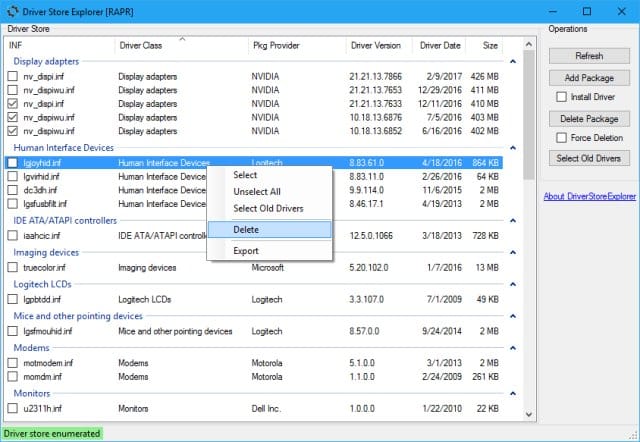
Download DriverStore Explorer - MajorGeeks
DriverStore Explorer is a free and Open Source utility that makes it easier to deal with the Windows driver store. Supported operations include enumeration, adding a driver package, adding & installing, deletion, and force deletion. DriverStore Explorer allows you to enumerate or list all the...
www.majorgeeks.com
Another option to clean up realtek is to use DDU
in safe mode
. While designed mainly for dealing with graphics drivers, DDU can also cleanup up Realtek drivers. https://www.guru3d.com/download/display-driver-uninstaller-download/ Read it’s instructions carefully.T o clean Realtek using DDU, Under device type select Audio, under select device select Realtek.
OS Windows 11 Pro 25H2 26200.7462
Computer type PC/Desktop
Manufacturer/Model Dell Optiplex 7080
CPU i9-10900 10 core 20 threads
Motherboard DELL 0J37VM
Memory 32 gb
Graphics Card(s) none-Intel UHD Graphics 630
Sound Card Integrated Realtek
Monitor(s) Displays Benq 27
Screen Resolution 2560x1440
Hard Drives 2x1tb Solidigm m.2 nvme /External drives 512gb Samsung m.2 sata+2tb Kingston m2.nvme
PSU 500w
Case MT
Cooling Dell Premium
Keyboard Logitech wired
Mouse Logitech wireless
Internet Speed so slow I’m too embarrassed to tell
Browser #1 Edge #2 Firefox
Antivirus Defender+MWB Premium
Operating System Windows 11 Pro 24H2 26100.6899
Computer type PC/Desktop
Manufacturer/Model Beelink Mini PC SER5
CPU AMD Ryzen 7 6800U
Memory 32 gb
Graphics card(s) integrated
Sound Card integrated
Monitor(s) Displays Benq 27
Screen Resolution 2560x1440
Hard Drives 1TB Crucial nvme
Keyboard Logitech wired
Mouse Logitech wireless
Internet Speed still too embarrassed to tell
Browser Firefox
Antivirus Defender
Other Info System 3 is non compliant Dell 9020 i7-4770/24gb ram Win11 PRO 26100.6899
- **
- #13
Has your realtek sound
ever
worked with this device?
Only thing I can think of you might try is to use Driver Store Explorer and manually force cleanup everything relating to Realtek, then restart and install again. Driver Store Explorer is a portable app and must be run as admin. The Realtek software is under Software Components. The Realtek driver is under sound, video and game controllers.
Download DriverStore Explorer - MajorGeeks
DriverStore Explorer is a free and Open Source utility that makes it easier to deal with the Windows driver store. Supported operations include enumeration, adding a driver package, adding & installing, deletion, and force deletion. DriverStore Explorer allows you to enumerate or list all the...
www.majorgeeks.com
Another option to clean up realtek is to use DDU
in safe mode
. While designed mainly for dealing with graphics drivers, DDU can also cleanup up Realtek drivers. https://www.guru3d.com/download/display-driver-uninstaller-download/ Read it’s instructions carefully.T o clean Realtek using DDU, Under device type select Audio, under select device select Realtek.
Thank you for the in depth response, I will attempt these fixes to the best of my ability. How would I go about recognizing which of these is related to Realtek? (edit, unsure if it ever has as I never took notes if it was installed when this OS on my build was brand new) (edit 2, misread your comment, I searched directly for HDXRT.inf and have found realtek drivers)
{3CB99C6C-DA18-4862-8D09-0201F8856692}.webp
68.5 KB · Views: 1
Last edited: Today at 7:04 PM
OS Windows 11
Computer type PC/Desktop
Manufacturer/Model MSI
CPU Intel i5 14600k
Motherboard MSI Pro B660M-A Wifi DDR4
Memory 32GB Teamgroup T-Force Delta RGB 3600MHz
Graphics Card(s) Zotac Gaming RTX 5070 Solid OC 12gb
Monitor(s) Displays AOC 24G2W1G3, AOC 24G2W1G4
Screen Resolution 1080p
Hard Drives BX500 1TB Sata SSD, ADATA Legend 800 2GB NVME
PSU Corsair RM850e 850W 80+Gold Fully Modular
Case CoolerMaster Masterbox NR400 Micro ATX
Cooling DeepCool AK620 Zero Dark Dual Tower
Keyboard Womier SK65 Custom mechanical keyboard
Mouse Glorious Model I Gaming Mouse
Internet Speed Download 53.70 Mbps, Upload 18.68 Mbps
Browser Opera GX
Antivirus Windows Defender
- **
- #14
How would I go about recognizing which of these is related to Realtek?
driver store explorer
OS Windows 11 Pro 25H2 26200.7462
Computer type PC/Desktop
Manufacturer/Model Dell Optiplex 7080
CPU i9-10900 10 core 20 threads
Motherboard DELL 0J37VM
Memory 32 gb
Graphics Card(s) none-Intel UHD Graphics 630
Sound Card Integrated Realtek
Monitor(s) Displays Benq 27
Screen Resolution 2560x1440
Hard Drives 2x1tb Solidigm m.2 nvme /External drives 512gb Samsung m.2 sata+2tb Kingston m2.nvme
PSU 500w
Case MT
Cooling Dell Premium
Keyboard Logitech wired
Mouse Logitech wireless
Internet Speed so slow I’m too embarrassed to tell
Browser #1 Edge #2 Firefox
Antivirus Defender+MWB Premium
Operating System Windows 11 Pro 24H2 26100.6899
Computer type PC/Desktop
Manufacturer/Model Beelink Mini PC SER5
CPU AMD Ryzen 7 6800U
Memory 32 gb
Graphics card(s) integrated
Sound Card integrated
Monitor(s) Displays Benq 27
Screen Resolution 2560x1440
Hard Drives 1TB Crucial nvme
Keyboard Logitech wired
Mouse Logitech wireless
Internet Speed still too embarrassed to tell
Browser Firefox
Antivirus Defender
Other Info System 3 is non compliant Dell 9020 i7-4770/24gb ram Win11 PRO 26100.6899
- **
- #15
Has your realtek sound
ever
worked with this device?
Only thing I can think of you might try is to use Driver Store Explorer and manually force cleanup everything relating to Realtek, then restart and install again. Driver Store Explorer is a portable app and must be run as admin. The Realtek software is under Software Components. The Realtek driver is under sound, video and game controllers.
Download DriverStore Explorer - MajorGeeks
DriverStore Explorer is a free and Open Source utility that makes it easier to deal with the Windows driver store. Supported operations include enumeration, adding a driver package, adding & installing, deletion, and force deletion. DriverStore Explorer allows you to enumerate or list all the...
www.majorgeeks.com
Another option to clean up realtek is to use DDU
in safe mode
. While designed mainly for dealing with graphics drivers, DDU can also cleanup up Realtek drivers. https://www.guru3d.com/download/display-driver-uninstaller-download/ Read it’s instructions carefully.T o clean Realtek using DDU, Under device type select Audio, under select device select Realtek.
Tried Driver Store Explorer, deleted all realtek related drivers, restarted, reinstalled from MOBO website, restarted. The new drivers show in DSE but not in device manager still, and the realtek audio console still does not work
OS Windows 11
Computer type PC/Desktop
Manufacturer/Model MSI
CPU Intel i5 14600k
Motherboard MSI Pro B660M-A Wifi DDR4
Memory 32GB Teamgroup T-Force Delta RGB 3600MHz
Graphics Card(s) Zotac Gaming RTX 5070 Solid OC 12gb
Monitor(s) Displays AOC 24G2W1G3, AOC 24G2W1G4
Screen Resolution 1080p
Hard Drives BX500 1TB Sata SSD, ADATA Legend 800 2GB NVME
PSU Corsair RM850e 850W 80+Gold Fully Modular
Case CoolerMaster Masterbox NR400 Micro ATX
Cooling DeepCool AK620 Zero Dark Dual Tower
Keyboard Womier SK65 Custom mechanical keyboard
Mouse Glorious Model I Gaming Mouse
Internet Speed Download 53.70 Mbps, Upload 18.68 Mbps
Browser Opera GX
Antivirus Windows Defender
-
**
OS Windows 11
Computer type PC/Desktop
Manufacturer/Model MSI
CPU Intel i5 14600k
Motherboard MSI Pro B660M-A Wifi DDR4
Memory 32GB Teamgroup T-Force Delta RGB 3600MHz
Graphics Card(s) Zotac Gaming RTX 5070 Solid OC 12gb
Monitor(s) Displays AOC 24G2W1G3, AOC 24G2W1G4
Screen Resolution 1080p
Hard Drives BX500 1TB Sata SSD, ADATA Legend 800 2GB NVME
PSU Corsair RM850e 850W 80+Gold Fully Modular
Case CoolerMaster Masterbox NR400 Micro ATX
Cooling DeepCool AK620 Zero Dark Dual Tower
Keyboard Womier SK65 Custom mechanical keyboard
Mouse Glorious Model I Gaming Mouse
Internet Speed Download 53.70 Mbps, Upload 18.68 Mbps
Browser Opera GX
Antivirus Windows Defender
- **
- #17
The new drivers show in DSE but not in device manager still, and the realtek audio console still does not work
The audio console is a separate download from the Microsoft store. Says so right in the driver details on the mobo site.
LINK for the console.
OS Windows 11 Pro
- **
- #18
The Audio console is a separate download from the Microsoft store. Says so right in the driver details on the mobo site.
LINK for the console.
Just used DDU, cleaned all realtek drivers and reinstalled. This is my device manager after
{A3385330-BF58-4B05-A61F-E2F18BDD0E94}.webp
30.1 KB · Views: 1
OS Windows 11
Computer type PC/Desktop
Manufacturer/Model MSI
CPU Intel i5 14600k
Motherboard MSI Pro B660M-A Wifi DDR4
Memory 32GB Teamgroup T-Force Delta RGB 3600MHz
Graphics Card(s) Zotac Gaming RTX 5070 Solid OC 12gb
Monitor(s) Displays AOC 24G2W1G3, AOC 24G2W1G4
Screen Resolution 1080p
Hard Drives BX500 1TB Sata SSD, ADATA Legend 800 2GB NVME
PSU Corsair RM850e 850W 80+Gold Fully Modular
Case CoolerMaster Masterbox NR400 Micro ATX
Cooling DeepCool AK620 Zero Dark Dual Tower
Keyboard Womier SK65 Custom mechanical keyboard
Mouse Glorious Model I Gaming Mouse
Internet Speed Download 53.70 Mbps, Upload 18.68 Mbps
Browser Opera GX
Antivirus Windows Defender
- **
- #19
The audio console is a separate download from the Microsoft store. Says so right in the driver details on the mobo site.
LINK for the console.
I get this screen when trying to download the console
{0DF45CFC-7F1B-4E27-8ACD-7CB643FB2B72}.webp
16.9 KB · Views: 1
OS Windows 11
Computer type PC/Desktop
Manufacturer/Model MSI
CPU Intel i5 14600k
Motherboard MSI Pro B660M-A Wifi DDR4
Memory 32GB Teamgroup T-Force Delta RGB 3600MHz
Graphics Card(s) Zotac Gaming RTX 5070 Solid OC 12gb
Monitor(s) Displays AOC 24G2W1G3, AOC 24G2W1G4
Screen Resolution 1080p
Hard Drives BX500 1TB Sata SSD, ADATA Legend 800 2GB NVME
PSU Corsair RM850e 850W 80+Gold Fully Modular
Case CoolerMaster Masterbox NR400 Micro ATX
Cooling DeepCool AK620 Zero Dark Dual Tower
Keyboard Womier SK65 Custom mechanical keyboard
Mouse Glorious Model I Gaming Mouse
Internet Speed Download 53.70 Mbps, Upload 18.68 Mbps
Browser Opera GX
Antivirus Windows Defender
- **
- #20
The audio console is a separate download from the Microsoft store. Says so right in the driver details on the mobo site.
LINK for the console.
could installing Realtek UAD Driver 6.0.9575.1 potentially help at all? I’ve done a bit of research and it seems to be for older machines, though.
OS Windows 11
Computer type PC/Desktop
Manufacturer/Model MSI
CPU Intel i5 14600k
Motherboard MSI Pro B660M-A Wifi DDR4
Memory 32GB Teamgroup T-Force Delta RGB 3600MHz
Graphics Card(s) Zotac Gaming RTX 5070 Solid OC 12gb
Monitor(s) Displays AOC 24G2W1G3, AOC 24G2W1G4
Screen Resolution 1080p
Hard Drives BX500 1TB Sata SSD, ADATA Legend 800 2GB NVME
PSU Corsair RM850e 850W 80+Gold Fully Modular
Case CoolerMaster Masterbox NR400 Micro ATX
Cooling DeepCool AK620 Zero Dark Dual Tower
Keyboard Womier SK65 Custom mechanical keyboard
Mouse Glorious Model I Gaming Mouse
Internet Speed Download 53.70 Mbps, Upload 18.68 Mbps
Browser Opera GX
Antivirus Windows Defender