Our studies require editing Sanskrit text in Devanāgarī (देवनागरी) and the IAST↗ scripts. Below is a cheatsheet to help with this.
Concepts
Conceptually there are two mechanisms to input text.
- Use a keyboard layout. All of us are familiar with this. Default keyboard layout (US international or similar) corresponds to the keys in the physical keyboard. You could use a keyboard layout and map the physical keys into the Devanāgarī characters.
- Or, you could use a Transliteration scheme where you type ASCII characters in your existing keyboard layout and a special software called Input Methods↗ framework transliterates that into Devanāgarī. E.g., with [Harvard-Kyoto↗](https://en…
Our studies require editing Sanskrit text in Devanāgarī (देवनागरी) and the IAST↗ scripts. Below is a cheatsheet to help with this.
Concepts
Conceptually there are two mechanisms to input text.
- Use a keyboard layout. All of us are familiar with this. Default keyboard layout (US international or similar) corresponds to the keys in the physical keyboard. You could use a keyboard layout and map the physical keys into the Devanāgarī characters.
- Or, you could use a Transliteration scheme where you type ASCII characters in your existing keyboard layout and a special software called Input Methods↗ framework transliterates that into Devanāgarī. E.g., with Harvard-Kyoto↗ transliteration scheme you type
khaand you getख.
We highly recommend the excellent Fcitx5↗ input method for Linux. It supports both keyboard layouts and rule based transliteration schemes. This tool effectively enables us to type IAST↗ and Devanāgarī in any text box. The m17n↗ project provides a database for Multilingualization (m17n) or transliteration schemes. You can point Fcitx5↗ to these with fcitx-m17n↗.
Configuring Fcitx5
As usual, the Archlinux wiki↗ provides a fantastic guide for setup. Also see https://fcitx-im.org/wiki/Setup_Fcitx_5↗. Use fcitx5-configtool↗ for a GUI based setup, screenshot below.
Typing in IAST can be done using a transliteration scheme or a keyboard layout. We recommend latter for fast typing response. Use the Keyboard - English (US) - English (intl., with AltGr dead keys) keyboard layout. This smart layout allows you to input ASCII text as usual, and leverages the dead keys↗ withRight Altmodifier to input special text likeāforआ.
Typing in Devanāgarī is achieved through the Harvard-Kyoto↗ transliteration scheme. You can pick any scheme supported by m17n↗.
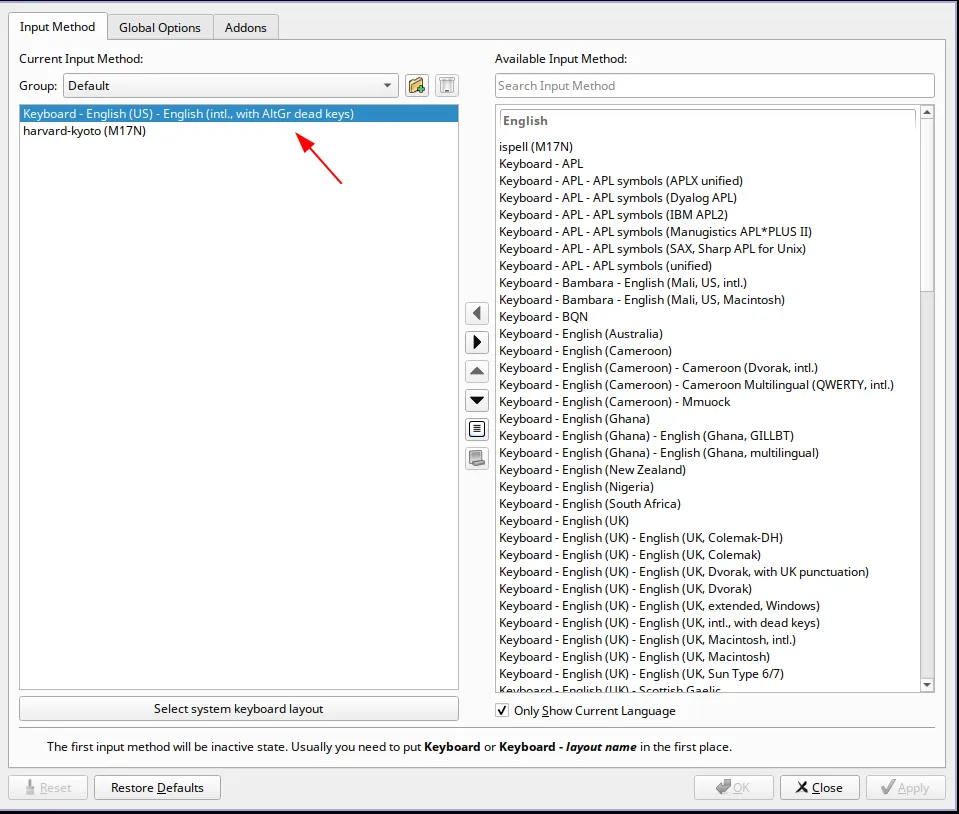 Sanskrit editing configurations in fcitx5-configtool↗ app.
Key Shortcuts
US Intl with AltGr Dead Keys
Modified from https://dry.sailingissues.com/us-international-keyboard-layout.html↗ for AltGr Dead Keys keyboard layout.
| Diacritic | Keyboard shortcut |
|---|---|
| ā | AltGr+Shift+3 + a |
| ś | AltGr+’ + s |
| ȧ | AltGr+. + a |
| ạ | AltGr+Shift+- + a |
| ã | AltGr+Shift+` + a |
Below diacritics are not used in IAST, provided for completion.
| Diacritic | Keyboard shortcut |
|---|---|
| à | AltGr+` + a |
| ä | AltGr+Shift+” + a |
| â | AltGr+6 + a |
| ă | AltGr+Shift+9 + a |
| ǎ | AltGr+Shift+. + a |
| ő | AltGr+Shift+2 + o |
| ą | AltGr+8 + a |
| å | AltGr+Shift+0 + a |
Vowels (śvara) and Codas
Modified from Wikipedia pages of IAST↗ and Harvard-Kyoto↗. We’re using direct Unicode keyboard shortcut Ctrl+Shift+u on Linux for certain characters.
| Devanāgarī | IAST | Harvard Kyoto | Key Shortcut |
|---|---|---|---|
| अ | a | a | |
| आ | ā | A | |
| इ | i | i | |
| ई | ī | I | AltGr+Shift+3 + i |
| उ | u | u | |
| ऊ | ū | U | AltGr+Shift+3 + u |
| ऋ | ṛ | R | AltGr+Shift+- + r |
| ॠ | ṝ | RR | Ctrl+Shift+u 1e5d |
| ऌ | ḷ | lR | AltGr+Shift+- + l |
| ॡ | ḹ | lRR | Ctrl+Shift+u 1e39 |
| ए | e | e | |
| ऐ | ai | ai | |
| ओ | o | o | |
| औ | au | au | |
| `ं | ṁ | M | AltGr+. + m |
| ः | ḥ | H | AltGr+Shift+- + h |
| `ँ | m̐ | Ctrl+Shift+u 0901 | |
| ऽ | ’ | .a | Ctrl+Shift+u 093d |
| । | | | Ctrl+Shift+u 0964 | |
| ॥ | ! | Ctrl+Shift+u 0965 | |
| ॐ | OM | Ctrl+Shift+u 0950 |
Consonants (vyañjana)
Map of Devanāgarī consonants with equivalent IAST↗ or Harvard-Kyoto↗. Note only the differing Harvard-Kyoto↗ keys are mentioned after the comma. This table is taken from the Wikipedia and enhanced with above.
| velars | palatals | retroflexes | dentals | labials | Category |
|---|---|---|---|---|---|
| क k | च c | ट ṭ, T | त t | प p | tenuis stops |
| ख kh | छ ch | ठ ṭh, Th | थ th | फ ph | aspirated stops |
| ग g | ज j | ड ḍ, D | द d | ब b | voiced stops |
| घ gh | झ jh | ढ ḍh, Dh | ध dh | भ bh | breathy-voiced stops |
| ङ ṅ, G | ञ ñ, J | ण ṇ, N | न n | म m | nasal stops |
| ह h | य y | र r | ल l | व v | approximants |
| श ś, z | ष ṣ, S | स s | sibilants | ||
| ळ ḻ, L | approximants (Vedic) |
Hope you enjoy this new Sanskrit editor setup 🕉️