IDE plugins are a great way to make developer’s life easier by providing functionalities which help them build or test an application and much more.
While reviewing one of the IntelliJ plugins, i came across persistent storage which can be used to store passwords, Oauth tokens etc. https://plugins.jetbrains.com/docs/intellij/persisting-sensitive-data.html
For example — If a plugin requires logging in and fetches data and maintains session using Oauth tokens, It can use persistent storage to store the tokens. Otherwise if a user closes the IDE their tokens stored within the memory of the application/IDE is erased, to make it convenient to the developers so that they are signed back when t...
IDE plugins are a great way to make developer’s life easier by providing functionalities which help them build or test an application and much more.
While reviewing one of the IntelliJ plugins, i came across persistent storage which can be used to store passwords, Oauth tokens etc. https://plugins.jetbrains.com/docs/intellij/persisting-sensitive-data.html
For example — If a plugin requires logging in and fetches data and maintains session using Oauth tokens, It can use persistent storage to store the tokens. Otherwise if a user closes the IDE their tokens stored within the memory of the application/IDE is erased, to make it convenient to the developers so that they are signed back when they open the IDE, a Oauth Refresh token can be stored and fetched on IDE startup by the respective plugin and log back the user. (by fetching Access token using that Refresh token)
What i learned after a little research is that, that sensitive data would be available to any 3rd party plugin installed in the IDE due to the nature how IntelliJ is designed, since there is no sandboxing between the plugins. Which can basically mean a complete Account takeover depending on what kind of data is stored. We would keep the 1st draft of this blog for MacOS keychain.
In case of IntelliJ on MacOS the data is stored in the keychain, All the 3rd party plugin (malicious user) has to do is look for a key name and add a piece of code to fetch it from the keychain.
Below is the code which is used to store credentials in keychain. (Program in Java)
private CredentialAttributes createCredentialAttributes(String key) { //Create an instance of CredentialAttributes with app name(com.app) and keyname)(refreshToken) which you want to storereturn new CredentialAttributes( CredentialAttributesKt.generateServiceName(“com.app”, key) ); }
//Name the Key you want to store String key = "refreshToken"; // e.g. serverURL, accountID CredentialAttributes credentialAttributes = createCredentialAttributes(key);
Below screenshot shows one of the plugins storing Oauth refresh token as Persistent storage in MacOS keychain. IntelliJ seems to append “IntelliJ Platform” to the key name.
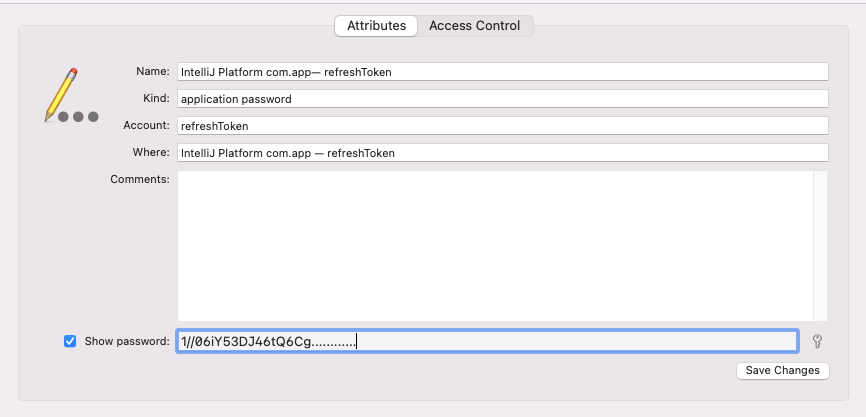
If you see the ACL below, it allows IntelliJ IDEA to access it. While accessing for the first time a user is prompted to enter system credentials and if you click “Allow Always”. IntelliJ would be given access to these credential but there is no application logic on IntelliJ or plugin sandboxing which would disallow other plugins to access these secrets stored by another plugin. This seems an inherent design flaw/WAI (working as intended) in IntelliJ platform.
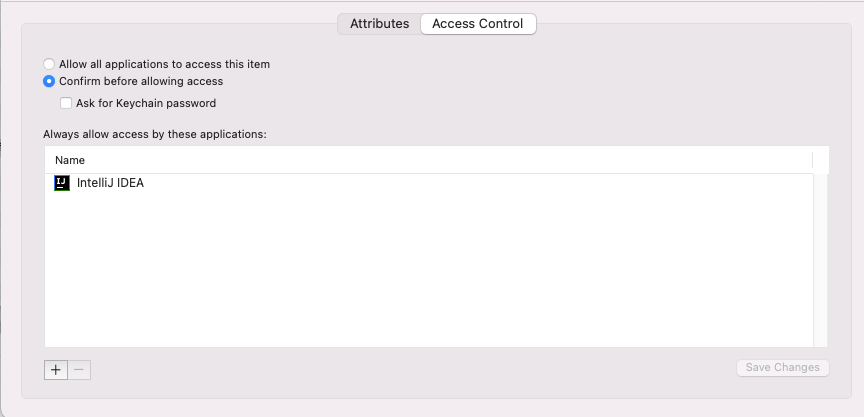
But this needs to be taken into consideration while building a plugin and also while using other plugins without verifying its authenticity.
For Developer of plugins —
While creating plugins make sure you take into consideration the data that you are storing using persistent storage API will be accessible to any 3rd party plugin without any notice to User. In case you still choose to do that, make the User aware. Along with the mitigations that can be applied by the user as mentioned in next section.
For IDE Users/Developers —
You can setup your IDE to not store passwords. this would make sure your password or any sensitive data is not being stored on your system (Keychain for MacOS) which would otherwise be available to any 3rd party plugin.
For MacOS — Go to Preferences | Appearance & Behavior | System Settings | Passwords and check
“Do not save, forget passwords after restart”
For Bug bounty hunters/Pentesters —
In case you come across a plugin which logs you in even after you closed the IDE, they are using persistent storage, you can also manually check for “IntelliJ” keyword in MacOS keychain.
If you want to create a POC, you can follow this guide for creating an IntelliJ plugin. https://ayusch.com/intellij-android-studio-plugin-development-tutorial/
And add the below code to read data from MacOS keychain, all you need is to identify the key name. (Program is in Kotlin)
private fun createCredentialAttributes() =
//Get the service(com.app) and key name(refreshToken) from MacOS keychain CredentialAttributes(generateServiceName(“com.app”, “refreshToken”))
fun get(): String? {val credentialAttributes = createCredentialAttributes()
val credentials = PasswordSafe.instance.get(credentialAttributes)
val token = credentials?.getPasswordAsString()
println(“refresh token:”+token)
return token
}
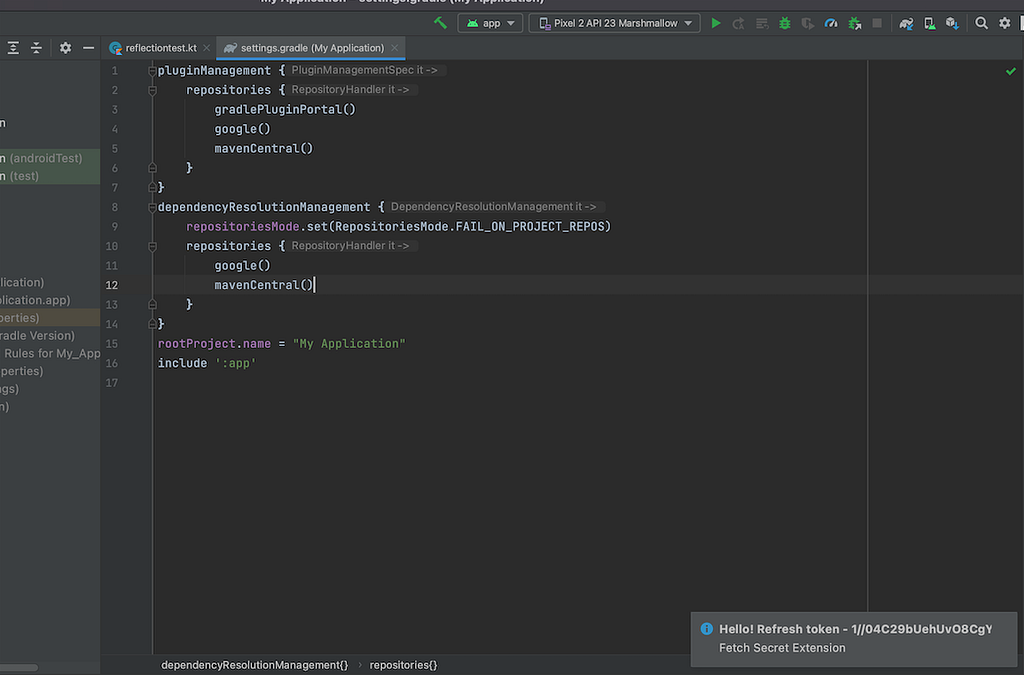
Closing —
I would like to review the runtime security of the IntelliJ plugins. (If one plugin can read credentials of other plugins from memory).
This post will eventually evolve covering those areas as well as security of plugins in other IDE like Visual Studio.
IntelliJ/Android Studio IDE plugin security, Insecure Storage of tokens. was originally published in InfoSec Write-ups on Medium, where people are continuing the conversation by highlighting and responding to this story.