Seth Larson @ 2025-12-10
Despite considering myself a “gamer”, I realized I had only played ~5 hours of video-games in the whole year 2022 and ~6 hours in 2021. Honestly, these numbers made me a bit sad to see... You can’t “improve” what you don’t measure, so I started looking for low-effort ways to measure the amount of play time while getting back into actually playing video-games.
I have already achieved what I wanted for GameCube by mid-2025 using the Memcard Pro GC’s Wi-Fi and API. I’ve blogged about this setup which gathers date and duration data for playing GameCube, but I wanted to cover my other consoles.
What about the Nintendo Switch?
S…
Seth Larson @ 2025-12-10
Despite considering myself a “gamer”, I realized I had only played ~5 hours of video-games in the whole year 2022 and ~6 hours in 2021. Honestly, these numbers made me a bit sad to see... You can’t “improve” what you don’t measure, so I started looking for low-effort ways to measure the amount of play time while getting back into actually playing video-games.
I have already achieved what I wanted for GameCube by mid-2025 using the Memcard Pro GC’s Wi-Fi and API. I’ve blogged about this setup which gathers date and duration data for playing GameCube, but I wanted to cover my other consoles.
What about the Nintendo Switch?
Surprisingly, Nintendo Switch offered no such data, despite having an option called “Play Activity” in the menus of the Nintendo Switch, Nintendo Account, and many of their mobile apps. This was unfortunate, as I was playing many more new Nintendo Switch games like the Paper Mario: Thousand-Year Door remake and Pikmin 4, and going back to games I had “missed” like Super Mario Odyssey.
That is... until the Nintendo Store app was released just a few weeks ago. This app provides “Play Activity” data at a much higher resolution than any other Nintendo app or service. You can find complete historical data across your Nintendo Account, going back as far as the Nintendo 3DS and Wii-U! The data includes games played, dates, and play durations in 15 minute increments.
Shoutout to the WULFF DEN podcast for talking about this, otherwise I would never have discovered this niché new feature. But how can I query this data for my own purposes?
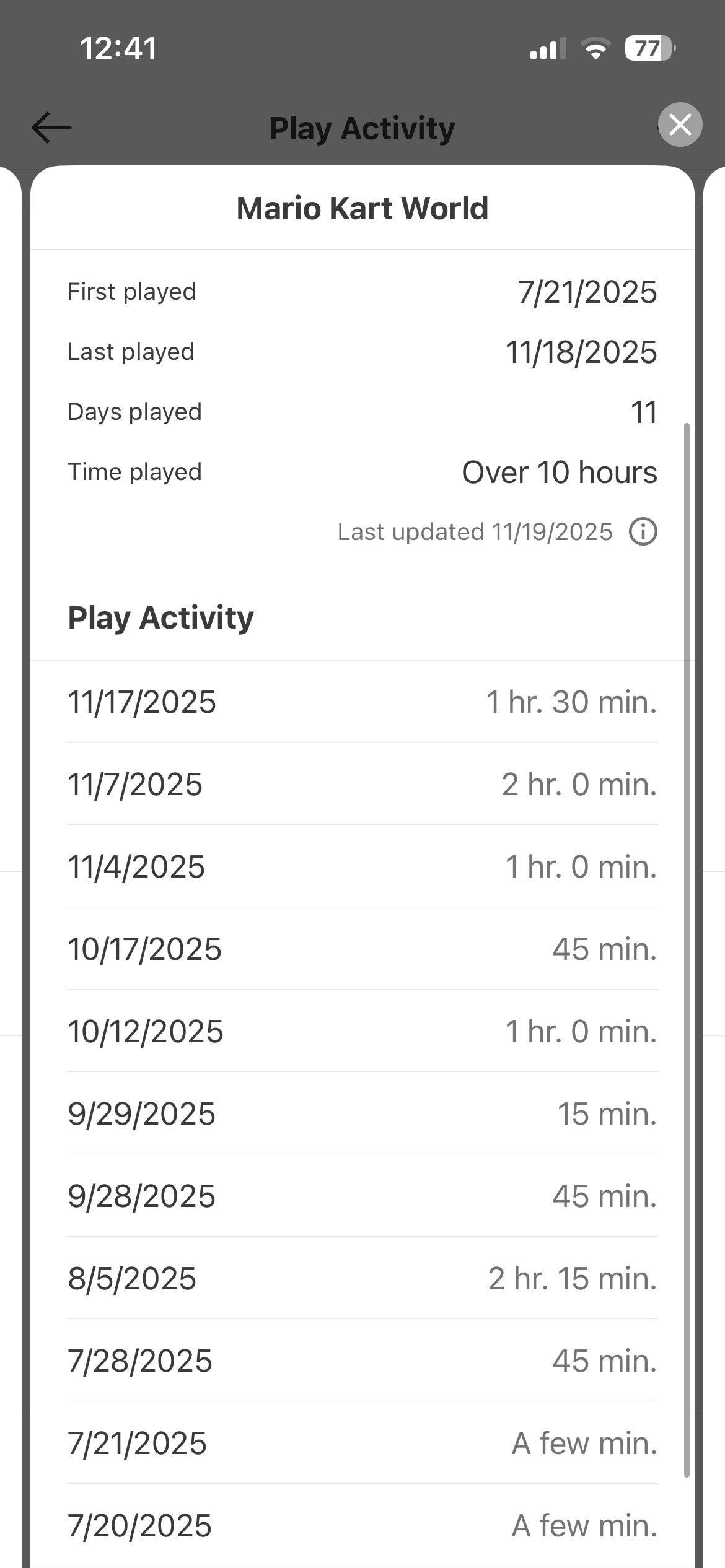 Example of data available in the Nintendo Store “Play Activity”.
Using Optical Character Recognition (OCR)
Basically the data was in the app, but couldn’t be selected and copy-pasted or exported. Instead, the data would have to be transferred to a queryable format another way.
I took this as an opportunity to try out a technology I’d never used before: Optical Character Recognition (OCR). OCR basically turns pictures of letters and numbers into actual strings of text. State of the art for OCR today appears to be using machine-learning models.
After a bit of research, I landed on EasyOCR which uses PyTorch models that are already pre-trained. This appeared to require downloading the model from the internet, which bothered me a bit, but I decided that running the model within a Docker container without network access (--net=none) was probably enough to guarantee this library wasn’t sending my data off my machine.
I created a workflow (source code available on GitHub) that takes a directory of images mounted as a volume, runs OCR on each image, and then returns the parsed text as “JSON lines” for each image along with the checksum of the image. This checksum is stored by the program processing the OCR text to avoid running OCR on images more than once.
This is an example of the text that OCR is able to read from one screenshot:
[
"20:13", "15",
"Play Activity",
"Animal Crossing: New Horizons",
"5/9/2020",  "1 hr; 15 min.",
"5/8/2020",  "1 hr. 0 min:",
"5/5/2020",  "45 min:",
"5/4/2020",  "1 hr. 30 min:",
"5/3/2020",  "A few min.",
...
]
There’s some unexpected elements here! Notice how the phone time and battery are picked up by OCR and how the play time durations all have either . or : at the end. This extra punctuation seems to come from the vertical border on the screen to the right of the text. The least consistent readings are when there is text as a part of the game logo.
Segmenting and parsing OCR data
OCR can consistently the actual text from the application itself, so we can use the Play Activity and First played labels as anchors to know where the other data is. Using these anchors we can segment OCR text into:
- Phone UI (time, battery %)
- Game information (title, first played, last played)
- Game play activity (date, duration)
For some games the model really struggles to read the game title consistently. To fix this I created a list of words that the OCR model does consistently read and mapped those words to corresponding game titles, such as “Wonder” → “Super Mario Bros. Wonder”. This would be a problem if I played more games, but we’ll cross that bridge when we come to it! ;)
The game play activity data parses fairly consistently. The date is always MM/DD/YYYY and there are three forms of duration that the application uses:
A few minXX minX hr Y min
Parsing the date and duration text and accounting for the extra punctuation was accomplished with a single regular expression:
([1-9][0-9]?/[1-9][0-9]?/2[0-9]{3})
(A few min|(?:([0-9]+)\s*hr[:;,. ]+)?([0-9]+)\s*min)
This parses out into 4 groups, the date, a “flag” for detecting “A few min”, and then hours and minutes. Because the resolution below 15 minutes isn’t shown by the application I assigned the “A few min” duration an approximate value of 5 minutes of play time. The explicit hours and minutes values are calculated as expected.
So now we have the game name and a list of play activity days and durations from a single image, do that to each image and insert the results into an SQLite database that you can query:
SELECT STRFTIME('%Y', date) AS y, SUM(duration)/3600 AS d
FROM sessions GROUP BY y ORDER BY y ASC;
The results show just how little I was playing video games in 2021 and 2022 and how I started playing more again in 2023 onwards.
| Year | Play Activity (Hours) |
|---|---|
| 2020 | 151 |
| 2021 | 6 |
| 2022 | 5 |
| 2023 | 30 |
| 2024 | 33 |
| 2025 | 66 ❤️ |
Whenever I want fresh data I can take new screenshots of the Nintendo Store app on my phone, place the new screenshots in the images/ folder, and run the index.py script to only run OCR on the new images.
If this blog post was interesting to you, I’m planning to look at this data combined with my GameCube play activity data before the end of 2025. Stay tuned and play more games!
Wow, you made it to the end!
- Share your thoughts with me on Mastodon, email, or Bluesky.
- Browse this blog’s archive of 152 entries.
- Check out this list of cool stuff I found on the internet.
- Follow this blog on RSS or the email newsletter.
- Go outside (best option)