Standard RAID solutions waste space when disks have different sizes. Linux software RAID with LVM uses the full capacity of each disk and lets you grow storage by replacing one or two disks at a time.
We start with four disks of equal size:
$ lsblk -Mo NAME,TYPE,SIZE
NAME TYPE  SIZE
vda  disk  101M
vdb  disk  101M
vdc  disk  101M
vdd  disk  101M
We create one partition on each of them:
$ sgdisk --zap-all --new=0:0:0 -t 0:fd00 /dev/vda
$ sgdisk --zap-all --new=0:0:0 -t 0:fd00 /dev/vdb
$ sgdisk --zap-all --new=0:0:0 -t 0:fd00 /dev/vdc
$ sgdisk --zap-all --new=0:0:0 -t 0:fd00 /dev/vdd
$ lsblk -Mo NAME,TYPE,SIZE
NAME   TYPE  SIZE
vda    disk  101M
└─vda1 part  100M
vdb    disk  101M
└─vdb1 part  100M
vdc    disk  101M
└─vdc1 part  100M
vdd    disk  101M
└─vdd1 part  100M

...
Standard RAID solutions waste space when disks have different sizes. Linux software RAID with LVM uses the full capacity of each disk and lets you grow storage by replacing one or two disks at a time.
We start with four disks of equal size:
$ lsblk -Mo NAME,TYPE,SIZE
NAME TYPE  SIZE
vda  disk  101M
vdb  disk  101M
vdc  disk  101M
vdd  disk  101M
We create one partition on each of them:
$ sgdisk --zap-all --new=0:0:0 -t 0:fd00 /dev/vda
$ sgdisk --zap-all --new=0:0:0 -t 0:fd00 /dev/vdb
$ sgdisk --zap-all --new=0:0:0 -t 0:fd00 /dev/vdc
$ sgdisk --zap-all --new=0:0:0 -t 0:fd00 /dev/vdd
$ lsblk -Mo NAME,TYPE,SIZE
NAME   TYPE  SIZE
vda    disk  101M
└─vda1 part  100M
vdb    disk  101M
└─vdb1 part  100M
vdc    disk  101M
└─vdc1 part  100M
vdd    disk  101M
└─vdd1 part  100M
We set up a RAID 5 device by assembling the four partitions:1
$ mdadm --create /dev/md0 --level=raid5 --bitmap=internal --raid-devices=4 \
>   /dev/vda1 /dev/vdb1 /dev/vdc1 /dev/vdd1
$ lsblk -Mo NAME,TYPE,SIZE
NAME          TYPE    SIZE
vda           disk    101M
┌┈▶ └─vda1        part    100M
┆   vdb           disk    101M
├┈▶ └─vdb1        part    100M
┆   vdc           disk    101M
├┈▶ └─vdc1        part    100M
┆   vdd           disk    101M
└┬▶ └─vdd1        part    100M
└┈┈md0           raid5 292.5M
$ cat /proc/mdstat
md0 : active raid5 vdd1[4] vdc1[2] vdb1[1] vda1[0]
299520 blocks super 1.2 level 5, 512k chunk, algorithm 2 [4/4] [UUUU]
bitmap: 0/1 pages [0KB], 65536KB chunk
We use LVM to create logical volumes on top of the RAID 5 device.
$ pvcreate /dev/md0
Physical volume "/dev/md0" successfully created.
$ vgcreate data /dev/md0
Volume group "data" successfully created
$ lvcreate -L 100m -n bits data
Logical volume "bits" created.
$ lvcreate -L 100m -n pieces data
Logical volume "pieces" created.
$ mkfs.ext4 -q /dev/data/bits
$ mkfs.ext4 -q /dev/data/pieces
$ lsblk -Mo NAME,TYPE,SIZE
NAME          TYPE    SIZE
vda           disk    101M
┌┈▶ └─vda1        part    100M
┆   vdb           disk    101M
├┈▶ └─vdb1        part    100M
┆   vdc           disk    101M
├┈▶ └─vdc1        part    100M
┆   vdd           disk    101M
└┬▶ └─vdd1        part    100M
└┈┈md0           raid5 292.5M
├─data-bits   lvm     100M
└─data-pieces lvm     100M
$ vgs
VG   #PV #LV #SN Attr   VSize   VFree
data   1   2   0 wz--n- 288.00m 88.00m
This gives us the following setup:
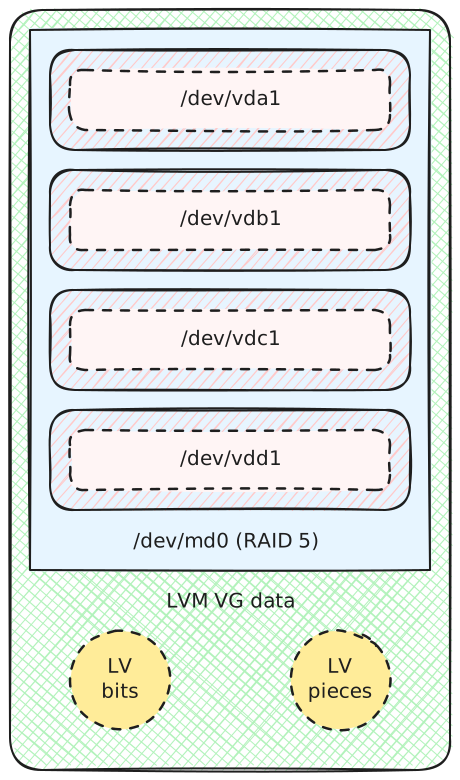
RAID 5 setup with disks of equal capacity
We replace /dev/vda with a bigger disk. We add it back to the RAID 5 array after copying the partitions from /dev/vdb:
$ cat /proc/mdstat
md0 : active (auto-read-only) raid5 vdb1[1] vdd1[4] vdc1[2]
299520 blocks super 1.2 level 5, 512k chunk, algorithm 2 [4/3] [_UUU]
bitmap: 0/1 pages [0KB], 65536KB chunk
$ sgdisk --replicate=/dev/vda /dev/vdb
$ sgdisk --randomize-guids /dev/vda
$ mdadm --manage /dev/md0 --add /dev/vda1
$ cat /proc/mdstat
md0 : active raid5 vda1[5] vdb1[1] vdd1[4] vdc1[2]
299520 blocks super 1.2 level 5, 512k chunk, algorithm 2 [4/4] [UUUU]
bitmap: 0/1 pages [0KB], 65536KB chunk
We do not use the additional capacity: this setup would not survive the loss of /dev/vda because we have no spare capacity. We need a second disk replacement, like /dev/vdb:
$ cat /proc/mdstat
md0 : active (auto-read-only) raid5 vda1[5] vdd1[4] vdc1[2]
299520 blocks super 1.2 level 5, 512k chunk, algorithm 2 [4/3] [U_UU]
bitmap: 0/1 pages [0KB], 65536KB chunk
$ sgdisk --replicate=/dev/vdb /dev/vdc
$ sgdisk --randomize-guids /dev/vdb
$ mdadm --manage /dev/md0 --add /dev/vdb1
$ cat /proc/mdstat
md0 : active raid5 vdb1[6] vda1[5] vdd1[4] vdc1[2]
299520 blocks super 1.2 level 5, 512k chunk, algorithm 2 [4/4] [UUUU]
bitmap: 0/1 pages [0KB], 65536KB chunk
We create a new RAID 1 array by using the free space on /dev/vda and /dev/vdb:
$ sgdisk --new=0:0:0 -t 0:fd00 /dev/vda
$ sgdisk --new=0:0:0 -t 0:fd00 /dev/vdb
$ mdadm --create /dev/md1 --level=raid1 --bitmap=internal --raid-devices=2 \
>   /dev/vda2 /dev/vdb2
$ cat /proc/mdstat
md1 : active raid1 vdb2[1] vda2[0]
101312 blocks super 1.2 [2/2] [UU]
bitmap: 0/1 pages [0KB], 65536KB chunk

md0 : active raid5 vdb1[6] vda1[5] vdd1[4] vdc1[2]
299520 blocks super 1.2 level 5, 512k chunk, algorithm 2 [4/4] [UUUU]
bitmap: 0/1 pages [0KB], 65536KB chunk
We add /dev/md1 to the volume group:
$ pvcreate /dev/md1
Physical volume "/dev/md1" successfully created.
$ vgextend data /dev/md1
Volume group "data" successfully extended
$ vgs
VG   #PV #LV #SN Attr   VSize   VFree
data   2   2   0 wz--n- 384.00m 184.00m
$  lsblk -Mo NAME,TYPE,SIZE
NAME          TYPE    SIZE
vda           disk    201M
┌┈▶ ├─vda1        part    100M
┌┈▶┆   └─vda2        part    100M
┆  ┆   vdb           disk    201M
┆  ├┈▶ ├─vdb1        part    100M
└┬▶┆   └─vdb2        part    100M
└┈┆┈┈┈md1           raid1  98.9M
┆   vdc           disk    101M
├┈▶ └─vdc1        part    100M
┆   vdd           disk    101M
└┬▶ └─vdd1        part    100M
└┈┈md0           raid5 292.5M
├─data-bits   lvm     100M
└─data-pieces lvm     100M
This gives us the following setup:2

Setup mixing both RAID 1 and RAID 5
We extend our capacity further by replacing /dev/vdc:
$ cat /proc/mdstat
md1 : active (auto-read-only) raid1 vda2[0] vdb2[1]
101312 blocks super 1.2 [2/2] [UU]
bitmap: 0/1 pages [0KB], 65536KB chunk

md0 : active (auto-read-only) raid5 vda1[5] vdd1[4] vdb1[6]
299520 blocks super 1.2 level 5, 512k chunk, algorithm 2 [4/3] [UU_U]
bitmap: 0/1 pages [0KB], 65536KB chunk
$ sgdisk --replicate=/dev/vdc /dev/vdb
$ sgdisk --randomize-guids /dev/vdc
$ mdadm --manage /dev/md0 --add /dev/vdc1
$ cat /proc/mdstat
md1 : active (auto-read-only) raid1 vda2[0] vdb2[1]
101312 blocks super 1.2 [2/2] [UU]
bitmap: 0/1 pages [0KB], 65536KB chunk

md0 : active raid5 vdc1[7] vda1[5] vdd1[4] vdb1[6]
299520 blocks super 1.2 level 5, 512k chunk, algorithm 2 [4/4] [UUUU]
bitmap: 0/1 pages [0KB], 65536KB chunk
Then, we convert /dev/md1 from RAID 1 to RAID 5:
$ mdadm --grow /dev/md1 --level=5 --raid-devices=3 --add /dev/vdc2
mdadm: level of /dev/md1 changed to raid5
mdadm: added /dev/vdc2
$ cat /proc/mdstat
md1 : active raid5 vdc2[2] vda2[0] vdb2[1]
202624 blocks super 1.2 level 5, 64k chunk, algorithm 2 [3/3] [UUU]
bitmap: 0/1 pages [0KB], 65536KB chunk

md0 : active raid5 vdc1[7] vda1[5] vdd1[4] vdb1[6]
299520 blocks super 1.2 level 5, 512k chunk, algorithm 2 [4/4] [UUUU]
bitmap: 0/1 pages [0KB], 65536KB chunk
$ pvresize /dev/md1
$ vgs
VG   #PV #LV #SN Attr   VSize   VFree
data   2   2   0 wz--n- 482.00m 282.00m
This gives us the following layout:

RAID 5 setup with mixed-capacity disks using partitions and LVM
We further extend our capacity by replacing /dev/vdd:
$ cat /proc/mdstat
md0 : active (auto-read-only) raid5 vda1[5] vdc1[7] vdb1[6]
299520 blocks super 1.2 level 5, 512k chunk, algorithm 2 [4/3] [UUU_]
bitmap: 0/1 pages [0KB], 65536KB chunk

md1 : active (auto-read-only) raid5 vda2[0] vdc2[2] vdb2[1]
202624 blocks super 1.2 level 5, 64k chunk, algorithm 2 [3/3] [UUU]
bitmap: 0/1 pages [0KB], 65536KB chunk
$ sgdisk --replicate=/dev/vdd /dev/vdc
$ sgdisk --randomize-guids /dev/vdd
$ mdadm --manage /dev/md0 --add /dev/vdd1
$ cat /proc/mdstat
md0 : active raid5 vdd1[4] vda1[5] vdc1[7] vdb1[6]
299520 blocks super 1.2 level 5, 512k chunk, algorithm 2 [4/4] [UUUU]
bitmap: 0/1 pages [0KB], 65536KB chunk

md1 : active (auto-read-only) raid5 vda2[0] vdc2[2] vdb2[1]
202624 blocks super 1.2 level 5, 64k chunk, algorithm 2 [3/3] [UUU]
bitmap: 0/1 pages [0KB], 65536KB chunk
We grow the second RAID 5 array:
$ mdadm --grow /dev/md1 --raid-devices=4 --add /dev/vdd2
mdadm: added /dev/vdd2
$ cat /proc/mdstat
md0 : active raid5 vdd1[4] vda1[5] vdc1[7] vdb1[6]
299520 blocks super 1.2 level 5, 512k chunk, algorithm 2 [4/4] [UUUU]
bitmap: 0/1 pages [0KB], 65536KB chunk

md1 : active raid5 vdd2[3] vda2[0] vdc2[2] vdb2[1]
303936 blocks super 1.2 level 5, 64k chunk, algorithm 2 [4/4] [UUUU]
bitmap: 0/1 pages [0KB], 65536KB chunk
$ pvresize /dev/md1
$ vgs
VG   #PV #LV #SN Attr   VSize   VFree
data   2   2   0 wz--n- 580.00m 380.00m
$ lsblk -Mo NAME,TYPE,SIZE
NAME          TYPE    SIZE
vda           disk    201M
┌┈▶ ├─vda1        part    100M
┌┈▶┆   └─vda2        part    100M
┆  ┆   vdb           disk    201M
┆  ├┈▶ ├─vdb1        part    100M
├┈▶┆   └─vdb2        part    100M
┆  ┆   vdc           disk    201M
┆  ├┈▶ ├─vdc1        part    100M
├┈▶┆   └─vdc2        part    100M
┆  ┆   vdd           disk    301M
┆  └┬▶ ├─vdd1        part    100M
└┬▶ ┆  └─vdd2        part    100M
┆  └┈┈md0           raid5 292.5M
┆     ├─data-bits   lvm     100M
┆     └─data-pieces lvm     100M
└┈┈┈┈┈md1           raid5 296.8M
You can continue by replacing each disk one by one using the same steps. ♾️
Write-intent bitmaps speed up recovery of the RAID array after a power failure by marking unsynchronized regions as dirty. They have an impact on performance, but I did not measure it myself. ↩︎ 1.
In the lsblk output, /dev/md1 appears unused because the logical volumes do not use any space from it yet. Once you create more logical volumes or extend them, lsblk will reflect the usage. ↩︎