September 19, 2025
by Osledy Bazo
Document Parsing with LLMs: From OCR to Structural Understanding.
Introduction
Extracting useful information from PDF documents and complex spreadsheets has long been a challenge. Traditional tools such as OCR (Optical Character Recognition) were created to convert text from scanned images into plain text. However, their scope is limited: they extract characters but lose the structure of the document, failing to capture visual hierarchies or contextual relationships between columns or cells.
For example, when processing a financial statement with OCR or a traditional parser, something like this balance table:
 were created to convert text from scanned images into plain text. However, their scope is limited: they extract characters but lose the structure of the document, failing to capture visual hierarchies or contextual relationships between columns or cells.
For example, when processing a financial statement with OCR or a traditional parser, something like this balance table:
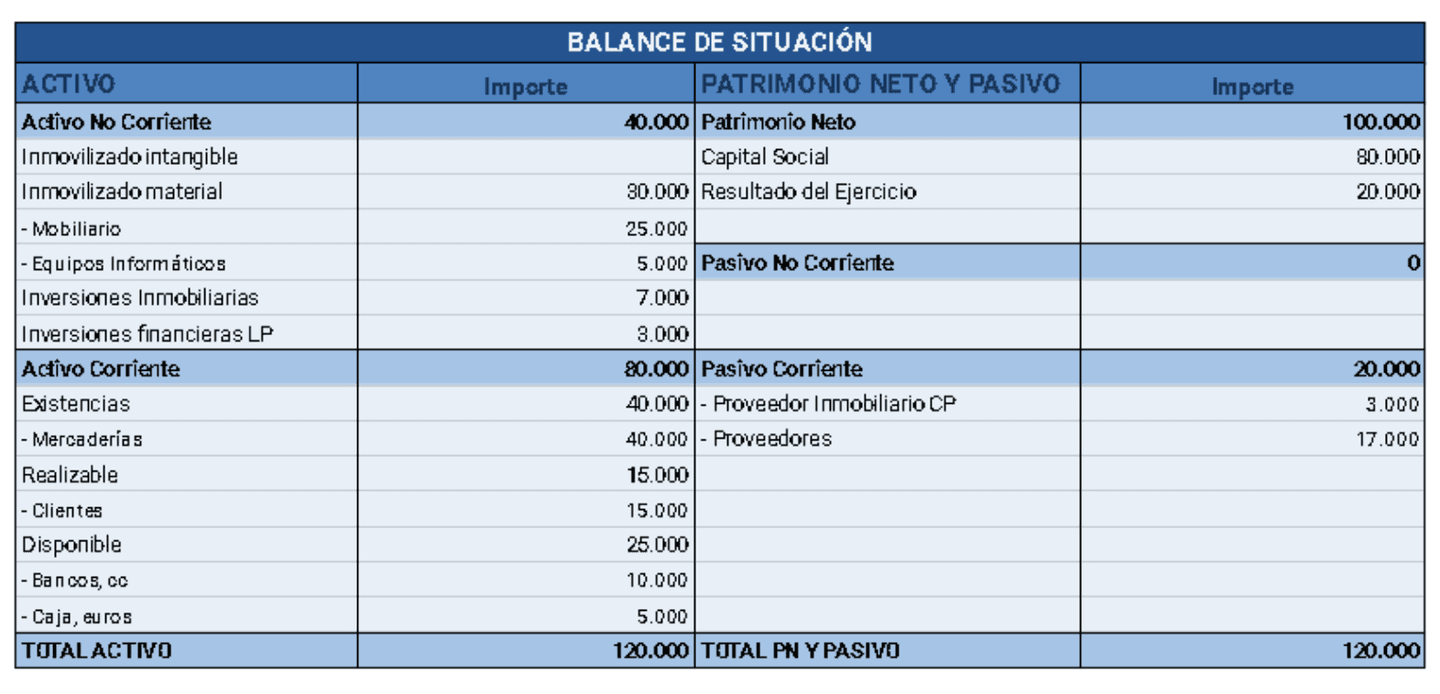
May be misinterpreted as a sequential list of values, breaking the relationship between each label and its corresponding amount. This occurs because OCR does not “see” the table layout, nor does it recognize that “NON-CURRENT ASSETS” with “40,000” and “Intangible fixed assets” belong to the same structured column—let alone that two parallel accounting blocks appear on the same row.
In practice, this leads to errors such as:
Mixing assets and equity columns.
Duplication or loss of information.
Misinterpretations when converting content into usable data.
Faced with these limitations, large language models (LLMs) and multimodal models introduce the concept of PDF understanding a way to interpret not only text but also the visual and semantic structure of the document. Tools such as LlamaParse leverage these models to preserve column relationships, visual hierarchy (headings, subheadings, groupings), and context—even in documents with mixed structures like accounting tables or financial statements.
For example, in the case above, LlamaParse can correctly identify that there are two sections (Assets vs Equity), with their respective subheadings and amounts, preserving their original distribution and converting them into a valid structured table for query or analysis.
This technological leap marks a clear transition: from OCR that merely “reads letters” to LLMs that understand the document as a whole.
LlamaParse and LlamaCloud
The rise of language models has given way to a new category of tools specialized in transforming unstructured documents into machine-readable data. Within this landscape, LlamaParse stands out as one of the most robust and versatile solutions for interpreting PDFs and other complex formats. Its integration into the LlamaCloud platform enables enterprise-scale processing.
LlamaParse is a parsing engine developed by LlamaIndex, designed specifically to integrate with generative models and Retrieval-Augmented Generation (RAG) pipelines.
Unlike traditional parsers, LlamaParse is optimized to extract text, tables, structural hierarchy, and visual content such as images or diagrams—all in a format readily consumable by LLMs.
It supports multiple file types, including:
DOCX, PPTX, XLSX
EPUB, HTML, JPEG
ZIP archives with multiple documents
It also outputs in enriched Markdown and structured JSON, and can integrate with tools such as LlamaIndex, LangChain, or any LLM via API.
Example
Suppose you upload a contract in PDF with headings such as “Clause 1: Purpose of the Agreement” and “Clause 2: Supplier Obligations.” A standard parser may return plain text without distinguishing sections. LlamaParse, on the other hand, produces a hierarchical structure like this:
# Clause 1: Purpose of the Agreement
This agreement has as its purpose...
# Clause 2: Supplier Obligations
The supplier commits to...
This allows an LLM to later answer queries such as:
“What are the supplier’s obligations according to the contract?” with much higher accuracy.
Cloud infrastructure that hosts LlamaParse, designed to provide:
Scalable, asynchronous processing.
Batch processing.
Document and parsed-results management.
API and SDK interfaces (CLI, Python).
Compatibility with tools like Neo4j, Snowflake, LangChain, and more .
LlamaCloud also enables custom configurations: from output formats to page-level confidence scores, skew correction, language detection, and beyond.
Practical Example
A common real-world scenario is processing technical manuals in PDF with numerous tables, headers, and diagrams. LlamaParse not only extracts textual content but also preserves table layouts (including merged cells), extracts images as separate files, and maintains hierarchical headers.
For example, a diagram inside the document may be returned as:
And a technical specification table can be converted into Markdown or structured JSON, ready for search engines, LLM agents, or databases.
The combination of LlamaParse + LlamaCloud transforms complex documents into faithful, structured representations, prepared for tasks such as semantic search, RAG, data extraction, or intelligent summarization. Its LLM-native design sets it apart from traditional parsers that lack contextual understanding.
Key Advantages and Use Cases
LlamaParse is not simply a “more modern” parser, but a tool that redefines how we extract and use information from complex documents. Below, we review its main benefits compared to traditional approaches and illustrate how organizations in different sectors are already taking advantage of its capabilities.
Main Advantages
Unlike traditional parsers that return plain text, LlamaParse maintains the visual and logical hierarchy of the document: headings, subheadings, lists, tables, figure captions, and more.
Example: In a technical manual, headings such as 1. Introduction, 1.1 Scope, and 1.2 Limitations are converted into properly indented Markdown, enabling contextual searches or navigation with LLMs.
LlamaParse correctly interprets tables with multiple header layers, merged cells, subtotals, and mixed formats (numbers, dates, text).
Example: In a financial statement, LlamaParse distinguishes that “A) Non-current assets” and “A) Equity” belong to different columns, and that “0.00” is correctly aligned with its accounting category—without mixing data.
Images, diagrams, and figures are extracted along with useful metadata such as description, position, and their relationship to text.
Example: In a PDF presentation, each diagram can be stored as a `.png` file linked to its figure caption, enabling separate use or interpretation by a vision model.
Output formats (Markdown, JSON, XML) are optimized for generative models, RAG engines, embeddings, agents, or automated extraction workflows.
Example: A legal clause extracted by LlamaParse can be directly used in a query to an LLM: “Which clause of the contract mentions the cancellation period?”, and the answer will include an exact passage with reference to the correct section.
Use Cases by Sector
Parsing balance sheets, annual reports, and invoices. Extracting KPIs and comparing metrics across documents.
Large-scale ingestion of contracts with extraction of key clauses (dates, obligations, penalties). Building semantic search tools for legal document review.
Extracting data from CVs, evaluation forms, and résumés. Generating candidate summaries or detecting key requirements.
Processing papers, manuals, patents, and scientific reports. Building knowledge graphs or enabling search over technical content.
Common Pitfalls and Implementation Strategies
Although LlamaParse greatly simplifies the extraction of information from documents, its deployment is not without challenges. Many organizations stumble into common pitfalls that compromise either data quality or workflow efficiency. Below, we examine the most frequent issues and the best practices to avoid them.
Common Pitfalls
Some companies attempt to process their entire document repository at once without auditing document types, often leading to inconsistent results.
Example: An insurance firm uploads forms, contracts, and medical reports in the same batch, expecting uniform output. The result is mixed formats and reduced accuracy for certain document types.
While LlamaParse preserves structure, failing to configure the right output format (e.g., Markdown vs JSON) can result in difficult-to-use data.
Example: A financial statement extracted into plain text loses column relationships, while a JSON configuration preserves each block with its correct accounting label.
Relying blindly on the parser can lead to incorrect data usage. LlamaParse provides page-level confidence scores, but these are often overlooked.
Example: A low-quality scanned document is processed without review. An LLM then produces answers based on incomplete data, affecting decision-making.
Uploading hundreds of documents in parallel without safeguards means that a single failure can halt the entire pipeline.
Example: During a legal audit, one faulty contract causes the system to stop execution instead of processing the rest.
Recommended Strategies
Identify which documents deliver the highest value and which are most complex (e.g., balance sheets, contracts, technical manuals). Prioritize accordingly.
Start with a small set of documents to test configurations (Markdown, JSON, XML) and validate output for the intended use case.
Configure alerts or human reviews for pages with low scores, minimizing critical errors in sensitive datasets.
Leverage LlamaCloud’s infrastructure to process documents in parallel, with check pointing and automatic retries in case of failure.
Integrate manual reviews and iterative feedback to continuously improve parsing and adapt configurations to the most frequent document types.
Practical Example 1: Parsing Financial Data in PDF and Excel
One of the most common scenarios where traditional OCR solutions fail is extracting financial information from scanned PDFs or accounting tables in Excel. In these files, tabular structure is critical: it is not enough to read numbers, the parser must preserve the relationship between each concept and its corresponding amount.
The Challenge with Traditional OCR
Some amounts are missed, particularly those right-aligned.
Nonexistent figures are introduced (e.g., reading “80,000” as “80000l”).
Table rows split in two, breaking the link between labels and values.
“Assets” items get mixed with “Liabilities” amounts.
Non-current Assets 40000
Tangible fixed assets 30.000
Furnitur0 25.00
Cornputers 5000
Non-current Liabilities 0
Short-term Property Supplier 3000
The output is plain text, full of errors, with no reliable structure.
Parsing with LlamaParse
In contrast, when processing the same document with LlamaParse, the results are structured and hierarchical, preserving the tabular format and eliminating OCR errors.
# Balance Sheet
## Non-current Assets (40,000)
-
Intangible assets
-
Tangible assets: 30,000
-
Furniture: 25,000
-
IT equipment: 5,000
-
Real estate investments: 7,000
-
Long-term financial investments: 3,000
## Current Assets (80,000)
-
Inventory: 40,000
-
Merchandise: 40,000
-
Receivables: 15,000
-
Customers: 15,000
-
Cash and equivalents: 25,000
-
Bank accounts: 10,000
-
Cash: 5,000
**TOTAL ASSETS: 120,000**
## Equity and Liabilities
### Equity (100,000)
-
Share Capital: 80,000
-
Net Income: 20,000
### Non-current Liabilities (0)
### Current Liabilities (20,000)
-
Short-term Property Supplier: 3,000
-
Suppliers: 17,000
**TOTAL EQUITY AND LIABILITIES: 120,000**
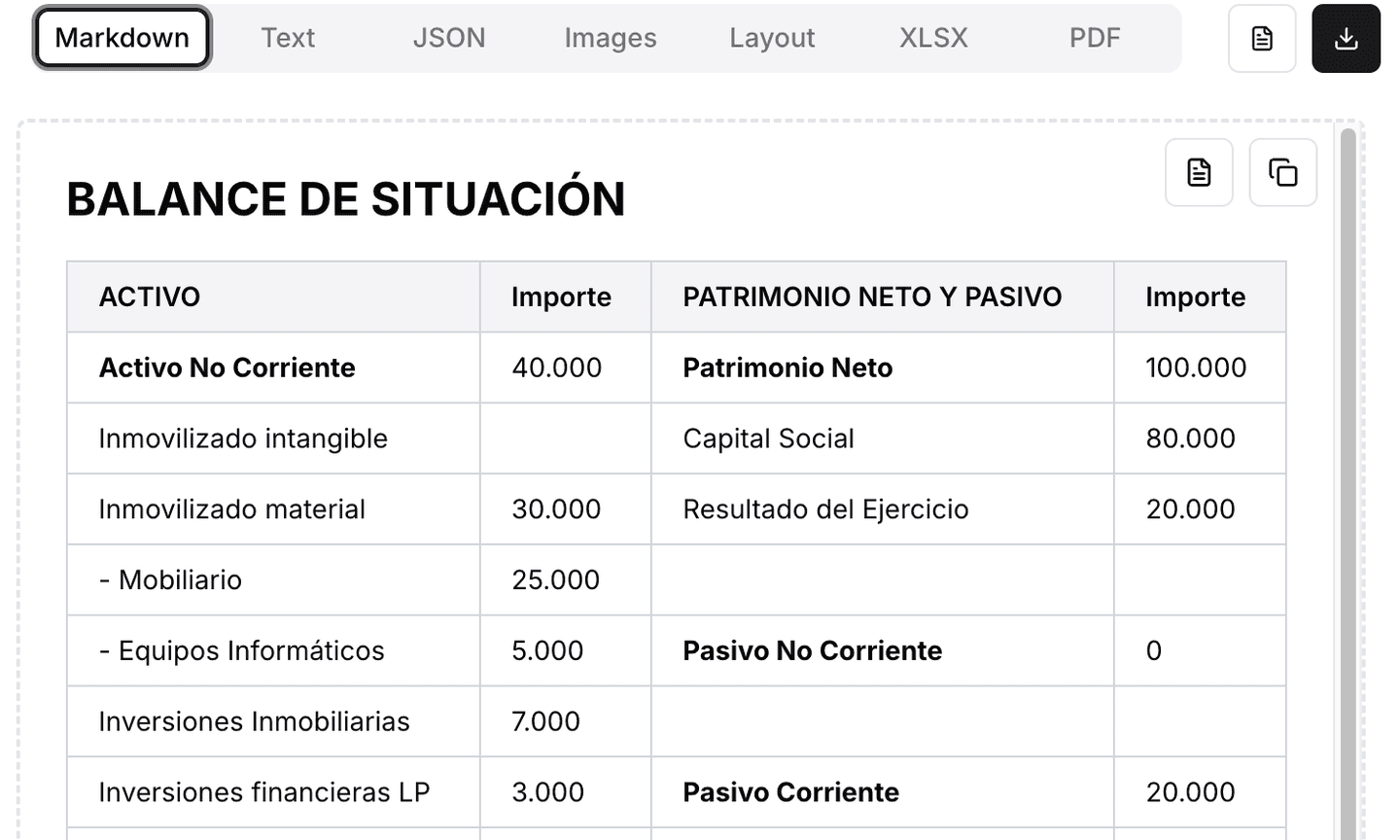
Observed Benefits
Preservation of hierarchy: sections, subtotals, and concepts are clearly separated.
Accurate table interpretation: the relationship between “Assets” and “Liabilities” columns is preserved.
Zero character errors: amounts are extracted faithfully.
Directly usable format: Markdown or JSON output can be fed into a search engine, financial dashboard, or database.
Case Conclusion
While traditional OCR generates noisy plain text that is difficult to leverage, LlamaParse delivers a faithful structure of the original document, ready to be used in financial analysis workflows, audits, or LLM-based queries.
Practical Example 2: Repair Manual (Text + Images + Diagrams)
In scanned technical manuals, OCR often “detaches” text from figures: photos lose captions, steps get mixed, and diagrams disappear. The biggest issue is reliably associating each repair step with its corresponding image.
With LlamaParse, we solved two problems at once:
Image extraction as standalone files (e.g., `page_03_fig_02.png`).
Alt-text generation and explicit linking of each image to its step and caption.
Images are not extracted or have unhelpful names.
Figure captions (“Fig. 2 – Remove back cover”) appear as detached text.
Loss of order: “Step 3” may end up separated from its photo.
Step 3: Remove the back cover...
[image not detected]
Step 4: Disconnect the hose...
Fig. 3: Rear view of the cover
There is no reliable way to know which image goes with which step.
What LlamaParse Produces (After)
LlamaParse preserves visual context and order, creating a structured representation (JSON/Markdown) where each step explicitly references its image.
Benefits:
step_number and figure_ref ensure the step–figure link.
image.path provides a ready-to-use cropped file for UIs or reports.
alt provides generated descriptions (helpful for accessibility and search).
page and bbox allow visual grounding and validation.
Section: Disassembly
### Step 3
Remove the back cover by unscrewing 4 Phillips screws.
**Figure 2:** Rear view of the washer with back cover and position of 4 Phillips screws.

### Step 4
Disconnect the drain hose from the pump assembly.
**Figure 3:** Close-up of the drain hose connected to the water pump.
> ⚠️ Be sure to close the water valve before disconnecting the hose.

Upload the scanned PDF of the manual to LlamaParse.
Set output to JSON (for structure) or Markdown (for docs/UI).
Enable image extraction and descriptions (alt-text).
Use page/bbox fields for visual validation or previews.
Integrate the JSON into your app: render each step with its image and warnings.
Reliable step–image association (avoids typical OCR detachment).
Accessibility and searchability thanks to generated alt-text.
Full traceability: you can return to the exact page and region where the image appears.
Ready for RAG: “Show me the step where the back cover is removed along with its photo.”
Once the document is processed with LlamaParse, we not only have the extracted text but also a rich representation with structure, images, and metadata. This material forms the foundation for building Retrieval-Augmented Generation (RAG) pipelines, as it allows organizing the information into retrievable units and optimizing both retrieval and generation.
Structured text (Markdown/JSON) with sections, tables, and steps.
Extracted images (files) + descriptions/alt-text + (optional) position (page, bbox).
Metadata (title, H1/H2 headers…, figure_ref, block types, etc.).
Texto/JSON: base de datos documental (MongoDB), o ficheros en S3/GCS con índice en SQL.
Imágenes: object storage (S3/GCS/Azure Blob) guardando solo la ruta en los chunks.
Vectores: vector DB (FAISS/pgvector/Pinecone/Weaviate/Qdrant). Guarda:
-
embedding_text(obligatorio) -
embedding_table(opcional, si serializas tablas) -
embedding_image(opcional, si haces RAG multimodal) -
metadata (doc_id, page, headers, figure_ref, tipos de bloque, etc.)
Text: Sentence/paragraph embeddings. Good chunk size: 300–800 tokens with 10–20% overlap. Include hierarchical context in the text to vectorize: “[Manual X200 > Disassembly > Step 3] Remove the cover…”.
Tables: Do not flatten rows randomly. Serialize by row or logical block (faithful CSV/Markdown + title + notes). Or create a summary embedding schema+values.
Images:
1. Text-first: use the alt-text generated by LlamaParse, vectorize it, and store the image path.
2. Multimodal: create image embeddings (CLIP/LLM-vision) and store an image vector in addition to the alt-text.
Table: Balance Sheet. Row: Current Assets; Metric: Inventory; Amount: 40,000
Respect the structure: a chunk should never mix heterogeneous sections.
Semantic units: Manual → each step + its figure(s). Balance Sheet → accounting blocks or sub-chunks if extensive.
Hierarchical context included in the chunk text (breadcrumb path).
Do not split tables in half (avoid breaking a row).
Moderate overlap (10–20%) to maintain continuity.
[Manual X200 > Disassembly > Step 4]
Disconnect the drain hose from the pump assembly.
Warning: close the water valve before disconnecting...
Figure 3 (page_04_fig_03.png): Close-up of the drain hose connected to the pump.
[Balance 2024 > Current Assets > Inventory]
Concept: Merchandise. Amount: 40,000. Notes: Quarterly inventory.
Hybrid queries: keyword + vector (BM25/SQL + embeddings).
Reranking: send top-k candidates to a reranker (optional).
Hierarchical context builder: merge sibling/parent chunks if the prompt requires it. For tables, include headers and notes.
Cited and grounded response: return text + image paths (and page/bbox if applicable). For balance sheets: preserve units and numeric formatting.
Blind text extraction is no longer sufficient. As we have seen, PDF understanding powered by LLMs—particularly LlamaParse on LlamaCloud—transforms complex documents into structured, reliable data: it respects layout, understands hierarchy, and correctly relates tables, figures, and text.
Finance (balance sheets): LlamaParse preserved column relationships and subtotals, avoiding the line-break errors typical of OCR (Tesseract). The result: faithful data, ready for analysis or querying.
Technical manuals (washers): the critical challenge of linking each step with its image was solved. LlamaParse extracted graphics, generated descriptions, and maintained step–figure associations, enabling search and answers with visual evidence.
Storage of text/JSON, tables, and images (object storage) with metadata.
Embeddings of text (and optionally tables and images) for hybrid retrieval.
Hierarchical chunking (sections → subsections → steps/rows) with context and moderate overlap.
Context construction with grounding (page/bbox), returning citations and images.
Layout matters: do not flatten tables or mix heterogeneous blocks.
Hierarchy is essential: chunks must reflect document structure.
Multimodality adds value: alt-text + image enhances accessibility, search, and traceability.
Quality requires governance: use confidence scores, selective human reviews, and monitoring.
In short, moving from OCR to LLMs is not just about better reading—it is about enabling precise, citable, and actionable answers from documents once considered opaque. With LlamaParse and best practices in RAG, any organization can turn its PDFs into a living source of knowledge.