Introducing Multiple Registry Support on DigitalOcean Container Registry
At DigitalOcean, we’re dedicated to enhancing our container registry experience, providing users with a simple, powerful tool to organize, manage, and deploy containerized applications.
Today, we’re excited to announce the General Availability (GA) of a major enhancement to our container registry: the ability to create and manage multiple registries under a single team. Available to customers on the Professional Plan at no additional cost, this feature enables the creation of up to 10 registries per team, delivering great flexibility of image rollout on DigitalOcean.
[What is Multi-Registry support, and why does it m…
Introducing Multiple Registry Support on DigitalOcean Container Registry
At DigitalOcean, we’re dedicated to enhancing our container registry experience, providing users with a simple, powerful tool to organize, manage, and deploy containerized applications.
Today, we’re excited to announce the General Availability (GA) of a major enhancement to our container registry: the ability to create and manage multiple registries under a single team. Available to customers on the Professional Plan at no additional cost, this feature enables the creation of up to 10 registries per team, delivering great flexibility of image rollout on DigitalOcean.
What is Multi-Registry support, and why does it matter?
Previously, although one DigitalOcean Container Registry (DOCR) account could create multiple teams, each team was limited to a single container registry.
With this update, Professional Plan customers can now create up to 10 registries under a single team, each housing its own independent set of repositories and configurations. This architecture is designed for users managing distinct environments (like development, staging, production) or distributed teams, allowing for compartmentalized registry management.
Benefits of Multiple Registries
Environment isolation: Segregate different deployment stages (such as dev vs. prod).
Regional performance: Provision registries in specific regions (like fra1 or nyc3) to co-locate images with your Kubernetes clusters. This reduces latency and data transfer costs during image pulls.
Regulatory compliance: For users with strict data residency requirements (such as GDPR), multiple registries enhance compliance by ensuring container artifacts are stored within a specific geographical jurisdiction.
Ready for DOCR’s future enhancements: This multi-registry foundation paves the way for DOCR’s future advanced capabilities like registry mirroring and geo-replication.
How to use the new Multi-Registry feature on DigitalOcean
1. Via the Control Panel
Click on the “Create Registry” button on the upper right to add more registries.
(https://doimages.nyc3.cdn.digitaloceanspaces.com/002Blog/docr image 1.png)
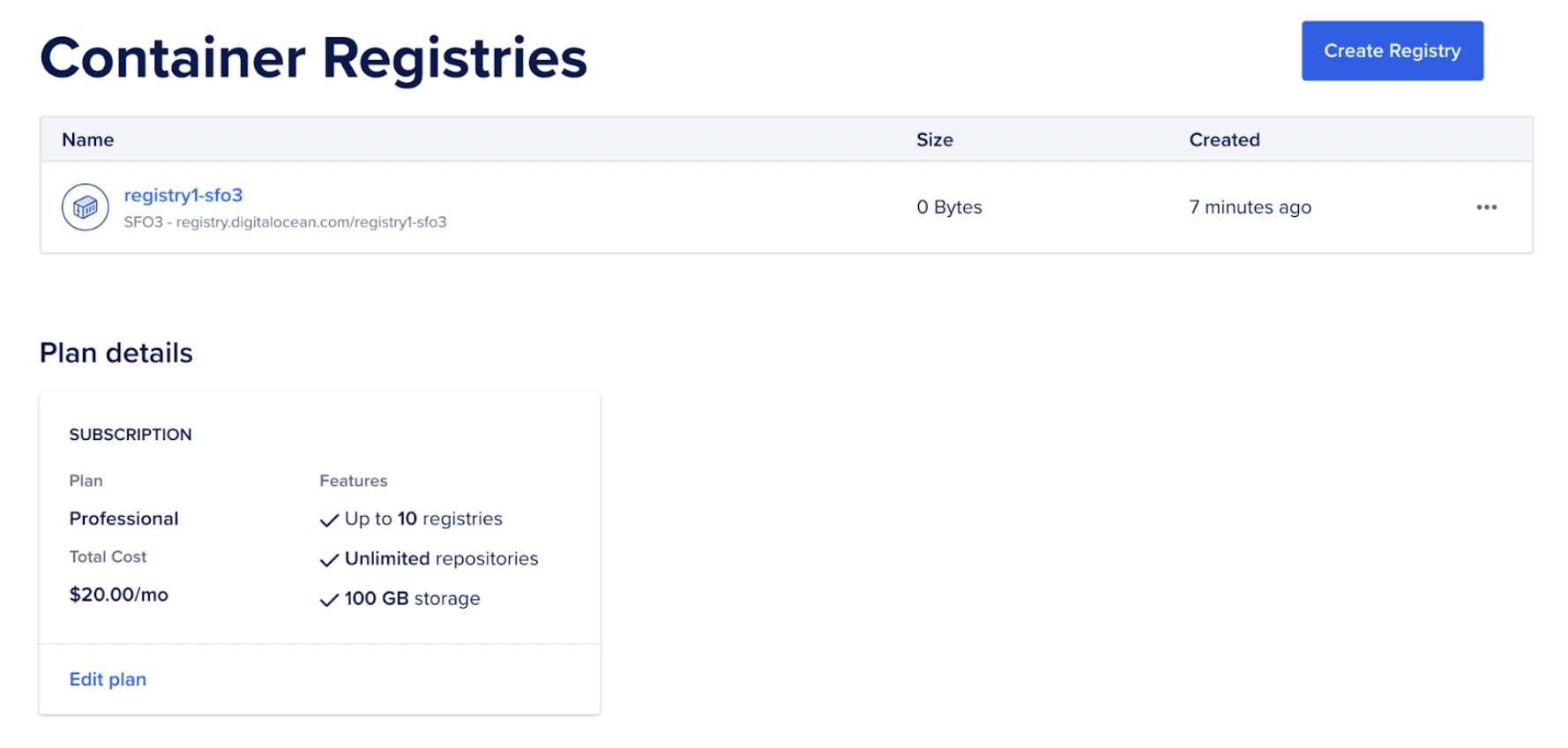
Create one more registry.
(https://doimages.nyc3.cdn.digitaloceanspaces.com/002Blog/docr image 2.png)
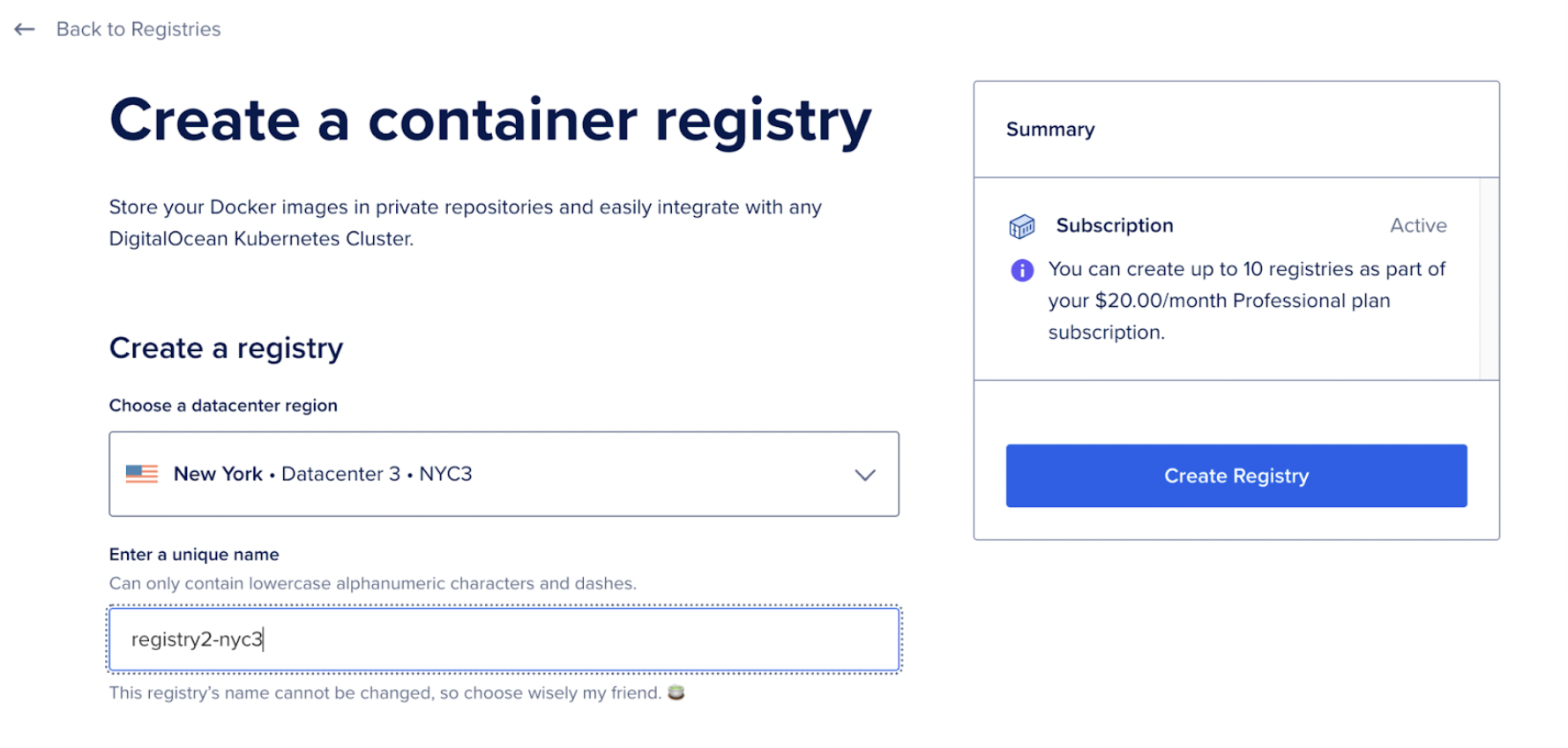
A new registry is added.
(https://doimages.nyc3.cdn.digitaloceanspaces.com/002Blog/docr image 2.png)
2. Via the API
Managing multiple registries is streamlined through our updated API namespace: v2/registries. Note that while the legacy v2/registry endpoint remains for backward compatibility, all multi-registry operations must use the new pluralized endpoint.
Creating a registry
To provision a new registry, send a POST request specifying the unique name and target region.
curl -X POST \

-H "Content-Type: application/json" \

-H "Authorization: Bearer $DIGITALOCEAN_TOKEN" \

-d '{"name": "example", "subscription_tier_slug": "basic", "region": "fra1"}' \

"https://api.digitalocean.com/v2/registries"
Note: You can create up to 10 registries on the Professional plan.
Listing all registries
Audit your infrastructure by retrieving a list of all registries associated with your account.
curl -X GET \

-H "Content-Type: application/json" \

-H "Authorization: Bearer $DIGITALOCEAN_TOKEN" \

"https://api.digitalocean.com/v2/registries"
Retrieving registry information
Get configuration details for a specific registry, such as its endpoint and creation date.
curl -X GET \

-H "Content-Type: application/json" \

-H "Authorization: Bearer $DIGITALOCEAN_TOKEN" \

"https://api.digitalocean.com/v2/registries/example"
Accessing Docker credentials
Generate scoped credentials for a specific registry. This is essential for configuring isolated CI/CD pipelines (for example, allowing a runner to push only to the staging registry).
curl -X GET \

-H "Content-Type: application/json" \

-H "Authorization: Bearer $DIGITALOCEAN_TOKEN" \

"https://api.digitalocean.com/v2/registries/example/docker-credentials"
Initiating Garbage Collection
Garbage collection is vital for managing the shared storage pool of your Professional Plan. Trigger it explicitly for a specific registry to clear untagged manifests.
curl -X POST \

-H "Content-Type: application/json" \

-H "Authorization: Bearer $DIGITALOCEAN_TOKEN" \

"https://api.digitalocean.com/v2/registries/example/garbage-collection"
Deleting a Registry
You must use the v2/registries endpoint to delete a registry in a multi-registry setup. The legacy endpoint cannot distinguish which registry to remove.
curl -X DELETE \

-H "Content-Type: application/json" \

-H "Authorization: Bearer $DIGITALOCEAN_TOKEN" \

"https://api.digitalocean.com/v2/registries/example"
Our command-line tool, doctl, and the Terraform provider now include support for managing the DigitalOcean Container Registry.
3. Via the CLI
In parallel with the API updates, our command-line tool, doctl, now features a new, pluralized subcommand: registries. This subcommand is the new canon for managing registries, mirroring the new API namespace. Note that the legacy registry subcommand will be deprecated in a future release.
Creating a registry
To provision a new registry, use the create command and specify the unique name, target region and subscription tier.
doctl \

-t $DIGITALOCEAN_TOKEN \

registries create cool-reg \

--region=blr1 \

--subscription-tier=professional
Note: Choose the professional tier to create and manage multiple registries.
Listing all registries
Audit your infrastructure by retrieving a list of all registries associated with your account.
doctl \

-t $DIGITALOCEAN_TOKEN \

registries list
Retrieving a registry
Get configuration details for a specific registry, such as its endpoint and region slug.
doctl \

-t $DIGITALOCEAN_TOKEN \
registries get cool-reg
Deleting a registry
Use the delete command to remove a specific registry. You will be prompted before deleting a registry, choose yes if you are sure.
doctl \

-t $DIGITALOCEAN_TOKEN \
registries delete cool-reg
**
For more information about the available commands, read doctl registries help.
Handling limitations and edge cases
As you adopt this feature, keep the following operational constraints in mind:
10-registry limit: Each team with a Professional plan subscription can create up to 10 registries.
API namespace: Operations for multiple registries must use the v2/registries path. The singular v2/registry path will default to your “primary” registry or fail if the context is ambiguous.
Plan downgrades: If you wish to downgrade from the Professional Plan to Starter or Basic, you must first manually delete all “secondary” registries until only one remains.
Get started today
Multi-registry support is now Generally Available for all DigitalOcean Container Registry users on the Professional Plan. Visit the Container Registry product page for full documentation. We’re excited to see how you leverage this flexibility to build more secure, compliant, and performant delivery pipelines.