Docker has long been the simplest way to run containers. Developers start with a docker-compose.yml file, run docker compose up, and get things running fast.
As teams grow and workloads expand into Kubernetes and integrate into cloud services, simplicity fades. Kubernetes has become the operating system of the cloud, but your clusters rarely live in isolation. Real-world platforms are a complex intermixing of proprietary cloud services – AWS S3 buckets, Azure Virtual Machines, Google Cloud SQL databases – all running alongside your containerized workloads. You and your teams are working with clusters and clouds in a sea of YAML.
Managing this hybrid sprawl often means context switching between Docker Desktop, the Kubernetes CLI, cloud provider consoles, and infrastructure as co…
Docker has long been the simplest way to run containers. Developers start with a docker-compose.yml file, run docker compose up, and get things running fast.
As teams grow and workloads expand into Kubernetes and integrate into cloud services, simplicity fades. Kubernetes has become the operating system of the cloud, but your clusters rarely live in isolation. Real-world platforms are a complex intermixing of proprietary cloud services – AWS S3 buckets, Azure Virtual Machines, Google Cloud SQL databases – all running alongside your containerized workloads. You and your teams are working with clusters and clouds in a sea of YAML.
Managing this hybrid sprawl often means context switching between Docker Desktop, the Kubernetes CLI, cloud provider consoles, and infrastructure as code. Simplicity fades as you juggle multiple distinct tools.
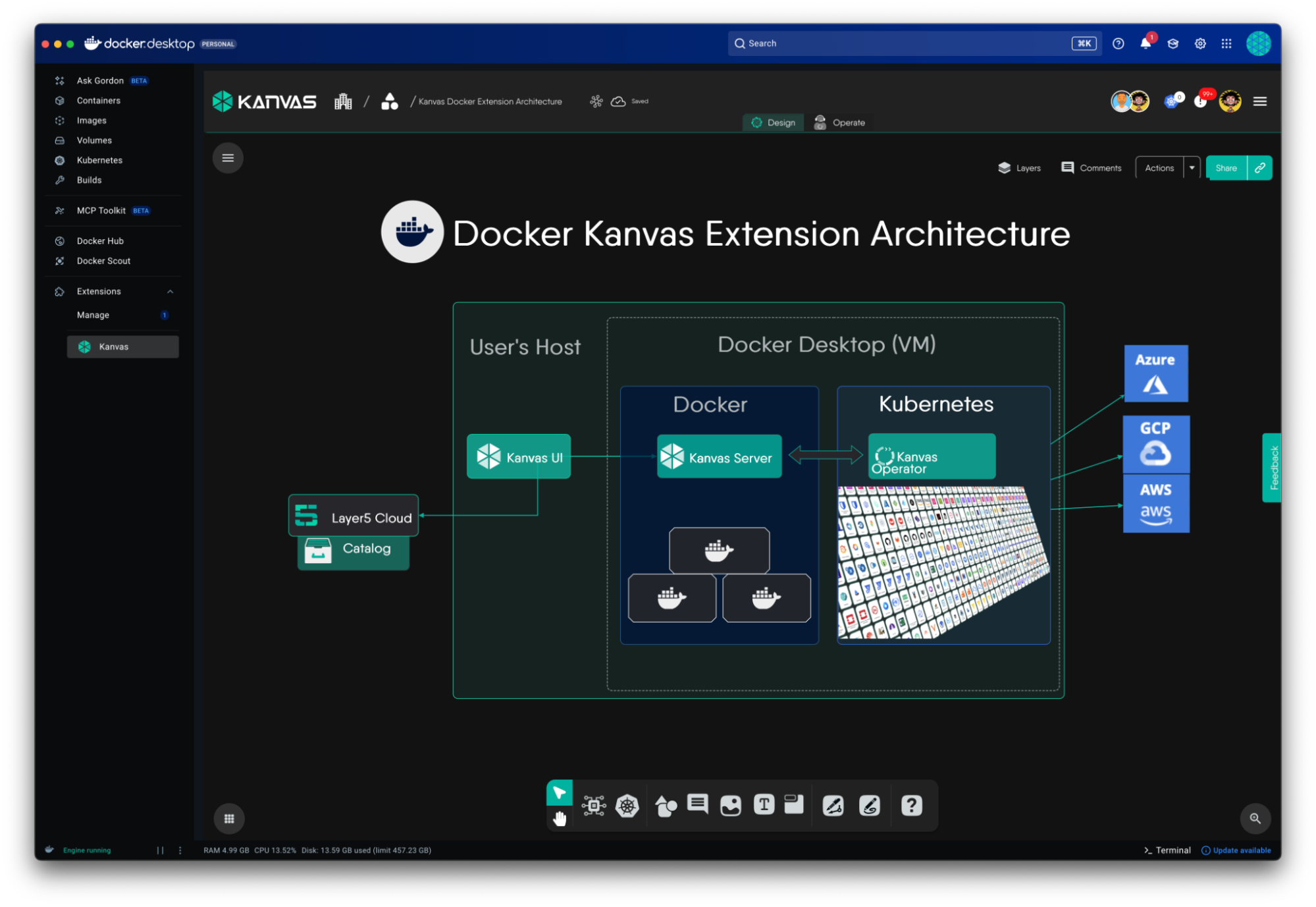
Bringing clarity back from this chaos is the new Docker Kanvas Extension from Layer5 – a visual, collaborative workspace built right into Docker Desktop that allows you to design, deploy, and operate not just Kubernetes resources, but your entire cloud infrastructure across AWS, GCP, and Azure.
What Is Kanvas?
Kanvas is a collaborative platform designed for engineers to visualize, manage, and design multi-cloud and Kubernetes-native infrastructure. Kanvas transforms the concept of infrastructure as code into infrastructure as design. This means your architecture diagram is no longer just documentation – it is the source of truth that drives your deployment. Built on top of Meshery (one of the Cloud Native Computing Foundation’s highest-velocity open source projects), Kanvas moves beyond simple Kubernetes manifests by using Meshery Models – definitions that describe the properties and behavior of specific cloud resources. This allows Kanvas to support a massive catalog of Infrastructure-as-a-Service (IaaS) components:
- AWS: Over 55+ services (e.g., EC2, Lambda, RDS, DynamoDB).
- Azure: Over 50+ components (e.g., Virtual Machines, Blob Storage, VNet).
- GCP: Over 60+ services (e.g., Compute Engine, BigQuery, Pub/Sub).
Kanvas bridges the gap between abstract architecture and concrete operations through two integrated modes: Designer and Operator.
Designer Mode (declarative mode)
Designer mode serves as a “blueprint studio” for cloud architects and DevOps teams, emphasizing declarative modeling – describing what your infrastructure should look like rather than how to build it step-by-step – making it ideal for GitOps workflows and team-based planning.
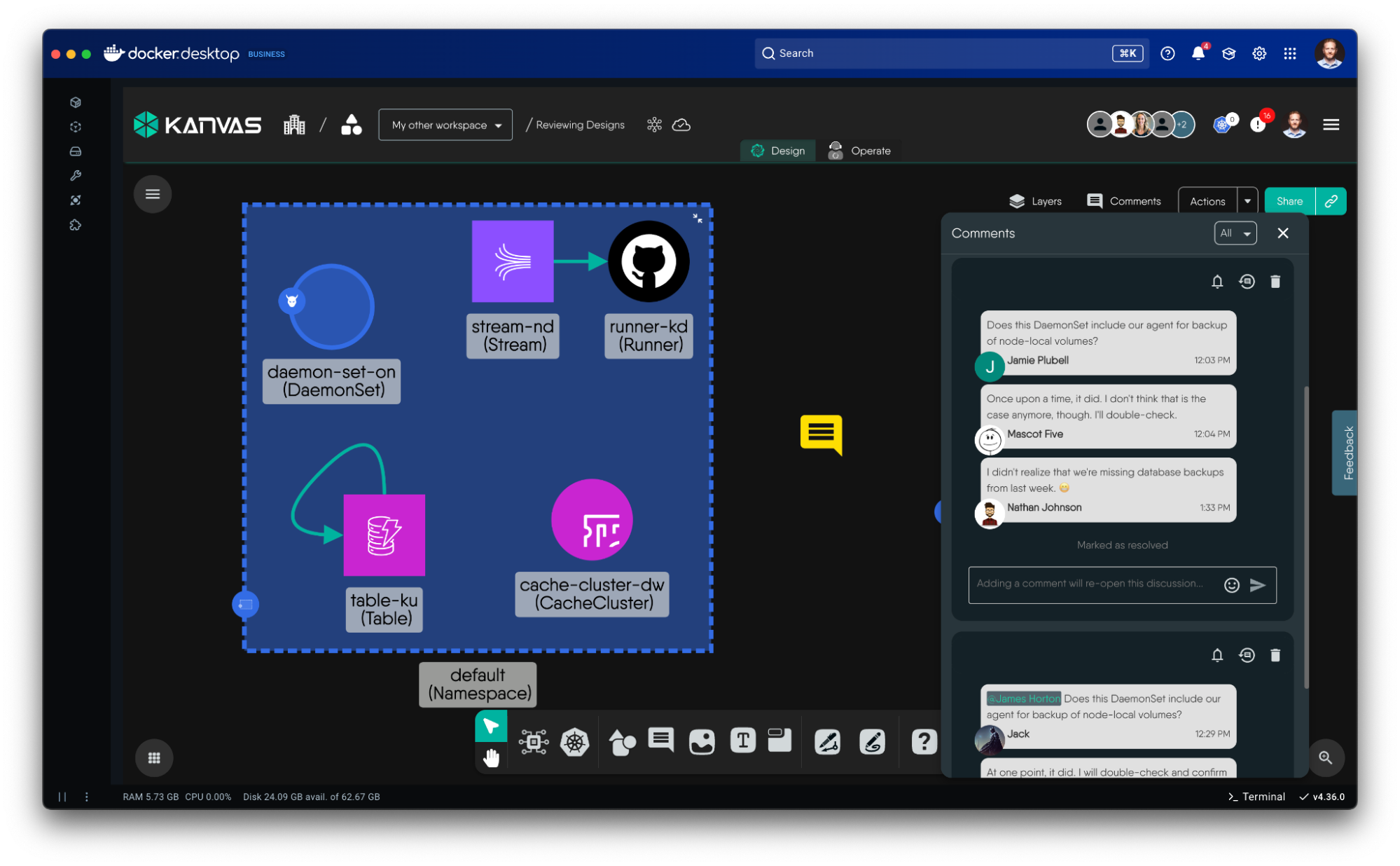
- Build and iterate collaboratively: Add annotations, comments for design reviews, and connections between components to visualize data flows, architectures, and relationships.
- Dry-run and validate deployments: Before touching production, simulate your deployments by performing a dry-run to verify that your configuration is valid and that you have the necessary permissions.
- **Import and export: **Brownfield designs by connecting your existing clusters or importing Helm charts from your GitHub repositories.
- Reuse patterns, clone, and share: Pick from a catalog of reference architectures, sample configurations, and infrastructure templates, so you can start from proven blueprints rather than a blank design. Share designs just as you would a Google Doc. Clone designs just as you would a GitHub repo. Merge designs just as you would in a pull request.
Operator Mode (imperative mode)
Kanvas Operator mode transforms static diagrams into live, managed infrastructure. When you switch to Operator mode, Kanvas stops being a configuration tool and becomes an active infrastructure console, using Kubernetes controllers (like AWS Controllers for Kubernetes (ACK) or Google Config Connector) to actively manage your designs.
Operator mode allows you to:
-
**Load testing and performance management: **With Operator’s built-in load generator, you can execute stress tests and characterize service behavior by analyzing latency and throughput against predefined performance profiles, establishing baselines to measure the impact of infrastructure configuration changes made in Designer mode.
-
Multi-player, interactive terminal: Open a shell session with your containers and execute commands, stream and search container logs without leaving the visual topology. Streamline your troubleshooting by sharing your session with teammates. Stay in-context and avoid context-switching to external command-line tools like kubectl.
-
Integrated observability: Use the Prometheus integration to overlay key performance metrics (CPU usage, memory, request latency) and quickly find spot “hotspots” in your architecture visually. Import your existing Grafana dashboards for deeper analysis.
-
Multi-cluster, multi-cloud operations: Connect multiple Kubernetes clusters (across different clouds or regions) and manage workloads that span across a GKE cluster and an EKS cluster in a single topology view.them all from a single Kanvas interface.
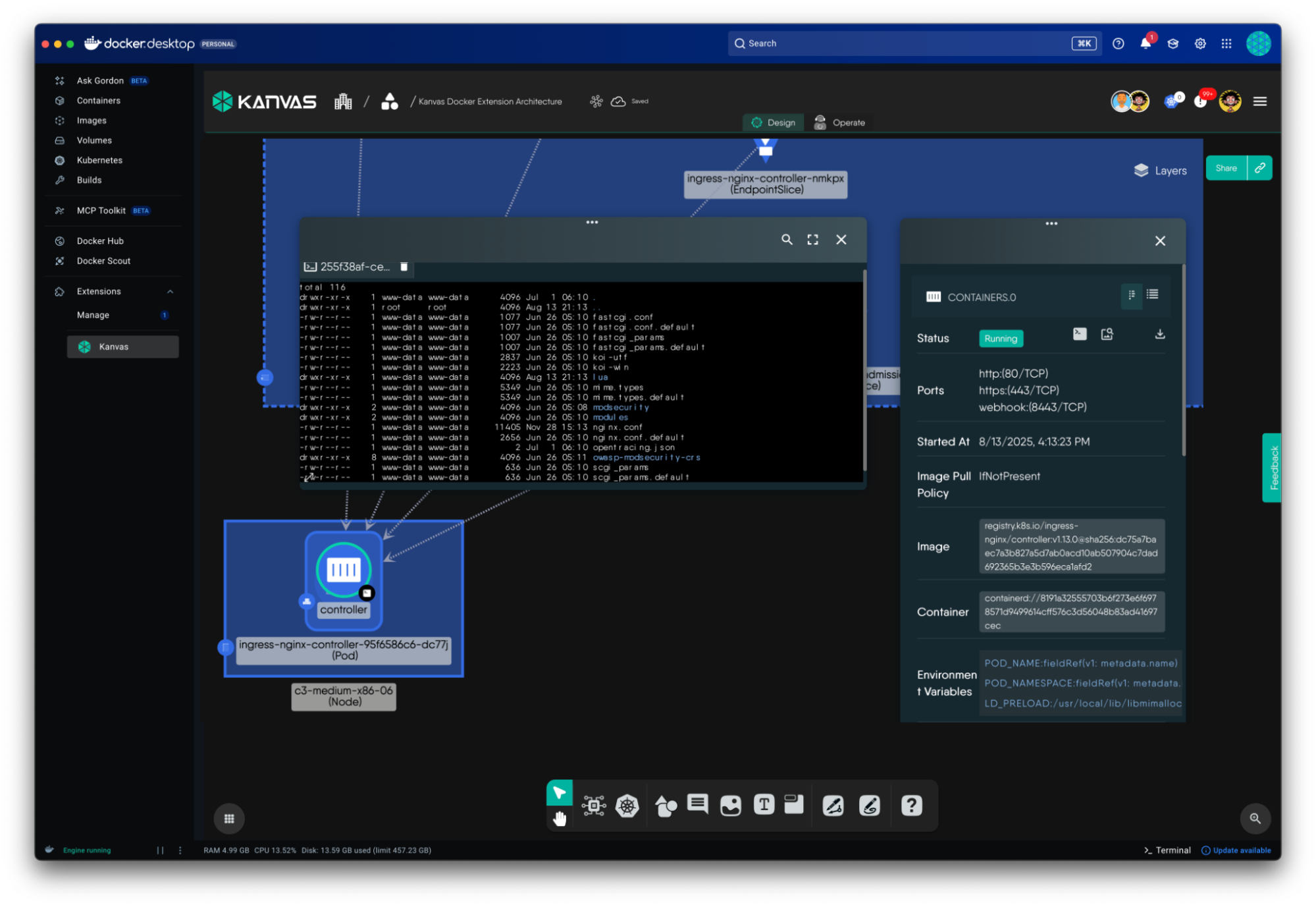
While Kanvas Designer mode is about intent (what you want to build), Operator mode is about reality (what is actually running). Kanvas Designer mode and Operator mode are simply two, tightly integrated sides of the same coin.
With this understanding, let’s see both modes in-action in Docker Desktop.
Walk-Through: From Compose to Kubernetes in Minutes
With the Docker Kanvas extension (install from Docker Hub), you can take any existing Docker Compose file and instantly see how it translates into Kubernetes, making it incredibly easy to understand, extend, and deploy your application at scale.
The Docker Samples repository offers a plethora of samples. Let’s use the Spring-based PetClinic example below.
# sample docker-compose.yml

services:
petclinic:
build:
context: .
dockerfile: Dockerfile.multi
target: development
ports:
- 8000:8000
- 8080:8080
environment:
- SERVER_PORT=8080
- MYSQL_URL=jdbc:mysql://mysqlserver/petclinic
volumes:
- ./:/app
depends_on:
- mysqlserver

mysqlserver:
image: mysql:8
ports:
- 3306:3306
environment:
- MYSQL_ROOT_PASSWORD=
- MYSQL_ALLOW_EMPTY_PASSWORD=true
- MYSQL_USER=petclinic
- MYSQL_PASSWORD=petclinic
- MYSQL_DATABASE=petclinic
volumes:
- mysql_data:/var/lib/mysql
- mysql_config:/etc/mysql/conf.d
volumes:
mysql_data:
mysql_config:
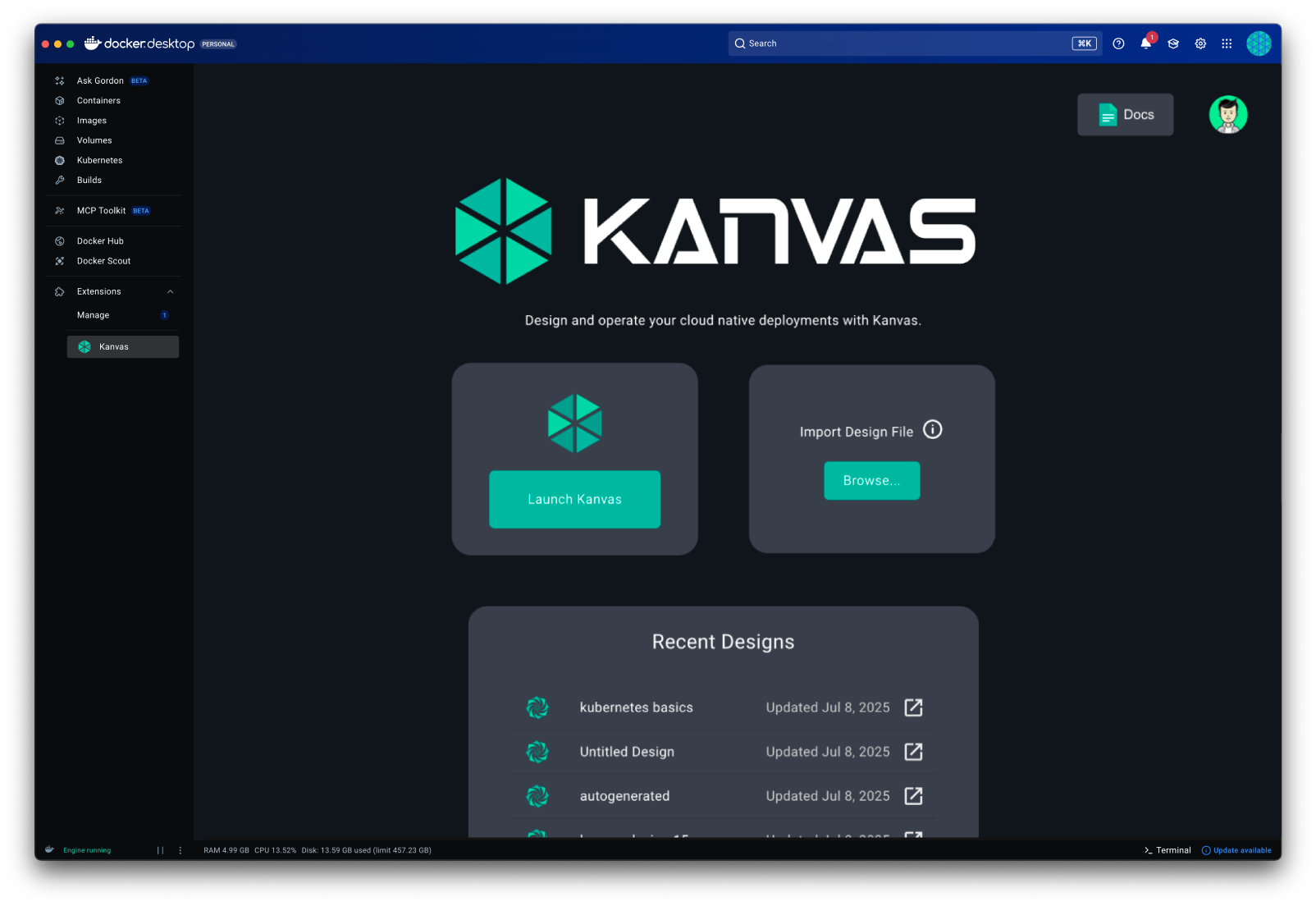
With your Docker Kanvas extension installed:
- **Import sample app: **Save the PetClinic docker-compose.yml file to your computer, then click to import or drag and drop the file onto Kanvas.
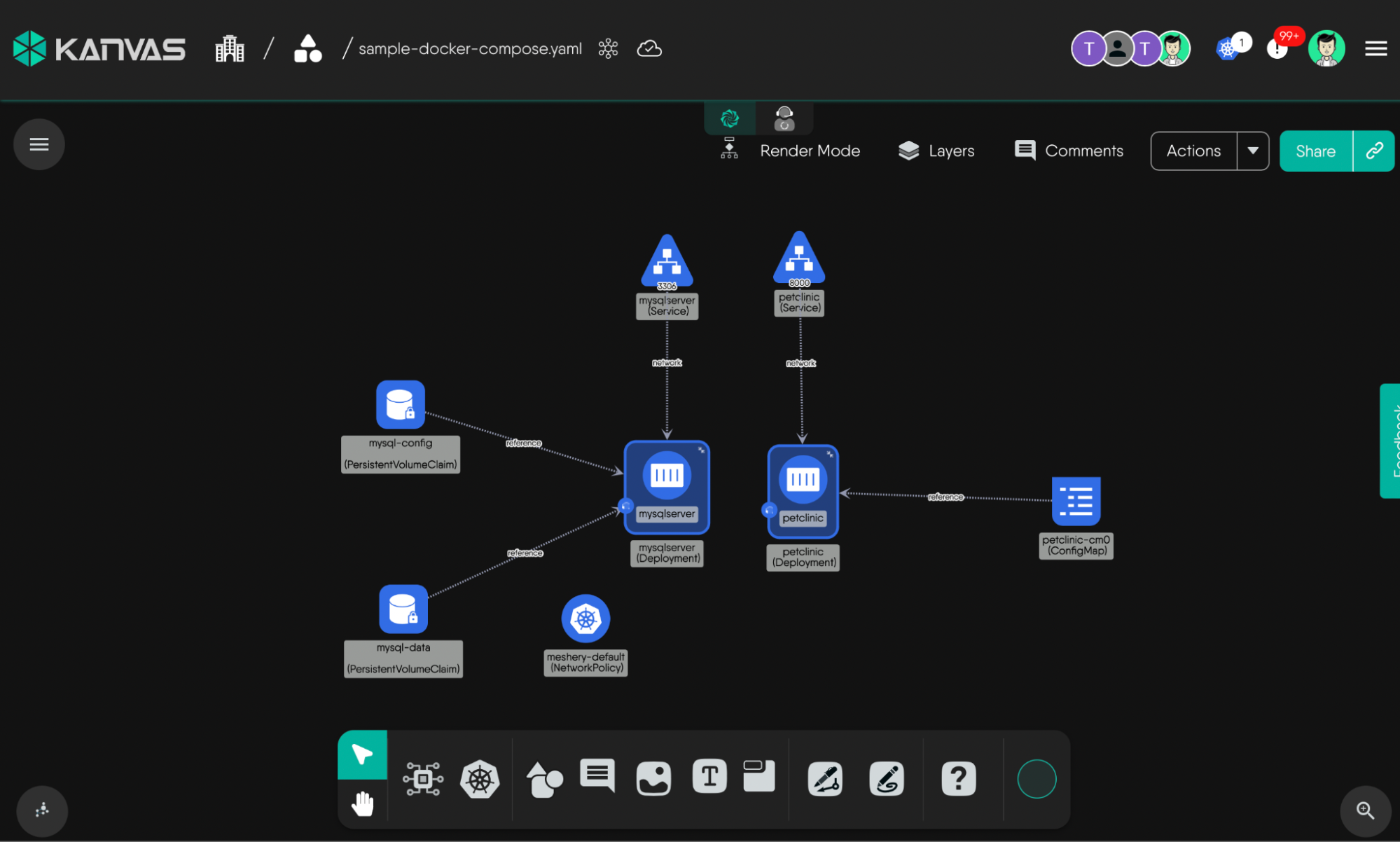
Kanvas renders an interactive topology of your stack showing services, dependencies (like MySQL), volumes, ports, and configurations, all mapped to their Kubernetes equivalents. Kanvas performs this rendering in phases, applying an increasing degree of scrutiny in the evaluation performed in each phase. Let’s explore the specifics of this tiered evaluation process in a moment.
- Enhance the PetClinic design
From here, you can enhance the generated design in a visual, no-YAML way:
- Add a LoadBalancer, Ingress, or ConfigMap
- Configure Secrets for your database URL or sensitive environment variables
- Modify service relationships or attach new components
- Add comments or any other annotations.
Importantly, Kanvas saves your design as you make changes. This gives you production-ready deployment artifacts generated directly from your Compose file.
- Deploy to a cluster
With one click, deploy the design to any cluster connected to Docker Desktop or any other remote cluster. Kanvas handles the translation and applies your configuration.
- Switch modes and interact with your app
After deploying (or when managing an existing workload), switch to Operator mode to observe and manage your deployed design. You can:
- Inspect Deployments, Services, Pods, and their relationships.
- Open a terminal session with your containers for quick debugging.
- Tail and search your container logs and monitor resource metrics.
- Generate traffic and analyze the performance of your deployment under heavy load.
- Share your Operator View with teammates for collaborative management.
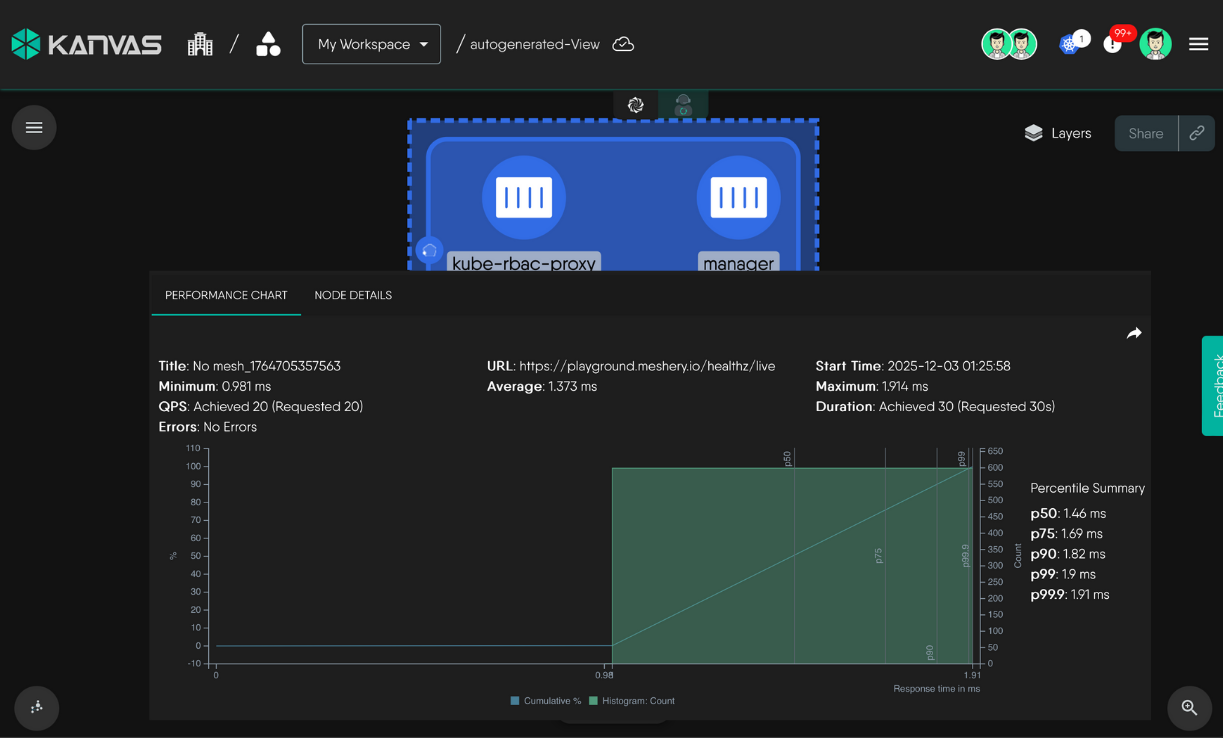
Within minutes, a Compose-based project becomes a fully managed Kubernetes workload, all without leaving Docker Desktop. This seamless flow from a simple Compose file to a fully managed, operable workload highlights the ease by which infrastructure can be visually managed, leading us to consider the underlying principle of Infrastructure as Design.
Infrastructure as Design
Infrastructure as design elevates the visual layout of your stack to be the primary driver of its configuration, where the act of adjusting the proximity and connectedness of components is one in the same as the process of configuring your infrastructure. In other words, the presence, absence, proximity, or connectedness of individual components (all of which affect how one component relates to another) respectively augments the underlying configuration of each. Kanvas is highly intelligent in this way, understanding at a very granular level of detail how each individual component relates to all other components and will augment the configuration of those components accordingly.
Understand that the process by which Kanvas renders the topology of your stack’s architecture in phases. The initial rendering involves a lightweight analysis of each component, establishing a baseline for the contents of your new design. A subsequent phase of rendering applies a higher level of sophistication in its analysis as Kanvas introspect the configuration of each of your stack’s components, their interdependencies, and proactively evaluates the manner in which each component relates to one another. Kanvas will add, remove, and update the configuration of your components as a result of this relationship evaluation.
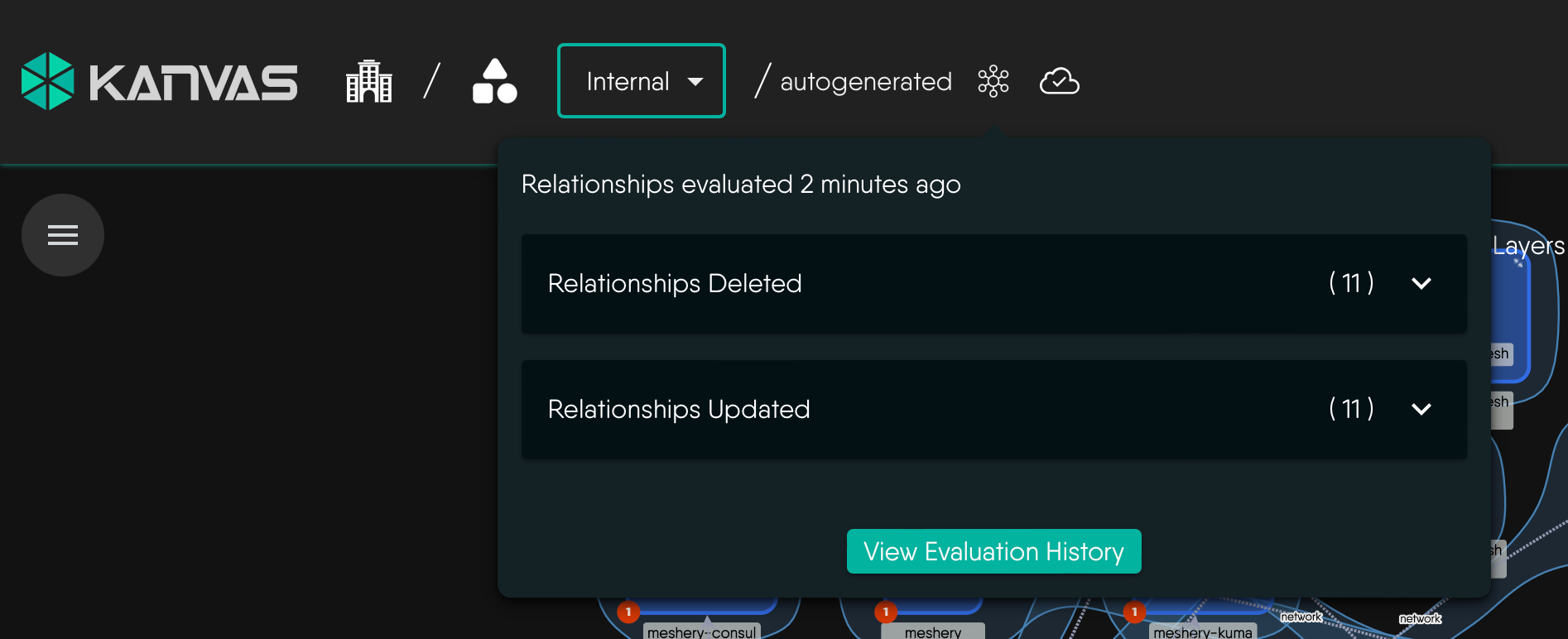
This process of relationship evaluation is ongoing. Every time you make a change to your design, Kanvas re-evaluates each component configuration.
To offer an example, if you were to bring a Kubernetes Deployment in the same vicinity of the Kubernetes Namespace you will find that one magnetizes to the next and that your Deployment is visually placed inside of the Namespace, and at the same time, that Deployment’s configuration is mutated to include its new Namespace designation. Kanvas proactively evaluates and mutates the configuration of the infrastructure resources in your design as you make changes.
This ability for Kanvas to intelligently interpret and adapt to changes in your design—automatically managing configuration and relationships—is the key to achieving infrastructure as design. This power comes from a sophisticated system that gives Kanvas a level of intelligence, but with the reliability of a policy-driven engine.
AI-like Intelligence, Anchored by Deterministic Truth
In an era where generative AI dramatically accelerates infrastructure design, the risk of “hallucinations”—plausible but functionally invalid configurations—remains a critical bottleneck. Kanvas solves this by pairing the generative power of AI with a rigid, deterministic policy engine.
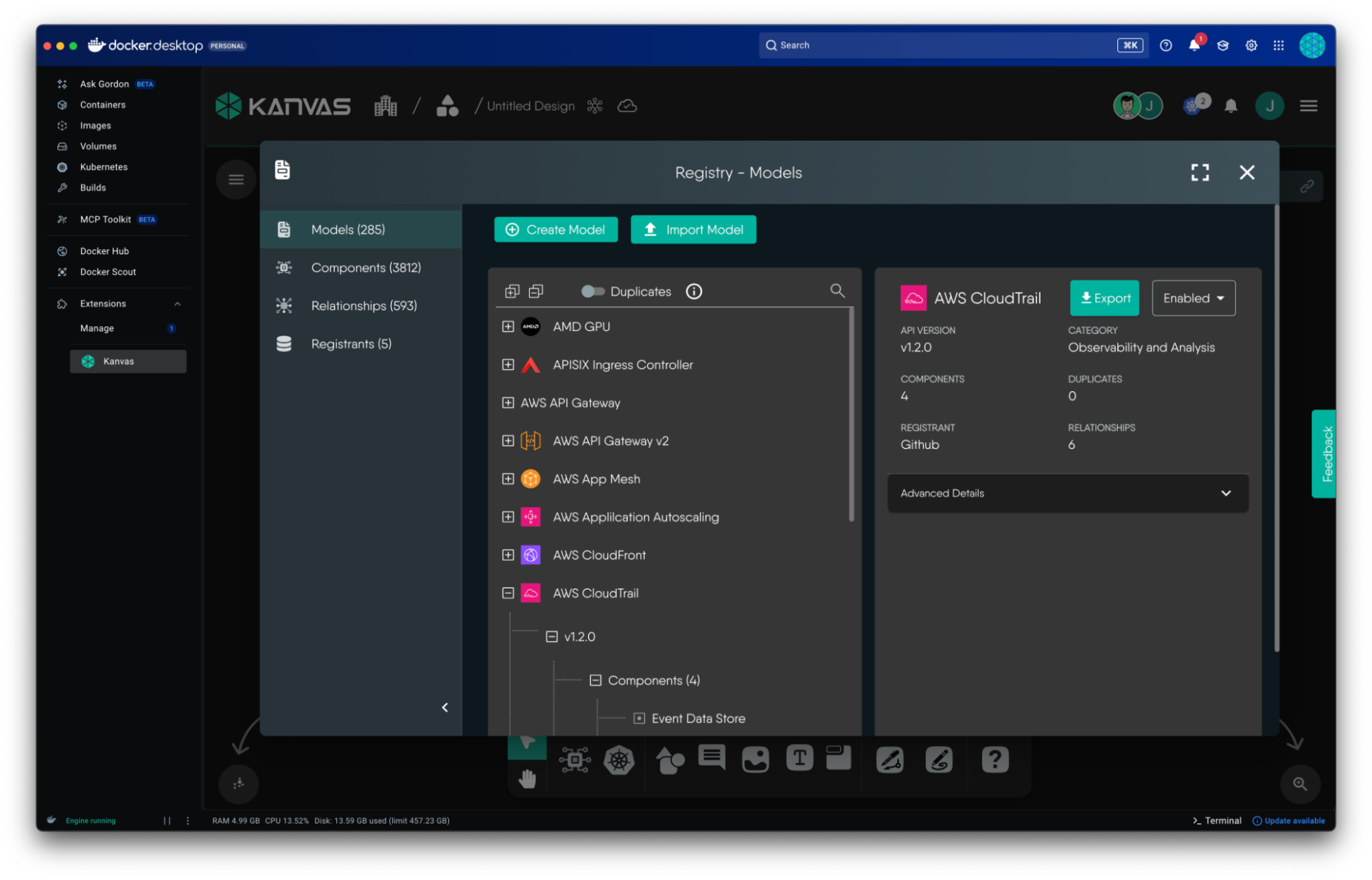
This engine acts as an architectural guardrail, offering you precise control over the degree to which AI is involved in assessing configuration correctness. It transforms designs from simple visual diagrams into validated, deployable blueprints.
While AI models function probabilistically, Kanvas’s policy engine functions deterministically, automatically analyzing designs to identify, validate, and enforce connections between components based on ground-truth rules. Each of these rules are statically defined and versioned in their respective Kanvas models.
- Deep Contextualization: The evaluation goes beyond simple visualization. It treats relationships as context-aware and declarative, interpreting how components interact (e.g., data flows, dependencies, or resource sharing) to ensure designs are not just imaginative, but deployable and compliant.
- Semantic Rigor: The engine distinguishes between semantic relationships (infrastructure-meaningful, such as a TCP connection that auto-configures ports) and non-semantic relationships (user-defined visuals, like annotations). This ensures that aesthetic choices never compromise infrastructure integrity.
Kanvas acknowledges that trust is not binary. You maintain sovereignty over your designs through granular controls that dictate how the engine interacts with AI-generated suggestions:
- “Human-in-the-Loop” Slider: You can modulate the strictness of the policy evaluation. You might allow the AI to suggest high-level architecture while enforcing strict policies on security configurations (e.g., port exposure or IAM roles).
- Selective Evaluation: You can disable evaluations via preferences for specific categories. For example, you may trust the AI to generate a valid Kubernetes Service definition, but rely entirely on the policy engine to validate the Ingress controller linking to it.
Kanvas does not just flag errors; it actively works to resolve them using sophisticated detection and correction strategies.
- Intelligent Scanning: The engine scans for potential relationships based on component types, kinds, and subtypes (e.g., a
Deploymentlinking to aServicevia port exposure), catching logical gaps an AI might miss. - Patches and Resolvers: When a partial or a hallucinated configuration is detected, Kanvas applies patches to either propagate missing configuration or dynamically adjusts configurations to resolve conflicts, ensuring the final infrastructure-as-code export (e.g., Kubernetes manifests, Helm chart) is clean, versionable, and secure.
Turn Complexity into Clarity
Kanvas takes the guesswork out of managing modern infrastructure. For developers used to Docker Compose, it offers a natural bridge to Kubernetes and cloud services — with visibility and collaboration built in.
| Capability | How It Helps You |
|---|---|
| Import and Deploy Compose Apps | Move from Compose, Helm, or Kustomize to Kubernetes in minutes. |
| Visual Designer | Understand your architecture through connected, interactive diagrams. |
| Design Catalog | Use ready-made templates and proven infrastructure patterns. |
| Terminal Integration | Debug directly from the Kanvas UI, without switching tools. |
| Sharable Views | Collaborate on live infrastructure with your team. |
| Multi-Environment Management | Operate across local, staging, and cloud clusters from one dashboard. |
Kanvas brings visual design and real-time operations directly into Docker Desktop. Import your Compose files, Kubernetes Manifests, Helm Charts, and Kustomize files to explore the catalog of ready-to-use architectures, and deploy to Kubernetes in minutes — no YAML wrangling required.
Designs can also be exported in a variety of formats, including as OCI-compliant images and shared through registries like Docker Hub, GitHub Container Registry, or AWS ECR — keeping your infrastructure as design versioned and portable.
Install the Kanvas Extension from Docker Hub and start designing your infrastructure today.