If you’re using Veeam Backup & Replication today, there’s a good chance you’re running it on a separate Windows server and pointing it at a network share, iSCSI LUN, or object bucket on your storage appliance. That’s the traditional model; a backup server over here, your storage over there, and a network stack in the middle to design, configure, and operate separately. But with the release of Veeam v13 and its Linux-powered software appliances, TrueNAS users have another option: you can now run both the Veeam Software Appliance and the Veeam Infrastructure Appliance directly on your TrueNAS system, cutting out networking overhead and shrinking your backup window. Running the Veeam Software Appliance is enabled by TrueNAS Da…
If you’re using Veeam Backup & Replication today, there’s a good chance you’re running it on a separate Windows server and pointing it at a network share, iSCSI LUN, or object bucket on your storage appliance. That’s the traditional model; a backup server over here, your storage over there, and a network stack in the middle to design, configure, and operate separately. But with the release of Veeam v13 and its Linux-powered software appliances, TrueNAS users have another option: you can now run both the Veeam Software Appliance and the Veeam Infrastructure Appliance directly on your TrueNAS system, cutting out networking overhead and shrinking your backup window. Running the Veeam Software Appliance is enabled by TrueNAS Data Hypervisor, which enables containers and virtual machines to extend the services of TrueNAS with full access to the data repository. 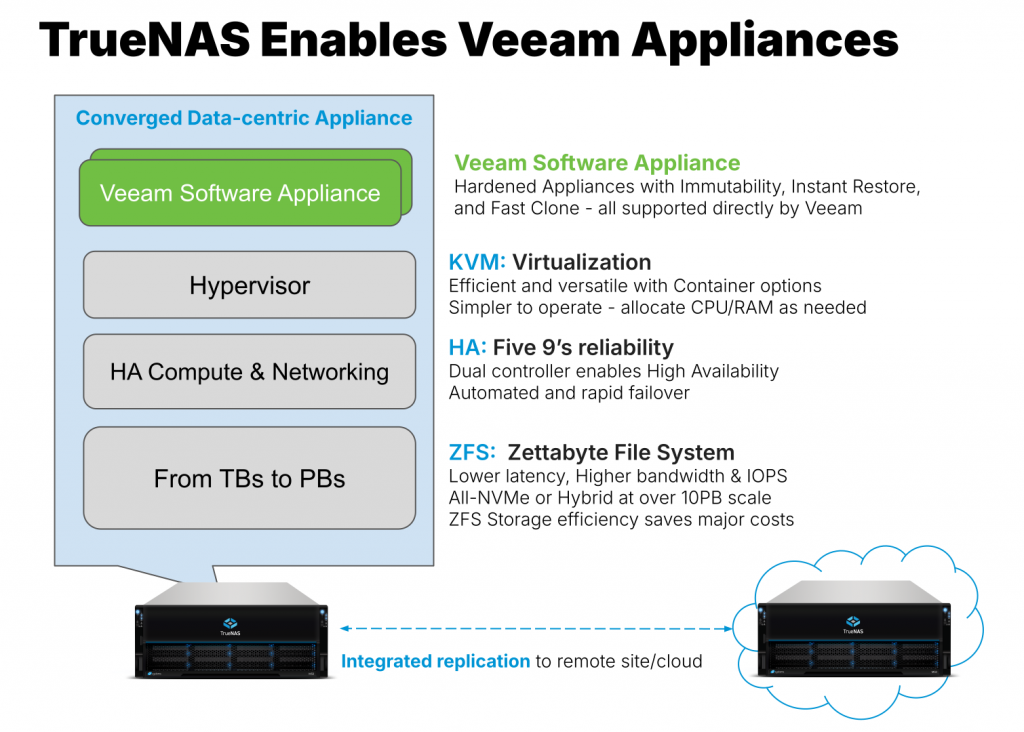
Direct Storage Access for Better Backup Performance
With the new Linux-powered Veeam software running directly on your TrueNAS appliance, Veeam sends its data streams directly from the backup source, eliminating the overhead of network-based file or block protocols. Write directly to your repository to shrink your backup window, and restore back faster than ever. When recovery time has to be as short as possible, Veeam’s Instant Restore functionality allows you to run a VM from its backup state. With TrueNAS running the Veeam Infrastructure Appliance right next to the storage, you can skip the network traffic and restore a VM on the same storage it’s being backed up to, cutting the startup time down to a minimum.
Reduce your Infrastructure Overhead
By consolidating your Veeam components onto TrueNAS appliances, you can shrink the overall footprint of your backup architecture. You no longer need a separate virtual machine or physical host to run your Veeam environment, saving you on power, cooling, and complexity – translating into superior TCO. The Veeam Infrastructure Appliance includes support for Veeam Fast Clone, allowing you to shrink your logical backup footprint as well. Store multiple full copies of data with minimal overhead, leveraging fast file clones and copy-on-write architecture to achieve massive levels of data reduction. With fewer moving parts and consolidated hardware, day-to-day operations and monitoring become more streamlined, and replacing dedicated servers with the Veeam Appliances can provide reductions in licensing costs to help your bottom line.
Lock Down without getting Locked Out
When deployed on TrueNAS appliances, the new Veeam v13 Software Appliances are hardened to DISA STIG standards. Coupled with zero-trust access controls, and automatic patching through Veeam directly, keeping up to date is a snap. The hardened Veeam Infrastructure Appliance also includes built-in support for immutable backups, allowing you to protect your valuable repositories from accidental or malicious deletions by determined attackers.
New Design – Same Rock-Solid Reliability
The new Veeam appliances inherit the same powerful data protection features from TrueNAS as the traditional backup model. Our end-to-end checksums and self-healing file system ensure your backups are as pristine as the day you made them, and the included snapshot and replication features make sending a copy of your data offsite easier than ever. The adaptive caching in TrueNAS improves performance for enhanced Veeam reliability features such as SureBackup, ensuring that jobs running in your Veeam Virtual Lab execute quickly and cleanly.
Get Started with Veeam v13 and TrueNAS Today
If you’re already familiar with Veeam, you can get started by following the instructions on the TrueNAS Documentation Site for either the Veeam Software Appliance or Veeam Infrastructure Appliance to configure a Virtual Machine in TrueNAS to act as either a brand new instance of Veeam or as a hardened backup repository. Deploying the Veeam v13 Software Appliances requires TrueNAS 25.04.2 or later for single-controller TrueNAS systems, and TrueNAS 25.10.1 or later for dual-controller TrueNAS systems with High Availability. You can upgrade your TrueNAS installation from within the appliance itself, or for supported Enterprise users, by contacting our Support team directly to schedule an appointment for assisted installation. TrueNAS appliances with Veeam Ready Repository qualification are available now, ready to integrate with your existing backup environment or serve as the foundation for a refreshed one. With optional cloud tiers to complete your offsite backup, TrueNAS helps you easily achieve your cybersecurity compliance requirements and protect your valuable data. Please contact the TrueNAS team for consultation or to get a quote.
Built to Fit your Needs
Just like businesses, TrueNAS appliances come in all sizes – from small, ready-to-ship units with a few dozen terabytes, all the way to multi-petabyte repositories ready for your toughest workloads. Check out our line of TrueNAS Enterprise systems, or give TrueNAS Community Edition a trial run to see what the world’s most deployed storage software can do for you. Whether you’re a small business or a member of the Fortune 500, the new Veeam Software Appliance and Infrastructure Appliance running on TrueNAS can help you build an all-in-one backup platform, keeping your data safe and your business protected. Reach out to our sales team today and find out how the unified storage of TrueNAS can help you and your business take control of your storage.
**
Glossary **** **
TrueNAS Data Hypervisor The virtualization and container platform built into TrueNAS that lets you run virtual machines and containers directly on the storage appliance, including the Veeam Software and Infrastructure Appliances. Veeam v13 Software Appliance A Linux‑powered virtual appliance version of Veeam Backup & Replication that runs directly on TrueNAS as a VM. It provides backup and recovery services without requiring a separate Windows or hypervisor host. Learn more in the Veeam Software Appliance documentation. Veeam v13 Infrastructure Appliance A hardened Veeam appliance that runs alongside storage on TrueNAS and acts as a backup repository, enabling fast restore, Instant Restore, Fast Clone, and immutable backups for cyber‑resilient architectures. Learn more in the Veeam Infrastructure Appliance documentation. Immutable Backups Backups that cannot be modified, encrypted, or deleted for a defined retention period. On TrueNAS with Veeam v13, immutability helps protect backup repositories from ransomware, accidental deletions, and malicious changes. Veeam Fast Clone A Veeam feature that uses copy‑on‑write and file‑cloning capabilities to create multiple full backup copies with minimal extra storage. On TrueNAS, Fast Clone reduces the logical backup footprint and improves backup and restore efficiency.