Budgie 10.10 is a brand new release series for Budgie Desktop, marking our first release to migrate Budgie from X11 to Wayland. This release series brings to a close just over a decade of Budgie 10 development; we are formally putting Budgie 10 into maintenance mode to focus our efforts on Budgie 11.
Waylandifying Budgie Desktop
Fundamentally, the experience of using Budgie Desktop under Wayland remains the same as it was under X11. You still have your applets, panels, and Raven, along with desktop icons provided by Budgie Desktop View. Your keyboard shortcuts remain familiar. The team has put extensive effort into ensuring that the transition to Wayland is as seamless as possible for end users.
Leveraging the Wayland Ecosystem
At its core, the goal of Budgie 10.10 i…
Budgie 10.10 is a brand new release series for Budgie Desktop, marking our first release to migrate Budgie from X11 to Wayland. This release series brings to a close just over a decade of Budgie 10 development; we are formally putting Budgie 10 into maintenance mode to focus our efforts on Budgie 11.
Waylandifying Budgie Desktop
Fundamentally, the experience of using Budgie Desktop under Wayland remains the same as it was under X11. You still have your applets, panels, and Raven, along with desktop icons provided by Budgie Desktop View. Your keyboard shortcuts remain familiar. The team has put extensive effort into ensuring that the transition to Wayland is as seamless as possible for end users.
Leveraging the Wayland Ecosystem
At its core, the goal of Budgie 10.10 is to offer a similar, if not better, experience than what users expect from Budgie Desktop under X11. Rather than reinventing the wheel, we focused on integrating well-established and well-loved Wayland tools to create a more cohesive experience. These tools enable us to seamlessly implement a wide array of functionality:
- Screenshots: Functionality is powered by grim and slurp for capturing images and selecting screen regions.
- Screen Locking and Idle Management: We have integrated swayidle, gtklock or swaylock, and wlopm. These modern solutions leverage the
ext-session-lockprotocol, and Budgie Screensaver (our fork of gnome-screensaver) is now considered deprecated. Your screen will automatically dim and lock after inactivity, and manual locking is supported at any time. - Desktop Backgrounds: Handled by swaybg to ensure wallpapers display correctly under Wayland.
- Application Integration: Uses XDG Desktop Portals xdg-desktop-portal-gtk for most tasks and xdg-desktop-portal-wlr for screenshots and ScreenCasts. This enables applications to request screen sharing in a secure, standardized way.
For display configuration, we recommend pairing Budgie 10.10 with wdisplays to manage multiple monitors and resolutions. Our new Budgie Desktop Services (written in Qt6 and C++) automatically saves your settings so they persist across sessions. This component will serve as the "beating heart" of Budgie 11; for Budgie 10.10, its primary focus is enabling persistent display configuration.
Compositor Recommendation and Bridge
For Budgie 10.10, we recommend the use of a wlroots-based compositor. The team has put special effort into enabling a great experience with labwc, a modern, lightweight, and feature-rich Wayland compositor perfectly suited for Budgie Desktop. We have achieved this by implementing a "labwc bridge" that automatically configures labwc with (in our opinion) sensible defaults. It mirrors settings from Budgie Control Center and Budgie Desktop Settings to labwc-specific configuration files in ~/.config/budgie-desktop/labwc (while also supporting XDG_CONFIG_HOME). This bridge enables:
- Default keyboard shortcuts for essential actions like opening the Budgie Menu, Raven, the Budgie Run Dialog, workspace switching, and screenshotting.
- Input acceleration for both touchpads and mice.
- Consistent theming for fonts, drop shadows, and title bar layouts.
- Specific window rules for the desktop, power dialog, and budgie-daemon.
- Window management features like snapping and a window switcher with thumbnails.
Beyond our recommended default of labwc, the move to Wayland represents a fundamental architectural shift. This shift to a protocol-first architecture represents a major milestone: it decouples the desktop from a specific window manager (budgie-wm, which in turn relied on our fork of Mutter called Magpie), and makes Budgie truly compositor-agnostic, opening the door for experimentation with alternative compositors beyond our primary recommendations. To support this flexibility, Budgie 10.10 relies on several Wayland protocols across its use of budgie-desktop-services, gtk-layer-shell and libxfce4windowing. While other compositors remain less tested by the team, any compositor implementing the following protocols could, in principle, power a Budgie session:
- ext-workspace-v1
- wlr-foreign-toplevel-management-unstable-v1
- wlr-layer-shell-unstable-v1
- wlr-output-management-unstable-v1
- xdg-output-unstable-v1
This protocol-first approach ensures Budgie remains flexible and interoperable within the broader Wayland ecosystem as we move toward Budgie 11.
Applet Updates
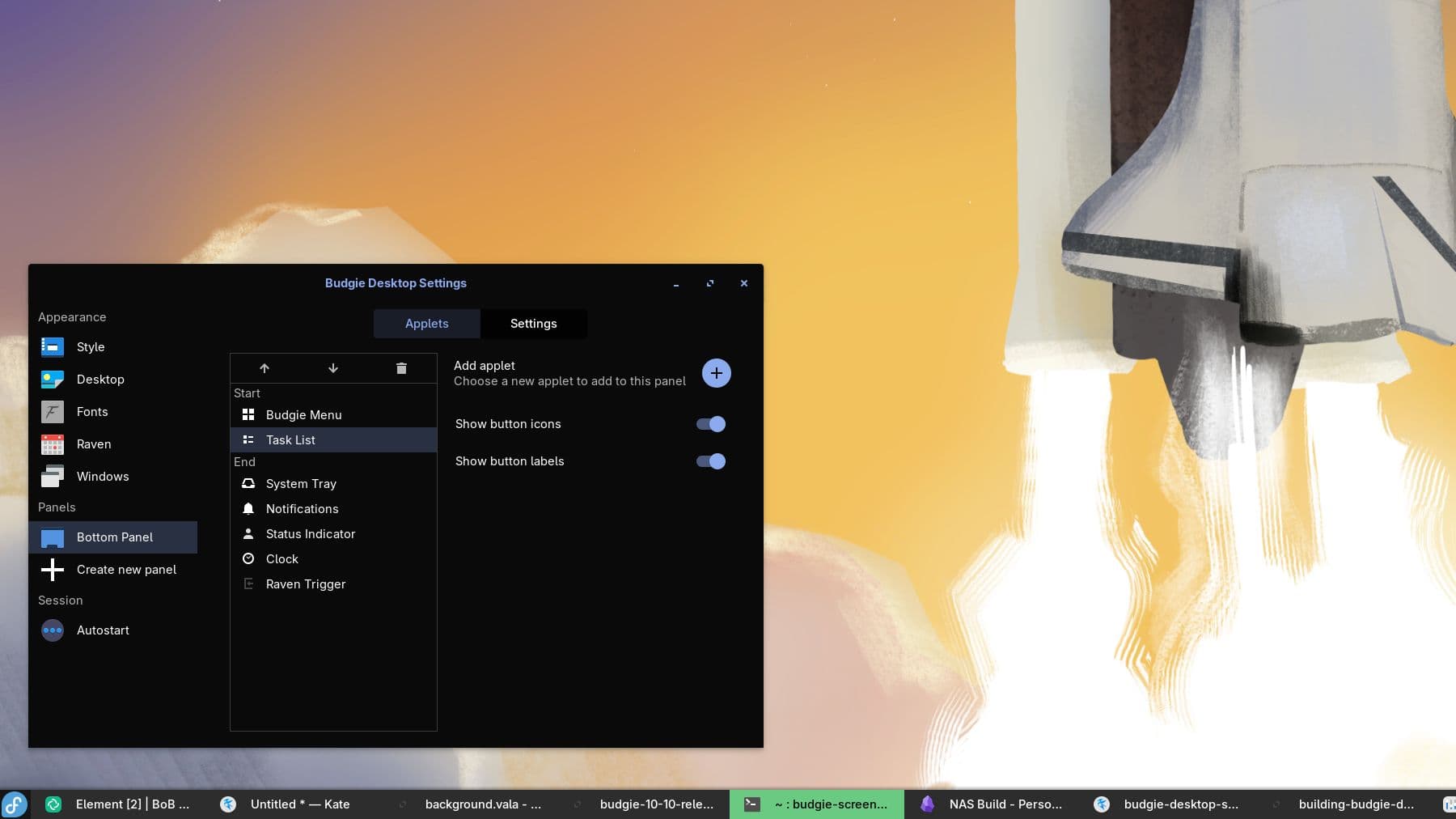
Many applets required updates for Wayland, and we took the opportunity to provide new features and visual improvements:
- IconTasklist: Our IconTasklist applet received numerous bug fixes and improvements to its use of libxfce4windowing, at least compared to work we had already done in Budgie 10.9 for moving IconTasklist to libxfce4windowing. We also renamed the applet’s popover class to ensure hybrid use of IconTasklist and legacy Tasklist do not trigger PopoverManager conflicts.
- Night Light: The Night Light applet now integrates with gammastep to control your display’s color temperature, reducing eye strain during evening hours or after a long day of work.
- Notifications: You can now toggle Do Not Disturb mode by middle-clicking the Notifications applet icon.
- Tasklist: Our more "legacy" style Tasklist saw a complete rewrite, moving away from merely being a
WnckTasklist to a more modern implementation that is built on top of libxfce4windowing. The new Tasklist scales better with many applications, including dynamic button sizing and dynamic scrolling (left and right navigation buttons also appear for more ease-of-use). - Workspaces: Improved reliability when new windows are opened and made the add workspace button more reactive.
Panel Updates and Improvements
budgie-panel now leverages layer-shell to anchor itself to the screen edges. We also improved the logic for start, center, and end sections to dynamically calculate heights / widths (depending on orientation), ensuring inner applets like the legacy Tasklist trigger overflow behavior correctly.
Other Component Updates
Our budgie-desktop was not the only component that received updates to enable Wayland support!
Budgie Desktop View
Budgie Desktop View now supports Wayland, leveraging layer-shell to ensure it remains positioned behind windows, Raven, and the panel.
Budgie Control Center
A new version of Budgie Control Center ships with this release, featuring several changes:
- Hides the existing Color panel, as it applied specifically to the X11-era Budgie WM/Magpie.
- Makes the Bluetooth panel optional to accommodate distributions deprecating older
gnome-bluetoothlibraries. We recommend distributions ship Bluejay. - Adds visibility checks to various panels.
- Introduces Wayland support for the Multitasking panel.
- Uses keyfiles to customize what BCC shows for window managers like labwc.
- The screen lock settings has been moved to Privacy -> Screen Lock.
- Nightlight has been moved to its own panel.
- We now support a number of Accessibility options including a working magnifier.
- Adjusted AppStream metadata to improve visibility in various software centers.
Budgie Session
Budgie Session now includes a Wayland compositor check executable to test if a compositor is started before firing off parts of our session.
Distribution Availability
Budgie 10.10 will ship in the upcoming releases of Fedora (Fedora 44) and Ubuntu Budgie (Ubuntu 26.04). It will gradually become available in other distributions as packagers adopt the new release.
Farewell, Budgie 10
Budgie 10.10 marks the final major release for the 10.x series as we transition it into maintenance mode. While our primary development focus shifts toward the future with Budgie 11, you can count on us to provide continued bug fixes and refined Wayland support for Budgie 10 as we develop the next generation. After more than a decade of development, we are ready to build the future of the Budgie Desktop. We would love for you to follow along—stay tuned for regular updates on our social channels and Matrix space as we bring Budgie 11 to life. Special thanks to everyone who has contributed to making this monumental release possible, and to those who have dedicated time and effort to Budgie Desktop over the years. We couldn’t be more delighted to not only close this chapter of Budgie’s history but to start writing the next one together.
Supporting The Project
Did you know that you can financially support the Buddies of Budgie project? Buddies of Budgie was founded to provide a home for Budgie Desktop and your financial contribution can go a long way to supporting our goals for development, providing opportunities for financial compensation, leveraging no-compromise Continuous Integration and Continuous Delivery systems for streamlining Budgie 10 and 11 development, and more