I migrated cursor.com from a CMS to raw code and Markdown. I had estimated it would take a few weeks, but was able to finish the migration in three days with $260 in tokens and hundreds of agents.
Content is just code
I was eating lunch with Roman and Eric at Cursor and we started talking about the cursor.com website. We recently shipped a redesign, and as part of that change, all content and web pages were now built through a headless CMS.
We went around the table airing our grievances. The CMS wasn’t working. We had this beautiful new website design and yet it felt more difficult than ever to ship new content.…
I migrated cursor.com from a CMS to raw code and Markdown. I had estimated it would take a few weeks, but was able to finish the migration in three days with $260 in tokens and hundreds of agents.
Content is just code
I was eating lunch with Roman and Eric at Cursor and we started talking about the cursor.com website. We recently shipped a redesign, and as part of that change, all content and web pages were now built through a headless CMS.
We went around the table airing our grievances. The CMS wasn’t working. We had this beautiful new website design and yet it felt more difficult than ever to ship new content.
Previously, we could @cursor and ask it to modify the code and content, but now we introduced a new CMS abstraction in between. Everything became a bit more clunky. We went back to clicking through UI menus versus asking agents to do things for us.
With AI and coding agents, the cost of an abstraction has never been higher. I asked them: do we really need a CMS? Will people care if they have to use a chatbot to modify content versus a GUI? We could eliminate so much complexity if we just went back to the raw code.
Roman asked me how long it would take to migrate from the CMS back to code. My quick estimate was 1-2 weeks and we’d probably hire an agency to help with it. Maybe I just haven’t updated my timelines for the current state of AI, but I decided to try creating a plan in Cursor for how to migrate and then kicking off an agent to take a first pass. I was surprised by how far it got, although there was clearly much more work to do.
It was enough to nerdsnipe me into taking on the migration. Here’s how I ended up migrating the site over the course of a weekend.
Removing complexity
The Cursor website is a standard Next.js and React app.
The new version was built on top of a CMS so that non-developers could build marketing pages and writers could add new blog posts. Again, using a CMS is pretty standard for most sites.
For many teams, the cost of the CMS abstraction is worth it. They need to have a portal where writers or marketers can log in, click a few buttons, and change the content. It’s been like this since the dawn of time (WordPress).
What is under discussed is the amount of technical complexity needed to integrate a headless CMS well into a modern website. I’m familiar with all the products and solutions, and yes some do a very good job of hiding that complexity! It’s still there though, even if behind an npm package.
Here’s a short list of the hidden complexity. If you’re not as interested in the technical details, you can skip over these:
1. User management
The first and most immediate issue is having user management in multiple places.
In a world where designers are developers, it’s not a stretch to have your marketing team in GitHub as well. You already have GitHub SSO and RBAC set up anyway.
New team members would try to make a change to the site, and then have to ask “can I get added to the CMS please?”. Yes, Enterprise tiers and SCIM can solve this, but… complexity.
We added our marketing team to GitHub instead. One account management system.
2. Previewing changes
You want to have a really fast marketing site, right?
That means you would ideally prerender as much as possible ahead of time, so you don’t make your visitors compute a new version of the page on every visit. Yes, I know, caching. Prerendering is a form of caching.
Speaking of removing complexity, a statically prerendered page removes a ton of operational complexity. You don’t want your marketing site going down when the CMS has a blip in availability. So, we want static pages.
Having your cake (static pages) and eating it too (using a CMS) is doable but just… kind of annoying? In Next.js, you have draft mode. There’s even a great integration with Vercel where you can toggle into draft mode from the Vercel toolbar. This allows you to dynamically fetch the latest content from the CMS (e.g. a server-side render) when you are making changes to your site, while still keeping production fast and statically rendered. Great!
But this is eating a lot of the complexity budget. Now if you want people to view URLs of draft content, they need to be logged into Vercel or have Vercel accounts. Again, doable, but now we’re in another Enterprise and SCIM account management solution.
When the content is code, you can create a PR, get a link with your changes, and share it with anyone. No login is required. Simplicity.
3. Internationalization
If you want to have a marketing site with localized content and routes, then your app needs i18n support. There’s a sneaky amount of complexity here, but it’s usually worth it for a better user experience.
There’s a number of new tools which take your source code and content, and then use AI during the build step to automatically generate the localized translations. You can provide rules and tweaks to make sure things are correct for each language, and then there’s a locking mechanism so you don’t have to re-do that work every time.
This is actually fairly smooth! We had taken this approach to translate our docs to many languages. Now, with a CMS, it gets complex again. We actually had to hire contractors to help build a plugin system for the CMS to work with our localization tool, as the open-source variants were not robust enough.
Let’s say you have a blog post /blog/2-0. This is a piece of content in the CMS. You then need to have a different variation for each language, leading to a bunch of items in the CMS. You also need to figure out the publishing process to automate generating the different translated copies. We got it to work, but it was painful.
You know what’s easier? Define the source in code, and then use compilers and AI.
4. CDN and asset delivery
We’re deconstructing a CMS from first principles at this point.
User management, content management, and… asset management. Blogs and web pages almost certainly require images and videos, so a large piece of a CMS is to upload and store assets in the cloud.
CMS providers also then serve as a CDN for delivery of static assets. You can, of course, use yet another SaaS product only for asset management (e.g. Cloudinary). But most people just use the CMS, and this is also where a lot of their usage revenue comes from.
After launching our CMS-backed website a few months ago, we had been serving a blog, changelog, and webpage assets from the CMS and its CDN. We started incurring usage pricing for:
- Bandwidth
- API requests
- CDN requests
We spent $56,848 on CDN usage since launching in September. The Cursor site is popular, but… obviously this doesn’t make sense. There are plenty of ways to serve assets at more affordable prices. You are paying a hefty markup for the convenience of the GUI.
Instead, we decided to host assets in object storage ourselves, and build a small GUI where we can upload, manage, and delete assets. This took only a few prompts.
5. Dependency and abstraction bloat
Using a CMS requires using whatever bespoke format they use for storing and rendering content. At the end of the day, it all turns into the same DOM elements and images.
Our codebase had become bloated. It’s not only the fault of the CMS, but it can lead to over abstraction. The code was harder to maintain, and worse, hard to keep in your head.
I’ll give you an example. You have a navbar.tsx and footer.tsx, which derive their content from the CMS. As a side note, how often are you really changing this content to where you can’t just edit the code!?
Okay, getting back on track… this is what the code might look like:
export default async function Navbar() {
const data = await fetchFromCMS('navigation');
return (
<nav>
<ul>
{data.map((item) => (
<li key={item.id}>
<Link href={item.url}>{item.label}</Link>
</li>
))}
</ul>
</nav>
);
}
You go over the network, probably in some special query syntax, to get back some JSON.
You (and AI agents) can’t just look at the code and tell what the navigation items are. Agents can’t use their tools to grep and edit the code. That network boundary is costly.
Let’s remove some complexity and inline the items.
const navItems = [
{ id: '1', label: 'Home', url: '/' },
{ id: '2', label: 'Docs', url: '/docs' },
{ id: '3', label: 'Features', url: '/features' },
{ id: '4', label: 'Enterprise', url: '/enterprise' },
];

export default function Navbar() {
return (
<nav>
<ul>
{navItems.map((item) => (
<li key={item.id}>
<Link href={item.url}>{item.label}</Link>
</li>
))}
</ul>
</nav>
);
}
This is definitely better, but it’s also one of my personal React gripes: turning everything into an array and then mapping over it. You already have a self-contained component. Just render the JSX. This becomes increasingly important when using Tailwind, because it is often nice to duplicate the styles (copy-paste is better than the wrong abstraction).
export default function Navbar() {
return (
<nav className="flex">
<ul className="flex space-x-4">
<li>
<Link className="px-3 py-2 hover:text-primary" href="/">
Home
</Link>
</li>
<li>
<Link className="px-3 py-2 hover:text-primary" href="/docs">
Docs
</Link>
</li>
<li>
<Link className="px-3 py-2 hover:text-primary" href="/features">
Features
</Link>
</li>
<li>
<Link className="px-3 py-2 hover:text-primary" href="/enterprise">
Enterprise
</Link>
</li>
</ul>
</nav>
);
}
If you want to change the navigation, it is a single coding agent prompt away: “change from /features to /contact-sales". Again, it’s not only the fault of the CMS for this code smell, but during this refactor I was able to prompt and clean up a lot of this mess.
Doing the migration
I created a plan with Opus 4.5. Cursor returned with a few clarifying questions.
It suggested something which was obvious but I didn’t immediately think of. We already have an API key to fetch content from the CMS. Rather than fumbling through menus to download things, we can create a series of scripts to export the content, validate the structure, convert it into markdown and files in the repository, and then upload the images and videos to object storage.
I got 80% of the way there with probably 10 agent runs. Cursor installed and removed dependencies, ran scripts, and built out pages and pages of content. However, as with most things in engineering, that last 20% takes most of the time. But it was too late, I was already nerdsniped. I needed to complete the task.
Some of the pages were not an exact match, so I ran this agent on every page:
The /features page is not a perfect match to production. Review how we exported CMS data for the home page, and re-export the full contents of the features page, including all sub-components, images, and backgrounds.
Use the @browser to take screenshots and keep iterating until the local version is a perfect match. The first attached image is local, second is production.
Once I started kicking off agents, I started doing a much more broad refactor of all the codebase patterns that were annoying. It was also a nice chance to use subagents (coming in the next version). I worked with Opus to create a plan for the API shape I wanted, and then asked Cursor to run subagents to make the changes in many different call sites in parallel. Much faster!

Happy little accidents
I was so excited to remove complexity that I also deleted Storybook entirely.
Storybook has some nice features but we were barely using it. Plus, with the Cursor browser and being able to visually edit things, I don’t really see the value as much anymore.
Plus, that’s a lot of dependencies being downloaded and installed on every machine and CI run, when I could instead build this simple version very quickly.

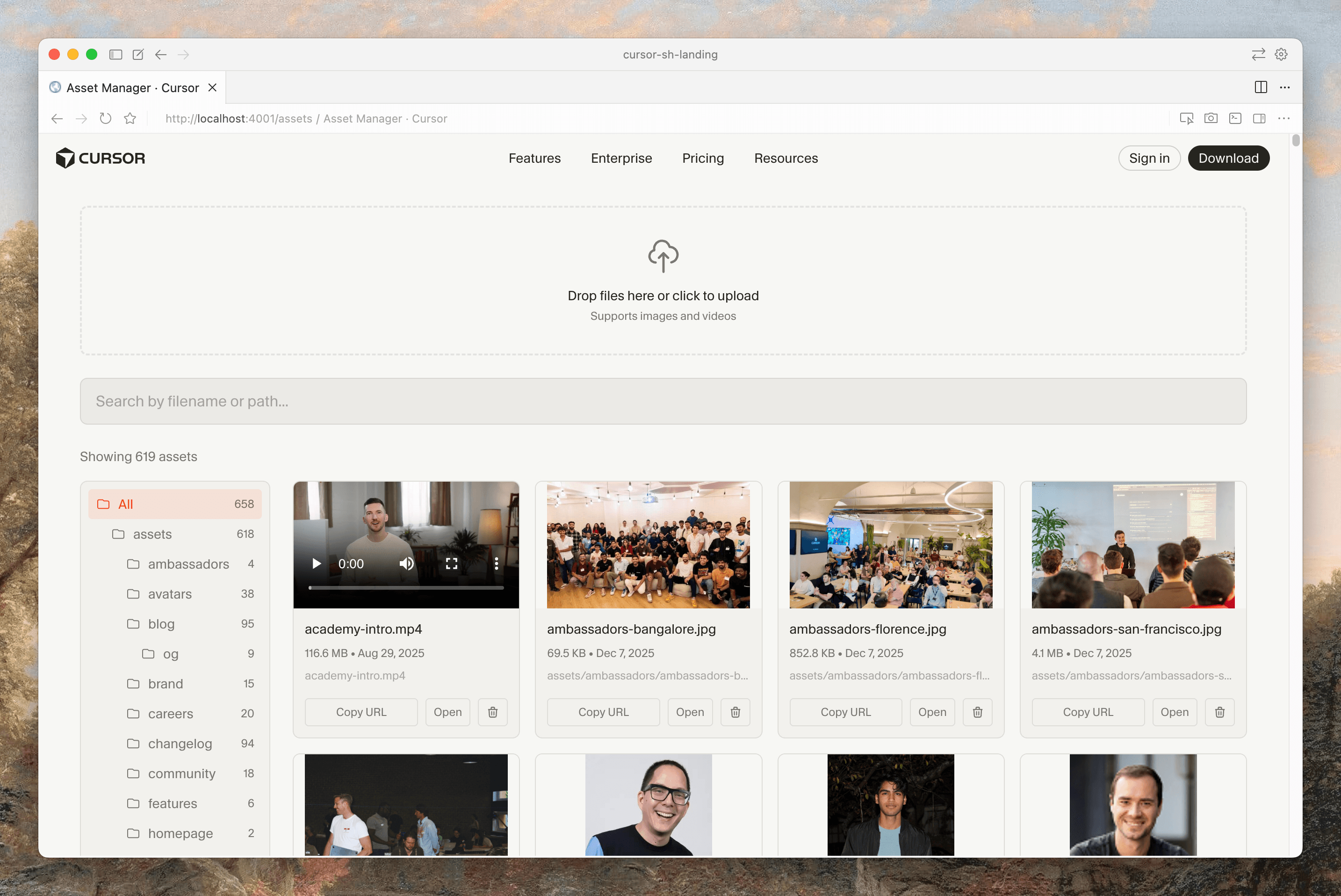
I also still wanted to have a GUI for managing assets on top of object storage. This was 3 or 4 prompts with the agent to get something decent and workable. It’s the minimum viable feature set. Sure, there’s a lot more it could do, but I don’t need that.
Another benefit of having your content in code is that all changes flow through git. This was nice in the past (for reverts or figuring out who changed things) but is incredibly helpful for coding agents to dig through autonomously.
Results
This is mind-blowing to me. Cursor wrote a script to use our APIs and calculate the usage:
- $260.32 and 297.4M tokens (mostly cached)
- 344 agent requests
- 66 manual Tab changes
- 67 commits (+43K / -322K lines)
What I previously thought would take weeks and maybe an agency to help with the slog work was done in $260 of tokens (or one $200/mo Cursor plan).
More importantly, the migration has already been worth it. The first day after, I merged a fix to the website from a cloud agent on my phone. The next day, an engineer shipped a feature across the product and marketing site in the same PR.
We’re saving thousands of dollars in CDN usage by moving to lower cost object storage. As a side effect, build times are 2x faster by cutting out network I/O going to the CMS when prerendering pages.
The cost of abstractions with AI is very high. Over abstraction was always annoying and a code smell but now there’s an easy solution: spend tokens. It was well worth the money to delete complexity from our codebase and it already paid for itself.
Imagine what this story would look like across the entire economy. Coding agents are helping teams try their wildest ideas, and fix tech debt that was buried deep in the backlog. I’m excited for a world of abundant, high-quality software, and hope that Cursor can continue to play a role in making it happen.