Most companies that employ me, hand me a “work laptop” as I enter the building. Of course, I do not install personal software and keep a clear division between my “work like” and my “real life.”
However, I also don’t like to carry two computers just to jot down personal notes. My remedy is to install a virtualization system and create a “personal” virtual machine. (Building cloud software as my day job means I usually have a few VMs running all the time.)
Since I want this VM to have minimal impact on my work, I base it on a “Server” version of Ubuntu. however, I like some graphical features, so my most minimal after market installation approach is:1
sudo apt-get install -y xinit
Since most of what I do is org-mode work, the next step is:
sudo apt-g...Most companies that employ me, hand me a “work laptop” as I enter the building. Of course, I do not install personal software and keep a clear division between my “work like” and my “real life.”
However, I also don’t like to carry two computers just to jot down personal notes. My remedy is to install a virtualization system and create a “personal” virtual machine. (Building cloud software as my day job means I usually have a few VMs running all the time.)
Since I want this VM to have minimal impact on my work, I base it on a “Server” version of Ubuntu. however, I like some graphical features, so my most minimal after market installation approach is:1
sudo apt-get install -y xinit
Since most of what I do is org-mode work, the next step is:
sudo apt-get install -y emacs
I have played with a lot of window managers, and while some claim to be unobtrusive and minimal2, I really just want Emacs in full-screen mode (utilizing all screen estate possible).3
To accomplish this, I create an .xinitrc file that contains only:
exec emacs
That’s right, folks, Emacs is my window manager. I add the following to my Emacs init.el script:
(set-frame-parameter nil 'fullscreen 'fullboth)
And now I can split the screen into windows, launch programs– even edit files– all without fondling the mouse, and since Emacs is in its graphical mode, I can use my favorite fonts, decorate the fringe, etc.
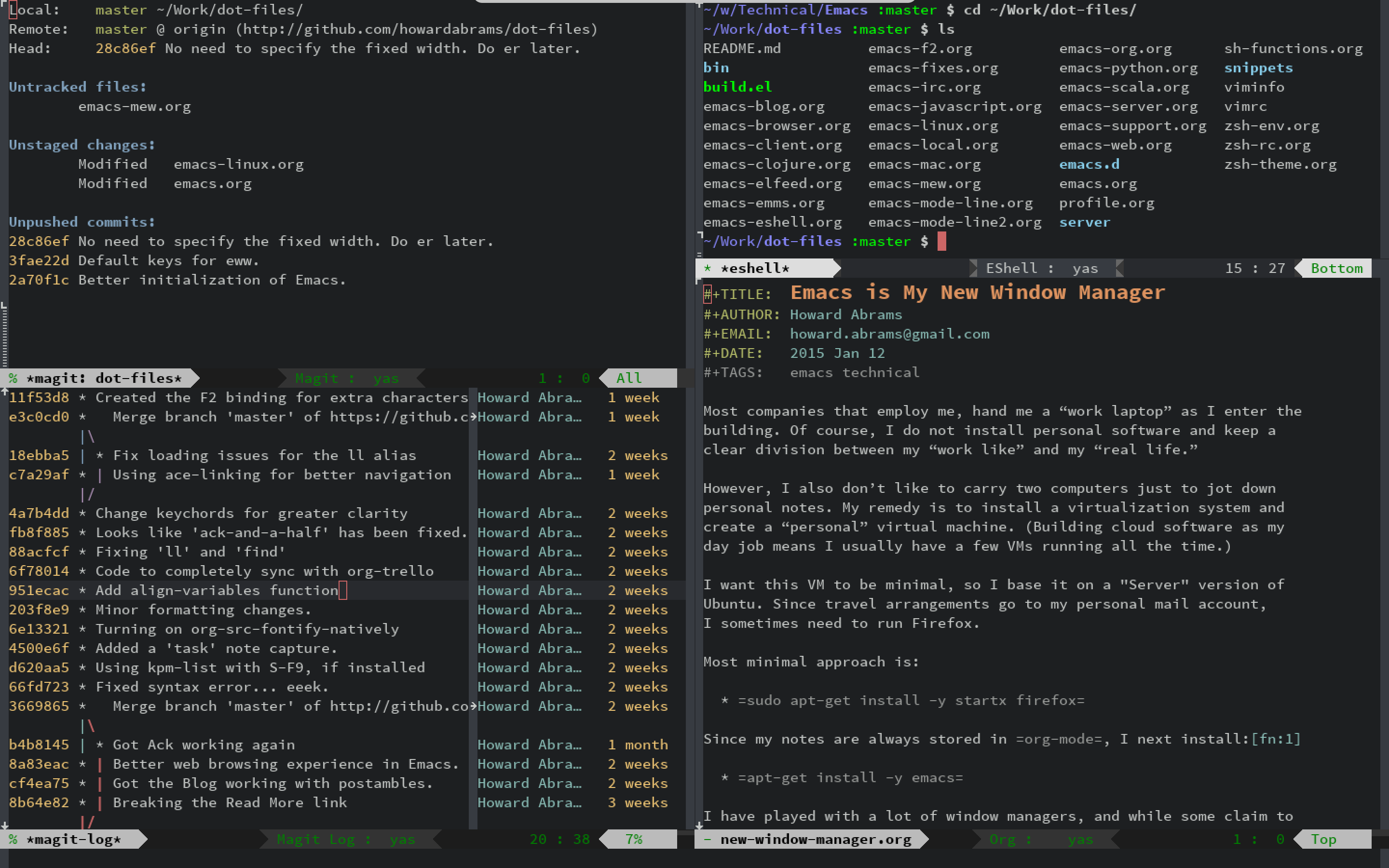
If I need a program that doesn’t run well within Emacs, I can call xterm (or any other application) with M-! xterm.
Web Browsing
Unlike the previous century, this century has been defined by web applications. Most of my web efforts are looking up code documentation and other technical resources, and this is good using a text-oriented browser like w3m or eww embedded within Emacs.
Whenever a page doesn’t render well (can you say JavaScript), I can hit the & key to bring up a web browser.4. You can kick off a graphical browser to a specific URL by binding a function that calls this:
(start-process "" nil "xdg-open" "http://mail.google.com")
Keep in mind, running X window applications without a real window manager will overlay Emacs, which is only an option if the window is temporary. When closed, you are back to Emacs:
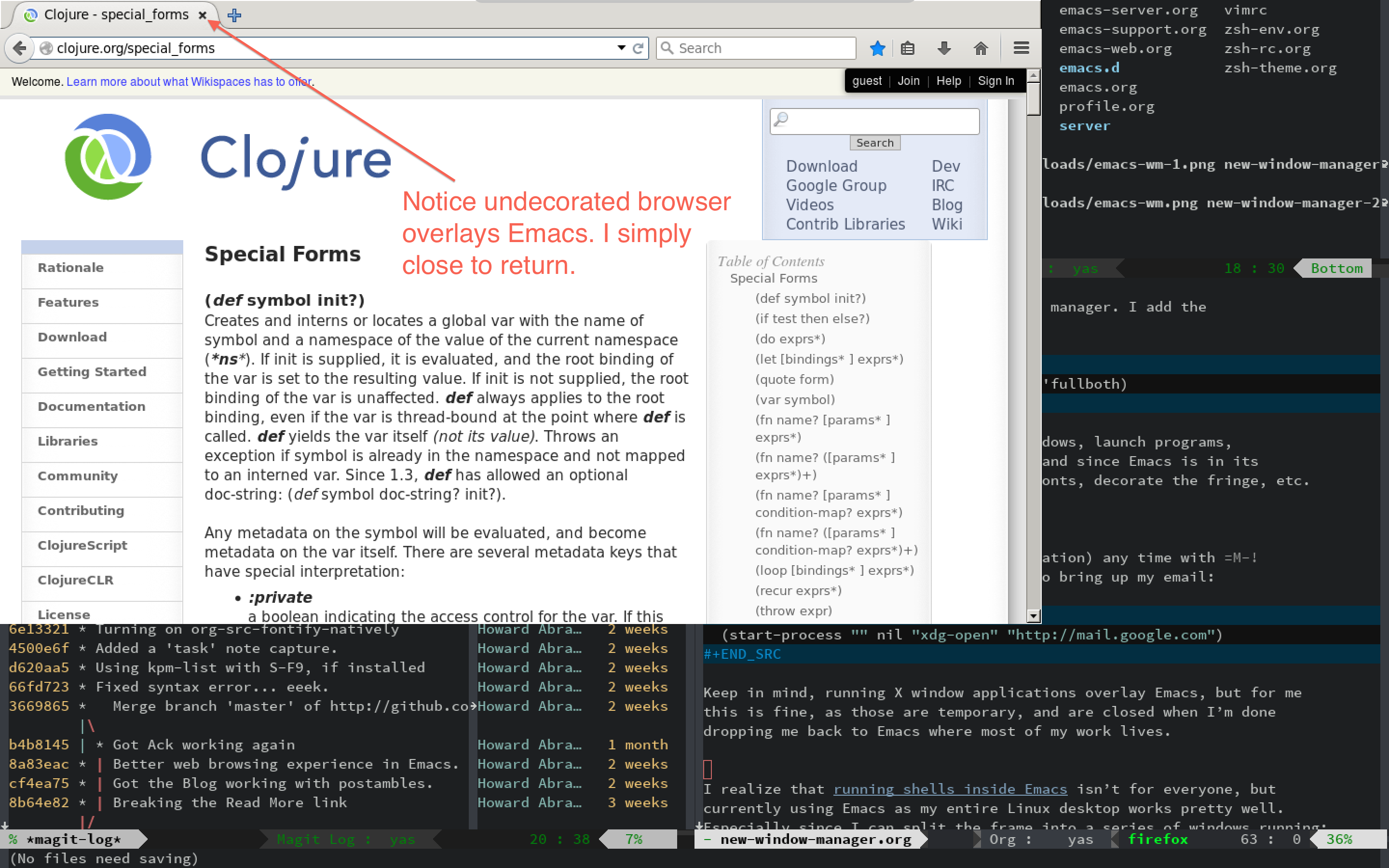
Update: Since I wrote this section, a number of people have mentioned some light-weight window managers. If you need to use a browser, but still want Emacs to utilize every possible pixel, the best seems to be Ratpoison5 (with DWM a close second).
Other Applications
I realize that running shells inside Emacs isn’t for everyone, but currently using Emacs as my entire Linux desktop works pretty well. Especially since I can split the frame into a series of windows running:
I use a function to start my favorite time-sinks…er, applications, at one time:
(defun setup-windows ()
"Organize a series of windows for ultimate distraction."
(interactive)
(delete-other-windows)


(sx-tab-frontpage t nil)


(split-window-horizontally)
(other-window 1)
(circe-connect-all)


(split-window-vertically)
(elfeed)


(other-window 2)
(split-window-vertically)
(twit)

(window-configuration-to-register ?w))
The last line insert this “current” configuration in a register, so after stomping and stirring my windows, I return to this organization with C-x r j w.
Perhaps another screenshot of these results are in order:

Footnotes:
Since I use my virtual machine primarily to take notes, you’ll need to install ispell (or one of the variants):
apt-get install -y ispell
In order to install the VirtualBox extensions, do:
sudo apt-get install -y build-essential
sudo mount /dev/cdrom /mnt
sudo /mnt/VBoxLinuxAdditions.run
I always grin when I read the change log in the release notes of any window manager project. It begins by complaining that all other window managers are bloated, and that this one will be small and efficient.
As you follow the history of the project, the complaints that it needs to do launching menus, iconify windows with translucent images, docks and panels, and soon the project is just as big as the competition.
Not that there is anything wrong with that… Writing a window manager is a lot of fun.
While taking notes at a conference, a person sitting behind me asked me after the session what window manager I was using. I said this was just a normal Mac, but running Emacs in a full-screen mode with a couple org-mode files, an embedded w3m browser, and an Emacs-based twitter client.
By the way, to have EWW use Chromium, add this to your init file:
(setq shr-external-browser "chromium-browser")
Along with having the best name, the Ratpoison window manager is minimal and mouse-less (and even has a nice Info page), but its default escape key, Control-t is the transpose key in Emacs. To get around this and call Emacs’ transpose function, type C-t t. This is okay when swapping two letters, but now swapping lines is
C-x
C-t t
. Acceptable if I’m swapping only two lines, but I’m often swapping multiple lines–and now it is painful.
To make Ratpoison completely palatable with Emacs, make it use a Command key sequence (like the useless Command-t or whatever that Windows key is on other keyboard). To do this, simply add the following to your ~/.ratpoisonrc file:
escape s-t
Note: I’ve received many alternative solutions to the most minimal, mouse-less window managers, Josuah Demangeon suggested 2wm. While I still prefer ratpoison, his journey mirrored mine, so I thought I would attach his email…especially, since variety is the spice of it all, right?
TL;DR - 2wm is the most smallest tiling window manager
Your post inspired me, and I decided to look for the nimblest window manager that could make Emacs rocks on X11.
I had a look at tinywm, but it is entirely mouse-driven, but hacking it would be like write a window manager from scratch.
I had a look at evilwm, which is great, but I got difficulties to make it work as I wanted to.
I looked at dwm: a very good one by Suckless, with many features. Maybe a little too much, and it wouldn’t be like a bare Emacs experience with this wm. But after browsing a bit their website I found 2wm
2wm is a keyboard-controlled tiling window manager that attach and detach windows on a main or side frame. It also support floating.
For me, 2wm is the minimal gap between Emacs and X11, as well as the ultimate window manager!
If you want to give it a try have a look at my repo. I tweaked the key-bindings to fit Emacs.