- 25 Dec, 2025 *
I didn’t really plan it, but I’ve recently done a bit of a personal tech refresh. I got some new hardware, upgraded another device, and also switched up several of the software and services that I use.
This post will go over some of the big changes.
I started writing this post on December 6, but then I decided to change my tech stack again and I’ve been trying to catch up ever since. At this point I’m just trying to wrap up this post before it is out of date again.
Hardware
Framework Chromebook -> Framework 13
I’d been happily using a Framework Laptop Chromebook Edition as my primary compu…
- 25 Dec, 2025 *
I didn’t really plan it, but I’ve recently done a bit of a personal tech refresh. I got some new hardware, upgraded another device, and also switched up several of the software and services that I use.
This post will go over some of the big changes.
I started writing this post on December 6, but then I decided to change my tech stack again and I’ve been trying to catch up ever since. At this point I’m just trying to wrap up this post before it is out of date again.
Hardware
Framework Chromebook -> Framework 13
I’d been happily using a Framework Laptop Chromebook Edition as my primary computing device since early 2023. It was cool to get all the security and stability attributes of ChromeOS combined with plenty of processing oomph for actually Doing Work in the ChromeOS Linux Development Environment. At the time, I was still pretty active in the Google Product Experts community and enjoyed helping other Chromebook users get the most out of their devices. I especially loved helping users explore that Linux environment.
Things have changed in the almost three years since then though; technology has generally turned to shit as corporations raced to shove "AI" into every crevice and orifice, destroying jobs, user experience, intellectual property rights, and the planet in the process. I used to be excited about new tech and new features, but I’ve become increasingly discouraged1 as every "new feature" turns out to be "old feature but now with AI a predictive word extruder bolted onto it". Corpo innovation is dead, and it’s time to for me to move on.
To that end, I started looking for options to move away from ChromeOS and back to a "real" computer. The Framework hardware is pretty nice, though, and the whole point of it is that it can be repaired and upgraded. Of course, this was around the time that Framework decided that they wanted to welcome (and financially support!) far-right assholes in their big tent. It didn’t feel right to send them more of my money... but I didn’t want to just waste my existing hardware.
I did some looking around on eBay and managed to find the bits I needed to convert my Framework Chromebook into the more traditional Framework Laptop 13: a mainboard with a 12th-gen i7 (i7-1280P) and a US-layout input panel to replace the Chromebook-specific keyboard. Purchasing the parts secondhand meant that I could extend the useful life of my current laptop without directly supporting Framework.
The process of replacing the laptop’s mainboard was pretty simple2 thanks to the maintenance-friendly design. I think it took me about half an hour, and that includes the time spent finessing the wires for the wifi antenna back into their appropriate channels.
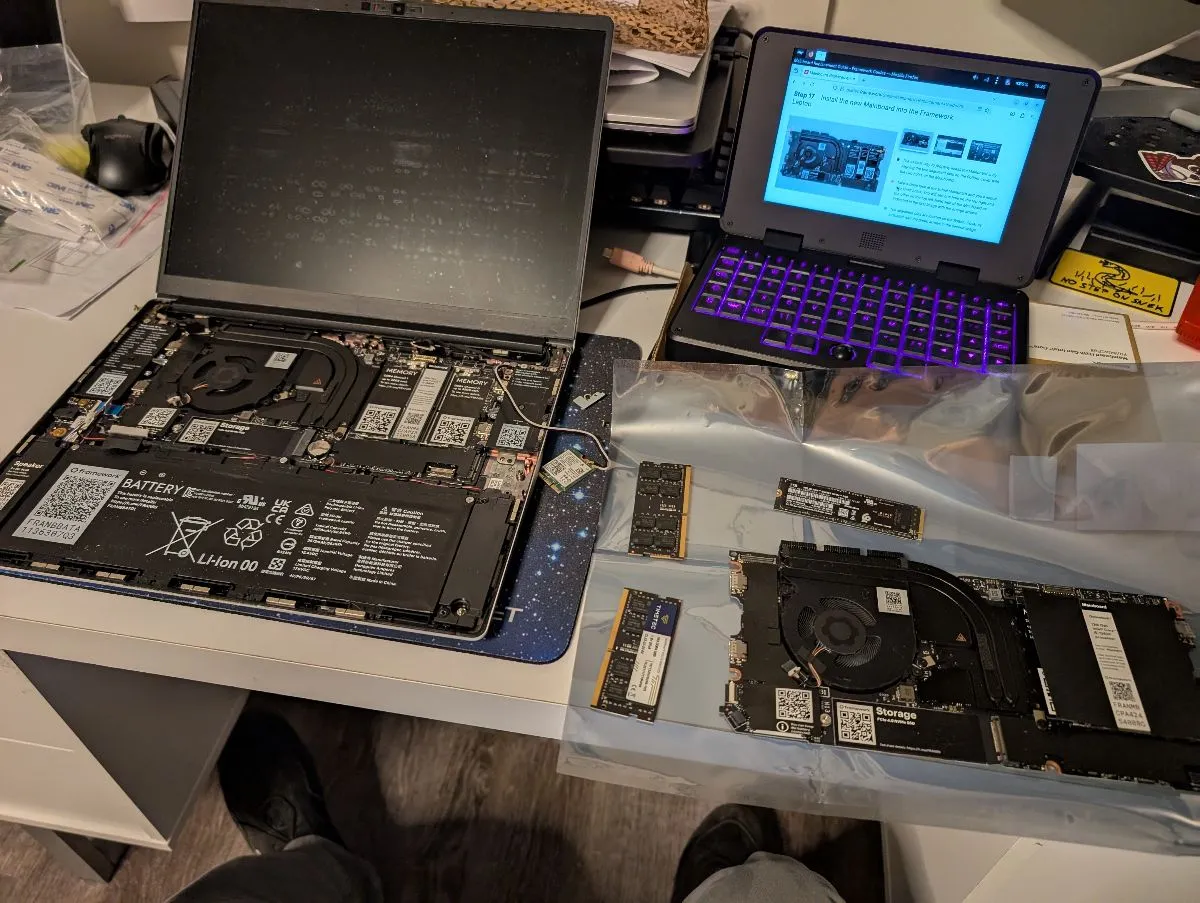
Even now, ~6 weeks on, I’m still struggling a bit with the Chromebook keyboard muscle memory3, but I’m otherwise enjoying the new setup. More on that in a moment.
MNT Pocket Reform
Sharp-eyed readers may have noticed another laptop chilling out in the photo4 showing the Framework surgery. That’s the tiny-but-thicc MNT Pocket Reform, an open-source open-hardware mini-laptop that’s designed to be modular, upgradable, and repairable. I opted for the first-generation Pocket Reform (equipped with the NXP i.MX8M Plus processor module) rather than the newer RK3588-equipped version primarily because it was available in-stock in the US without having to worry about our dumb tariff chaos or international shipping delays.
The Pocket Reform has a low-powered ARM64 processor, a small 7-inch display, a delightfully-clicky ultra-compact keyboard (with RGB lighting!), a cool optical trackball, and comes with a remarkably detailed Operator Handbook detailing how to use the thing. The handbook even includes schematics for basically every component in the device, and there are also details on how to interact with some of the components5. This is definitely a laptop made by hackers for hackers.
It runs Debian (unstable) with a good bit of customization for supporting the Pocket Reform’s hardware, and ships with a choice of graphical desktops, either Sway or GNOME. I started with Sway which was pretty cool, but honestly the tiling is a bit wasted on this tiny display; there’s just not much room for activities so I eventually decided that just sticking with GNOME (for familiarity and broader ecosystem support) and multitasking via workspaces fit my use case a bit better.
The Pocket Reform been a ton of fun for little bursts of computing while on the go6, and it was pretty perfect for use during some breakout sessions at KubeCon. While it doesn’t have a ton of computing power on its own, I was able connect back to my homelab (through the magic of Tailscale!) for running heavier workloads.
I may even eventually upgrade to the faster RK3588 chipset but for now the Pocket makes for a pretty great go-anywhere computing sidekick.
Software
ChromeOS -> NixOS
I had already been using Nix (the package manager) and Home Manager to maintain the user configuration within my Chromebook’s Linux environment, and I’d gotten pretty comfortable with that approach. So I decided to go all-in and load NixOS on the recently-transitioned Framework. The beauty of managing my dotfiles with Nix is that I was able to get most of my apps and preferences set up on the new system very quickly. I love having that kind of portability!
I spent weeks tinkering with my setup, slowly learning how to configure (and use) Sway more effectively. I added a bunch of plugins and utilities to really customize things, and slowly made it into a system that felt like home.
Of course, NixOS can be rather finicky. After a few weeks of daily-driving (and breaking) NixOS/Sway I started to realize that maybe I wanted an underlying OS with a bit more stability (and less prone to typo-induced breakage). ChromeOS’s immutable system and image-based updates had really spoiled me!
NixOS -> Bluefin
A friend had been telling me for years about their experience with Bluefin, an OS experience based on Fedora Silverblue (an "atomic" desktop OS where the system is updated as a single unit instead of a bunch of independent packages) and built via Universal Blue (a framework for building custom Silverblue images in a modern, repeatable way).
Bluefin comes with the GNOME desktop environment, a curated set of essential applications and features, an integrated app store for discovering and installing graphical apps, and Homebrew for installing tools you might use on the command line. It’s basically maintenance free in its standard configuration: the OS (and baked-in packages) gets automatically updated each week (but only after going through rigorous testing to make sure it will be a great upgrade experience) and your installed applications get automatically updated twice a day, completely transparently.
It’s kind of the perfect7 Linux workstation for normal people. You don’t have to even think about what operating system you’re using; you could treat it like an open-source Chromebook and just have a reliable, self-updating way to access your favorite (non-Google) web browser.
But while it’s easy enough for normal people to use, Bluefin easily adapts to fit more advanced developer-focused use cases. Enabling Developer Mode (by simply typing ujust devmode in the terminal) switches to a different OS image that has Docker, Podman, VSCode, and support for devcontainers baked in. It also includes support for "pet containers" which let you easily install and run packages and tools from other Linux distributions within the same workspace. It’s kind of nuts how cool that is.
I’m really impressed by how well this modern approach to a Linux workstation actually works.
Nix Home Manager -> Chezmoi
Of course, once I made the decision to abandon NixOS for Bluefin I needed to find another way to manage my dotfiles89. Bluefin recommends Chezmoi10 for this purpose so I decided to check it out.
Whereas the Nix Home Manager approach was to forcibly replace (and subsequently prevent modifications to) the designated config files, Chezmoi takes a more measured approach. When you initially tell Chezmoi to start managing a file, it basically just copies it into a local git repository (version control is neat!) while leaving the original in place. You can then chezmoi edit the managed file, and chezmoi apply to apply the changes. If Chezmoi detects a difference between the source (in Chezmoi’s local repo) and the target (the original file, likely under ~/.config/ or similar), it will ask how you’d like to handle the conflict. You can forcibly overwrite the file, abandon the changes, or merge the files to keep things in sync. Being able to merge rather than just blindly overwrite is pretty cool, particularly if an application wants to make changes to its own config file.
Chezmoi is packed with a bunch of other capabilities too, like using scripts to perform actions (including installing and updating Homebrew packages), templating config files to make them more portable, integrating with a bunch of password managers, and encrypting sensitive data directly in your Chezmoi repo.
It took me a few days to figure it out but I’ve now migrated the configs from my antique Nix dotfiles to a shiny new Chezmoi-managed home. And thanks to a few well-placed scripts, I can copy my standard configs to any new system with a single command. It’s neato.
Chrome/Firefox -> Zen Browser
I had continued using Chrome long past when I should have stopped simply because I was using a Chromebook and didn’t really have much choice11. Well, now I do have a choice - and I chose to try out Zen Browser. Zen is based on Firefox (which means excellent extension support), loaded with thoughtful features (and free of "AI"), and quite lovely to use. It does a great job of retreating into the background to let you focus on the content being rendered rather than the browser doing the rendering.
I really appreciate the way it handles grouping and pinning tabs, opening external links in floating windows (which can be easily dismissed or maximized after previewing the linked content), and the thoughtful and intentionally unobtrusive design decisions throughout.
Zen is appropriately chill.
Immich -> Ente
I haven’t completely ditched Google Photos since it makes it easy to automatically share pictures of our boys12 with my spouse, but it hasn’t been my primary photo management solution for several years. I had been backing up my photos and videos to a self-hosted Immich instance running on a virtual machine on the Proxmox cluster at my house. This was largely fine, but the updates often introduced breaking changes that I had to navigate, and the media took up a lot of storage space (something I don’t have a ton of in my homelab).
I switched to Ente, deployed on a virtual server I rent from Hetzner. Ente’s development process seems to be a bit more deliberate so updates are far less scary. The biggest reason13 I made the switch though is that Ente supports storing media in remote S3-compatible object storage. This lets it maintain a much smaller footprint on the server itself while offloading the heavy media files to a cost-effective storage provider like Backblaze B2 or (in my case) Mega S4. And it gets my photo library out of my house, which is nice considering that I’ve had to repair my Immich deployment multiple times due to storage-related problems.
Ente does all the cool things that you’d expect from a modern photo library tool, like grouping matching faces, searching in natural language, and providing easy album sharing. Ente also encrypts all the media files and metadata, both in transit and at rest, and does all of the ML-related processing solely on your local device.
As a neat side effect, I’ve also started using Ente Auth for managing and syncing some of my MFA secrets. Ente Auth is essentially built in to the Ente server itself, leveraging the same encryption and storage. And it lets me securely keep track of my MFA secrets on multiple devices without relying on a third-party syncing service or servers outside of my control.
Neovim -> Helix
After years of using (and tinkering with) a rather complicated Neovim setup as my primary text editor, I decided to try out a more modern editor with all the cool features already baked in. That editor is Helix, and I quickly fell in love. I don’t need to import (and configure) a dozen different plugins in order to get a full-featured terminal-based IDE – Helix does it all right out of the box. It unburdens itself from Vi’s legacy design decisions and implements a modal text editor in a more polished, more intuitive way.
There was a little bit of a learning curve as I had to adjust to the Helix way of doing things and the Helix key mappings14, but I’m really happy with the move.
Services
Kagi Search -> SearXNG
I had been using Kagi as my primary search engine off and on for about two years. The quality of the search results really impressed me, but I was somewhat less excited about the founder. I stuck around longer than I should have just because the search results were that much better than what I was able to get on most other search providers.
But wait. Kagi doesn’t do its own crawling or indexing. It just fetches results from other engines (including Google, Bing, and Brave) and mashes them together (along with some magic for weighting the results).
And it turns out that I can do that on my own, without paying a subscription which includes "AI" products I don’t want or supporting yet another tech CEO who seems to be a bit of an asshole. So I did.
I deployed a fresh15 instance of SearXNG, a self-hostable metasearch engine which, like Kagi, passes your search query on to other engines on the backend and then presents the aggregated results. As an instance administrator, I get a lot of control over which engines are used for what queries and how their responses will be weighted by default, but any user can also set their own preferences16 to override most of those defaults.
With a bit of fiddling I’m getting pretty decent results from my personal metasearch engine - maybe not quite as good as what I got from Kagi but still much better than I’ve gotten from any other single engine.
And while I initially deployed SearXNG solely for my personal use, I eventually decided to submit it to the list of public instances so that users who aren’t able to run their own can still benefit from it. You’re welcome to check it out at grep.vim.wtf, but you’ll probably want to jump into the preferences to select the engines you’d like to handle your query; I opted to disable a few big ones by default to help avoid my engine getting blocked or rate limited17.
Cloaked -> Bitwarden + Forward Email + Fastmail + Privacy
Keeping on the trend of breaking up with big tech (and smaller tech that wants to be big), I also decided to cancel the Cloaked subscription that I’d been using to generate unique identities for all of my online accounts. I liked how easy Cloaked made it to create fully functional email addresses, usernames, passwords, phone numbers, and credit card numbers and tightly associate them with the sites or retailers where they were used. I didn’t like how Cloaked was still missing basic password manager features (like tying credentials to a specific subdomain or enabling login MFA options other than email or SMS), how clumsy it was to send and receive email from those identities, or how the virtual credit card feature often just wouldn’t load18. These are issues that I could overlook immediately after Cloaked’s public launch, but they became gradually more frustrating as time went on. Add to that the increasingly unresponsive customer support, overall lack of focus on improving the core features, and my growing concerns about being so tightly dependent upon a single service and I decided it was time to part ways.
I opted to switch back to Bitwardden for managing my credentials. I was able to export my data19 from Cloaked, but it did take some massaging to get the data formatted correctly to import into Bitwarden. A big task was handling the distinction between usernames and email addresses; many of my Cloaked records only had one or the other, while Bitwarden often expected the email address to be the username. It was a rather tedious, largely manual process to get all the identities set up with the appropriate field mappings.
I had been a heavy user of Cloaked’s support for using your own custom domains for the generated email addresses so the first step of my migration was to simply repoint the mail records for those domains from Cloaked to Forward Email and enable "catch all" email forwarding to an address I have with Fastmail. That would allow me to continue to receive new emails sent to those existing identities (and avoid me needing to change the email addresses I had registered with some 400ish websites).
In addition to handling incoming mail, Forward Email also supports outbound messaging. It even allows you to configure an outbound catch-all address, which lets you send email from any handle on your domain without needing to first create a mailbox or anything. Fastmail also supports sending mail through such wildcard addresses, which means I can very easily reply to messages sent to my email aliases without having to jump through any hoops. That’s already a much more convenient setup than I was getting with Cloaked.
Bitwarden has a built-in username generator, and it can also be connected to external services to generate email aliases. So I set that up to talk to the Forward Email API and I can generate functional email aliases right from my password manager, just like I did with Cloaked. I can even change the domain used with the generator on a per-identity basis, allowing me to distribute my aliases across multiple domains (another improvement over Cloaked, which only supported changing domains on an account-wide basis).
I couldn’t find another cost-effective solution for generating a lot of functional phone numbers similar to what Cloaked provided me, but I didn’t want to give all these random sites my actual phone number either. I compromised by getting a secondary eSIM line through Tello with no data and 100 minutes for $5 per month. I use that number for when I’m required to give one but don’t want to use my personal number, and I can periodically dump it for a new number with little impact as needed. Having one throw-away number isn’t nearly as useful as generating dozens of unique ones on an as-needed basis but it still provides a little better privacy and control than I would get without such a solution.
And, finally, for protecting my payment information I switched back to Privacy.com, another service I relied upon in the pre-Cloaked days. While it was handy to be able to generate and manage virtual cards alongside Cloaked identities, the payment service was perhaps the most unreliable of their offerings. I frequently had transactions decline for no apparent reason, cards would fail to generate when I needed them, and trying to search for existing cards or transactions was a frequently frustrating experience. By contrast, Privacy was rock solid for years before I tried Cloaked and it has continued to be smooth and reliable in the months since I switched back. About the only negative about Privacy is that it doesn’t support funding virtual cards with credit cards; you have to use a debit card or checking account connection.
Ditching Cloaked wasn’t easy, but I’m glad to have done it and regained a bit more control in the process.
Conclusion
Looking back, I guess I’m just continuing my recent trend of looking for ways to decrease my dependence on giant corporations . I want to avoid putting all my eggs in a single basket wherever I can, and to maintain the ability to switch between different solutions without having to lose anything significant in the process.
I want to be interested in and excited by technology again, and these recent changes have helped me reignite that passion.
I’d like to eventually write up more details on some of these components (especially Chezmoi) over on my more technical blog... but it took me a month to write this post so we’ll see if I follow through on that.
In the words of Ed Zitron, "I will never forgive these people for what they’ve done to the computer."↩ 1.
Maybe technology isn’t all going to shit.↩ 1.
I KEEP ACTIVATING CAPS LOCK (Chromebooks don’t believe in caps lock).↩ 1.
And mess.↩ 1.
For instance, you can change the keyboard backlighting by writing hex color values to /dev/hidraw0 - or use a python script to enable a matrix-style animation that looks seriously crispy in the dark.↩
1.
And I even typed out substantial portions of this very post on the Pocket’s compact keyboard.↩ 1.
If rather opinionated.↩ 1.
The config files and settings and whatnot that I use to tailor my workspace to me, so called because the names of these files (or the directories in which they live) are typically prefixed with a . to mark them as "hidden" on a Linux system.↩
1.
Nix doesn’t play nice with an immutable system, where it isn’t able to write to the /nix/ directory path. I explored some hacks and workarounds for making it work (such as symlinking /nix to /var/nix/) but ultimately it was a hack that detracted from the elegance of Bluefin.↩
1.
Which I pronounce (very incorrectly) like "sham-wow."↩ 1.
Okay, I could (and did) run various other browsers within the Linux environment, but those were hindered by a lack of system integration and a bit of a performance penalty.↩ 1.
A rowdy pair of Boston terriers.↩ 1.
Also Ente’s mascot is a cute duck, and "Ente" is the German word for "duck". So that’s another pretty big reason.↩ 1.
It is possible to remap the keys to make Helix more closely match (Neo)Vi(m) but that kind of defeats the purpose.↩ 1.
Yes, dear astute reader, I did experiment a bit with SearXNG back in 2024, too.↩ 1.
Those preferences are only stored locally, in the user’s browser. There are no accounts, logins, or other identifiers on the server side.↩ 1.
I realized that maybe I goofed in adding mine to the public instances list when all of a sudden all of my configured engines started returning a middle finger instead of the results I sought. The sudden increase in traffic definitely seems to have stepped over the abuse detection thresholds. Switching to less-good engines by default and only enabling the better ones in my user preferences seems to have helped find a better balance.↩ 1.
There was also that time when changing the funding source for the virtual cards caused a $1,000 pre-auth for each card and wound up maxing out my credit line until the authorizations finally cleared several days later.↩ 1.
Of course, the Cloaked export only included the username, email address, and password for each identity. MFA codes, phone numbers, notes, custom fields, email messages, text messages, call histories, or virtual credit card transaction records. Cloaked provides no way to take that data with you, which is a little insane. I was pretty bitter about having to leave behind two years of email receipts and order confirmations, but ultimately this just reaffirmed my decision to move to a solution where I had a bit more ownership of my data.↩