Information comes in many shapes and forms. While retrieval-augmented generation (RAG) primarily focuses on plain text, it overlooks vast amounts of data along the way. Most enterprise knowledge resides in complex documents, slides, graphics, and other multimodal sources. Yet, extracting useful information from these formats using optical character recognition (OCR) or other parsing techniques is often low-fidelity, brittle, and expensive.
Vision RAG makes complex documents—including their figures and tables—searchable by using multimodal embeddings, eliminating the need for complex and costly text extraction. This guide explores how Voyage AI’s latest model powers this capability and provides a step-by-step implementation walkthrough.
Vision RAG: Building upon text RAG
Vis…
Information comes in many shapes and forms. While retrieval-augmented generation (RAG) primarily focuses on plain text, it overlooks vast amounts of data along the way. Most enterprise knowledge resides in complex documents, slides, graphics, and other multimodal sources. Yet, extracting useful information from these formats using optical character recognition (OCR) or other parsing techniques is often low-fidelity, brittle, and expensive.
Vision RAG makes complex documents—including their figures and tables—searchable by using multimodal embeddings, eliminating the need for complex and costly text extraction. This guide explores how Voyage AI’s latest model powers this capability and provides a step-by-step implementation walkthrough.
Vision RAG: Building upon text RAG
Vision RAG is an evolution of traditional RAG built on the same two components: retrieval and generation.
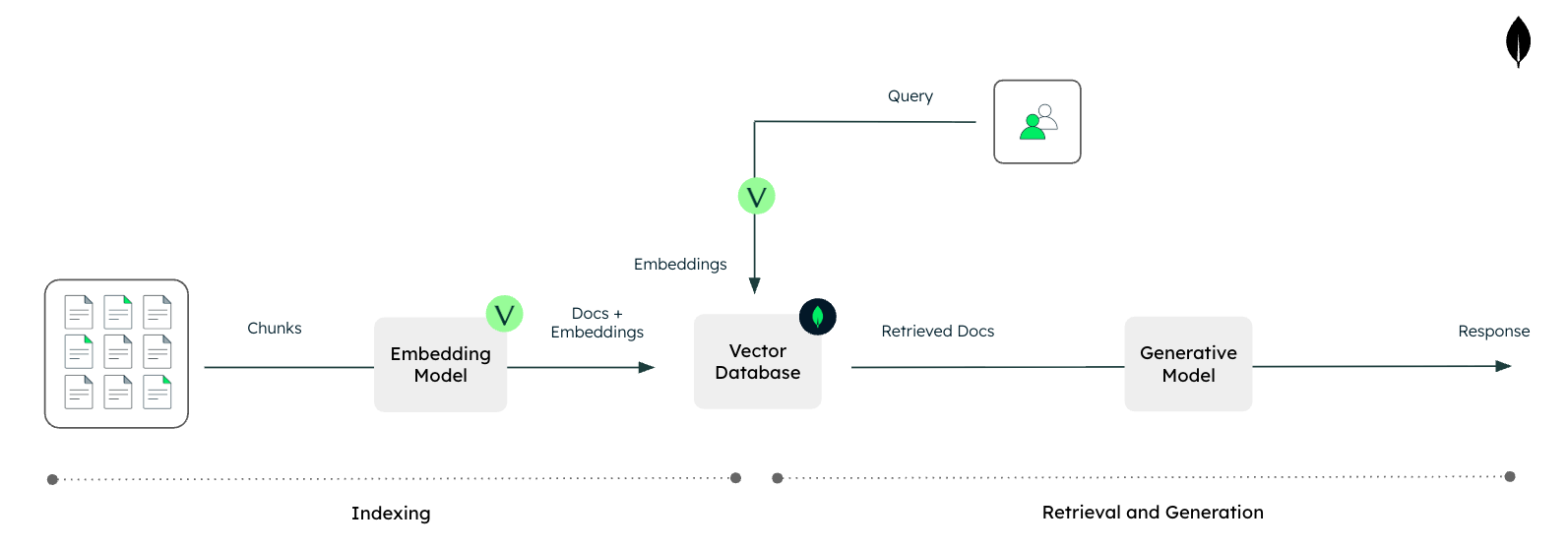
In traditional RAG, unstructured text data is indexed for semantic search. At query time, the system retrieves relevant documents or chunks and appends them to the user’s prompt so the large language model (LLM) can produce more grounded, context-aware answers.
Figure 1. Text RAG with Voyage AI and MongoDB.
Enterprise data, however, is rarely just clean plain text. Critical information often lives in PDFs, slides, diagrams, dashboards, and other visual formats. Today, this is typically handled by parsing tools and OCR services. Those approaches create several problems:
Significant engineering effort to handle many file types, layouts, and edge cases
Accuracy issues across different OCR or parsing setups
High costs when scaled across large document collections
Next-generation multimodal embedding models provide a simpler and more cost-effective alternative. They can ingest not only text but also images or screenshots of complex document layouts, and generate vector representations that capture the meaning and structure of that content.
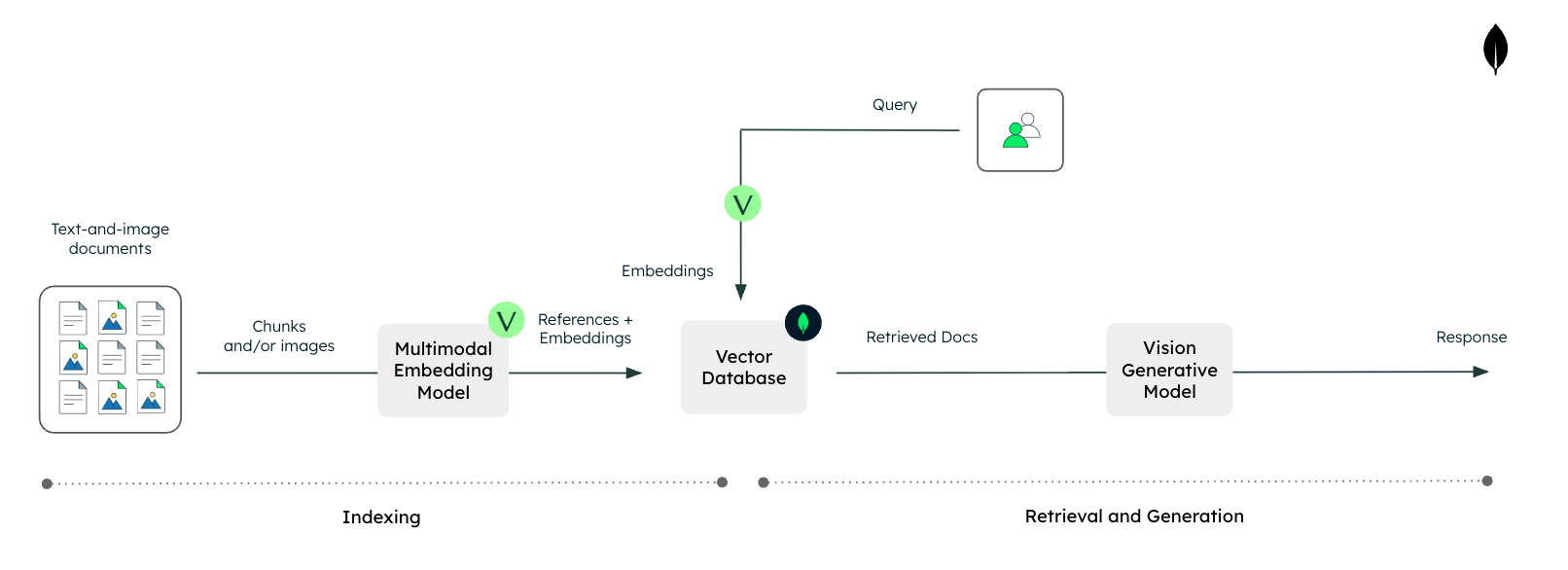
Vision RAG uses these multimodal embeddings to index entire documents, slides, and images directly, even when they contain interleaved text and images. This enables them to be searchable via vector search without requiring heavy parsing or OCR. At query time, the system retrieves the most relevant visual assets and feeds them, along with the text prompt, into a vision-capable LLM to inform its answer.
Figure 2. Vision RAG with Voyage AI and MongoDB.
As a result, vision RAG enables LLM-based systems with native access to rich, multimodal enterprise data, while reducing engineering complexity and avoiding the performance and cost pitfalls associated with traditional text-focused preprocessing pipelines.
Voyage AI’s latest multimodal embedding model
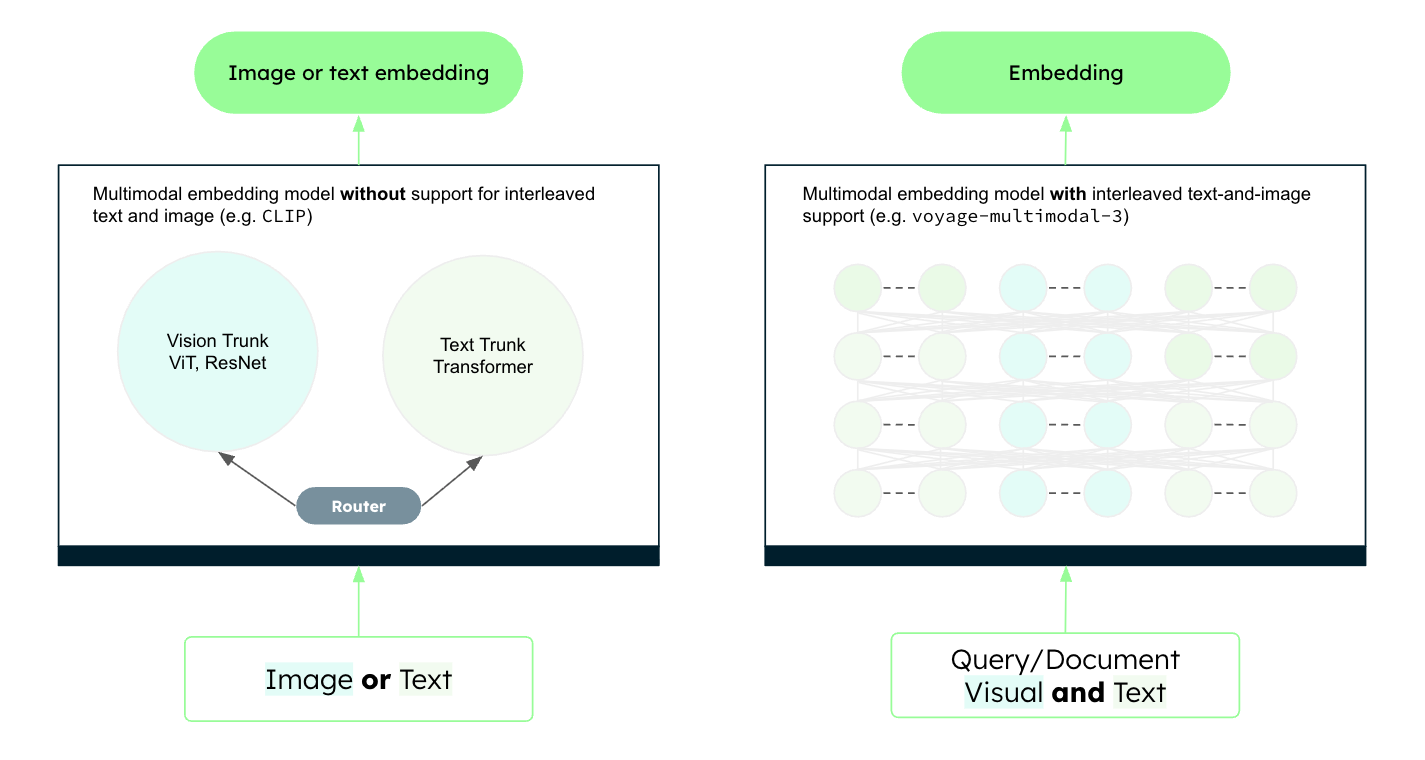
The multimodal embedding model is where the magic happens. Historically, building such a system was challenging due to the modality gap. Early multimodal embedding models, such as contrastive language-image pretraining (CLIP)-based models, processed text and images using separate encoders. Because the outputs were generated independently, results were often biased toward one modality, making retrieval across mixed content unreliable. These models also struggled to handle interleaved text and images, a critical limitation for vision RAG in real-world environments.
Voyage-multimodal-3 adopts an architecture similar to modern vision-capable LLMs. It uses a single encoder for both text and visual inputs, closing the modality gap and producing unified representations. This ensures that textual and visual features are treated consistently and accurately within the same vector space.
Figure 3. CLIP-based architecture vs. voyage-multimodal-3’s architecture.
This architectural shift enables true multimodal retrieval, making vision RAG a viable and efficient solution. For more details, refer to the voyage-multimodal-3 blog announcement.
Implementation of vision RAG
Let’s take a simple example and showcase how to implement vision RAG. Traditional text-based RAG often struggles with complex documents, such as slide decks, financial reports, or technical papers, where critical information is often locked inside charts, diagrams, and figures.
By using Voyage AI’s multimodal embedding models alongside Anthropic’s vision-capable LLMs, we can bridge this gap. We will treat images (or screenshots of document pages) as first-class citizens, retrieving them directly based on their visual and semantic content and passing them to a vision-capable LLM for reasoning.
To demonstrate this, we will build a pipeline that extracts insights from the charts and figures of the GitHub Octoverse 2025 survey, which simulates the type of information typically found in enterprise data.
The Jupyter Notebook for this tutorial is available on GitHub in our GenAI Showcase repository. To follow along, run the notebook in Google Colab (or similar), and refer to this tutorial for explanations of key code blocks.
Step 1: Install necessary libraries
First, we need to set up our Python environment. We will install the voyageai client for generating embeddings and the anthropic client for our generative model.
Code Snippet
Step 2: Initialize API clients
To interact with the models, you must initialize the client objects with your API keys. You will need a Voyage AI API key (for the voyage-multimodal-3 model) and an Anthropic API key (for claude-sonnet-4.5).
Note: It is best practice to use environment variables or a secret manager rather than hardcoding keys in production.
Code Snippet
Step 3: Extract visual content
For this example, we will scrape charts and infographics directly from the GitHub Octoverse blog post. In a production setting, this step might involve converting PDF pages to images or processing a directory of PNGs.
We’ll start by importing the standard utilities we need for web requests, image processing, and math operations.
Code Snippet
Next, we define a helper function extract_image_urls to parse the article’s HTML and grab image links, filtering out small icons or logos.
Code Snippet
Now let’s run the extraction on the specific URL.
Code Snippet
The scraping might return general blog assets. To ensure high relevance, we will filter the list to only include images containing “octoverse-2025” in their URL, which targets the report’s charts.
Code Snippet
Step 4: Build the multimodal index
This is the core indexing step. We loop through our filtered URLs, download the images locally, and then pass them to Voyage AI’s voyage-multimodal-3 model. This model converts the visual content into a dense vector embedding.
Code Snippet
Step 5: Define RAG components
We need three specific capabilities to make our RAG pipeline work:
Image Encoding: Converting images to base64 so they can be sent to the Anthropic API 1.
Vector Retrieval: Searching our array of embeddings to find the image most semantically similar to the user’s text query 1.
Generation: Sending the retrieved image and the user’s query to a VLM to get a natural language answer.
Let’s define helper functions for each.
Code Snippet
If you want a full end-to-end example using MongoDB, see this tutorial: Building Multimodal AI Applications with MongoDB, Voyage AI, and Gemini.
Step 6: Combine the components into a complete pipeline
We can now wrap these steps into a single entry point, vision_rag. This function accepts a user query, performs the retrieval to find the correct chart, displays it, and then answers the question.
Code Snippet
Step 7: Run queries
Let’s test our pipeline. We will ask a specific question about developer communities. The system should identify the correct infographic from the report and read the data directly from it.
Code Snippet
Now we can try a quantitative question regarding open-source repositories.
Code Snippet
And finally, a ranking question about programming languages.
Code Snippet
Conclusion
Multimodal embeddings, paired with vision-capable LLMs, enable systems to process and reason across diverse data types like text and images simultaneously. Vision RAG specifically unlocks the vast amount of knowledge trapped in visual formats containing interleaved text and images —such as slide decks, photos, PDF reports, and technical diagrams—that traditional text-only pipelines struggle with.
In this tutorial, we implemented a minimalist vision RAG pipeline from scratch. We extracted rich visual data from the GitHub Octoverse report, generated multimodal embeddings using Voyage AI, and used Anthropic’s model to answer complex questions grounded in visual evidence.
As you move forward, consider how this architecture can be applied to your own proprietary datasets, from financial reports to internal diagrams. When you are ready to take this into production, explore using a robust database like MongoDB to handle scale. For more examples and advanced techniques, check out the Voyage AI documentation to continue building the next generation of multimodal applications.
If you enjoyed reading this tutorial, you can explore more such content on our AI Learning Hub. If you want to go straight to code, we have several more examples of how to build RAG, agentic applications, evals, etc., in our Gen AI Showcase GitHub repository. As always, if you have further questions as you build your AI applications, please reach out to us in our generative AI community forums.