The limits of cryptography
Since this blog post is about security and cryptography, it makes sense to start with this XKCD reminder about the value of encryption: 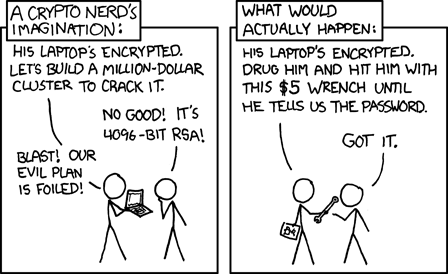 .
.
There is a similar, complementary discussion in this article: crypto can help but cannot safeguard against all actors.
Public Key encryption 101
GPG, the most widely used tool for end to end email encryption and signing software releases, is based on public key cryptography. In public key cryptography you have a private key, to keep very private and a public key you share to the world. If you use SSH with key authentication you know already [the concept](https://www.ssh.com/academy/ssh/publi…
The limits of cryptography
Since this blog post is about security and cryptography, it makes sense to start with this XKCD reminder about the value of encryption: .
There is a similar, complementary discussion in this article: crypto can help but cannot safeguard against all actors.
Public Key encryption 101
GPG, the most widely used tool for end to end email encryption and signing software releases, is based on public key cryptography. In public key cryptography you have a private key, to keep very private and a public key you share to the world. If you use SSH with key authentication you know already the concept:
$ ls -1 .ssh/id_rsa*
.ssh/id_rsa
.ssh/id_rsa.pub
Here id_rsa is the private key and id_rsa.pub the public key.
GPG private key on a hardware token
I would like to store the private part of my GPG key on a hardware token. This provides extra security compared to storing the private key on a hard disk: as the private key stays on the device, you need physical access to the device to do anything with the private key. It also eases the usage of the private key on different computers, as you just have to take the hardware token with you without creating multiple copies of the precious private key.
That is the basic, some people explains the topic better than me.
The hardware token I chose is a YubiKey because I already use such a dongle for two factor authentication on salsa, the Debian gitlab forge.
Some terminology
Understanding GPG and even worse hardware tokens, is like sailing in an endless sea of acronyms and recommendation practices. Let us navigate:
First the generic name of a GPG hardware token is an OpenPGP smart card. Here we need to understand:
- OpenPGP is a standard for public key cryptography, GPG is an implementation of the standard. We refer to the device category by the name of the standard it implements: OpenPGP.
- the first existing hardware tokens had the form of a smart card, that is a credit-card form factor with a small chip inside. Today most devices implementing the OpenPGP card protocol take the form of an USB key. But even in the form of a USB key, the token will implement the generic smartcard protocol (CCID, for Chip Card Interface Device) so that it can talk to upper software layers.
Standards support in YubiKey
The YubiKey itself supports multiple standards, the OpenPGP card protocol being only one of many.
This is what my YubiKey supports:
$ ykman info | awk '/Applications/,0'
Applications
Yubico OTP  	Enabled
FIDO U2F    	Disabled
FIDO2       	Disabled
OATH        	Enabled
PIV         	Disabled
OpenPGP     	Enabled
YubiHSM Auth	Disabled
Since I already threw 5 acronyms on the paragraph above, I will not go in details into what OATH and PIV are. What is important for us here, is that we have OpenPGP enabled on the device, more important we can verify that GPG sees a card with:
gpg --card-status | grep -E '(Application type|Manufacturer)'
Application type .: OpenPGP
Manufacturer .....: Yubico
Next steps
Now with this basic understanding, you can follow the Debian Keyring maintainer guide for key creation good practises, and the Debian Wiki smart card article on how to move the private keys to the YubiKey. Although the article is for a different device, I also found the topic is even more better described in the NitroKey documentation.
XKCD License: https://xkcd.com/license.html
You can also comment this post via Mastodon