Google recently released their Gemini 3 model, which reminded me about its capability to accept video inputs. Their advertisements showed how this could be used to “analyse your pickleball video”, however I wondered if and how this could be used to support web development, particularly for less commonly attempted tasks like exploratory testing.
Beyond Simple Screenshots
AI tools such as GitHub Copilot have had the ability to accept screenshots for a while which has been used in countless ways to aid developers. Whether aiding an AI model in debugging CSS, or allowing it to further “close the loop” (giving the agent the ability to verify that its changes have actually worked). With the Gemini 2.5 Flash and subsequent models supporting video input (not just reading a video’s tra…
Google recently released their Gemini 3 model, which reminded me about its capability to accept video inputs. Their advertisements showed how this could be used to “analyse your pickleball video”, however I wondered if and how this could be used to support web development, particularly for less commonly attempted tasks like exploratory testing.
Beyond Simple Screenshots
AI tools such as GitHub Copilot have had the ability to accept screenshots for a while which has been used in countless ways to aid developers. Whether aiding an AI model in debugging CSS, or allowing it to further “close the loop” (giving the agent the ability to verify that its changes have actually worked). With the Gemini 2.5 Flash and subsequent models supporting video input (not just reading a video’s transcript), I wondered what applications this might have in the world of software development.
I felt there were some obvious applications of video analysis, such as for debugging animations. However, I wanted to explore whether the model could understand the context of interactions, how it got from one state to another, rather than just the visuals. If it were capable of understanding the transition, this could support wider development practices.
The Idea
One job outside of actually writing code for an application is testing it. One of the many jobs of a tester or QA manager is called “exploratory testing”. A simplified description of this is testing where the tester is not investigating a specific bug fix or feature, but instead naturally exploring the application, looking for defects that are not obviously covered in the scope of other tests.
I wanted to create an AI-assisted tool that could support a tester that is performing some exploratory testing. My success criteria was that the tester should be able to record a video of their exploratory testing sessions and have Gemini analyse the video to note down any issues that it could see, triage them against a list of existing issues and work with the tester on how the issues should be handled.
Exploratory Testing Agent
I used GitHub Copilot’s custom agents to create an agent designed to be as unobtrusive as possible. The tester simply selects the custom agent and starts a session. Using two custom MCP servers, the agent silently watches for new video files in the background.
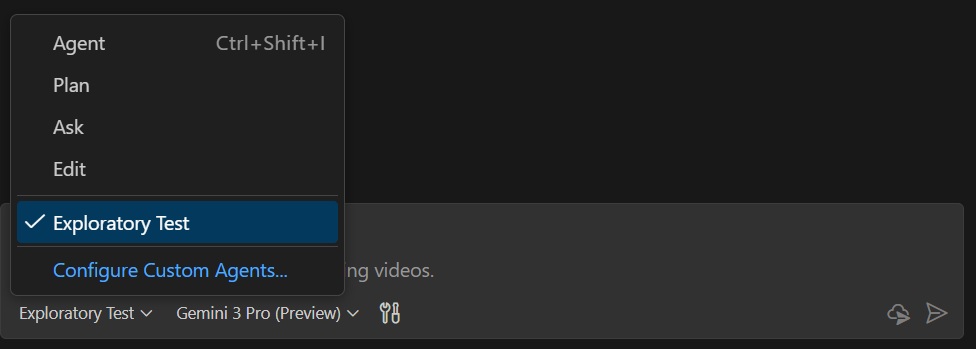 Screenshot of the custom agent in Copilot
When a recording is saved, the agent uploads it to Gemini 3 using a prompt based on general guidelines to identify issues and reproduction steps. Finally, it uses GitHub’s MCP server to help confirm the bug and triage it against existing issues, all without interrupting the tester’s flow.
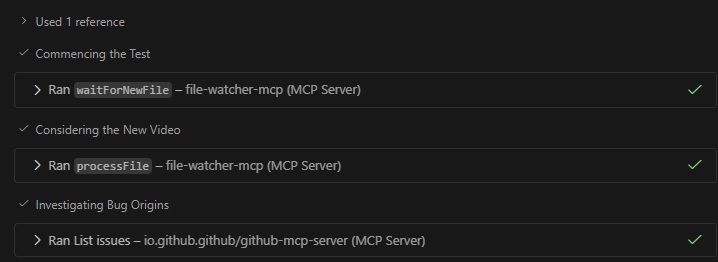 Screenshot of the agent using the mcp servers to watch and analyse videos
Was it a Success?
The short answer is yes, but let’s dig into it more.
The Setup
To properly test the agent, I built a simple UI which let me hand-craft bugs commonly found in web development. I added some visually obvious bugs such as broken image links, typos, and mismatched data. However, I also wanted to see how well it would perform with some less obvious bugs. For this, I removed some await keywords to make the app skip showing loading spinners. Overall, this provided a good range of bugs that a tester might find.
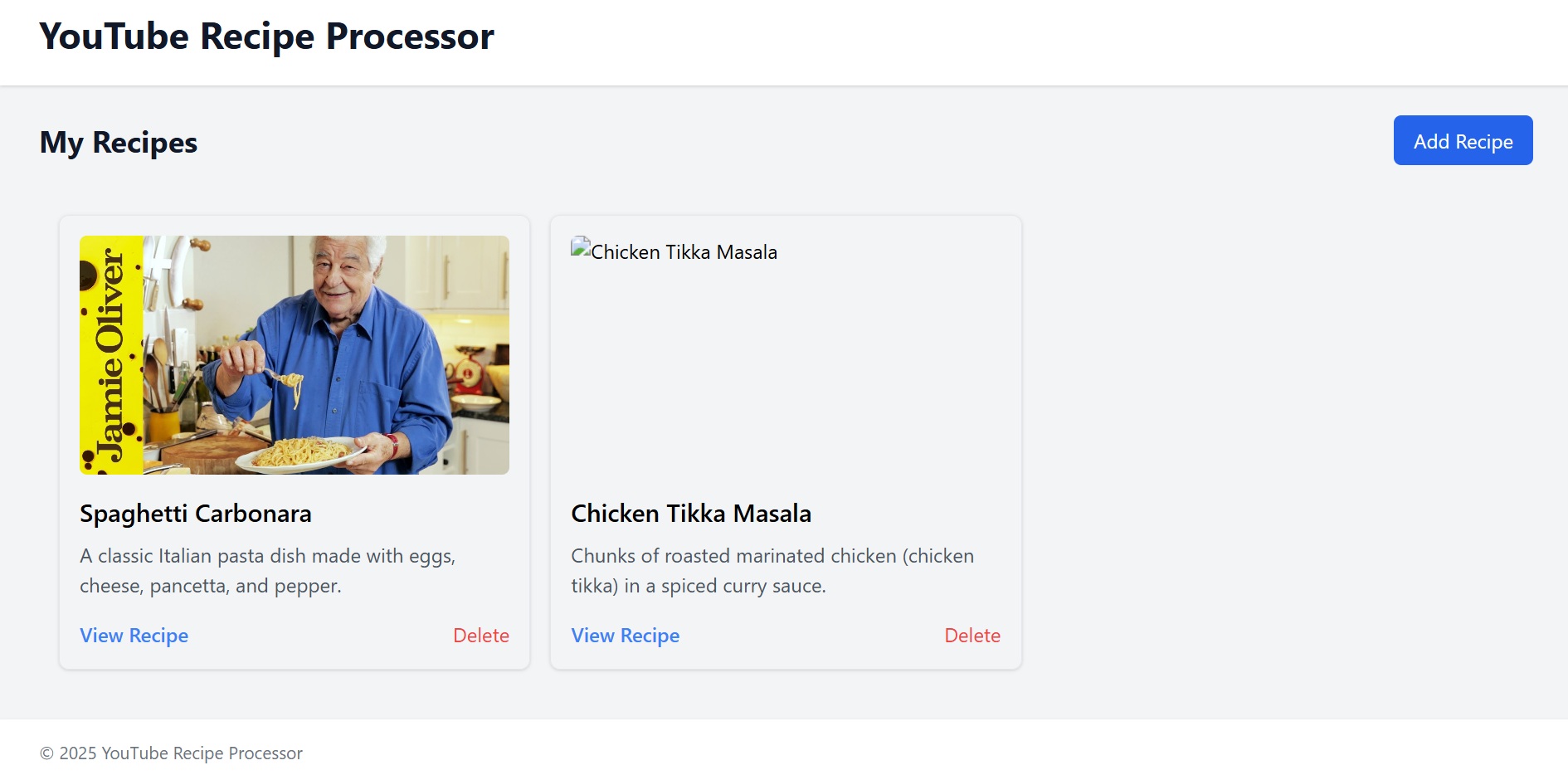 Screenshot of the test app used for exploratory testing
The Good
Overall, the agent performed surprisingly well at identifying genuine issues. It consistently found the broken images, mismatched data, and on one occasion, an unintended bug relating to adding a new value that I had missed myself. While most of the issues could have been spotted with a screenshot, the real benefit of the video analysis was the ability to observe the actions leading up to the bug. This allowed it to generate fairly accurate reproduction steps, something that a screenshot could never provide.
Once it had identified the bugs, it gave a detailed breakdown, reproduction steps, and correctly matched it against existing issues tracked against the project. I had a tester colleague try out the agent, and they praised how well the agent did at removing a lot of the annoying boilerplate work they usually had to do when raising bugs.
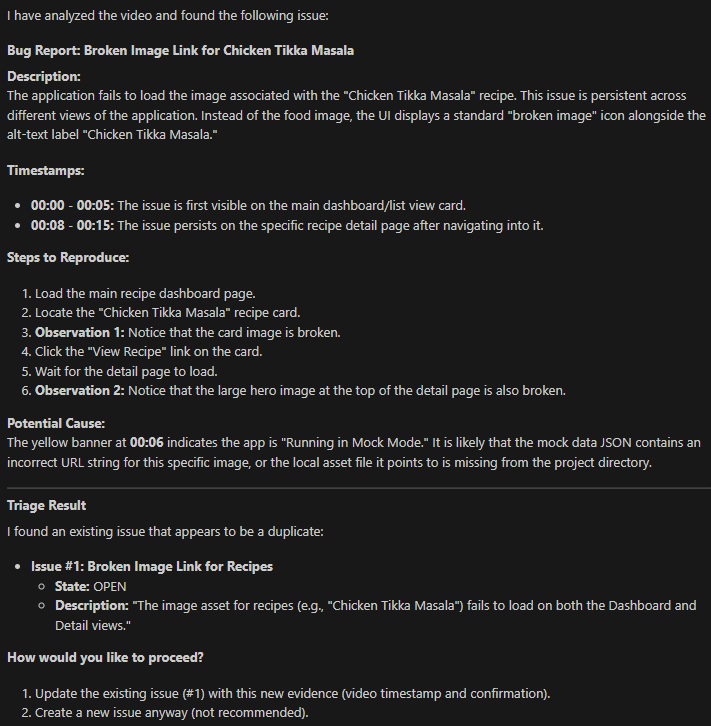 Example response from the agent after reviewing a video
Blind Spots
Surprisingly, the agent struggled to spot typos, even on a page containing a small amount of text. The tester had to zoom in on just the text for the video analysis to pick up on the typo, something I initially expected it to be very good at. This suggested it was either looking more at motion or changes than at the full picture of the application.
Unsurprisingly, it also struggled to spot the sneakier bugs such as loading spinners not appearing. This was more understandable; if something is missing, it’s harder for anyone to state if it’s a bug, intended, or just a feature that has not yet been implemented.
The Hallucinations
Models often hallucinate information, and this was no exception. Generally, if there was a bug in the video, it honed in on that; however, if a video was ever saved that did not show a bug, Gemini 3 would often make something up to prove it could still find one.
Here are a few examples:
Agent: “This text is cut off”
Actual: User hadn’t scrolled down to show the full text
Agent: Link A was clicked but page B was loaded
Actual: User scrolled through the page then clicked link B, page B loaded
I believe most hallucinations could be attributed to the context too strongly indicating that the tester was only saving videos that contain an issue, a common prompt problem. Another, video specific, issue that might explain some is the rate at which the video is sampled. Too low of a framerate could explain why the agent missed key actions happening and thinking a mistake was made. Further refinement would probably solve these issues but still showed that there can be problems fully trusting the model.
Cool… so what?
While this example use of video analysis won’t be revolutionising exploratory testing, and does show how we still need to carefully check the outputs of our AI tools, it highlights another practical use case where AI can support us in our day-to-day work as developers and testers. By handing off the boilerplate burdens of writing up bug reports and reproduction steps, testers can focus more on the actual exploring and less on the monotonous tasks.
I see video input likely becoming a native feature of tools such as GitHub Copilot in the near future, and this is another step forward for AI assisted tools. Giving agents visual feedback with images and now video is a critical piece required to “close the loop” on agentic AI. Without this feedback, most agents work in an “open loop”, generating code or answering questions based on a request without knowing if their answer works as intended. Imagine trying to develop an app but you are not allowed to see it running!
Adding the ability for agents to review videos gives them insights into the transition between states, something invaluable for tasks such as animations or reproduction steps. By “closing the loop” further in this way, we continue to improve agent’s ability to work autonomously. They will be able to implement an animation, verify every frame looks how it expects and iterate on its solution. I think this is a great improvement and I am excited to see how others make use of it.