In a remarkably short time, developers have gone from “AI what?” to “Which AI coding tool do you use?” LLM-based coding agents generate code fast and you can even spin up multiple agents to handle tasks in parallel.
But there’s a catch. Left to their own devices, agents produce unmergeable slop: wrong props, hallucinated states, render errors. They generate new code instead of reusing what you’ve built. And naively pointing them at your source code to reference will burn tokens ($$$).
Tools like the Storybook MCP server solve this by giving agents succinct, curated context—component APIs, validated patterns, and test suites— in an optimized payload.
This article shows how to combine…
In a remarkably short time, developers have gone from “AI what?” to “Which AI coding tool do you use?” LLM-based coding agents generate code fast and you can even spin up multiple agents to handle tasks in parallel.
But there’s a catch. Left to their own devices, agents produce unmergeable slop: wrong props, hallucinated states, render errors. They generate new code instead of reusing what you’ve built. And naively pointing them at your source code to reference will burn tokens ($$$).
Tools like the Storybook MCP server solve this by giving agents succinct, curated context—component APIs, validated patterns, and test suites— in an optimized payload.
This article shows how to combine your design system with LLM-based agents and Storybook MCP to build autonomously without sacrificing quality.
The frontend workflow is evolving
Traditionally, the workflow focused on a human feedback loop: write code, test it, and debug issues. Now, we’re incorporating agents to assist at every stage. Developers describe requirements in plain language, and agents generate code. These agents write tests and keep documentation in sync with the codebase. They even aid in debugging code problems.
In theory, this is fantastic. However, issues arise once you dig into the details of this workflow.

Your agent isn’t good enough as-is
The main problem is getting high quality results out of an agent. AI coding relies heavily on inference—the ability to extrapolate next steps from the current state of a project. The typical agentic workflow consists of planning, building, and verifying. However, there are gaps in this process, leading to varied and often subpar results.
Mismanaged context leads to skyrocketing costs
By default, the agent tries to read your source to figure things out, but this leads to information overload—the same issue a new developer faces on their first day. Your component library has thousands of files, internal utilities scattered across directories, and type definitions buried six levels deep. There might even be outdated experimental components that were never cleaned up. The agent loads all this into context and quickly burns through tokens.
Token costs add up rapidly. A single component generation task can consume 50K-100K tokens just to load context before the agent starts writing code. Scale this across your team and multiple agents running in parallel, and you’re dealing with significant cost for minimal quality improvement.
Poor quality and “average” output
Without proper context and guidance, agents tend to default to patterns from their training data. They’ve encountered millions of components, leading them to confidently generate “average components” that aren’t likely to align with the unique conventions of your project. These are conventions that you and your team have spent years establishing—how variants compose, how tokens cascade, and how accessibility is enforced. While the generated code technically works, it is not the right fit for your system.
Storybook MCP curates context for quality output and fewer tokens
So how do we fix this?
Storybook is the industry-standard tool for building and documenting UI components in isolation. It already captures your component APIs, usage patterns, and test suites—everything that defines how your design system actually works. The challenge is making this knowledge accessible to AI agents.
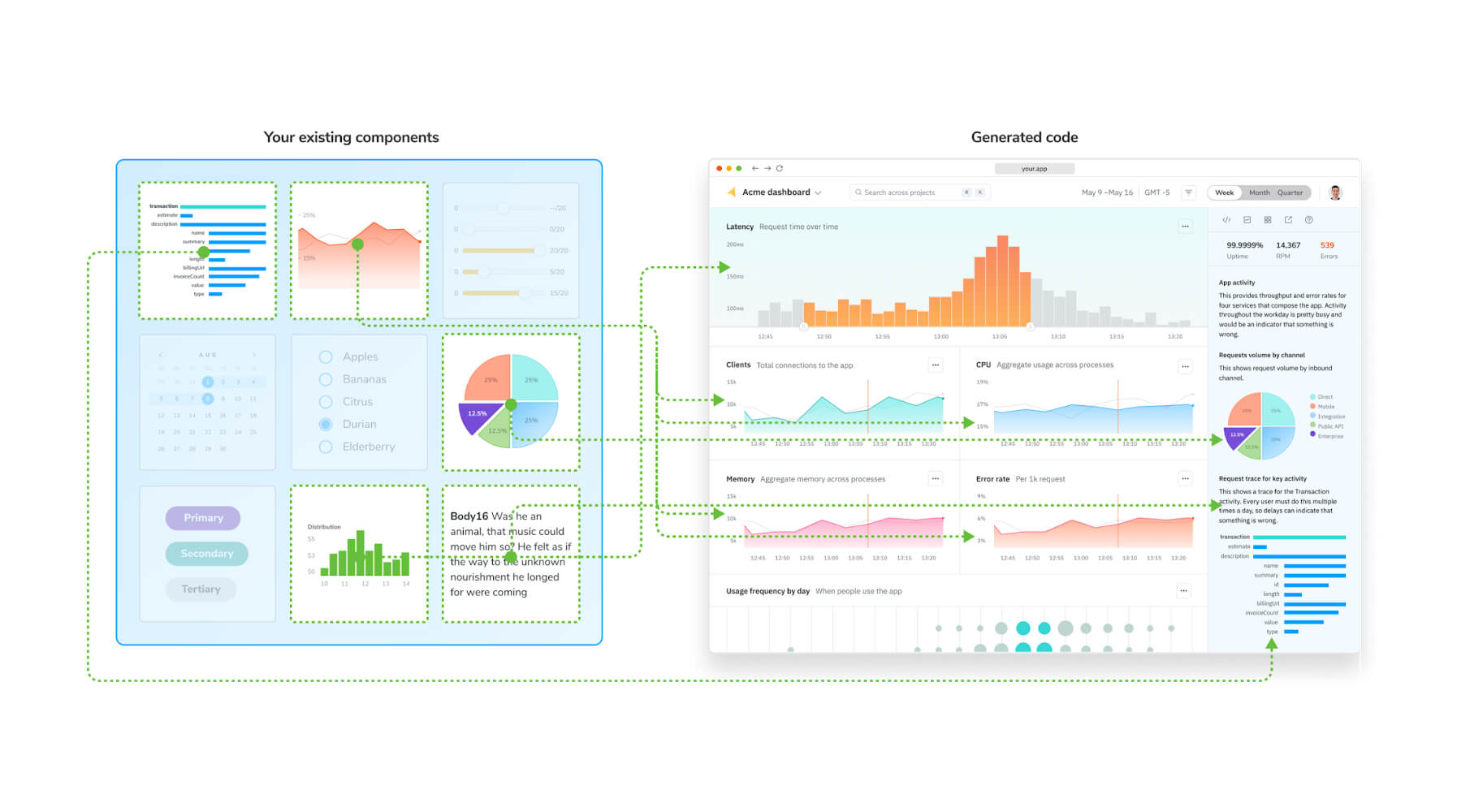
Storybook MCP helps agents follow your patterns by equipping them with curated, machine-readable context. Instead of dumping your entire codebase, Storybook generates a Component Manifest which packages all of your component metadata, including:
- Component APIs with validated prop types
- Usage examples from your Storybook stories
- JSDoc descriptions and tags
- Test suites that encode your requirements
What is MCP?
“Model Context Protocol is an open-source standard for connecting AI applications to external systems.”
The Component Manifest is an optimized payload, allowing an agent to parse a component’s interface, its variants, its design token bindings, and example usage—in a fraction of the tokens it would take to parse the source file, its dependencies, and the surrounding codebase.
Quality goes up and costs go down because context is purposeful. The agent sees how you actually use components, what patterns you’ve validated, what tests must pass. It generates code that fits your system because it’s working from your system’s knowledge, not generic training data.
Using Storybook MCP with Claude Code
To get started, you’ll need a React-based design system that uses Storybook version 10.1 or later. If you don’t have one, I suggest using my fork of the Reshaped design system.
It’s already equipped with the MCP addon and ready to go: https://github.com/winkerVSbecks/reshaped.
If you’re using this sample project, you can skip step one.
Note: Storybook MCP is an experimental feature under active development. To stay updated on the latest changes, follow the Storybook blog.
1. Set up Storybook MCP
Enable the component manifest feature in your .storybook/main.ts file. I also recommend the experimentalCodeExamples feature. Though optional, it aligns your addon-docs source snippets with the manifest content.
// .storybook/main.ts

export default {
// stories: [] etc.
features: {
experimentalComponentsManifest: true,
experimentalCodeExamples: true,
}
}
Once you start your Storybook npm run storybook, you should be able to see the manifest at: http://localhost:PORT/manifests/components.html
Your manifest might show errors and warnings, which can seem alarming, but it’s expected. You can address these later to optimize the manifest. Once you confirm that the manifest is functioning, install the MCP addon to utilize it.
npx storybook add @storybook/addon-mcp
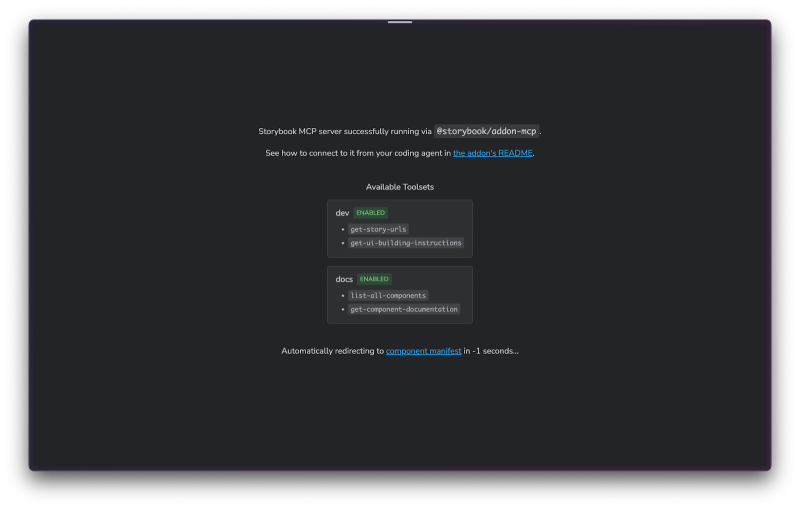
You should now be able to browse the MCP server in your Storybook at http://localhost:PORT/mcp
2. Using Storybook MCP with Claude Code
To use this addon with Claude Code, use the built-in MCP configuration command:
- Start Storybook: Make sure your Storybook development server is running:
npm run storybook
- **Add the MCP server to Claude Code **by running the following command:
claude mcp add storybook-mcp --transport http http://localhost:PORT/mcp --scope project
- Start Claude Code with a system level prompt to ensure your agent uses the Storybook tools when appropriate
claude --system-prompt "Before doing any UI, frontend or React development, ALWAYS call the storybook MCP server to get further instructions."
- Verify that MCP is enabled by using the
/mcp listcommand
If you prefer a different coding agent, check out the addon documentation for setup guides for other popular clients.
3. Run your first prompt
We’re all set to run our first prompt. Give your agent the following prompt to generate a FlightBooking component.
Create a flight booking component that includes:

- An autocomplete component for choosing source and destination from the following list of airports:
SYD: – Sydney Airport, Australia
MEL: – Melbourne Airport (Tullamarine), Australia
LAX: – Los Angeles International Airport, USA
JFK: – John F. Kennedy International Airport, New York, USA
LHR: – Heathrow Airport, London, UK
CDG: – Charles de Gaulle Airport, Paris, France
ATL: – Hartsfield–Jackson Atlanta International Airport, USA
DXB: – Dubai International Airport, UAE
HKG: – Hong Kong International Airport, Hong Kong
BNE: – Brisbane Airport, Australia
PER: – Perth Airport, Australia
DFW: – Dallas Fort Worth International Airport, USA

- A toggle button for return vs one way
- One or two date selects that when clicked on triggers a popover with a calendar widget.

The calendar widget shouldn't allow selecting dates in the past and the return flight must be after the outward flight.
Claude will plan and execute this task. Along the way, you’ll see it use the storybook-mcp tools to obtain build instructions, component documentation, and story URLs.

Once complete, you should see a functional FlightBooking component in your Storybook, built using components from your design system.
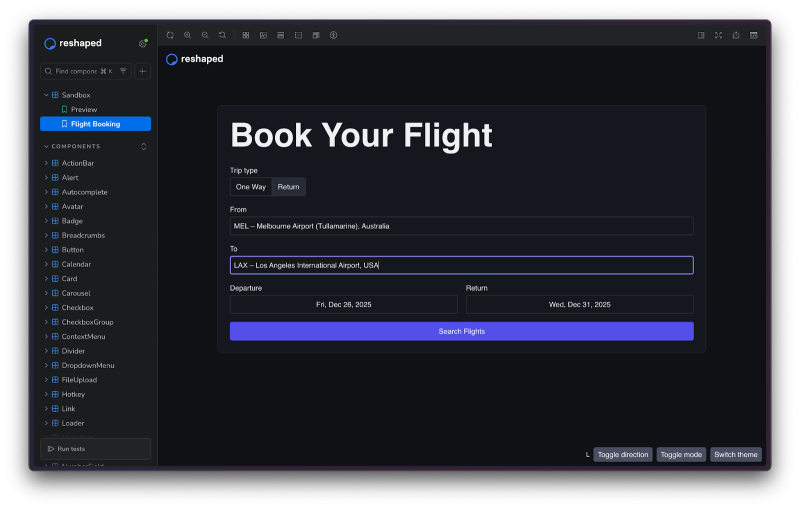
Seeing newly generated components instantly in your Storybook is a game-changer. It offers a quick feedback loop, eliminating the need to click around the app to find the right state to view a component after each prompt execution. You can prompt and review immediately.

4. Host your MCP server
We’ve been using a local Storybook MCP server, but you can also make it accessible to consumers of your design system by hosting it. The easiest way to host your MCP server is through Chromatic. With the component manifest enabled, Chromatic will automatically create an MCP server as part of the publishing process.
To get started with Chromatic, sign up and create a new project. Use your project token to publish your Storybook by running:
npx chromatic --project-token <your-project-token>

Once published, you can access your project’s MCP server at: https://your-published-storybook-url/mcp
Using your coding agent with the hosted server is similar to using the local MCP server, except you’ll use the URL for the hosted server. I recommend using permalinks to create persistent URLs that clients can point to:
claude mcp add storybook-mcp --transport http https://canary--6931b94e8a4ed8a6e74c7ffa.chromatic.com/mcp --scope project
Build faster without drowning in AI slop
The promise of AI coding agents is real, but only if you can meet three critical requirements:
High quality: Avoid AI slop. Generated code should align with your design system’s conventions, not rely on generic patterns from training data.
Fast feedback: Don’t waste time waiting for results. Complex multi-agent systems can take minutes or even hours to complete tasks. For daily work, you need quick feedback loops.
Cost efficient: Avoid exorbitant tool expenses. Token costs can skyrocket when agents load entire codebases into context for every task.
Storybook MCP addresses all three issues by providing agents with exactly what they need: curated component metadata, validated patterns, and test suites in an optimized payload. The result is code that fits seamlessly into your codebase, generated in seconds instead of minutes, and at a fraction of the token cost.Reminder: Storybook MCP is an experimental feature still in development. To stay updated, consider signing up for our Early Access Program.