By Developer Getting Started
Jan 27, 2026
InfluxData prides itself on prioritizing developer happiness. A key ingredient to that formula is providing client libraries that let users interact with the database in their chosen language and library. Data analysis is the task most broadly associated with Python use cases, accounting for 58% of Python tasks, so it makes sense that Pandas is the second most popular library for Python users. The InfluxDB 3 Python client library supports Pandas DataFrames, making it easy for data scientists to use InfluxDB.
In this tutorial, we’ll learn how to query our InfluxD…
By Developer Getting Started
Jan 27, 2026
InfluxData prides itself on prioritizing developer happiness. A key ingredient to that formula is providing client libraries that let users interact with the database in their chosen language and library. Data analysis is the task most broadly associated with Python use cases, accounting for 58% of Python tasks, so it makes sense that Pandas is the second most popular library for Python users. The InfluxDB 3 Python client library supports Pandas DataFrames, making it easy for data scientists to use InfluxDB.
In this tutorial, we’ll learn how to query our InfluxDB instance and return the data as a DataFrame. We’ll also explore some data science resources included in the Client repo. To learn about how to get started with the InfluxDB 3 Python client library, please take a look at this video.

Me eagerly consuming Pandas and InfluxDB Documentation. Photo by Sid Balachandran on Unsplash.
Data science resources
A variety of data science resources have been included in the InfluxDB Python client repo to help you take advantage of the Pandas functionality of the client. I encourage you to take a look at the example notebooks.
Dependencies
- pyarrow (automatically comes with influxdb3-python installation)
- pandas
- certifi (if you are using Windows)
Installations
pip install influxdb3-python pandas certifi
Import Dependencies
import influxdb_client_3 as influxDBclient3
import pandas as pd
Import certifi #if you are on Windows
from influxdb_client_3 import flight_client_options
Initialization
Direct Initialization
Take note that the “database” argument in the function is the bucket name if you are using InfluxDB cloud:
client = InfluxDBClient3(token="your-token",
host="your-host",
database="your-database or your bucket name")
For Windows Users
Include certifi within the “flight_client_options” argument within the client initialization to fix certificate issues:
with open(certifi.where(), "r") as fh:
cert = fh.read()
client = InfluxDBClient3(token="your-token",
host="your-host",
database="your-database or your bucket name”,
flight_client_options=flight_client_options(tls_root_certs=cert)
Prepare a pandas Dataframe
Let’s use simple weather data:
# Example weather data
df = pd.DataFrame({
"timestamp": pd.date_range("2025-09-01", periods=4, freq="h", tz="UTC"),
"city": ["Lagos", "Illinois", "Chicago", "Abuja"],
"temperature": [30.5, 15, 16, 32],
"humidity": [20, 10, 10, 19]
})

# ensure timestamp dtype is datetime64[ns] and (optionally) timezone-aware
df['timestamp'] = pd.to_datetime(df['timestamp'], utc=True)
print(df.head())
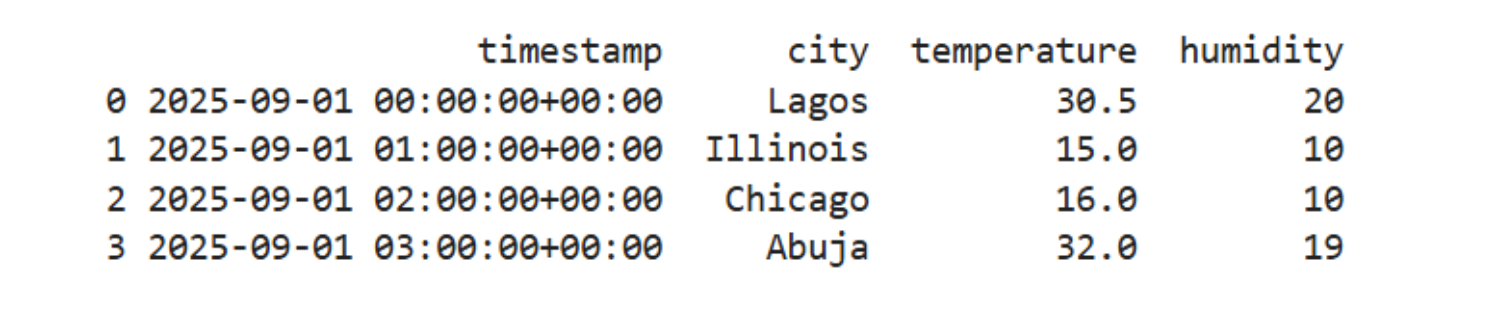
Weather timestamp data.
Write the pandas Dataframe to InfluxDB
client._write_api.write(
bucket="my_bucket",
record=df,
data_frame_measurement_name="weather",
data_frame_tag_columns=["city", "temperature"],
data_frame_timestamp_column="timestamp"
)
print("DataFrame written to bucket=new-test-bucket, measurement=weather")
Below is confirmation in your InfluxDB Cloud that the Pandas DataFrame was successfully written to the bucket.
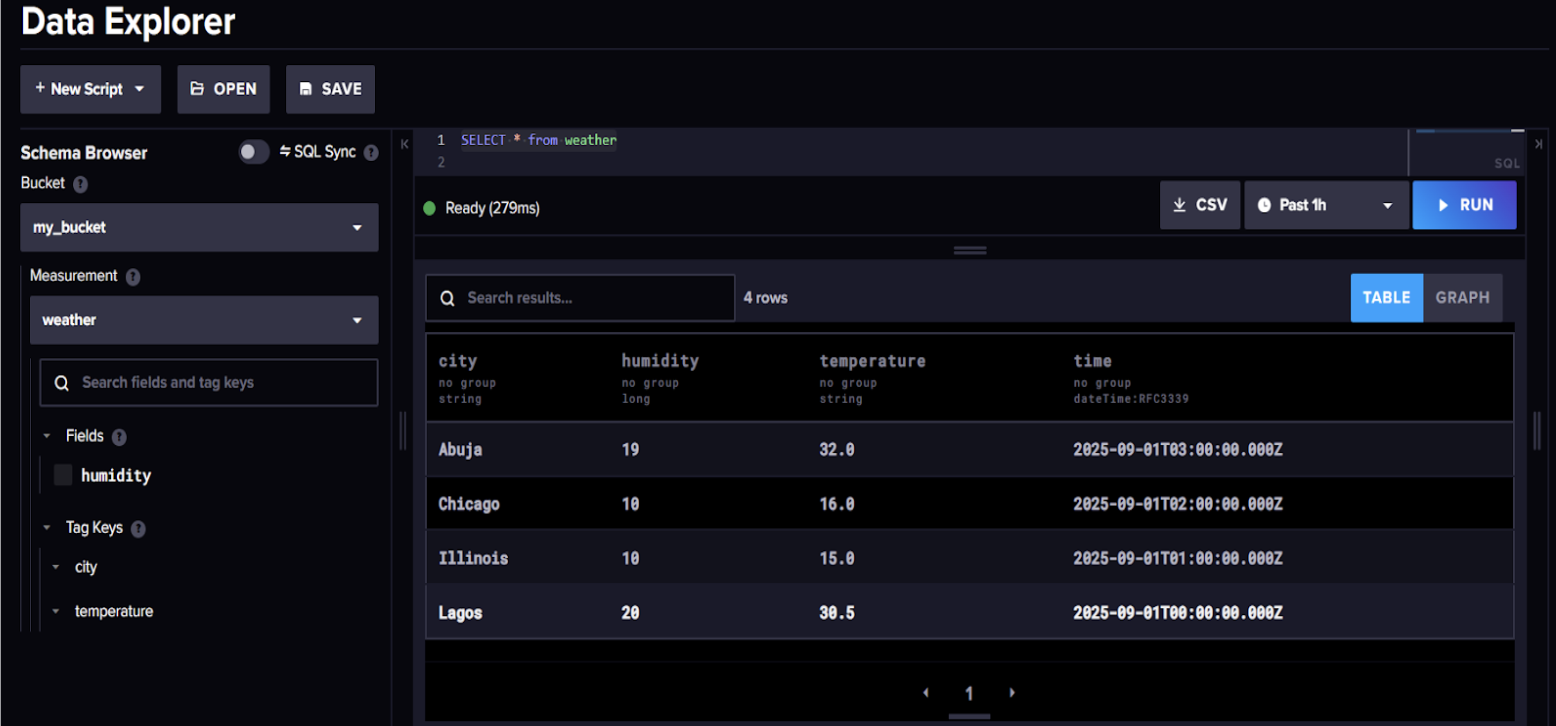
Pandas Dataframe written to InfluxDB.
Query InfluxDB and return a Pandas DataFrame
query = "SELECT * FROM weather"
table = client.query(query=query, language="influxql")
result_df = table.to_pandas()

print("Loading from InfluxDB:")
print(result_df.head())
 Returning a Pandas DataFrame from InfluxDB
Start building with InfluxDB and Pandas
InfluxDB makes it easy to integrate with your existing data analysis tools and frameworks, such as Pandas, to get insights from your time series data. Under the hood, you get the benefits of Apache Arrow for fast data transfers into Pandas DataFrames without any performance hits. Whether you’re building dashboards, machine learning models, or just exploring your metrics, combining InfluxDB 3 with Pandas gives you the best of both worlds in terms of performance and developer experience. As always, if you run into hurdles, please share them on our community site or Slack channel. We’d love to get your feedback and help with any problems you run into.