Previously, we implemented some canvas UI components using Web Components, including camera zooming and image downloading. In this lesson, we will expose more canvas capabilities through components and implement some new drawing properties:
- Implement
zIndexandsizeAttenuationdrawing properties - Move, rotate, and scale the canvas in hand mode
- Select, drag, and move shapes in selection mode, and display the shape property panel
Before implementing canvas modes, we need to do some preparatory work to support the zIndex and sizeAttenuation drawing properties.
Implementing zIndex
The mask layer displayed after selecting a shape needs to be displayed above all shapes, which involves the use of display order, controlled by zIndex:
ts
mask.zIndex = 99...Previously, we implemented some canvas UI components using Web Components, including camera zooming and image downloading. In this lesson, we will expose more canvas capabilities through components and implement some new drawing properties:
- Implement
zIndexandsizeAttenuationdrawing properties - Move, rotate, and scale the canvas in hand mode
- Select, drag, and move shapes in selection mode, and display the shape property panel
Before implementing canvas modes, we need to do some preparatory work to support the zIndex and sizeAttenuation drawing properties.
Implementing zIndex
The mask layer displayed after selecting a shape needs to be displayed above all shapes, which involves the use of display order, controlled by zIndex:
ts
mask.zIndex = 999;
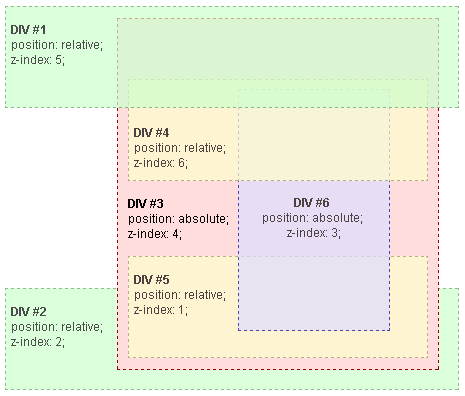
In CSS z-index, the value only makes sense within the same Stacking context. For example, in the figure below, although DIV #4 has a higher z-index than DIV #1, it is still rendered lower due to being in the context of DIV #3:
 Understanding z-index
Since sorting is a very performance-consuming operation, we add a sortDirtyFlag property to Shape, which is set to true whenever zIndex changes:
ts
class Sortable {
get zIndex() {
return this.#zIndex;
}
set zIndex(zIndex: number) {
if (this.#zIndex !== zIndex) {
this.#zIndex = zIndex;
this.renderDirtyFlag = true;
if (this.parent) {
this.parent.sortDirtyFlag = true;
}
}
}
}
We also need to consider this when appendChild and removeChild:
ts
class Shapable {
appendChild(child: Shape) {
if (child.parent) {
child.parent.removeChild(child);
}

child.parent = this;
child.transform._parentID = -1;
this.children.push(child);

if (!isUndefined(child.zIndex)) {
this.sortDirtyFlag = true;
}

return child;
}
}
Then, in each tick of the rendering loop, perform a dirty check and sort if necessary. We also do not want to directly change children, but use sorted to store the sorting results, after all, z-index should only affect the rendering order, not the actual order in the scene graph:
ts
traverse(this.#root, (shape) => {
if (shape.sortDirtyFlag) {
shape.sorted = shape.children.slice().sort(sortByZIndex);
shape.sortDirtyFlag = false;
}
// Omit rendering each shape.
});
The implementation of sortByZIndex is as follows: if zIndex is set, sort in descending order, otherwise maintain the original order in the parent node. This also shows why we do not change children, it retains the default sorting basis:
ts
export function sortByZIndex(a: Shape, b: Shape) {
const zIndex1 = a.zIndex ?? 0;
const zIndex2 = b.zIndex ?? 0;
if (zIndex1 === zIndex2) {
const parent = a.parent;
if (parent) {
const children = parent.children || [];
return children.indexOf(a) - children.indexOf(b);
}
}
return zIndex1 - zIndex2;
}
js
circle1Zindex = Inputs.range([-10, 10], {
label: 'z-index of red circle',
value: 0,
step: 1,
});
js
circle2Zindex = Inputs.range([-10, 10], {
label: 'z-index of green circle',
value: 0,
step: 1,
});
js
$icCanvas3 = call(() => {
return document.createElement('ic-canvas');
});
js
circle1 = call(() => {
const { Circle } = Core;
return new Circle({
cx: 100,
cy: 100,
r: 50,
fill: 'red',
});
});
js
circle2 = call(() => {
const { Circle } = Core;
return new Circle({
cx: 150,
cy: 150,
r: 50,
fill: 'green',
});
});
js
call(() => {
circle1.zIndex = circle1Zindex;
circle2.zIndex = circle2Zindex;
});
js
call(() => {
$icCanvas3.setAttribute('modes', '[]');

$icCanvas3.style.width = '100%';
$icCanvas3.style.height = '250px';

$icCanvas3.addEventListener('ic-ready', (e) => {
const canvas = e.detail;
canvas.appendChild(circle1);
canvas.appendChild(circle2);
});
});
When exporting to SVG, z-index cannot be directly mapped to element properties because SVG is rendered based on the order in which elements appear in the document, see: How to use z-index in svg elements?
In SVG, z-index is defined by the order the element appears in the document.
Therefore, we need to perform additional sorting work when exporting, and the sorting implementation for SerializedNode is almost the same as for Shape, which is not shown here:
ts
export function toSVGElement(node: SerializedNode, doc?: Document) {
// Omit handling other attributes.
[...children]
.sort(sortByZIndex)
.map((child) => toSVGElement(child, doc))
.forEach((child) => {
$g.appendChild(child);
});

return $g;
}
Implementing sizeAttenuation
We previously mentioned [sizeAttenuation of polylines], when displaying a mask layer and anchor points after selecting a shape, we do not want them to change size with camera zooming. For example, in excalidraw, auxiliary UIs such as drag handles (handle) adjust the line width according to the zoom level, using the Canvas2D API:
ts
const renderTransformHandles = (): void => {
context.save();
context.lineWidth = 1 / appState.zoom.value;
};
Of course, we have already passed u_ZoomScale into the Shader for adjustment.
Vertex compression
For flag bits like sizeAttenuation that only have 0 and 1, vertex compression technology can be used. In short, we try to use vec4 to store these vertex data and use certain compression techniques, which can reduce the time it takes to transfer data from the CPU side to the GPU side and save a lot of GPU memory. In addition, there is an upper limit to the number of attributes supported by OpenGL. The compression scheme is also very simple, compress in JS on the CPU side, and decompress in the vertex shader. It is applied in both mapbox and Cesium, see: Graphics Tech in Cesium - Vertex Compression. Let’s see how to compress two values into one float below:
In GLSL, float is a single-precision floating-point number Scalars, that is, IEEE-754 Single-precision floating-point format
 binary32 bits layout
We can compress sizeAttenuation and type into one float, where sizeAttenuation occupies 1 bit, and type occupies 23 bits.
ts
const LEFT_SHIFT23 = 8388608.0;
const compressed = (sizeAttenuation ? 1 : 0) * LEFT_SHIFT23 + type;

const u_Opacity = [opacity, fillOpacity, strokeOpacity, type];
const u_Opacity = [opacity, fillOpacity, strokeOpacity, compressed];
When decoding in the shader, it is also necessary to maintain the same order as encoding:
glsl
#define SHIFT_RIGHT23 1.0 / 8388608.0
#define SHIFT_LEFT23 8388608.0

// unpack data(sizeAttenuation(1-bit), type(23-bit))
float compressed = a_Opacity;

// sizeAttenuation(1-bit)
float sizeAttenuation = floor(compressed * SHIFT_RIGHT23);
compressed -= sizeAttenuation * SHIFT_LEFT23;

// type(23-bit)
float type = compressed;
After obtaining sizeAttenuation, use it in the vertex shader to adjust the vertex coordinates, taking the SDF implementation as an example:
glsl
float scale = 1.0;
if (sizeAttenuation > 0.5) {
scale = 1.0 / u_ZoomScale;
}
gl_Position = vec4((u_ProjectionMatrix
* u_ViewMatrix
* model
* vec3(position + v_FragCoord, 1)).xy, zIndex, 1);
* vec3(position + v_FragCoord * scale, 1)).xy, zIndex, 1);
Exporting SVG
Since this property is related to camera zooming, additional processing is required when exporting SVG, which is not supported for now.
Canvas mode
Infinite canvases usually support many modes, such as selection mode, hand mode, pen mode, etc., you can refer to Excalidraw ToolType and rnote.
The same interaction action corresponds to different operations under different modes. For example, dragging on the canvas corresponds to the selection operation in selection mode; in hand mode, it drags the entire canvas; in pen mode, it is free drawing of pen traces.
First, let’s add selection and hand modes to the canvas, which can be expanded in the future:
ts
export enum CanvasMode {
SELECT,
HAND,
DRAW_RECT,
}

class Canvas {
#mode: CanvasMode = CanvasMode.HAND;
get mode() {
return this.#mode;
}
set mode(mode: CanvasMode) {
this.#mode = mode;
}
}
Let’s implement a new UI component to switch between these modes.
Mode selection toolbar
Using Lit’s Dynamic classes and styles, we can achieve an effect similar to clsx (if you have used tailwindcss in your project, you will definitely be familiar with it), managing className, such as generating based on conditions. Here we use it to implement the highlighted style under the selected mode:
ts
@customElement('ic-mode-toolbar')
export class ModeToolbar extends LitElement {
render() {
const items = [
{ name: CanvasMode.HAND, label: 'Move', icon: 'arrows-move' },
{ name: CanvasMode.SELECT, label: 'Select', icon: 'cursor' },
{
name: CanvasMode.DRAW_RECT,
label: 'Draw rectangle',
icon: 'sqaure',
},
];
return html`
<sl-button-group label="Zoom toolbar">
${map(items, ({ name, label, icon }) => {
const classes = { active: this.mode === name };
return html`<sl-tooltip content=${label}>
<sl-icon-button
class=${classMap(classes)}
name=${icon}
label=${label}
@click="${() => this.changeCanvasMode(name)}"
></sl-icon-button>
</sl-tooltip>`;
})}
</sl-button-group>
`;
}
}
In addition, to reduce the amount of template code, we used Lit’s Built-in directives - map. The effect is as follows:
js
call(() => {
const $canvas = document.createElement('ic-canvas');
$canvas.style.width = '100%';
$canvas.style.height = '100px';
return $canvas;
});
Hand mode
As the name suggests, in this mode, users can only pan, rotate, and zoom the entire canvas. We have previously implemented CameraControlPlugin, now let’s combine it with the canvas mode, and in hand mode, the behavior is consistent with the original, that is, moving or rotating the canvas. It’s just that at the start of the drag and during the process, the mouse style is changed to grab and grabbing:
ts
export class CameraControl implements Plugin {
apply(context: PluginContext) {
root.addEventListener('drag', (e: FederatedPointerEvent) => {
const mode = getCanvasMode();
if (mode === CanvasMode.HAND) {
setCursor('grabbing');

if (rotate) {
rotateCamera(e);
} else {
moveCamera(e);
}
}
});
}
}
Panning the canvas with wheel
I have always mistakenly confused wheel with scrolling behavior or the scroll event. Here is MDN’s explanation for Element: wheel event:
A wheel event doesn’t necessarily dispatch a scroll event. For example, the element may be unscrollable at all. Zooming actions using the wheel or trackpad also fire wheel events.
During the use of Figma and Excalidraw, I found that in addition to dragging, using the wheel can also quickly complete the canvas panning operation. In Excalidraw, it also supports holding down Space to drag in other canvas modes, see: handleCanvasPanUsingWheelOrSpaceDrag. Therefore, let’s modify the original zoom logic first:
ts
root.addEventListener('wheel', (e: FederatedWheelEvent) => {
e.preventDefault();

// zoomByClientPoint(
//     { x: e.nativeEvent.clientX, y: e.nativeEvent.clientY },
//     e.deltaY,
// );
camera.x += e.deltaX / camera.zoom;
camera.y += e.deltaY / camera.zoom;
});
It is worth noting that the distance moved each time needs to consider the current zoom level of the camera, and the distance moved each time should be smaller when zoomed in.
Zooming the canvas with wheel
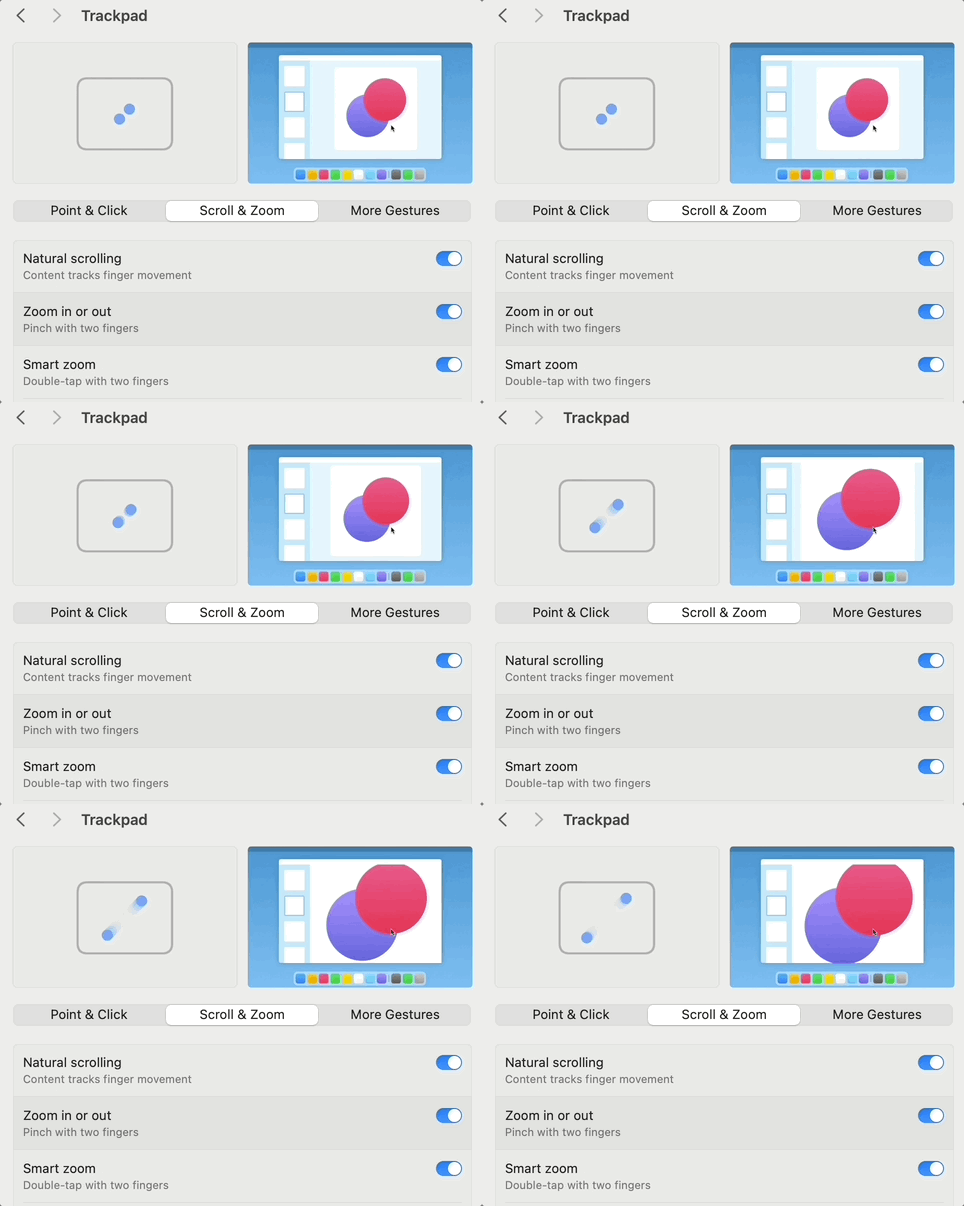
Of course, the zoom behavior still needs to be retained, triggered when Command or Control is pressed. If you have enabled the pinch to zoom function on the Mac trackpad, the wheel event triggered will automatically carry the ctrlKey, see: Catching Mac trackpad zoom:
 zoom in mac trackpad
In this way, we can easily distinguish the different behaviors corresponding to the wheel event in the zoom and pan scenarios:
ts
root.addEventListener('wheel', (e: FederatedWheelEvent) => {
e.preventDefault();

if (e.metaKey || e.ctrlKey) {
zoomByClientPoint(
{ x: e.nativeEvent.clientX, y: e.nativeEvent.clientY },
e.deltaY,
);
} else {
camera.x += e.deltaX / camera.zoom;
camera.y += e.deltaY / camera.zoom;
}
});
It is worth mentioning that Excalidraw also supports holding down Shift to horizontally scroll the canvas. However, we have already assigned the rotation operation to this behavior of the canvas, so it will not be implemented here.
Selection mode
In selection mode, users can select shapes on the canvas by clicking. In the selected state, a helper UI will be overlaid on the original shape, which usually consists of a mask layer and several anchor points. Dragging on the mask layer can move the shape, and dragging on the anchor points can change the shape size in various directions. We will also add an anchor point outside the top shape for rotation.
 Anchor positioning diagram with physical properties
Clicking to select shapes
Let’s implement the Selector plugin below, and the following interface will also be exposed to Canvas:
ts
export class Selector implements Plugin {
selectShape(shape: Shape): void;
deselectShape(shape: Shape): void;
}
After listening to the click event in this plugin, we need to handle the following situations:
- Clicking on a shape displays the UI in the selected state. If other shapes have been selected before, first cancel the selection.
- Clicking on a blank area of the canvas cancels the currently selected shape.
- Holding down Shift enters multi-select mode.
ts
const handleClick = (e: FederatedPointerEvent) => {
const mode = getCanvasMode();
if (mode !== CanvasMode.SELECT) {
return;
}

const selected = e.target as Shape;

if (selected === root) {
if (!e.shiftKey) {
this.deselectAllShapes();
this.#selected = [];
}
} else if (selected.selectable) {
if (!e.shiftKey) {
this.deselectAllShapes();
}
this.selectShape(selected);
} else if (e.shiftKey) {
// Multi select
}
};
root.addEventListener('click', handleClick);
js
$icCanvas = call(() => {
return document.createElement('ic-canvas');
});
js
call(() => {
const { Canvas, CanvasMode, RoughEllipse } = Core;

const stats = new Stats();
stats.showPanel(0);
const $stats = stats.dom;
$stats.style.position = 'absolute';
$stats.style.left = '0px';
$stats.style.top = '0px';

// $icCanvas.setAttribute('zoom', '200');
$icCanvas.setAttribute('mode', CanvasMode.SELECT);
$icCanvas.style.width = '100%';
$icCanvas.style.height = '200px';

$icCanvas.parentElement.style.position = 'relative';
$icCanvas.parentElement.appendChild($stats);

$icCanvas.addEventListener('ic-ready', (e) => {
const canvas = e.detail;

const ellipse = new RoughEllipse({
cx: 200,
cy: 100,
rx: 50,
ry: 50,
fill: 'black',
strokeWidth: 2,
stroke: 'red',
fillStyle: 'zigzag',
});
canvas.appendChild(ellipse);

// setTimeout(() => {
canvas.selectShape(ellipse);
// }, 1000);
});

$icCanvas.addEventListener('ic-frame', (e) => {
stats.update();
});
});
Dragging to move shapes
HTML natively supports dragging, of course, we can also implement it using lower-level events such as pointermove / up / down, see: Drag’n’Drop with mouse events, our implementation also draws on the ideas in this article. In the dragstart event, record the offset of the mouse on the canvas, note that here we use the screen coordinate system because the camera zoom needs to be considered:
ts
let shiftX = 0;
let shiftY = 0;
this.addEventListener('dragstart', (e: FederatedPointerEvent) => {
const target = e.target as Shape;
if (target === this.mask) {
shiftX = e.screen.x;
shiftY = e.screen.y;
}
});
In the drag event, adjust the mask layer position according to the offset, using the position property does not need to modify the mask path definition, reflecting in the underlying rendering only u_ModelMatrix will change:
ts
const moveAt = (canvasX: number, canvasY: number) => {
const { x, y } = this.mask.position;
const dx = canvasX - shiftX - x;
const dy = canvasY - shiftY - y;

this.mask.position.x += dx;
this.mask.position.y += dy;
};

this.addEventListener('drag', (e: FederatedPointerEvent) => {
const target = e.target as Shape;
const { x, y } = e.screen;

if (target === this.mask) {
moveAt(x, y);
}
});
In the dragend event, synchronize the mask layer position to the shape, at this time the mask path will be modified:
ts
this.addEventListener('dragend', (e: FederatedEvent) => {
const target = e.target as Shape;
if (target === this.mask) {
this.tlAnchor.cx += this.mask.position.x;
this.tlAnchor.cy += this.mask.position.y;

const { cx: tlCx, cy: tlCy } = this.tlAnchor;

this.mask.position.x = 0;
this.mask.position.y = 0;
this.mask.d = `M${tlCx} ${tlCy}L${trCx} ${trCy}L${brCx} ${brCy}L${blCx} ${blCy}Z`;
}
});
Displaying the property panel
When a shape is selected, we want to display the property panel corresponding to the shape, see Drawer - Contained to an Element, which will not be expanded here. Taking the stroke property as an example, we perform two-way binding, listening to the currently selected shape, and after the user manually modifies it, synchronize the new value to the shape:
html
<sl-color-picker
hoist
size="small"
value="${this.shape?.stroke}"
@sl-input="${this.handleStrokeChange}"
opacity
></sl-color-picker>
It should be noted that for colors, we want to separate the transparency, so we need to use the getFormattedValue method of sl-color-picker to get the color value, and then use the d3-color library to parse it, and assign values to stroke and strokeOpacity respectively:
ts
const strokeAndOpacity = (e.target as any).getFormattedValue('rgba') as string;
const { rgb, opacity } = rgbaToRgbAndOpacity(strokeAndOpacity); // with d3-color
Of course, there are many functions that need to be implemented under the selection mode, such as merging selections into groups, rotating shapes, etc., which we will continue to improve in subsequent courses. In addition, under the drawing mode, we hope to support drawing rectangles, lines, polygons, etc., which we will also implement in subsequent courses.