While I am not a strict command line affectionado, I have found myself to spend significant time in the terminal, especially when doing devops-y work. Here are some things I learned which will improve the speed when working in terminal.
Note that many of the snippets here were found by me / edited long back. I may not be able to attribute the correct source of each snippet. Let me know if you know the original sources of any snippets posted herein.
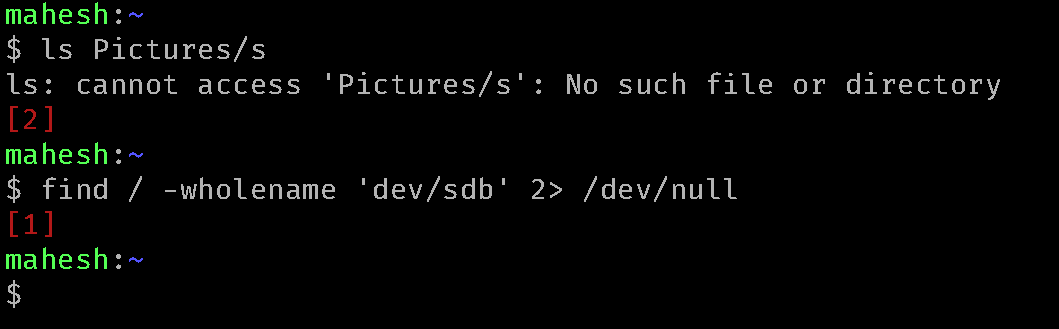
Showing non-zero exit codes in red.
When a command has too little or too less output, it’s impossible to visually distinguish whether the command failed or passed. I find it useful to print the exit code in red if it’s non-zero. That way a failing command is visually distinct.
Here’s how to set it up in ~/.bashrc.
## Mak...While I am not a strict command line affectionado, I have found myself to spend significant time in the terminal, especially when doing devops-y work. Here are some things I learned which will improve the speed when working in terminal.
Note that many of the snippets here were found by me / edited long back. I may not be able to attribute the correct source of each snippet. Let me know if you know the original sources of any snippets posted herein.
Showing non-zero exit codes in red.
When a command has too little or too less output, it’s impossible to visually distinguish whether the command failed or passed. I find it useful to print the exit code in red if it’s non-zero. That way a failing command is visually distinct.
Here’s how to set it up in ~/.bashrc.
## Make prompt display error code
prompt_show_ec () {
# Catch exit code
ec=$?
# Display exit code in red text unless zero
if [ $ec -ne 0 ];then
echo -e "\033[31m[$ec]\033[0m"
fi
}
PROMPT_COMMAND="prompt_show_ec; $PROMPT_COMMAND"
And here for zsh.
precmd_print_cmdres() {
__CMDRES="$?"
if [[ "$__CMDRES" -ne 0 ]]; then
echo -e "\e[31m[$__CMDRES]\e[0m"
fi
}

precmd_functions+=( precmd_get_kube )
A failing command would look like this.
Completions and fzf
These days most utilities come with tab completion which saves a lot of keystrokes when used correctly.
I almost never type full filenames. Rather, I can press 2-3 characters and press tab to see if there’s a completion (and there usually is).
Most common Go and Python CLIs come with completion scripts, since it’s built into CLI frameworks such as click (Python) and spf13/cobra (Go). Usually they will have a command which will generate the completion script. For example here’s kubectl.
kubectl completion bash > ~/.local/bash_scripts/kubectl_completions
## Source the file ~/.local/bash_scripts/kubectl_completions from ~/.bashrc
This combined with fzf I almost never have to type full filenames in the terminal.
fzf provides two things:
- a file chooser which lets you press
Ctrl+Tand select files from the current folder (recursively). - A history search which lets you press
Ctrl+Rand do a fuzzy search among commands in history.
Using Bash readline keybindings
Often we hold the backspace key or left arrow for tremendous amount of time to edit the bash commands in the terminal. But bash has its own key-bindings. However, this is very different from GUI editors. (partly because this system predates the CUA shortcut system used by most common GUI editors, and partly because there’s no reliable way to pass shift key to the terminal application.)
This system of keybindings is called readline (since its powered by GNU readline library or its equivalents).
Here are the most common shortcuts I use:
Ctrl+A: go to beginning of the line
Ctrl+E: go to the end of the line
Ctrl+W: Delete the word left to the cursor
Esc+D: Delete the word on right of the cursor
Ctrl+U: Delete text until beginning of the line
Ctrl+Shift+-: Undo last edit
Specifically, the undo feature is very helpful when one needs to remove a large copy pasted string from the terminal.
Readline has many more keybindings. A manual page man 3 readline should be available on most Linux systems.
Using an editor with Ctrl+X, Ctrl+E
Often commands are very long and editing them with bare terminal is not convenient.
For those cases, it’s possible to set a GUI editor (or vim on SSH sessions) as EDITOR and use this peculiar keybinding Ctrl+X, Ctrl+E to open the current command in editor. Once the editor is closed, the full edited version of the command will be available on the shell.
It works the same way git commit uses the editor for editing commit messages - by creating a temp file and reading it back after the editor command exists.
For using VSCode as editor, I set (in bashrc or similar):
export EDITOR="code --wait --new-window"
the --wait is required otherwise VSCode will detach the process, leading bash to immediately read the temporary file and conclude that there are no edits.
For zsh some trickery is required to achieve the same.
export VISUAL="code --new-window --wait"
autoload -z edit-command-line
zle -N edit-command-line
bindkey "^X^E" edit-command-line
Source: Stack overflow
Extend the bash prompt to show peristent information such as git and kubectl status
Augmenting the default bash prompt (which shows hostname and current directory) with a display of current git repository status is very useful, it serves as a visual reminder / confirmation of the number of new, staged or deleted. So common mistakes like forgetting to add a file before commit can be ignored. And oftentimes it saves the trouble of running git status when the verbose output of the latter is not required.
As I am writing this, this is what the prompt looks like (this is a blog deployed using github pages)

It means there are 3 new files and 1 modified file. If I stage a file, it changes to: 
When I worked on windows using powershell, I found posh-git prompt very useful. It was more detailed than any alternative (such as git’s built-in prompt, or bash-git-prompt). So I hacked together in some 100s of lines of C code using libgit2 a simple, portable version of the git prompt, which I can run on any shell.
Similarly it’s possible to extend the prompt for other persistent contexts one might keep switching between. For kubernetes I find it useful to append kubernetes-context | kubernetes-namespace to the prompt by customizing the PS1 variable.