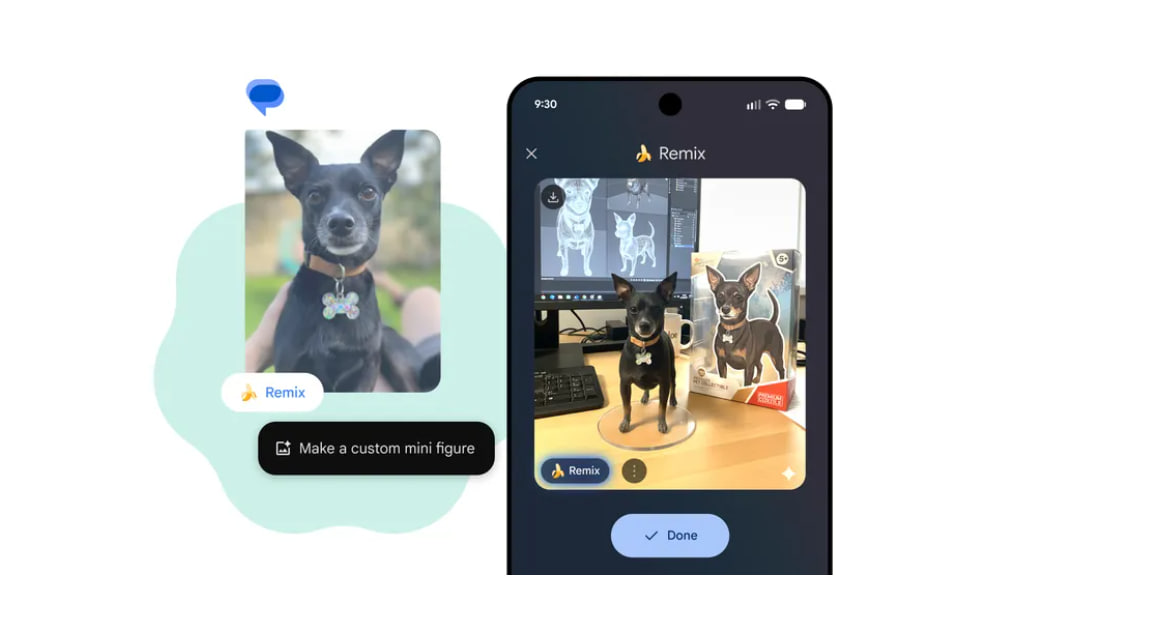
Google is quietly toning down the visual presence of Nano Banana inside Google Messages. In the latest beta, the AI image remix feature no longer pushes its bright banana branding front and center, replacing it with a smaller, more restrained control that blends into the app’s interface.
The change does not remove Nano Banana or limit what it can do. Image remixing remains available in chats, previews, and the media picker. What changes is how aggressively the feature announces itself while users are simply trying to view or send images.
A quieter look for image remixing
In the current stable version of Google Messages, Nano Banana is hard t…
Google is quietly toning down the visual presence of Nano Banana inside Google Messages. In the latest beta, the AI image remix feature no longer pushes its bright banana branding front and center, replacing it with a smaller, more restrained control that blends into the app’s interface.
The change does not remove Nano Banana or limit what it can do. Image remixing remains available in chats, previews, and the media picker. What changes is how aggressively the feature announces itself while users are simply trying to view or send images.
A quieter look for image remixing
In the current stable version of Google Messages, Nano Banana is hard to miss. The remix button appears prominently on image previews and in the full-screen viewer, complete with a bright yellow banana icon that draws immediate attention.
The latest beta (version 20251212_00_RC01) changes that presentation. In chat threads, image previews now show a smaller remix button without the banana logo. The function is still obvious, but it no longer dominates the preview or competes visually with the image itself.
This adjustment gives Nano Banana a more utility-focused feel, closer to a standard editing tool than a novelty feature.
Changes inside the image viewer
The full-screen image viewer sees a more noticeable shift. The old remix button, which previously sat alongside other controls, has been removed entirely from its former location.
Instead, remixing now appears as a compact icon in the bottom-left corner of the screen, positioned next to the comment button. The new icon matches the simplified design used in chat previews and again drops the banana branding.
The functionality remains the same, but users have to make a deliberate choice to engage with it rather than having it presented as a primary action every time an image is opened.
Where users will notice it
These UI changes are limited to Google Messages and only affect how Nano Banana is surfaced within the app. Other integrations, such as in Google Photos or the Gemini app, are not part of this update.
Users who frequently receive images in chats are the most likely to notice the difference. Image previews look cleaner, and opening photos feels less cluttered, especially in long conversations where multiple images are exchanged.
For users who actively use Nano Banana, the feature is still one tap away. For everyone else, it stays out of the way.
Beta only, for now
The updated UI is currently limited to the Google Messages beta channel and specifically to version 20251212_00_RC01. It is not live for users on the stable release.
Google has not announced a rollout schedule, and there is no confirmation on when the changes will reach all users. As with other Messages UI tweaks, rollout may be gradual once it exits beta.
Users on stable builds will continue to see the existing Nano Banana presentation until the update is promoted.
Why this matters
Google has been adding AI-powered features across its apps at a steady pace, and Nano Banana is one of the more visible examples. UI choices determine whether those features feel optional or unavoidable.
By reducing the size and prominence of the remix controls, Google Messages treats Nano Banana more like a tool than a centerpiece. The feature remains available without constantly demanding attention.
For a messaging app that prioritizes quick, low-friction communication, that restraint makes a practical difference, even though the underlying AI capabilities remain unchanged.
Summary
Article Name
Nano Banana in Google Messages is becoming less intrusive
Description
Google is dialing back how prominently Nano Banana appears in Google Messages, replacing its bold branding with smaller, subtler remix controls. The change is currently limited to the Messages beta (version 20251212_00_RC01) and is not live for all users yet.
Author
Arthur K
Publisher
Ghacks Technology News
Logo
