HuggingFace echoes SafeDocs with new PDF datasets
A recent Huggingface blog explores PDF because the format is “a high-quality data for pretraining, and importantly a source of long-context documents so often missing from [HTML data]”.
In the AI trainer’s search for information, they note in particular the value of PDF to AI models because, as they say:
“Content that requires significant effort to create typically correlates with higher information density.”
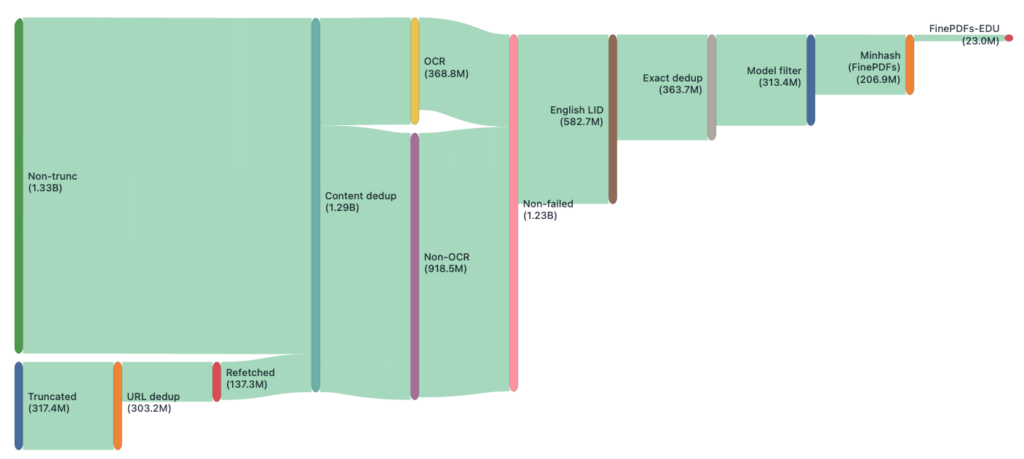
The blog post goes on to describe how HuggingFace identified truncation in the Common Crawl web archives and then refetched data in a process identical to the one previously described in the SafeDocs paper: Allison, T. et al. (2020) “Building a Wide Reach Corpus,” in LangSec 2020, Sixth Workshop on Language-Theoretic Security (LangSec) at the IEEE CS Security & Privacy Workshops, IEEE, (http://spw20.langsec.org/papers/corpus_LangSec2020.pdf). Unfortunately, the HuggingFace authors do not credit SafeDocs or reference this article, which was the original trigger for Common Crawl to increase its PDF truncation limit from 1MB to 5MB. The primary contribution from HuggingFace is the scale at which they can operate.
When it comes to extracting text, the article states that it’s a “nightmare”. While this may be true for certain document types, such as scans, the authors fail to mention Tagged PDFs, metadata, embedded files, or annotations, all of which provide additional semantic information that could benefit LLMs. The HuggingFace blog goes on to describe in detail the many and varied techniques they tried to solve this “nightmare”, resulting in their new “FinePDFs” and “FinePDFs-EDU” datasets.
FinePDFs is exactly that. It is the largest publicly available corpus sourced exclusively from PDFs, containing about 3 trillion tokens across 475 million documents in 1733 languages.
FinePDFs-Edu dataset consists of 350B+ tokens of educational PDFs filtered from FinePDFs dataset covering 69 languages.
Chrome does NOT sign or annotate your PDF!
But it will allow you to scrawl on it …
Google’s latest Chrome browser includes the ability to draw on a PDF. Here’s their video promoting the new feature:
However, it is a disservice to their users that the Chrome team has decided to promote this new PDF capability using the words “sign” and signature” as there are no electronic or digital signature capabilities.
This new feature simply allows users to manually draw on PDF pages.