I TabPFN through the ICLR 2023 paper — TabPFN: A Transformer That Solves Small Tabular Classification Problems in a Second. The paper introduced TabPFN, an open-source transformer model built specifically for tabular datasets, a space that has not really benefited from deep learning and where gradient boosted decision tree models still dominate.
At that time, TabPFN supported only up to 1,000 training samples and 100 purely numerical features, so its use in real-world settings was fairly limited. Over time, however, there have been several incremental improvements including TabPFN-2, which was introduced in 2025 through the paper — [Accurate Predictions on Small Data with a Tabular Foundation Model (TabPFN-2)]…
I TabPFN through the ICLR 2023 paper — TabPFN: A Transformer That Solves Small Tabular Classification Problems in a Second. The paper introduced TabPFN, an open-source transformer model built specifically for tabular datasets, a space that has not really benefited from deep learning and where gradient boosted decision tree models still dominate.
At that time, TabPFN supported only up to 1,000 training samples and 100 purely numerical features, so its use in real-world settings was fairly limited. Over time, however, there have been several incremental improvements including TabPFN-2, which was introduced in 2025 through the paper — Accurate Predictions on Small Data with a Tabular Foundation Model (TabPFN-2).
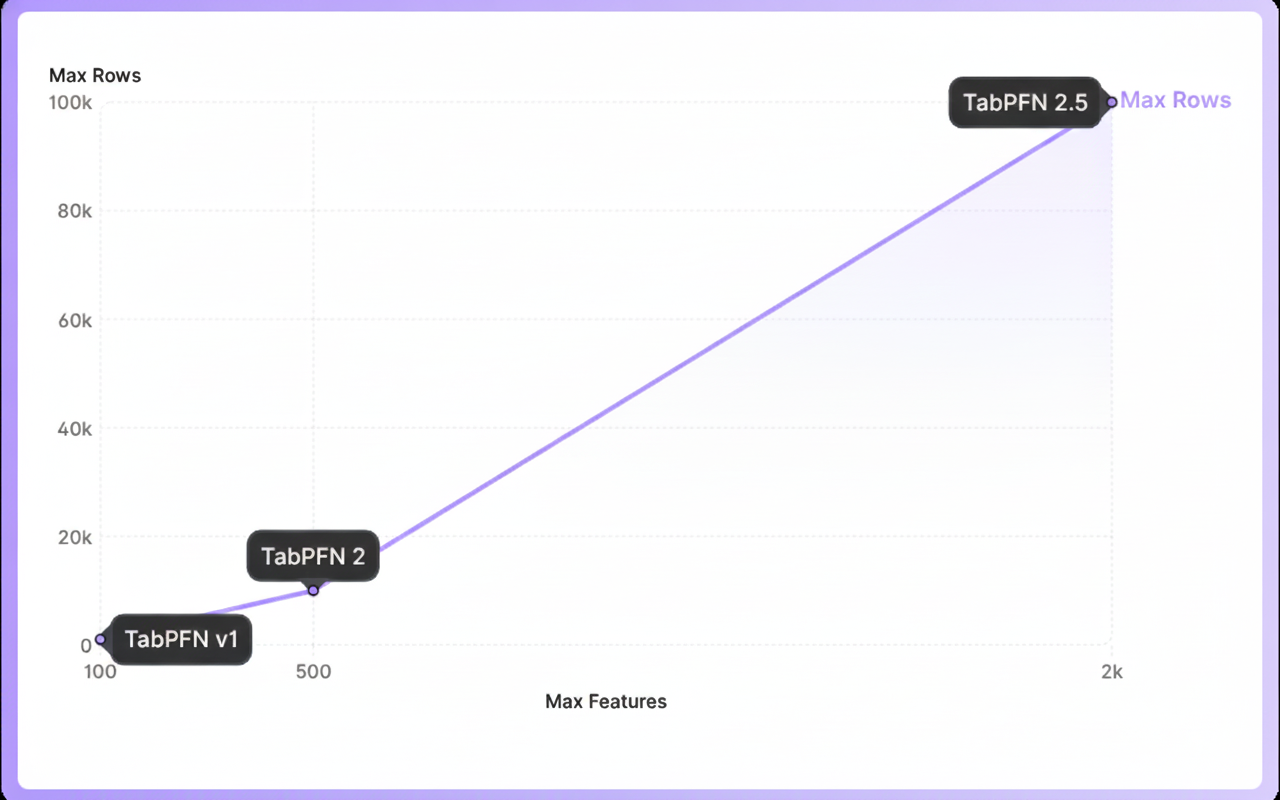 Evolution of TabPFN
More recently, TabPFN-2.5 was released and this version can handle close to 100,000 data points and around 2,000 features, which makes it fairly practical for real world prediction tasks. I have spent a lot of my professional years working with tabular datasets, so this naturally caught my interest and pushed me to look deeper. In this article, I give a high level overview of TabPFN and also walk through a quick implementation using a Kaggle competition to help you get started.
What is TabPFN
TabPFN stands for **Tabular Prior-data Fitted Network, a foundation model that **is based on the idea of fitting a model to a prior over tabular datasets, rather than to a single dataset, hence the name.
As I read through the technical reports, there were a lot interesting bits and pieces to these models. For instance, TabPFN can deliver strong tabular predictions with very low latency, often comparable to tuned ensemble methods, but without repeated training loops.
From a workflow perspective also there is no learning curve as it fits naturally into existing setups through a scikit-learn style interface. It can handle missing values, outliers and mixed feature types with minimal preprocessing which we will cover during the implementation, later in this article.
The need for a foundation model for tabular data
Before getting into how TabPFN works, let’s first try to understand the broader problem it tries to address.
With traditional machine learning on tabular datasets, you usually train a new model for every new dataset. This often involves long training cycles, and it also means that a previously trained model cannot really be reused.
However, if we look at the foundation models for text and images, their idea is radically different. Instead of retraining from scratch, a large amount of pre-training is done upfront across many datasets and the resulting model can then be applied to new datasets without retraining in most cases.
This in my opinion is the gap the model is trying to close for tabular data i.e reducing the need to train a new model from scratch for every dataset and this looks like a promising area of research.
TabPFN training & Inference pipeline at a high level
 A high level overview of the training and inference pipeline of the TabPFN model
TabPFN utilises **in-context learning **to fit a neural network to a prior over tabular datasets. What this means is that instead of learning one task at a time, the model learns how tabular problems tend to look in general and then uses that knowledge to make predictions on new datasets through a single forward pass. Here is an excerpt from TabPFN’s Nature paper:
TabPFN leverages in-context learning (ICL), the same mechanism that led to the astounding performance of large language models, to generate a powerful tabular prediction algorithm that is fully learned. Although ICL was first observed in large language models, recent work has shown that transformers can learn simple algorithms such as logistic regression through ICL.
The pipeline can be divided into three major steps:
1. Generating Synthetic Datasets
TabPFN treats an entire dataset as a single data point (or a token) fed into the network. This means it requires exposure to a very large number of datasets during training. For this reason, training TabPFN starts with synthetic tabular datasets. Why synthetic? Unlike text or images, there are not many large and diverse real world tabular datasets available, which makes synthetic data a key part of the setup. To put it into perspective, TabPFN 2 was trained on 130 million datasets.
The process of generating synthetic datasets is interesting in itself. TabPFN uses a highly parametric structural causal model to create tabular datasets with varied structures, feature relationships, noise levels and target functions. By sampling from this model, a large and diverse set of datasets can be generated, each acting as a training signal for the network. This encourages the model to learn general patterns across many types of tabular problems, rather than overfitting to any single dataset.
2. Training
The figure below has been taken from the Nature paper, mentioned above clearly demonstrates the training and inference process.
 The high-level overview of TabPFN pre-training and usage | Source: Accurate predictions on small data with a tabular foundation model (Open Access Article)
During training, a synthetic tabular dataset is sampled and split into X train,Y train, X test, and **Y test. **The Y test values are held out, and the remaining parts are passed to the neural network which outputs a probability distribution for each Y test data point, as shown in the left figure.
The held out Y test values are then evaluated under these predicted distributions. A cross entropy loss is then computed and the network is updated to** minimize this loss.** This completes one backpropagation step for a single dataset and this process is then repeated for millions of synthetic datasets.
3. Inference
At test time, the trained TabPFN model is applied to a real dataset. This corresponds to the figure on the right, where the model is used for inference. As you can see, the interface remains the same as during training. You provide X train, Y train, and X test, and the model outputs predictions for **Y test **through a single forward pass.
Most importantly, there is no retraining at test time and TabPFN performs what is effectively zero-shot inference, producing predictions immediately without updating its weights.
Architecture
 The TabPFN architecture | Source: Accurate predictions on small data with a tabular foundation model (Open Access Article)
Let’s also touch upon the core architecture of the model as mentioned in the paper. At a high level, TabPFN adapts the transformer architecture to better suit tabular data. Instead of flattening a table into a long sequence, the model treats each value in the table as its own unit. It uses a two-stage attention mechanism wherein it first learns how features relate to each other within a single row and then learns how the same feature behaves across different rows.
This way of structuring attention is vital as it matches how tabular data is actually organized. This also means the model does not care about the order of rows or columns which means it can handle tables that are larger than those it was trained on.
Implementation
Lets now walk through an implementation of TabPFN-2.5 and compare it against a vanilla XGBoost classifier to provide a familiar point of reference. While the model weights can be downloaded from Hugging Face, using Kaggle Notebooks is more straightforward since the model is readily available there and GPU support comes out of the box for faster inference. In either case, you need to accept the model terms before using it. After adding the TabPFN model to the Kaggle notebook environment, run the following cell to import it.
# importing the model
import os
os.environ["TABPFN_MODEL_CACHE_DIR"] = "/kaggle/input/tabpfn-2-5/pytorch/default/2"
You can find the complete code in the accompanying Kaggle notebook** here.**
Installation
You can access TabPFN in two ways either as a Python package and run it locally or as an API client to run the model in the cloud:
# Python package
pip install tabpfn


# As an API client
pip install tabpfn-client
Dataset: Kaggle Playground competition dataset
To get a better sense of how TabPFN performs in a real world setting, I tested it on a Kaggle Playground competition that concluded few months ago. The task, Binary Prediction with a Rainfall Dataset (MIT license), requires predicting the probability of rainfall for each id in the test set. Evaluation is done using ROC–AUC, which makes this a good fit for probability-based models like TabPFN. The training data looks like this:
 First few rows of the training data
Training a TabPFN Classifier``
Training TabPFN Classifier is straightforward and follows a familiar **scikit-learn **style interface. While there is no task-specific training in the traditional sense, it is still important to enable GPU support, otherwise inference can be noticeably slower. The following code snippet walks through preparing the data, training a TabPFN classifier and evaluating its performance using ROC–AUC score.
# Importing necessary libraries
from tabpfn import TabPFNClassifier
import pandas as pd, numpy as np
from sklearn.model_selection import train_test_split

# Select feature columns
FEATURES = [c for c in train.columns if c not in ["rainfall",'id']]
X = train[FEATURES].copy()
y = train["rainfall"].copy()

# Split data into train and validation sets
train_index, valid_index = train_test_split(
train.index,
test_size=0.2,
random_state=42
)

x_train = X.loc[train_index].copy()
y_train = y.loc[train_index].copy()

x_valid = X.loc[valid_index].copy()
y_valid = y.loc[valid_index].copy()

# Initialize and train TabPFN
model_pfn = TabPFNClassifier(device=["cuda:0", "cuda:1"])
model_pfn.fit(x_train, y_train)

# Predict class probabilities
probs_pfn = model_pfn.predict_proba(x_valid)

# # Use probability of the positive class
pos_probs = probs_pfn[:, 1]

# # Evaluate using ROC AUC
print(f"ROC AUC: {roc_auc_score(y_valid, pos_probs):.4f}")

-------------------------------------------------
ROC AUC: 0.8722
Next let’s train a basic XGBoost classifier.
Training an XGBoost Classifier
from xgboost import XGBClassifier

# Initialize XGBoost classifier
model_xgb = XGBClassifier(
objective="binary:logistic",
tree_method="hist",
device="cuda",
enable_categorical=True,
random_state=42,
n_jobs=1
)

# Train the model
model_xgb.fit(x_train, y_train)

# Predict class probabilities
probs_xgb = model_xgb.predict_proba(x_valid)

# Use probability of the positive class
pos_probs_xgb = probs_xgb[:, 1]

# Evaluate using ROC AUC
print(f"ROC AUC: {roc_auc_score(y_valid, pos_probs_xgb):.4f}")

------------------------------------------------------------
ROC AUC: 0.8515
As you can see, TabPFN performs quite well out of the box. While XGBoost can certainly be tuned further, my intent here is to compare basic, vanilla implementations rather than optimised models. It placed me on a 22nd rank on the public leaderboard. Below are the top 3 scores for reference.
 Kaggle Leaderboard Score using TabPFN
What about model explainability?
Transformer models are not inherently interpretable and hence to understand the predictions, post-hoc interpretability techniques like SHAP (SHapley Additive Explanations) are commonly used to analyze individual predictions and feature contributions. TabPFN provides a dedicated Interpretability Extension that integrates with SHAP, making it easier to inspect and reason about the model’s predictions. To access that you’ll need to install the extension first:
# Install the interpretability extension:
pip install "tabpfn-extensions[interpretability]"

from tabpfn_extensions import interpretability

# Calculate SHAP values
shap_values = interpretability.shap.get_shap_values(
estimator=model_pfn,
test_x=x_test[:50],
attribute_names=FEATURES,
algorithm="permutation",
)

# Create visualization
fig = interpretability.shap.plot_shap(shap_values)
 Left: SHAP values per feature across individual predictions | Right: Average SHAP feature importance across the dataset. SHAP values were computed on a subset of validation samples for efficiency.
The plot on the left shows the average SHAP feature importance across the entire dataset, giving a global view of which features matter most to the model. The plot on the right is a SHAP summary (beeswarm) plot, which provides a more granular view by showing SHAP values for each feature across individual predictions.
From the above plots, it is evident that cloud cover, sunshine, humidity, and dew point have the largest overall impact on the model’s predictions, while features such as wind direction, pressure, and temperature-related variables play a comparatively smaller role.
It is important to note that SHAP explains the model’s learned relationships, not physical causality.
Conclusion
There is a lot more to TabPFN than what I have covered in this article. What I personally liked is both the underlying idea and how easy it is to get started. There are lot of aspects that I have not touched on here, such as TabPFN use in time series forecasting, anomaly detection, generating synthetic tabular data, and extracting embeddings from TabPFN models.
Another area I am particularly interested in exploring is fine-tuning, where these models can be adapted to data from a specific domain. That said, this article was meant to be a light introduction based on my first hands-on experience. I plan to explore these additional capabilities in more depth in future posts. For now, the official documentation is a good place to dive deeper.
Note: All images, unless otherwise stated, are created by the author.