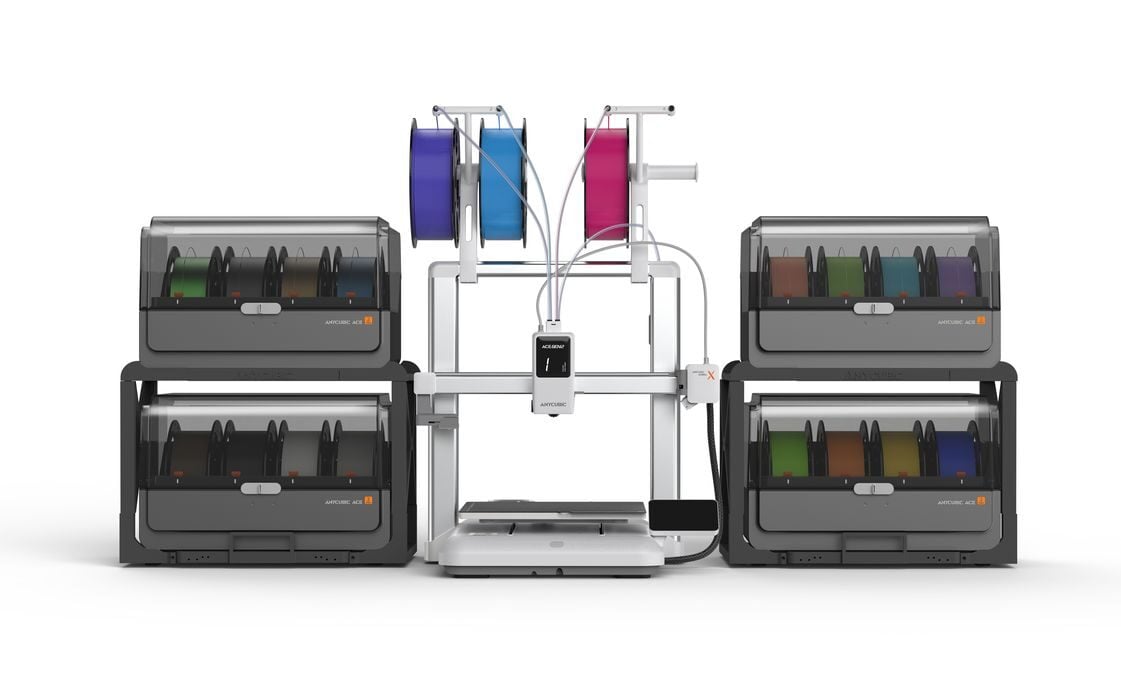
 The Kobra X 3D printer [Source: Anycubic]
Anycubic announced a new desktop FFF 3D printer, the Kobra X.
This is the latest in a long line of Kobra systems from Anycubic, and as you’d expect, it includes a number of increasingly advanced features.
The Kobra series has two branches. The S1 branch are enclosed CoreXY systems, while the rest are open gantry, cartesian systems. The Kobra X seems to be the successor the previous Kobra 3 V2, which was announced only a few weeks ago.
Let’s look at the differences between these two machines.
The build volume of the Kobra X is somewhat larger at 260 x 260 x …
The Kobra X 3D printer [Source: Anycubic]
Anycubic announced a new desktop FFF 3D printer, the Kobra X.
This is the latest in a long line of Kobra systems from Anycubic, and as you’d expect, it includes a number of increasingly advanced features.
The Kobra series has two branches. The S1 branch are enclosed CoreXY systems, while the rest are open gantry, cartesian systems. The Kobra X seems to be the successor the previous Kobra 3 V2, which was announced only a few weeks ago.
Let’s look at the differences between these two machines.
The build volume of the Kobra X is somewhat larger at 260 x 260 x 260 mm, vs 255 x 255 x 260 mm. Print speeds are identical at 300mm/s recommended, 600mm/s maximum. Both machines support PLA, PETG, and TPU — with a caveat. They do not support ABS material as that requires an enclosure to capture heat and prevent warping.
The hot end can reach 300C on both machines, while the print plate can be heated only to 100C on the Kobra X vs 110C on the Kobra 3 V2. As these machines don’t print ASA or ABS, the extra heat really isn’t required anyway.
The color touchscreen on the Kobra X is notably smaller at 3.5”, vs 4.3” on the Kobra 3 V2. However, the webcam’s resolution increases to 1080p vs 720p on the older machine.
You might be thinking that these machines are pretty much the same at this point, and you’d be correct. But there are two major differences.
The first is multicolor support. The Kobra 3 V2 enabled the use of Anycubic’s ACE Pro filament swapper accessory. This unit would push and pull filaments as required during printing to effect color changes. Anycubic would sell the Kobra 3 V2 as a “combo”, which included an ACE Pro. It is also possible to attach a second ACE Pro to allow printing of up to eight colors on that machine.
The Kobra X supercharges this concept by allowing not just one, not two, but FOUR ACE Pros simultaneously attached. This would imply the Kobra X can support an amazing 16 colors in a single print job — four spools per ACE Pro.
But wait, there’s more!
The extrusion system on the Kobra X is wildly different from prior models. Instead of accepting a single filament, as most FFF systems do, it can accept FOUR filaments at once.
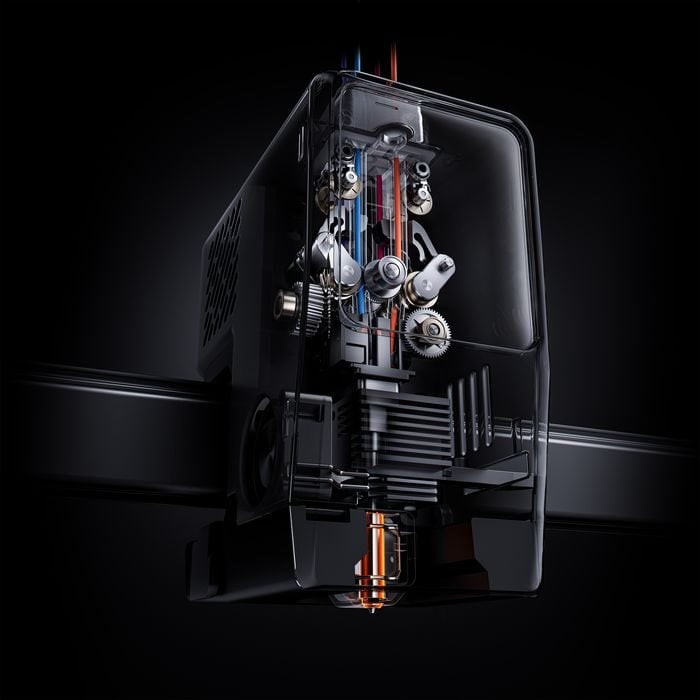 Complex printhead on the Kobra X 3D printer [Source: Anycubic]
In this image you can see how it works. Four filaments are fed directly into the printhead. There is only one nozzle, so printing takes place when one of the four is inserted into the hot end. The other three remain idle, but close nearby.
This allows for a very intriguing configuration: attaching four ACE Pro units to one feed, and three individual spools, one on each of the remaining slots. That means you can theoretically print an object with 19 different colors.
I’m not sure how often this would be required, but it’s a pretty amazing feature.
This is a brilliant design, as it provides some major benefits.
First, filament swaps are far faster. Other filament swapping systems will pull the filament all the way back to the spool, and then feeding the next filament all the way back to the hot end, taking considerable time. Here the travel time for the filament pushes and pulls is quite short.
The second major benefit is about waste. Normally when swapping colors the filament is cut, and then the new filament must push out all the old filament out of the nozzle with a long purge process. This creates a “poop” of wasted material that must be disposed of.
Major controversy has erupted over the amount of waste generated by these systems, which in some extreme cases can be as much as 10X the material used in the model itself. Other manufacturers have been developing systems to reduce waste, and this new extrusion system seems to be Anycubic’s solution.
The new printhead is designed to shorten the length of the purged filament, apparently reducing the waste by 2X. Above you can see the internals of this system and the short lengths used in the design.
There are other interesting twists to this extrusion system. One is that it is able to vary the force on materials — it can use a higher force on more rigid materials, and less on soft materials like TPU.
Now let’s look back at the unusual configuration possibilities. You could, for example, hook up an ACE Pro unit with several colors on one of the four filament slots, and mount a spool of soft TPU on one of the other slots.
You could then print an object with both rigid (PLA) and soft (TPU) in the same print job. The extruder would adapt to the material as above, and the TPU would not get snagged in the ACE Pro unit. The proof is above, a set of pliers printed with a soft TPU hinge.
Finally, the Kobra X includes dynamic flow calibration, which should greatly increase the print quality.
The Kobra X is not yet available for purchase, but we hope to see it appear soon.
Via Anycubic